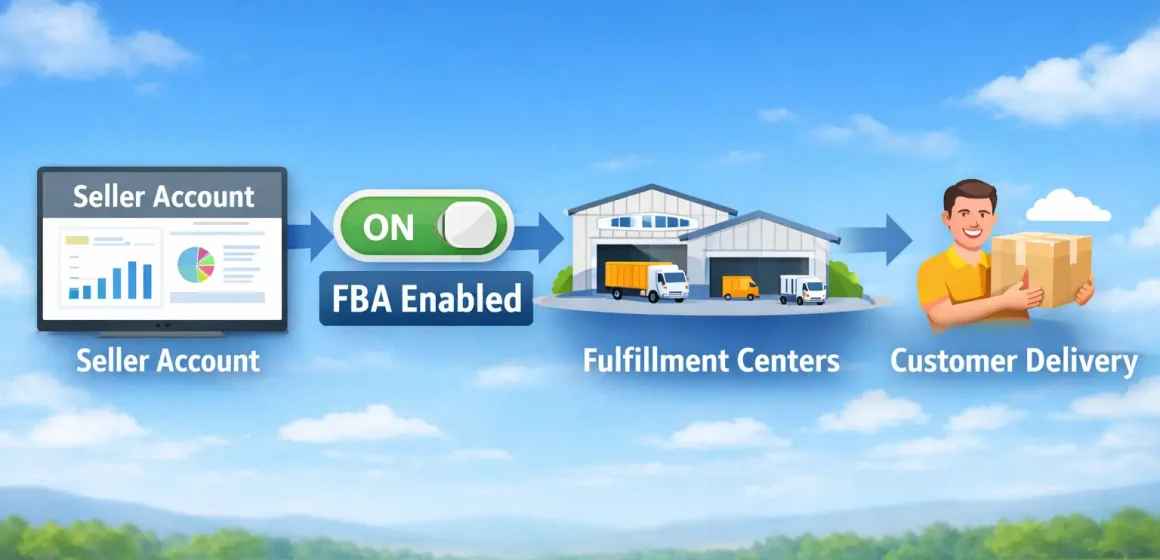
If you’re hearing “Amazon FBA account,” it usually doesn’t mean a separate account—it means you’re using Fulfillment by Amazon (FBA) inside your existing Amazon Seller (Seller Central) account. In practice, you enable FBA as a fulfillment option for your products and then send inventory to Amazon so Amazon can fulfill orders for those FBA offers.
Here’s the simplest way to think about it:
What FBA is (in plain English):
What FBA is not:
Now that the terminology is clear, FBA works like a pipeline: you send inventory in, and Amazon fulfills customer orders for those FBA offers. The important detail many beginners miss is that Amazon can’t fulfill from FBA until your inventory is successfully checked in at a fulfillment center.
A high-level FBA flow looks like this:
A useful mental model: FBA is fulfillment operations—your business responsibilities still sit on top of it.
With the steps in mind, the cleanest way to avoid “FBA = passive” thinking is this: Amazon runs the fulfillment tasks, but you still run the business decisions.
Boundary note: the exact split can vary based on product type, category rules, and how your offer is configured—when in doubt, confirm the latest guidance inside Seller Central.
Once you understand the responsibility split, the choice becomes practical: FBA outsources fulfillment workload to Amazon, while FBM keeps fulfillment in your hands (or your 3PL’s). Many sellers pick based on a trade-off between operational time, cost structure, and control.
Here’s a simple comparison:
FBA tends to fit better when:
FBM can be better when:
A decision-friendly rule: if you’re operationally constrained, FBA can reduce workload—but you should sanity-check total costs and inbound complexity first.
If neither option is perfect, a mixed approach is often possible: you can use FBA for some offers/products and FBM for others, depending on how you set up listings and inventory. Amazon’s own guidance discusses choosing between (and sometimes combining) fulfillment methods, but the workable details depend on your listings and operational setup.
A practical way to think about it:
If you decide FBA is worth testing, the next bottleneck is usually not “creating an FBA account”—it’s getting your account and shipment workflow ready.
After choosing a fulfillment approach, you’ll move faster if you treat onboarding like a checklist: FBA goes smoothly when your Seller Central basics (verification, payouts, tax info) are complete and your listing/shipping workflow is ready.
Boundary note: requirements can vary by marketplace and business type. For anything identity/tax-related, rely on Amazon’s official instructions and, when appropriate, a qualified professional (this article is not legal or tax advice).
Before you go deep on FBA, you may see “Individual vs Professional” and wonder if it blocks you. The short answer is: plan choice affects fees and tools, and the “right” plan depends on expected volume and how you want to operate (details can change, so treat any specific pricing as time-sensitive).
Once your account basics are ready, the next move is straightforward at a conceptual level: enable FBA for the offer, then create an inbound shipment plan that matches your physical cartons.
A high-level sequence:
With the workflow clear, you can evaluate whether FBA makes sense by thinking in fee buckets, not random numbers: FBA costs usually include selling fees plus fulfillment/storage-related fees that vary by product and time in storage.
A safe “bucket map” looks like this:
What changes fees the most (without getting trapped in outdated tables):
If you want a product-specific estimate, the safest path is to use Amazon’s official calculators and the latest fee pages inside Seller Central rather than copying numbers from blog posts.
Now let’s turn the “conceptual” into something you can run: your first shipment.
Once you decide to try FBA, the first shipment succeeds when prep + labeling + shipment-plan data match the physical cartons you actually ship. Most beginner problems happen when those pieces drift apart.
Boundary note: exact prep/label requirements can change and can vary by category. When you need specificity, verify the latest requirement pages in Seller Central for your product type.
If the workflow above feels manageable, DIY can work—but complexity grows fast when you have multiple suppliers, mixed SKUs, or international shipping. A partner can make sense when the risk of mismatches (labels/carton data/shipments) is higher than the cost of outsourcing.
Common “outsourcing triggers”:
If you’re shipping into FBA from multiple suppliers (especially from China), a consolidation + prep workflow can reduce “shipment-plan vs carton reality” mistakes. FBABEE supports door-to-door freight and China-side consolidation/prep for Amazon sellers—useful when you want process consistency without implying any special relationship with Amazon.
After you’ve seen the inbound steps, the main pattern is simple: receiving issues usually start with mismatches—between labels, carton contents, and what your shipment plan says. Preventing them is mostly procedural, not mysterious.
Use this “mistake → impact → prevention” list as a pre-flight check:
Boundary note: outcomes and timelines can vary widely based on product type, time of year, and how cleanly your inbound data matches your cartons—avoid assuming a “standard” receiving time.
If your inventory is made outside the US, there’s one more layer before Amazon receiving: cross-border logistics.
If you’re sourcing from China, the flow is still “create shipment → ship to FBA,” but there are extra upstream steps: pickup, consolidation/prep, export, freight, customs clearance, and last-mile delivery happen before Amazon can receive your inventory. None of these steps come with guaranteed timelines, so planning buffers matter.
A simple end-to-end chain looks like this:
Boundary note: customs, duties, and compliance requirements depend on product type and regulations—verify specifics with official resources and qualified professionals.
To choose a shipping method without chasing “best,” use this trade-off lens: faster options often cost more, and the most reliable plan is the one that matches your risk tolerance and inventory urgency.
A good first-shipment posture is conservative: start smaller, learn your true all-in process and costs, then scale with a repeatable carton/label/shipment-plan system.
Q: Is an Amazon FBA account a separate account from Seller Central? A: Usually, no—people use “FBA account” to mean using the FBA program inside a Seller Central seller account. You typically enable FBA for your listings/offers and then create inbound shipments so inventory can be received and fulfilled by Amazon.
Q: What does Amazon FBA do for sellers? A: At a high level, FBA lets Amazon store inventory, then pick, pack, and ship orders for your FBA offers, and handle customer service/returns for many FBA orders. You still manage listings, inventory planning, and compliance requirements for your products.
Q: What’s the difference between FBA and FBM? A: FBA outsources fulfillment operations to Amazon (storage + shipping for FBA offers), while FBM means you (or your 3PL) store and ship orders. The better choice depends on your product profile, margins, and operational capacity—not on a guaranteed outcome.
Q: Can you use both FBA and FBM at the same time? A: Often, yes—many sellers use a mixed approach, using FBA for some products and FBM for others. The practical details depend on how your listings and inventory are set up, and a mixed strategy can increase operational complexity.
Q: What do you need to set up before you can use FBA? A: Typically you need a Seller Central account with onboarding steps completed (verification, payouts, tax info as required), the ability to create listings, and access to inbound shipment tools. Then you enable FBA for the offer and create a shipment plan that matches your cartons.
Q: What fee types should you expect with Amazon FBA? A: Think in buckets: selling-related fees, fulfillment-related fees (often driven by size/weight/category), storage-related fees (driven by time and volume), and optional service fees depending on what you use. For current specifics, rely on Seller Central fee pages and calculators rather than static numbers.
Q: What are common mistakes that cause FBA receiving delays or problems? A: The most common pattern is mismatch: labels, carton contents, and shipment-plan data don’t align. A pre-ship verification step—carton counts, label checks, and a carton-level packing list—prevents many avoidable exceptions.
To wrap it up, an “Amazon FBA account” is usually just shorthand for using FBA inside Seller Central—and the real success lever is whether you can run a clean inbound process. If you want a low-regret next step, use this decision + action checklist:
If your first shipment involves multiple suppliers or international logistics, your biggest leverage is process consistency (carton planning, labeling checks, shipment data accuracy). That’s where an experienced consolidation/prep + freight partner can reduce avoidable inbound issues—even though no provider can promise specific Amazon receiving timelines.
Back to top
Your email address will not be published. Required fields are marked *
Comment *
Name *
Email *
Save my name, email, and website in this browser for the next time I comment.
Δ
This site uses Akismet to reduce spam. Learn how your comment data is processed.
What Are FBA Shipment Splits? Amazon FBA shipment splits are inbound placement options that may send your inventory to one ...
Shipping from China to Amazon FBA in the USA rarely has one fixed price. Two sellers can ship similar products ...
Table of Contents Heavy box label decision + placement Terms that get mixed up: Team Lift vs Heavy Package vs ...