

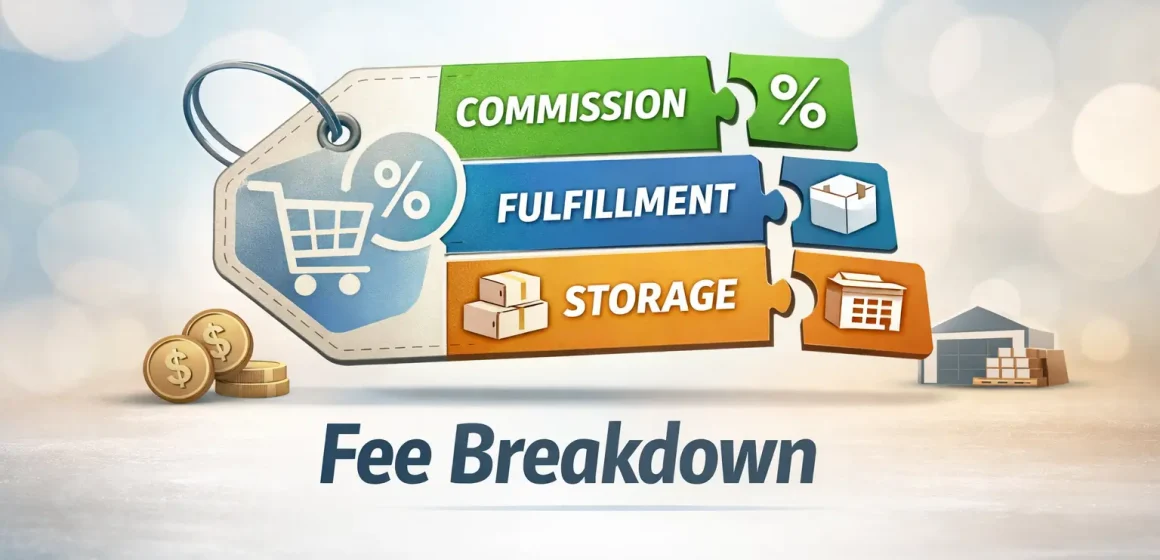
What the Amazon referral fee is (and why it matters)
If you only remember one thing, remember this: the Amazon referral fee is Amazon’s selling commission charged when you sell an item. It’s usually calculated as a percentage of the item’s total price, so getting the right fee category and inputs is the difference between “good margin” and “surprise fees.”
- What it is: a per-item selling fee (commission) deducted from your sale proceeds.
- What it’s based on: Amazon defines an item’s total price as including list price + shipping costs + gift-wrapping charges.
- Why it’s tricky: rates vary by fee category, and Amazon notes your product’s fee category may not match the category shoppers see—so “guessing the category” can misprice your SKU.
- Best practice: verify the category and rate in official tools (steps below), then plug that verified number into your pricing sheet.
What “referral fee” means for sellers (and what it does not mean)
Now that the definition is clear, avoid the most common confusion: “referral” can mean different things on Amazon. In this article, referral fee = the seller commission for selling a product, not an affiliate payout or a marketing bonus.
Here are the three terms people mix up:
- Seller referral fee (this article): the selling commission Amazon charges for each item sold.
- Amazon Associates (affiliate) commissions: a separate program where publishers earn commission income on “qualifying purchases.”
- Brand Referral Bonus: a program that can provide credits/bonuses tied to off-Amazon marketing and Amazon Attribution, which can offset referral fees later.
If you’re pricing a SKU, you’re almost always dealing with the seller referral fee first—then you decide whether FBA or self-fulfillment adds additional costs.
How the referral fee is calculated (what it’s based on)
Once you know which “referral” you mean, the key math is simple: referral fee = (referral fee rate) × (total price basis). Amazon’s public pricing page explicitly defines total price as including list price, shipping costs, and gift-wrapping charges.
What this means in practice:
- If you change price, or you change shipping/gift-wrap charges (where applicable), your referral-fee base can change—so the fee amount can change even if the percentage stays the same.
- If you’re using FBA, you’re typically separating selling fees (referral fee) from fulfillment fees and storage costs—they scale differently and require different inputs.
“Includes / excludes” checklist for the fee base
To make the base concrete, use this checklist as your “sanity check” before you assume your referral fee is wrong. Amazon’s public definition explicitly includes the items below; anything else should be verified in your own fee preview/transaction details because scenarios can vary.
Explicitly included in “total price” (public definition):
- Item list price
- Shipping costs
- Gift-wrapping charges
Common inputs that can still change what you pay (verify in official tools):
- Discounts/coupons/promotions (they change what the customer actually pays)
- Returns/cancellations (they can affect final fee outcomes and credits)
- Marketplace choice (Amazon.com vs other countries’ stores use different schedules)
How to find your referral fee rate for a specific product/category (US)
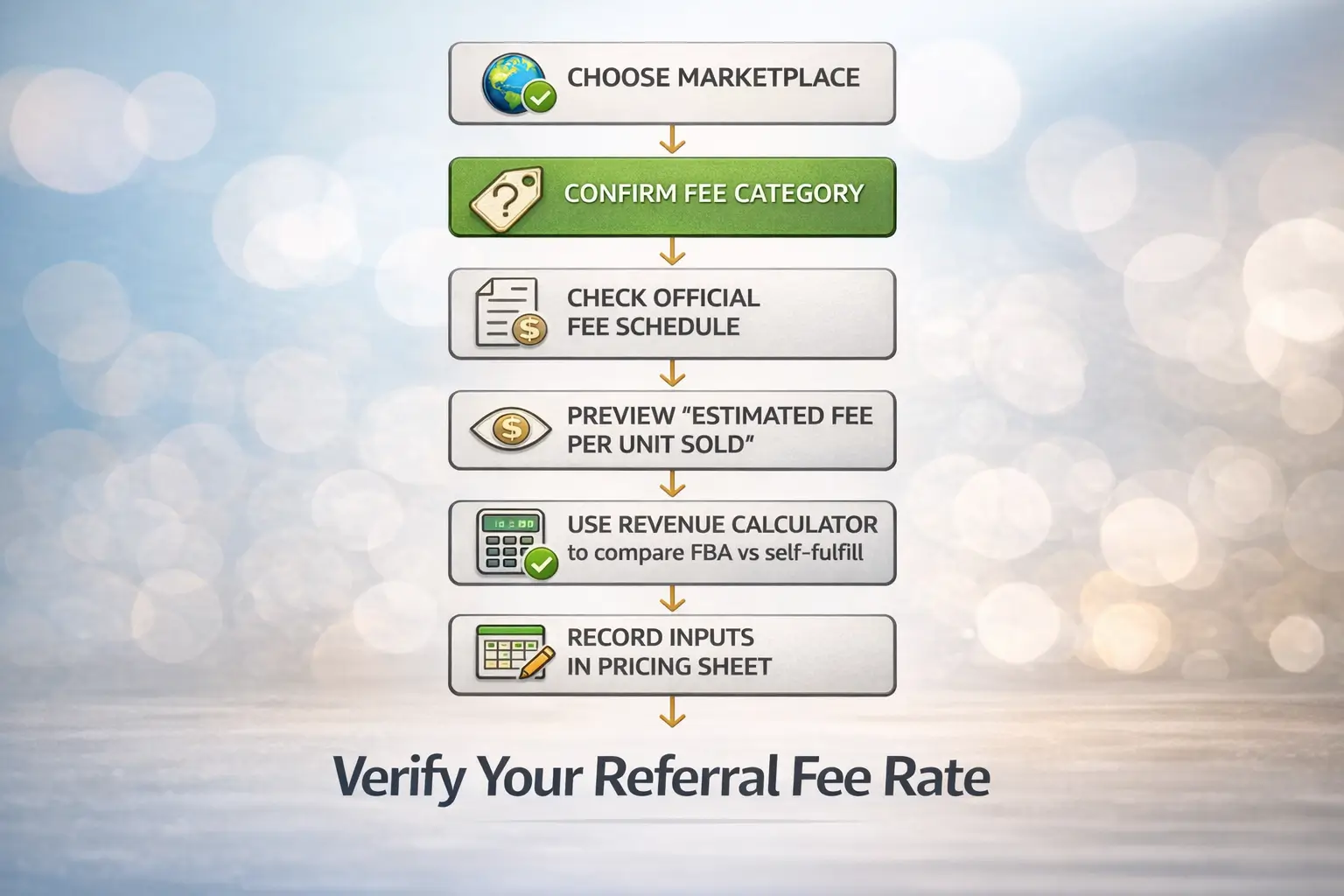
With the fee base clear, the safest approach is straightforward: verify your fee category and rate using official pages/tools, then treat that verified rate as an input in your pricing model. Amazon explicitly warns that a product’s fee category may not match the storefront category customers see—so verification beats guessing.
Here’s the mindset: you’re not trying to memorize a table; you’re trying to create a repeatable “verify → record → model” workflow.
Step official “verify your rate” routine
These steps turn “it depends on category” into a checklist you can run in a few minutes before you commit to a price.
- Confirm the marketplace you’re pricing for (here: Amazon.com / US).
Don’t reuse a UK/EU/AU schedule for US pricing (or vice versa). - Start with Amazon’s public “standard selling fees” page to understand category structure and minimums.
This page includes category-level referral-fee structures and notes about fee category vs storefront category. - In Seller Central, preview fees at the product level when possible.
Amazon’s “Estimate fees and costs” guidance points to the “Estimated fee per unit sold” column in Manage All Inventory, where you can click into the estimate for details. - Use the Revenue Calculator to compare fulfillment methods (FBA vs your own fulfillment).
Amazon’s guidance describes defining a product using dimensions, weight, category, price, and shipping charges, then comparing fees and costs across fulfillment methods. - Record the result as a pricing input (and label it with marketplace + date).
Fees can change; you want your spreadsheet to show when you last verified the assumption. - Sanity-check category mapping if the estimate surprises you.
Amazon’s public note about fee category vs storefront category is a top explanation for “why my fee doesn’t match what I expected.”
Common mistakes (quick prevention list):
- Using a third-party “current rates” table without verifying it in official tools (freshness risk).
- Assuming the storefront category = fee category.
- Forgetting that total price can include shipping/gift wrap charges when relevant.
- Mixing selling fees (referral) with fulfillment/storage fees (different math).
Why referral fee rates vary by category (and what “tiered” means)
Once you can verify your rate, the “why” becomes simpler: Amazon sets different commission structures by category, and some categories use tiered price bands. In other words, a category may apply one percentage to one portion of the price and another percentage above a threshold.
What “tiered” usually means for your workflow (without memorizing numbers):
- Repricing can change your effective referral fee if your new price crosses a tier boundary.
- The only safe way to model tiering is to read the current official category structure (or confirm it via fee preview tools) before you finalize pricing.
Bridge: tiering explains “why repricing changed my fee”; minimum fees explain “why low-priced items feel over-fee’d.”
Minimum referral fee and low-price edge cases
After tiering, the next common surprise is the minimum referral fee, which can create a higher effective fee burden on low-priced items. Amazon’s public pricing table shows a “minimum referral fee” column for many categories, which is why “percentage only” math can under-estimate fees at the low end.
Practical implications:
- If your item price is low, a minimum fee can make the effective percentage feel much higher than you expected.
- Minimums can vary by category/program, so don’t generalize from one category to another—verify for your exact scenario.
Bridge: once you’ve nailed the referral fee, separate it from other fee types so you don’t build a blended, misleading cost stack.
Referral fee vs other Amazon fees (don’t mix the fee stack)
With referral fees understood, keep your model clean: referral fee is a selling commission, while FBA fulfillment and storage are service costs tied to physical handling and inventory. Amazon’s “Estimate fees and costs” framework separates selling fees from FBA costs, and Amazon’s FBA page describes storage costs as monthly and based on inventory volume.
Quick comparison table: referral fee vs FBA fees and other selling fees
Before the table: remember that each fee uses different “drivers,” so each needs different inputs (category vs size/weight vs time/volume).
| Fee type | When it applies | What it’s based on | Why it matters for pricing |
|---|---|---|---|
| Referral fee (selling commission) | When an item sells | Total price basis (includes list price + shipping + gift wrap charges) and the product’s fee category | Usually the first “selling fee” you model; wrong category/base = wrong margin |
| FBA fulfillment fee | If you use FBA to fulfill the order | Item size tier / weight style inputs (varies by program and fee card) | Changes per-unit economics; requires accurate dimensions/weight inputs |
| FBA storage costs | If inventory is stored in Amazon fulfillment centers | Charged monthly; tied to the space your inventory occupies (volume-based) | Affects holding cost and replenishment strategy |
| Selling plan subscription fee | If you have a plan with a monthly subscription | Subscription plan terms | Not per-unit; affects break-even volume |
| Category/program-specific fees (example: media closing fee) | Only for certain categories/programs | Category-specific rules | Can surprise you if you treat all categories “the same” |
Bridge: if your actual fee still looks “off,” you need a troubleshooting checklist that starts with the fastest, highest-probability checks.
Why your referral fee is higher/lower than expected (troubleshooting)
If your fee doesn’t match your expectation, the fastest path is to check category mapping and the exact estimate details in official tools, then verify whether your inputs changed (price, shipping/gift wrap charges, tier thresholds, minimums, or returns). Amazon explicitly notes fee category may differ from what shoppers see, and Amazon’s “Estimate fees and costs” guidance points to where you can click into fee estimates for details.
Ranked troubleshooting checklist (fast checks first)
Use these in order—most sellers find the answer in the first few items.
- Fee category mismatch: confirm the product’s fee category (don’t assume storefront category).
- Wrong marketplace schedule: confirm you’re using the US schedule for Amazon.com pricing.
- Tier boundary crossed: if you repriced, check whether a tiered structure applies in that category.
- Minimum referral fee applies: low-priced items can be constrained by minimum fees in some categories.
- Total price inputs changed: confirm shipping/gift wrap charges where relevant (they can be part of total price).
- Estimate vs actual: click into the estimate details (or fee preview/reporting) to see what assumptions were used.
- Promotion/discount effect: if the customer paid a different effective price, the fee amount can change with it (verify in transaction details).
- Returns/cancellations: refunds and credits can change “net” fee outcomes over time (verify in your reports).
- Listing changes: changes to variation structure, item attributes, or category assignment can shift the fee category (verify what changed and when).
- Program-specific fee rules: some categories have additional fees (e.g., media closing fees) that look like “extra” charges if you weren’t expecting them.
If you need to contact support, gather this first (saves time):
- ASIN/SKU + marketplace (Amazon.com US)
- The fee you expected vs the fee charged (with dates)
- Pricing history and any promotions/coupons during the period
- Screenshots/export of the official estimate details you clicked into (where available)
- Confirmation of the product’s fee category (or what you believe it is, and why)
Bridge: once your referral-fee inputs are verified, you can build a clean pricing model that separates Amazon fees from your inbound logistics and prep costs.
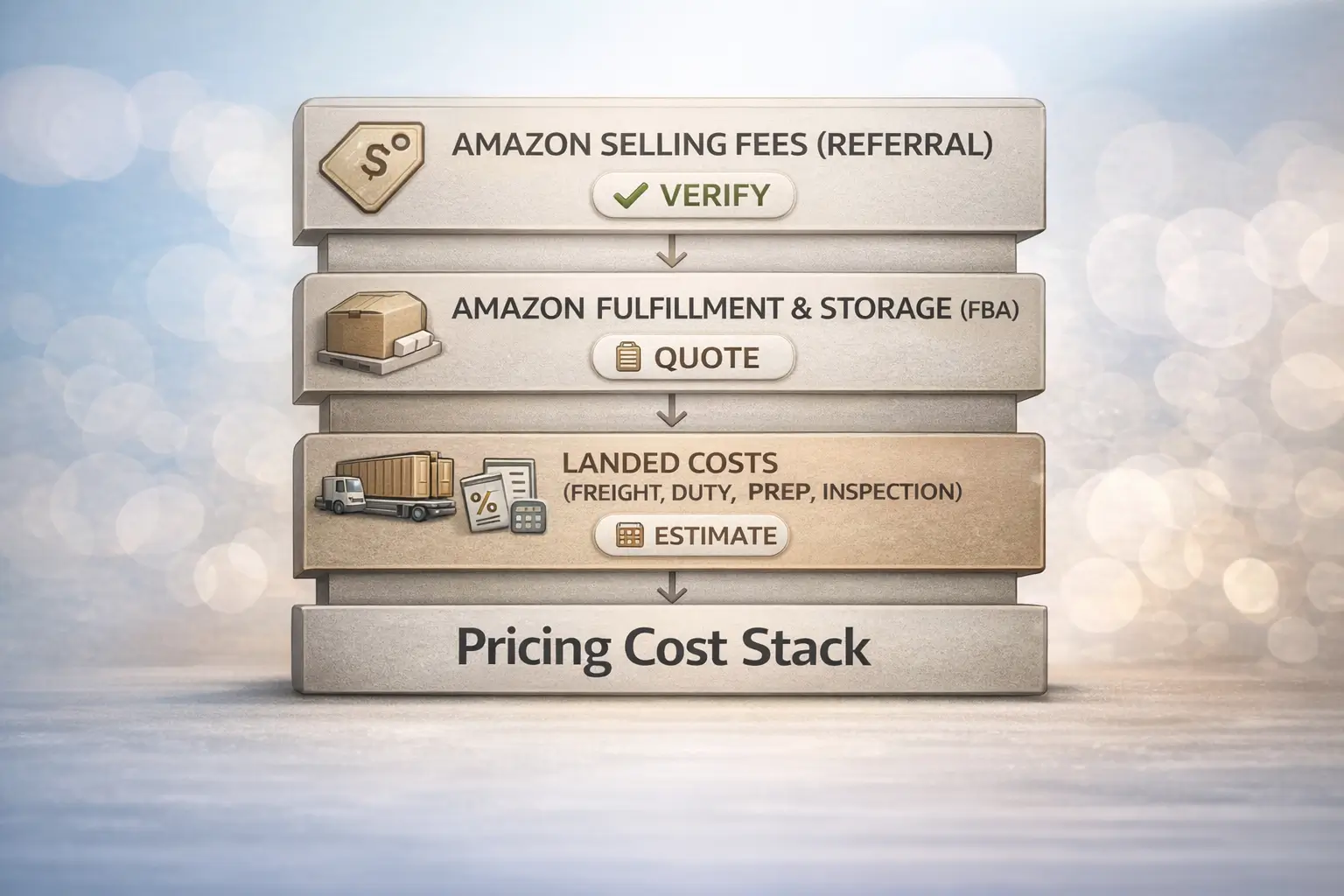
Pricing and landed-cost framework: where referral fees fit (FBA sellers)
Once your referral fee inputs are verified, build a pricing model that separates Amazon selling fees, Amazon fulfillment/storage, and your landed costs (freight, duties, prep, and inventory carrying). That separation is the quickest way to see what you can control (supply chain choices) vs what you can only estimate and re-verify (Amazon fee schedule).
Cost stack table + margin sanity-check steps (use this in your pricing sheet)
Use this table as a template: it’s designed to be copied into a spreadsheet and filled with your verified inputs.
| Cost component | Who charges it | Main driver | How to estimate safely | Notes |
|---|---|---|---|---|
| Referral fee | Amazon | Fee category + total price basis | Verify fee category/rate in official tools; record marketplace + date | Don’t guess category; total price can include shipping/gift wrap |
| FBA fulfillment fee | Amazon (if FBA) | Size/weight style inputs | Use Revenue Calculator / fee preview with accurate dimensions/weight | Different from referral fee; per-unit handling cost |
| FBA storage cost | Amazon (if FBA) | Monthly volume-based storage | Model as a monthly inventory carrying cost; reduce with replenishment discipline | Charged monthly; tied to inventory volume |
| Inbound freight to US (China → US) | Carrier / forwarder | Mode (sea/air/express), cartons, seasonality | Get quotes; use ranges until you have booking-ready details | Varies widely; don’t treat as a fixed % |
| Duties/taxes (import) | Government / customs process | HS code/classification, declared value, country rules | Treat as “depends”; confirm with customs broker/pro guidance | Not legal/tax advice; verify for your product |
| China-side prep (labels, polybag, bundle) | Prep provider | SKU count, requirements, complexity | Quote per SKU/carton; validate against Amazon prep requirements | Reduces inbound rejection risk when done correctly |
| Quality inspection | Factory/3rd party/warehouse | Inspection depth + sampling | Quote per order or per SKU batch | Helps catch issues before they become returns |
| Packaging inserts / kitting | You / prep provider | Assembly steps, labor | Quote per unit; pilot on small batch first | Keep claims realistic; measure actual labor |
Margin sanity-check (simple steps):
- Verify referral fee category/rate and capture the date you verified it.
- Estimate Amazon fulfillment/storage costs (if FBA) using official estimate tools with accurate size/weight inputs.
- Add landed costs (freight, duties, prep) using quotes or conservative ranges.
- Run “best / expected / worst” scenarios—especially for freight and storage.
- If margin only works in the best case, revise price, packaging, or supply chain plan before scaling.
If you’re sourcing from multiple China suppliers, the “non-Amazon” part of this cost stack (consolidation, prep, carton planning, shipping mode) is where a logistics + prep partner like FBABEE can help you reduce operational surprises. FBABEE is an independent provider and not affiliated with Amazon.
Marketplace differences: US vs UK/EU/AU (how to verify locally)
If you sell in multiple marketplaces, the safe assumption is simple: fee schedules can differ by marketplace, so verify locally instead of porting US numbers. Amazon’s pricing resources list multiple country stores and tools, reinforcing that “which marketplace?” is a real input—not a detail.
A quick 3-step habit:
- Decide the marketplace (US, UK, DE, etc.) you’re pricing for.
- Use that marketplace’s official fee pages/tools to verify the category structure and estimate fees (don’t rely on a US screenshot).
- Store the marketplace + verification date in your pricing sheet, and re-check after major price/category changes.
FAQ
Q: What is the Amazon referral fee (and does it apply to FBA and FBM)?
The referral fee is Amazon’s selling commission charged when an item sells. It’s part of standard selling fees and is separate from fulfillment costs; if you use FBA you may pay additional FBA fulfillment and storage costs on top of selling fees. When in doubt, use Amazon’s official estimate tools to compare FBA vs your own fulfillment method.
Q: What does Amazon calculate the referral fee on (what is “total sales price”)?
For Amazon.com, Amazon’s public pricing page defines an item’s total price as including list price, shipping costs, and gift-wrapping charges. That’s why changing price or shipping/gift-wrap settings (where applicable) can change the fee amount even if your category rate doesn’t change. For edge cases, confirm in your estimate details/transaction records.
Q: How do I find the referral fee rate for my category/product (officially)?
Use an official “verify → record → model” workflow: confirm marketplace, identify/confirm fee category, then preview fees in Seller Central (Estimated fee per unit sold details) or use Amazon’s Revenue Calculator to estimate and compare fulfillment methods. Record the result with a date, because fees can change over time.
Q: What’s the difference between referral fees and FBA fulfillment fees?
Referral fees are selling commissions based on the item’s total price basis and fee category, while FBA fulfillment fees are service costs tied to fulfillment handling and require accurate size/weight inputs. Storage costs are separate again and are charged monthly based on the space your inventory occupies. Keeping these separate prevents “blended fee” math errors.
Q: Why is my referral fee higher than expected?
Start with the fast checks: confirm fee category (don’t assume storefront category), confirm marketplace schedule, and check for tiered structures or minimum referral fees in that category. Then click into the official estimate details to see what inputs were used (price, shipping/gift wrap). If still unclear, gather ASIN + dates + estimate details before contacting support.
Q: What is the minimum referral fee and when does it matter?
A minimum referral fee is a floor that can apply in some categories, making low-priced items feel like they have a higher “effective percentage” fee. Amazon’s public category tables include a “minimum referral fee” column, so modeling only “rate × price” can under-estimate fees at the low end. Verify your category’s minimums before committing to a low-price strategy.
Q: Do referral fees differ across Amazon marketplaces (US vs UK/EU/AU)?
They can—so treat “which marketplace?” as a required input. Use each marketplace’s official fee pages/tools, and store the marketplace + the date you verified fees in your pricing sheet. This matters most if you sell globally or plan to expand into new marketplaces, because category structures and thresholds may not match the US store.
Summary and next steps
To wrap it up, use a verification-first workflow instead of guessing:
- Define the fee correctly: referral fee = selling commission on each item sold.
- Use the right base: Amazon’s public definition of total price includes list price, shipping costs, and gift-wrapping charges.
- Verify your rate in official tools: use Seller Central estimate details and/or the Revenue Calculator to preview and compare fulfillment methods.
- Don’t mix fee stacks: referral fee (selling) ≠ fulfillment fee (handling) ≠ storage cost (monthly volume-based).
- If something looks off: check fee category mapping, tiering, and minimums first—then compare estimate vs actual.
If you’re building a landed-cost model for China → Amazon FBA shipments, focus on controlling what you can (prep accuracy, consolidation, carton planning, shipping mode) and re-verifying what you can’t (Amazon fees). FBABEE is an independent logistics + prep provider, not affiliated with Amazon.
Disclosure: FBABEE is an independent logistics and prep service provider and is not affiliated with Amazon.



