


Amazon FBA is simple to explain—but easy to misunderstand in practice. If you’re new to selling on Amazon, the biggest unlock is knowing exactly what Amazon will do for you after your inventory arrives, and what you still need to get right before it ever reaches an Amazon fulfillment center.
Amazon FBA
Amazon FBA (Fulfillment by Amazon) is a service where you send inventory to Amazon and Amazon fulfills customer orders for you. In plain terms: Amazon stores your products, ships orders, and handles customer-facing fulfillment tasks—while you still own the “inbound readiness” work like prep, labeling, and shipping inventory in.
| Amazon typically handles (after inventory arrives) | Sellers still handle (before inventory arrives) |
|---|---|
| Storage inside Amazon fulfillment centers | Product readiness: packaging, labeling, and prep decisions |
| Pick, pack, and ship customer orders | Creating inbound shipments (shipment plan, carton details) |
| Customer service and returns processing | Getting inventory to Amazon: supplier pickup, consolidation, freight, delivery coordination |
| Delivery experience that can support fast shipping offers (context) | Inventory planning: stock levels, replenishment timing, avoiding long-term storage risk |
Key points
- FBA is a fulfillment model, not a guarantee of sales, rankings, or profit.
- The most common “FBA pain” happens before Amazon can fulfill anything: wrong labels, weak packaging, mixed cartons, or unclear inbound shipment details.
- Fees exist in categories (fulfillment and storage are the big ones), and they vary by product and marketplace.
Boundary conditions
- Requirements and workflows can change and vary by marketplace—always verify current details in Seller Central for your account.
- “Amazon handles fulfillment” does not mean “Amazon fixes inbound mistakes.”
How Amazon FBA works step by step
Once you enroll in FBA, the workflow is straightforward: you list products, create an inbound shipment, send inventory to Amazon, and Amazon fulfills orders from there. The part that surprises beginners is that “send inventory” includes real operational work—prep, labeling, carton accuracy, and delivery planning—before your inventory is ready to sell.

Key points
- Think of FBA as two phases: inbound (you) → fulfillment (Amazon).
- Inbound accuracy (labels, packaging, carton details) directly affects whether receiving is smooth or frustrating.
- Receiving speed can vary; plan buffers instead of assuming instant availability.
Boundary conditions
- Seller Central screens and options differ by account settings and marketplace.
- Receiving timelines aren’t guaranteed; treat them as variable and plan accordingly.
The 6-step FBA workflow (setup → inbound → fulfillment)
FBA usually runs as a loop: set up → create inbound shipment → prep and ship → Amazon receives → Amazon fulfills → you replenish.
- Create a selling account and enable FBA in Seller Central (your fulfillment method choice happens early).
- Create or match product listings (your ASINs and listing data are the foundation for inventory handling).
- Create an inbound shipment (choose what you’re sending, how it’s packed, and where it’s going).
- Prep, label, and pack inventory so units and cartons are scannable and shipment details match reality.
- Ship inventory to Amazon (carrier/forwarder pickup, consolidation if needed, then delivery to the assigned fulfillment center).
- Amazon receives inventory and fulfills orders (pick/pack/ship, plus customer service and returns).
Key points
- The “shipment plan” stage is where many downstream problems start or stop.
- Prep and carton accuracy are not “nice to have”—they’re operational risk controls.
Boundary conditions
- The number of steps you see in Seller Central can vary; focus on the logic, not the exact buttons.
What happens after Amazon receives your inventory (high-level)
After delivery, Amazon has to receive and process your shipment before inventory is available for fulfillment. In practice, “received” and “sellable” are status concepts you should monitor—because not everything becomes available at the same pace or with the same outcome.
Key points
- Amazon receiving is the handoff point: once inventory is checked in, FBA can fulfill orders from it.
- If inventory arrives with issues (labels, damage, mismatches), you can see delays or extra work before it’s ready.
- Your goal is to reduce avoidable friction by getting inbound prep and shipment details right.
Boundary conditions
- Receiving speed and inventory availability can vary; don’t plan launches assuming instant check-in.
- If something looks off, verify what you shipped vs what the inbound plan says, before you escalate.
FBA costs: fee categories vs your inbound costs
FBA costs are best understood as fee categories with drivers, not one universal number. A second common confusion: Amazon FBA fees are not the same thing as your inbound freight and prep costs—you need both to estimate whether FBA fits your margins.
Key points
- Amazon fees commonly include a fulfillment fee (per unit) and storage fees (based on stored inventory), plus other fee types depending on what happens to inventory.
- Your inbound costs usually include freight, prep/labeling, and packaging/cartonization work before inventory arrives.
- “Cost to start” is a bucketed plan: inventory investment + inbound costs + FBA fees.
Boundary conditions
- Fee structures and rates change and vary by marketplace and product; use Amazon’s current tools/pages for exact numbers.
- Avoid decisions based on unsourced “average FBA fees” you see in random posts.
Fee categories (mini-table) and the biggest drivers
FBA fees are predictable at the category level: you can’t control that fees exist, but you can often control the drivers (product size/weight, packaging decisions, and how long inventory sits).
| Fee category (Amazon) | What it covers (plain English) | Biggest drivers (what changes it) |
|---|---|---|
| Fulfillment fee | Picking, packing, shipping an order to the customer (per unit) | Product size/weight tier, handling requirements |
| Monthly storage fee | Storing inventory in Amazon’s fulfillment centers | Cubic volume stored, time of year/season, how long inventory sits |
| Returns/removals (category) | Costs tied to returned units or removing/disposing inventory (when used) | Return volume, removal decisions, product category behavior |
| Other program fees (category) | Program- or service-specific fees that may apply | Marketplace/program settings and current fee rules |
Key points
- Size/weight and volume are often the biggest economic lever: they influence fulfillment and storage sensitivity.
- Inventory velocity matters: slow movers create higher storage and cashflow risk.
- For exact pricing, use Amazon’s current fee pages and calculators tied to your marketplace and product attributes.
Boundary conditions
- Exact fee rates and definitions can change; verify in the official FBA fees/fee schedule resources in Seller Central.
“Cost to start” without hype: the real cost buckets to plan for
There isn’t one “startup cost” for FBA. A realistic plan breaks it into buckets so you can estimate what’s controllable and what’s variable.
Key points
- Inventory investment: your first production run and unit costs (your biggest upfront variable).
- Inbound costs (your supply chain): pickup, consolidation, freight, packaging upgrades, and prep/labeling labor.
- Amazon fees (FBA): fulfillment + storage categories (driven by product profile and how inventory moves).
- Working capital buffer: because receiving timing and sell-through are variable, cashflow planning matters.
Boundary conditions
- Avoid ROI or income promises: profitability depends on product, pricing, competition, and execution.
- If you don’t have carton dimensions/weights yet, treat any quote—Amazon fees or freight—as provisional.
Pros and cons of FBA (real trade-offs)
FBA can remove a lot of fulfillment work from your plate, but it doesn’t eliminate operational responsibility—it shifts it. The right question is: do the convenience and buyer experience benefits outweigh the fees and control trade-offs for your product and workflow?
Pros (why sellers choose FBA)
- Less day-to-day fulfillment work: Amazon handles pick/pack/ship and customer-facing fulfillment operations.
- Easier to scale fulfillment volume without building your own warehouse process.
- Standardized fulfillment operations that can simplify customer service and returns handling.
Cons (what sellers underestimate)
- Fees can be significant, especially for bulky/slow-moving items with higher storage sensitivity.
- Less control over the fulfillment experience and some operational details once inventory is inside Amazon.
- Inbound mistakes can be costly: relabeling, repacking, delays, and inventory availability issues.
- Inventory planning becomes more important: stockouts and overstock both hurt in different ways.
Boundary conditions
- The balance of pros/cons varies by category, competition, and inventory velocity.
- FBA doesn’t remove supply chain variability; it changes where your risk shows up.
FBA vs FBM (and when mixing makes sense)
FBA and FBM differ mainly in who fulfills orders and what that implies for cost, workload, and control. If you want the simplest decision rule: FBA trades fees for outsourced fulfillment work, while FBM trades workload (and sometimes complexity) for more direct control.
Key points
- FBA: Amazon fulfills orders from your inventory stored in their network.
- FBM: you (or your warehouse/3PL) fulfill orders yourself.
- The “best” option depends on product economics (margin and size/weight) and your operational capacity.
Boundary conditions
- Some program rules and eligibility details vary by marketplace; verify current requirements in Seller Central.
Comparison table: FBA vs FBM across the criteria that matter
| Criteria | FBA (Fulfilled by Amazon) | FBM (Fulfilled by Merchant) |
|---|---|---|
| Who stores inventory | Amazon fulfillment centers | Your warehouse / 3PL / home storage |
| Who ships orders | Amazon | You / your warehouse partner |
| Fulfillment workload | Lower day-to-day shipping work | Higher day-to-day shipping work |
| Cost structure (high-level) | FBA fees + your inbound costs | Carrier costs + your ops costs |
| Control over fulfillment process | More standardized, less direct control | More direct control (but more responsibility) |
| Returns/customer service (fulfillment side) | Often handled through Amazon fulfillment ops | You manage processes and policies (or 3PL handles) |
| Scaling effort | Easier to scale fulfillment volume | Scaling requires capacity/process growth |
| Operational risk hotspots | Inbound prep, receiving variability, storage sensitivity | Pick/pack accuracy, shipping performance, warehouse capacity |
Boundary conditions
- “Lower” or “higher” depends on your setup and product—treat this as a framework, not a universal promise.
When mixing FBA and FBM can make sense (without calling it “best practice”)
Some sellers use a hybrid approach when one model doesn’t fit every SKU or scenario. The key is to treat “mixing” as a risk-management tool—not automatically better.
Common hybrid scenarios (conditional, not universal)
- Bulky or fee-sensitive items: FBM may be used when FBA fees pressure margins too hard.
- Seasonality and spikes: FBA can help absorb demand surges, while FBM handles slower periods or special handling needs.
- Testing phase: FBM for early testing, then shifting winners into FBA when demand is steadier (or vice versa).
Boundary conditions
- Mixing models adds operational complexity (inventory splits, process differences). It’s only worth it if the complexity is manageable.
What sellers still handle before shipping to FBA (prep checklist)
Even with FBA, sellers are responsible for making sure inventory arrives ready to be received and fulfilled. In practice, that means labels are scannable, packaging is protective and compliant for the product, cartons are accurate, and the inbound shipment plan matches what you actually ship.
Key points
- “Prep” is not one task—it’s a set of workstreams: labeling, packaging protection, cartonization, and shipment-plan alignment.
- If you source from multiple suppliers, consolidation and carton planning are often where errors multiply.
- Treat prep as risk reduction: the goal is fewer preventable delays and rework (never guaranteed, but highly influenced by preparation quality).
Boundary conditions
- Prep requirements can vary by product type and can change; verify current requirements in Seller Central.
- Don’t assume fixed carton limits or universal rules unless you confirm them in official guidance for your marketplace.
Prep checklist (labels, packaging, cartons, shipment alignment)
Use this as a practical starting checklist before you finalize an inbound shipment.
1) Labeling readiness
- Confirm each sellable unit has the correct scannable label for your listing (and that old/unwanted barcodes are not accidentally scannable).
- Keep labels clean, flat, and placed consistently—smudged or hidden labels create avoidable friction.
- If you have multiple SKUs, create a simple cross-check method (SKU list ↔ cartons ↔ quantities) before cartons are sealed.
2) Packaging protection
- Package for the real journey: factory handling + consolidation + international transit + last-mile delivery.
- Prevent easy failures: loose parts, sharp edges, leaking liquids, fragile components, or packaging that collapses in transit.
- If you’re bundling or inserting materials, ensure the final unit is still scannable and protected.
3) Carton planning and accuracy
- Keep carton contents consistent and documented (what’s inside, how many units, which SKUs).
- Make sure carton labels and carton counts match your inbound plan.
- Avoid “mystery cartons”: unlabeled or mixed cartons without a clear paper trail are a common cause of delays.
4) Shipment-plan alignment (what you ship must match what you declare)
- Before pickup, reconcile: units per SKU, number of cartons, carton dimensions/weights, and labeling approach.
- If anything changes after you create the inbound plan (quantities, cartons, suppliers), update the plan instead of “shipping anyway.”
Boundary conditions
- Some products have category-specific preparation rules; verify current requirements for your product type and marketplace.
Common prep mistakes that delay receiving (and how to avoid them)
Most “FBA receiving problems” aren’t mysterious—they’re a handful of preventable patterns.
Common mistake patterns
- Wrong or inconsistent labels: units labeled for the wrong SKU, labels covering the wrong barcode, or labels that can’t be scanned.
- Carton mismatch: shipment plan says one thing; cartons contain another (quantities, SKUs, carton count).
- Weak packaging: products arrive damaged, leaking, or unsellable—creating rework or removals.
- Multi-supplier chaos: each supplier ships differently, and consolidation happens without a single carton plan and reconciliation step.
How to prevent them
- Build a single “source of truth” packing list before anything ships (SKU → units → cartons → labels).
- Add a quick pre-ship photo/spot-check habit (labels visible, cartons consistent, quantities match).
- If using multiple suppliers, consolidate to one plan before you create the final inbound shipment.
Boundary conditions
- Outcomes vary; avoid assuming any single mistake “always” triggers the same result—your goal is to reduce avoidable risk.
If your first shipment involves multiple factories, many SKUs, or kitting/bundles, consider getting a second set of eyes on your prep plan (labels, carton counts, and packing list) before you book the final shipment.
How to ship inventory to Amazon FBA from a supplier (high-level flow)
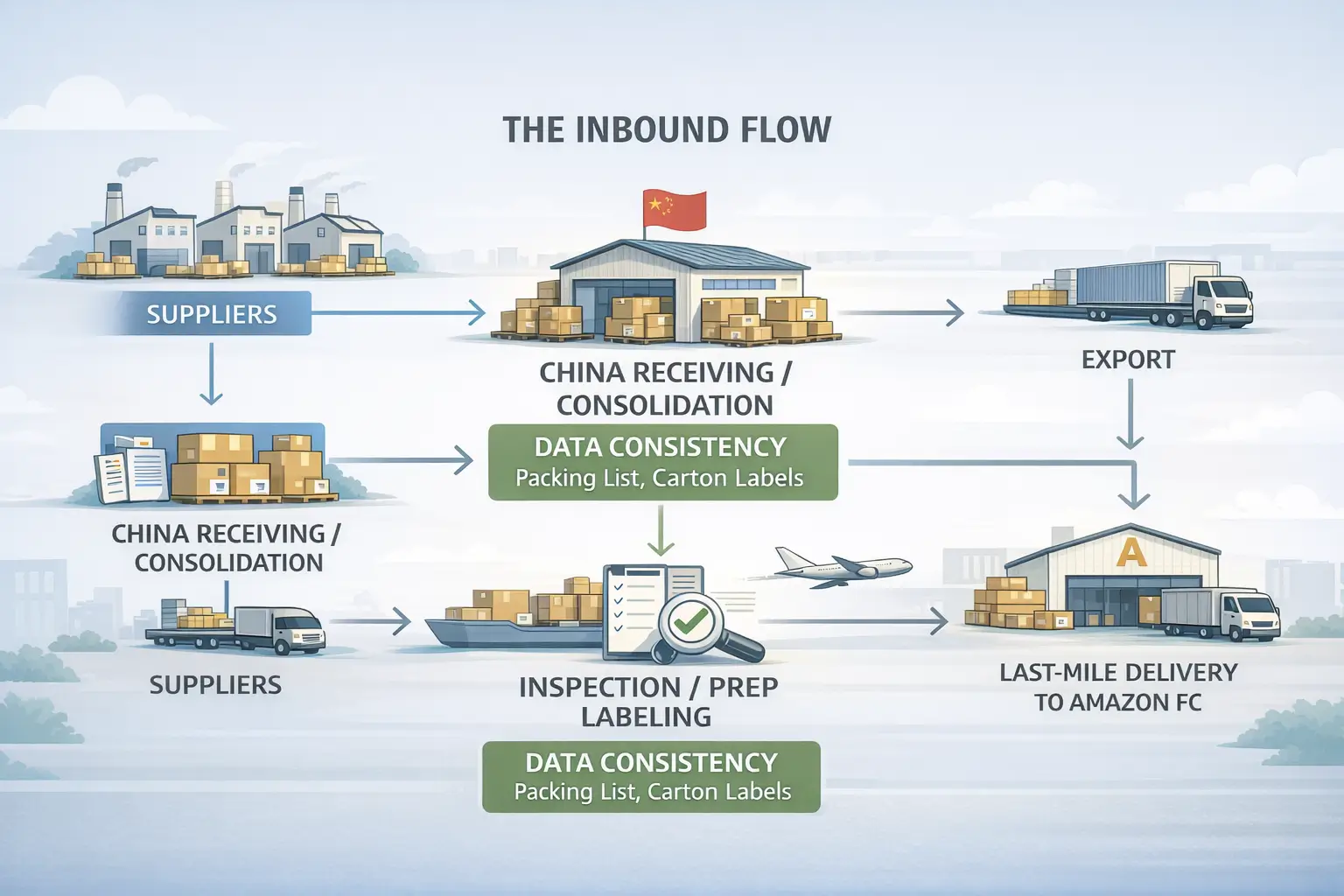
Shipping into FBA is a real supply chain, not a single step. The simplest mental model is: supplier pickup → receiving/consolidation → prep → international freight → import → final delivery to the Amazon fulfillment center.
Key points
- The best setup reduces handoff confusion: one packing list, clear carton plan, and consistent labeling before freight begins.
- Mode choices (sea/air/express) are trade-offs between cost, speed, and variability—there’s no universal “best.”
- Consolidation helps when you have multiple suppliers, but it also means your timeline can be constrained by the slowest supplier.
Boundary conditions
- Customs outcomes and delivery timelines are not guaranteed; build buffer into your launch plan.
- This is operational guidance, not legal/tax advice—verify jurisdiction-specific requirements with appropriate professionals.
Diagram: supplier → consolidation/prep → Amazon FC delivery
This flow shows the major handoffs so you can plan where data (carton counts, labels, documents) must stay consistent.
Boundary conditions
- Exact handoffs depend on your service setup and Incoterms; the goal is to keep responsibilities and data clear.
Sea vs air vs express: trade-offs for FBA replenishment
Sea, air, and express are best chosen based on how urgently you need stock, how fee-sensitive your product is, and how much variability you can tolerate.
Key trade-offs (non-numeric)
- Ocean (sea): usually chosen for lower unit shipping cost on larger volumes; planning and buffer matter more because variability can be higher.
- Air: a middle path when you need faster replenishment than ocean but still want more cost control than express.
- Express courier: often used for urgent replenishment or small, high-value shipments; convenience is high but unit cost sensitivity can be higher.
Boundary conditions
- Transit time and reliability vary by route, season, and carrier capacity—avoid planning around “guaranteed” timelines.
Is Amazon FBA worth it for beginners? A quick decision guide
FBA is often worth it when it saves you more operational burden than it costs you in fees and loss of control. A practical way to decide is to evaluate your product through four criteria: margin buffer, size/weight sensitivity, inventory velocity, and your operational capacity.
Decision rules (quick)
- FBA tends to fit better when:
- You have enough margin buffer to absorb fulfillment and storage fees.
- Your product is relatively easy to pack and ship (less fragile, less bulky).
- You expect steady sell-through (reducing storage risk and cash tied up).
- You’d rather focus on product and marketing than building a shipping operation.
- FBA tends to fit worse when:
- Your product is bulky/slow-moving and storage sensitivity threatens margins.
- You need very tight control over packaging/insert experience on every order.
- Your supply chain is unstable and you can’t plan replenishment buffers.
Scenario mini-table
| Your situation | FBA may fit when… | Watch out for… |
|---|---|---|
| First-time seller, limited time | You want to outsource fulfillment operations | Underestimating inbound prep and shipment accuracy |
| Many suppliers/SKUs | You can consolidate and standardize prep before shipping | Coordination errors, carton mismatches |
| Fast-moving items | Inventory turns quickly and storage risk stays low | Stockouts if replenishment planning is weak |
| Bulky or fee-sensitive items | You still have margin room after fee sensitivity | Storage/cashflow pressure if velocity drops |
Boundary conditions
- There are no earnings guarantees; outcomes depend on product, competition, pricing, and execution.
- Use Amazon’s current calculators and fee pages for exact estimates rather than viral “income” claims.
FAQ
This FAQ restates the most common questions in a short, extractable format. Answers are intentionally concise and do not include CTAs.
What is Amazon FBA (Fulfillment by Amazon)?
Q: What is Amazon FBA (Fulfillment by Amazon)?
A: Amazon FBA is a fulfillment service where you send inventory to Amazon and Amazon stores, picks, packs, and ships customer orders, while also handling customer service and returns. Sellers still handle inbound readiness—prep, labeling, carton accuracy, and shipping inventory into Amazon.
Boundary conditions
- FBA is not a guarantee of sales or profitability; it’s a fulfillment model.
How does Amazon FBA work step by step?
Q: How does Amazon FBA work step by step?
A: You set up FBA, create listings, create an inbound shipment plan, prep/label/pack inventory, ship it to an Amazon fulfillment center, and Amazon fulfills orders from there. The exact Seller Central screens and receiving timelines can vary.
Boundary conditions
- Receiving timelines aren’t guaranteed; plan buffer for check-in and availability.
What fees does Amazon FBA charge (by category)?
Q: What fees does Amazon FBA charge (by category)?
A: The main categories are fulfillment fees (per unit) and storage fees (for inventory stored), plus other fee types that may apply depending on returns or removals. Exact rates vary by product, marketplace, and time, so verify in Amazon’s current fee pages and calculators.
Boundary conditions
- Avoid relying on unsourced “average fees”; use official tools for your product attributes.
What’s the difference between FBA and FBM?
Q: What’s the difference between FBA and FBM?
A: With FBA, Amazon fulfills orders from your inventory stored in their network; with FBM, you (or your warehouse/3PL) store inventory and ship orders yourself. The best choice depends on your margins, product size/weight, and how much fulfillment work you want to own.
Boundary conditions
- Some program details vary by marketplace; verify current rules for your account.
What do I need to do before shipping products to Amazon FBA?
Q: What do I need to do before shipping products to Amazon FBA?
A: At a minimum: make sure each unit is correctly labeled and scannable, packaging protects the product in transit, cartons are accurate and documented, and your inbound shipment plan matches what you actually ship.
Boundary conditions
- Prep requirements vary by product type; always verify current guidance for your category.
Is Amazon FBA worth it for beginners?
Q: Is Amazon FBA worth it for beginners?
A: It can be worth it when you have margin buffer, steady sell-through, and you want to outsource the day-to-day fulfillment workload. It’s often a tougher fit for bulky, fee-sensitive, or slow-moving products where storage and fee sensitivity can erode margins.
Boundary conditions
- There are no earnings guarantees; use a product-by-product decision process.
Simple starter workflow (and when to get help)
If you want a safe starter approach, focus on one objective: reduce preventable inbound mistakes before you scale volume. This workflow is intentionally simple and works well for first-time shipments.
Starter workflow (high-level)
- Choose 1–2 SKUs to start and confirm your listing and labeling approach.
- Build a packing list (SKU → units → cartons → labels) and keep it as your source of truth.
- Decide whether you need consolidation (single supplier vs multiple suppliers).
- Prep and pack with scanability and protection in mind (labels, packaging, carton accuracy).
- Create the inbound shipment and reconcile it against the final cartons before pickup.
- Ship inventory, then monitor receiving status and keep buffer for variability.
- Replenish based on sell-through, not hope—inventory velocity drives storage risk.
When it’s worth getting help (common triggers)
- Multiple factories or many SKUs (consolidation and carton planning complexity)
- Prep-sensitive products (fragile, liquids, bundles/kitting, inserts)
- High-value shipments where mistakes are expensive
- You don’t have reliable carton dimensions/weights yet and need quote planning
If you’re sourcing from multiple suppliers in China, a partner like FBABEE can help coordinate China-side receiving, consolidation, prep (labeling/kitting), and door-to-door shipping into Amazon FBA—so your inbound plan stays consistent from factory to fulfillment center.
Boundary conditions
- No one can guarantee customs outcomes or receiving timelines; good planning reduces avoidable risk but can’t eliminate variability.



