


What “Amazon FBA Mastery” Means (and What It Doesn’t)
Amazon FBA mastery means you can run the end-to-end system behind an FBA product reliably—especially the inbound execution that gets inventory checked in and sellable. It’s not an official Amazon term, and it’s not a guarantee of sales or profit.
Skills map for physical products:
- Know the FBA responsibility split (Amazon fulfills; you own inbound accuracy)
- Lock packout + labeling before production ends (so cartons match your shipment plan)
- Create shipments without data mismatches (box contents, labels, ship-from details)
- Prevent common receiving issues (mislabels, wrong counts, weak cartons, mixed cartons)
- Choose shipping mode/routing by urgency (air/ocean/express; direct vs 3PL buffer)
- Replenish with a system (lead-time buffers + reorder triggers)
What FBA Means: What Amazon Handles vs What You Still Own
FBA (Fulfillment by Amazon) means Amazon stores your inventory and fulfills customer orders after check-in—but you still own inbound accuracy and compliance. Think “Amazon handles fulfillment,” while you control whether the shipment arrives labeled, packed, and documented correctly.
| Amazon handles (after check-in) | You still own (before & during inbound) |
|---|---|
| Storage and order fulfillment (pick/pack/ship) | Product, supplier, and packaging/packout decisions |
| Customer service and returns for FBA orders | Shipment plan accuracy (SKUs, quantities, box contents) |
| Inventory tools/reporting | Labels and carton plan match what’s inside the boxes |
| — | Shipping mode/routing and delivery coordination |
Mastery takeaway: if inbound execution is messy, you’ll see delays, rework, and stockouts no matter how good your marketing is. With that split clear, choose the model you’re actually mastering.
Which FBA Model Are You Mastering? (Private Label, Wholesale, Arbitrage, Books)
Mastery depends on your sourcing model, so keep this section short and use it to avoid “wrong playbook” mistakes.
| Model | Typical inbound pattern | What usually breaks |
|---|---|---|
| Private label | Longer lead times, repeat cartons | Packout/label errors scale fast |
| Wholesale | Frequent replenishment, stable cartons | Thin margins make mistakes expensive |
| Arbitrage | Mixed SKUs, changing box contents | Box content + mixed-carton errors |
| Books/reselling | Many single units | Labor-heavy prep/label consistency |
Now follow a realistic path to your first compliant shipment—the point where “mastery” stops being theory.
A Realistic Roadmap: Beginner → First Compliant FBA Shipment
A realistic roadmap gets you to one clean inbound shipment, then makes it repeatable.
- Pick a model and constraints (budget, timeline, risk).
- Validate the product + compliance basics (can it be packaged and labeled consistently?).
- Lock packout (units per carton; case pack vs mixed SKUs).
- Decide labeling responsibility (factory vs prep center).
- Choose routing strategy (direct to FBA vs via a 3PL buffer).
- Create the shipment plan in Seller Central (accurate SKUs, counts, box contents).
- Prep/pack/verify → ship → monitor check-in → save what worked as your template.
First-shipment “go/no-go” checks:
- Packout and carton plan are written down (not just in someone’s head)
- Labels scan cleanly and won’t rub off in transit
- Box contents in the plan match the cartons you’re shipping
- You have a pre-ship verification step (counts + photos)
Where Prep and Logistics Fit (and What to Outsource)
For physical products, mastery includes moving inventory from suppliers to FBA reliably. A simple mental model:
- Factory: makes the product, basic packaging, proves it can follow your packout instructions
- Prep workflow: makes units and cartons “FBA-ready” (labels, bundling, verification)
- Logistics: gets the right cartons to the assigned destination (or to your 3PL buffer)
Outsource more when:
- You have multiple suppliers and need consolidation
- You ship mixed SKUs or bundles/kits
- You’ve had label/count issues and need verification
The handoff info you should collect before shipping:
- SKU list + quantities (by SKU and by carton)
- Case pack vs mixed-SKU definition (units/carton)
- Who applies unit labels vs prints/applies box labels
- Carton dims/weights (or a measurement plan)
- Ship-from address + ready date
- Any handling constraints (fragile, liquid, oversize)
With that, you’re ready to build a shipment workflow that prevents the most common “plan vs reality” mismatches.
Creating an FBA Shipment: Workflow + Handoff Checklist
Creating an FBA shipment is mostly a data-accuracy exercise: the shipment plan, box contents, and labels must match the physical cartons. Seller Central’s “Send to Amazon” workflow guides shipment creation, including packing details and printing box labels.
Workflow (high level):
- Choose inventory to send (SKUs/quantities + ship-from).
- Enter packing details (case packs vs mixed; box content info).
- Confirm shipping (shipping mode + ship date).
- Print/apply box labels (every box, scannable).
- Confirm carrier/pallet details (if you ship pallets).

Handoff checklist (prep center / freight partner):
- Shipment name/ID + assigned destination(s)
- Box label PDFs + where/how to apply them
- Carton plan sheet (SKU → units/carton → carton count)
- Carton measurement sheet (dims/weights)
- Pickup address, contact, ready date
Before cartons leave the factory/prep center:
- Reconcile physical counts to the shipment plan
- Spot-check labels vs SKUs (unit + box)
- Test-scan a sample label set
- Take verification photos (labels + sealed cartons)
Need help consolidating suppliers, doing China-side inspection, or standardizing FBA prep before export? FBABEE supports receiving, consolidation, prep, and shipping coordination so cartons and shipment data stay aligned.
With the workflow in place, mastery comes from prevention: catching the mistakes that trigger delays or rework.
Common Prep & Shipping Mistakes That Cause Delays (and How to Prevent Them)
Most inbound issues are mismatches between the shipment plan and what arrives. Use this table as your prevention checklist.
| Mistake | Impact | Prevention control |
|---|---|---|
| Wrong unit label / barcode confusion | Units can’t be identified cleanly | Confirm barcode choice early; keep one scannable barcode |
| Wrong box label on a carton | Carton can be delayed/misrouted | Apply labels only after carton plan is final |
| Box contents don’t match cartons | Receiving exceptions and slow check-in | Carton plan sheet + reconciliation before pickup |
| Mixed cartons by accident | Miscounts and extra handling | Clear “do not mix” rules; separate packing stations |
| Weak cartons / labels damaged | Damage and unreadable labels | Strong cartons, tape, void fill; labels on flat surfaces |
| Last-minute packout changes | Label-to-carton mismatch | Freeze packout before printing labels; restart plan if needed |
Stop-and-fix triggers:
- Counts don’t reconcile (plan ≠ cartons)
- Labels don’t scan reliably on a test
- Destinations/shipments changed after you packed (re-check labels)
Once mistakes are controlled, the biggest recurring mastery decision is shipping mode and routing—because that drives speed, cost, and stockout risk.
Choosing Shipping Mode and Routing: Air vs Ocean vs Express, Direct vs 3PL
Shipping mode mastery is using repeatable criteria (urgency + volume + buffer), not guessing.
| Option | Best when | Trade-off |
|---|---|---|
| Express | Very small/urgent shipments | Fast, usually highest cost per unit |
| Air | Launch windows or urgent replenishment | Faster than ocean, higher cost |
| Ocean | Bulky/heavy and not urgent | More cost-effective, slower lead time |
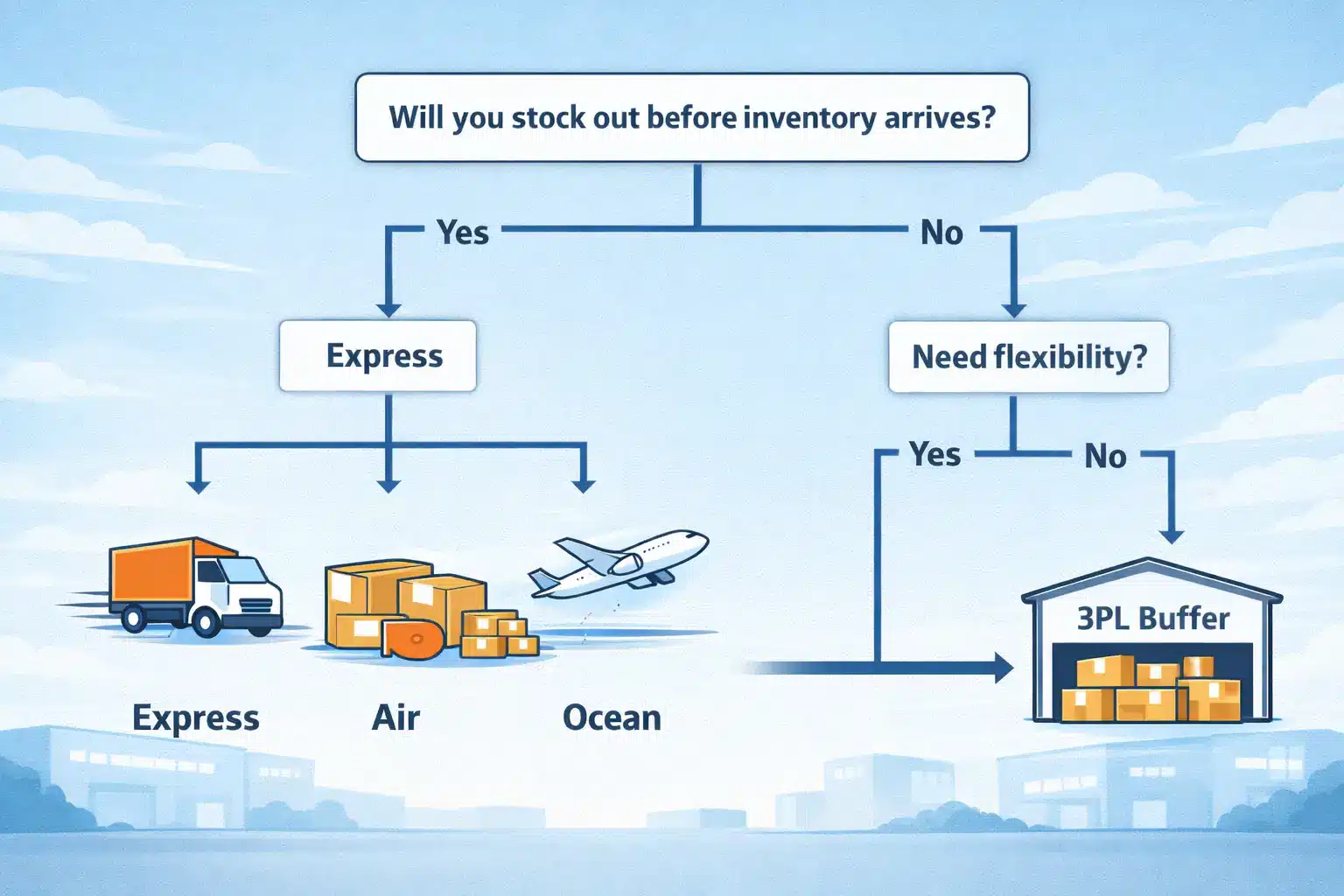
Direct-to-FBA vs via a 3PL buffer
- Go direct when cartons are stable (case packs, known packout) and you want fewer handoffs.
- Use a 3PL buffer when you want flexibility (split shipments, staged replenishment, or a safety net).
Rules of thumb:
- If you’ll stock out before ocean arrives, speed can be cheaper than losing momentum.
- If the shipment is bulky and your buffer is healthy, ocean is often the planning default.
- If box contents change often, ship smaller, more controlled batches.
- Avoid fixed transit-time assumptions; seasonality and routing change outcomes.
Cost Buckets Beyond Product Cost (How to Estimate Without Guessing)
You don’t need perfect numbers—you need the right buckets and the inputs that drive them.
| Cost bucket | What drives it | What you can control |
|---|---|---|
| Product cost | Supplier price, packaging | Packout design, defect rate |
| Amazon fees (selling + FBA) | Size/weight tier, services | Packaging size/weight, SKU selection |
| Storage | Volume + time | Replenishment cadence, buffer size |
| Prep/labeling | Handling steps per unit | Simplify packout; standardize instructions |
| Freight (international + local) | Mode, volume/weight, season | Consolidation, mode/routing decisions |
| Duties/taxes (market-dependent) | HS code, value, importer setup | Accurate docs; verify with broker/pros |
| Rework/damage/returns handling | Packaging + label quality | Verification steps + stronger cartons |
Inputs checklist (landed-cost planning):
- Unit + carton dims/weights (after packaging)
- Units/carton and carton count (case pack vs mixed)
- Target marketplace + routing (direct vs 3PL)
- Shipping mode (express/air/ocean)
- Documentation basics (HS code/value approach—verify with a pro)
With the operational picture clear, you can judge “FBA mastery” courses realistically: do they teach execution and decision rules, or just marketing.
If “FBA Mastery” Is a Course: Credibility Checklist and Red Flags
Evaluate any “mastery” program by what it helps you do in practice, not by outcome stories.
Credibility checklist:
- Clear scope (which model it’s for)
- Up-to-date ops content (shipments, labeling, inventory planning)
- Templates/SOPs you can reuse (carton plan, pre-ship checks, cost model)
- Transparent support boundaries (what help you get, and for how long)
Red flags:
- Guaranteed earnings or pressure tactics
- Vague syllabi that skip inbound execution details
- No clarity on refunds/support
FAQ
Q: What does “Amazon FBA mastery” mean in plain English?
A: It means you can run an FBA business reliably end to end—especially sourcing, prep, shipment creation, and replenishment—so inventory arrives ready to receive. It’s not an official Amazon term and it doesn’t guarantee results.
Q: What does FBA mean on Amazon, and what does Amazon handle vs the seller?
A: FBA is Amazon’s fulfillment service: Amazon stores inventory and fulfills orders after check-in. Sellers still own inbound accuracy—shipment plans, labels, box contents, and routing—so verify current requirements in Seller Central.
Q: Is “FBA Mastery” a course/brand name or a general term?
A: It can be either. Some creators use it as a course name; others use it as shorthand for operational competence. Judge it by scope, deliverables (SOPs/templates), and whether it covers execution—not hype.
Q: What’s a realistic step-by-step roadmap to become competent at Amazon FBA?
A: Choose a model, lock packaging/packout, plan labeling, pick routing, then create and execute your first shipment with verification steps. Save what worked as a template, then iterate on the friction points.
Q: What are the most common FBA prep/shipping mistakes that cause delays or rework?
A: Label mismatches, incorrect box contents, carton count errors, weak cartons, and packout changes after labels are printed. Prevent them with a carton plan sheet, spot scans, reconciliation, and pre-ship photos.
Q: How do you choose air vs sea vs express for an FBA shipment?
A: Start with urgency: if you’ll stock out, prioritize speed (express/air). If the shipment is bulky and buffers are healthy, ocean is often more cost-effective. Avoid fixed time assumptions—seasonality and routing matter.
Q: What costs should you plan for beyond product cost when selling via FBA?
A: Plan for Amazon fees, storage, prep/labeling, freight, and market-dependent duties/taxes. Use a bucketed model driven by dims/weights, packout, routing, and mode—rather than guessing one “all-in” number.
Summary: What to Do Next
Mastery is repeatable execution and decision rules—not a label on a course page. If you want the fastest practical path, build a stable inbound system and improve it shipment by shipment.
Next steps checklist:
- Write your skills map and pick a model
- Lock packout + labeling plan before production ends
- Create shipments with a carton plan sheet + verification steps
- Add mistake-prevention controls before every pickup
- Choose mode/routing with urgency + buffer criteria, then track costs by bucket
If you want help with China-side consolidation, inspection, FBA prep, or coordinating delivery to Amazon FBA (or your 3PL), FBABEE can support the operational side of getting inventory “FBA-ready.” Always verify the latest requirements in Seller Central.



