

What does “Amazon FBA job” mean? (3 paths + pick yours)
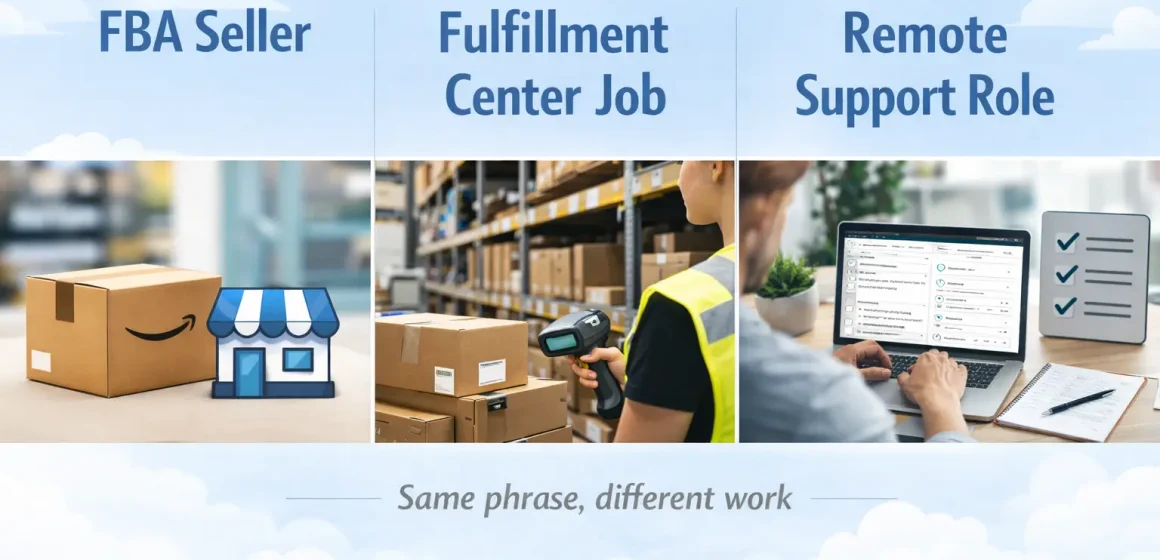
An “Amazon FBA job” usually means one of three paths: (1) running an Amazon FBA seller business, (2) working at an Amazon fulfillment center, or (3) doing remote work that supports FBA sellers. The day-to-day tasks (and what “success” looks like) are completely different in each path.
The 3 most common meanings
- FBA seller (business owner): You choose products, manage listings and inventory, and send stock into Amazon; Amazon fulfills orders for you.
- Fulfillment center job (employee): You’re paid to help run warehouse operations that pick/pack/ship customer orders.
- Remote support role (freelance/agency/in-house): You help sellers with tasks like listings, PPC, sourcing, and operations reporting.
| Meaning of “Amazon FBA job” | Who you are | Typical work | “Success” usually means |
|---|---|---|---|
| FBA seller | Business owner | Product + listing + inventory + inbound shipments | Healthy margins, stable stock, fewer operational surprises |
| Fulfillment center employee | Amazon employee | Warehouse operations (receiving, stowing, picking, packing, shipping) | Hitting safety + quality + productivity standards |
| Remote support role | Seller support (VA/PPC/ops) | Execution in Seller Central tools + reporting | Clear deliverables, measurable improvements, reliable cadence |
Quick self-check
- If you’re asking “Is this a good side hustle / business?” → you probably mean FBA seller (jump to the seller sections).
- If you’re asking “How do I apply / what’s the role like?” → you probably mean fulfillment center job.
- If you’re asking “What work can I do remotely for sellers?” → you probably mean remote support role.
Jump to your section
- Seller path: Day-to-day workload → see “If you mean ‘FBA seller’…”
- Employment path: Fulfillment center roles → see “If you mean ‘Amazon warehouse job’…”
- Remote path: VA/PPC/account manager/sourcing → see “If you mean ‘remote Amazon FBA jobs’…”
What is Amazon FBA—and what does Amazon handle vs what you still do?
Amazon FBA (Fulfillment by Amazon) is a fulfillment service where you send inventory to Amazon, and Amazon stores it and fulfills customer orders when they happen. It’s powerful because it removes a big chunk of shipping operations—but it doesn’t run your business for you.
Here’s the cleanest way to think about the split:
| With FBA, Amazon typically handles… | As the seller, you still own… |
|---|---|
| Storing inventory in fulfillment centers | Choosing products and suppliers |
| Picking, packing, and shipping customer orders | Creating and improving listings (content, pricing strategy) |
| Customer service and returns handling for FBA orders (at a high level) | Inventory planning, replenishment, and avoiding stockouts/overstock |
| Last-mile delivery experience (execution side) | Compliance decisions (what you sell, documentation, category constraints) |
Boundary notes (important):
- The exact rules and options can vary by marketplace, product type, and program settings, so treat any “requirements” as check-and-confirm items.
- FBA reduces fulfillment labor, but you still manage the business levers: product, demand, inventory, and quality control.
How Amazon FBA works (step by step)
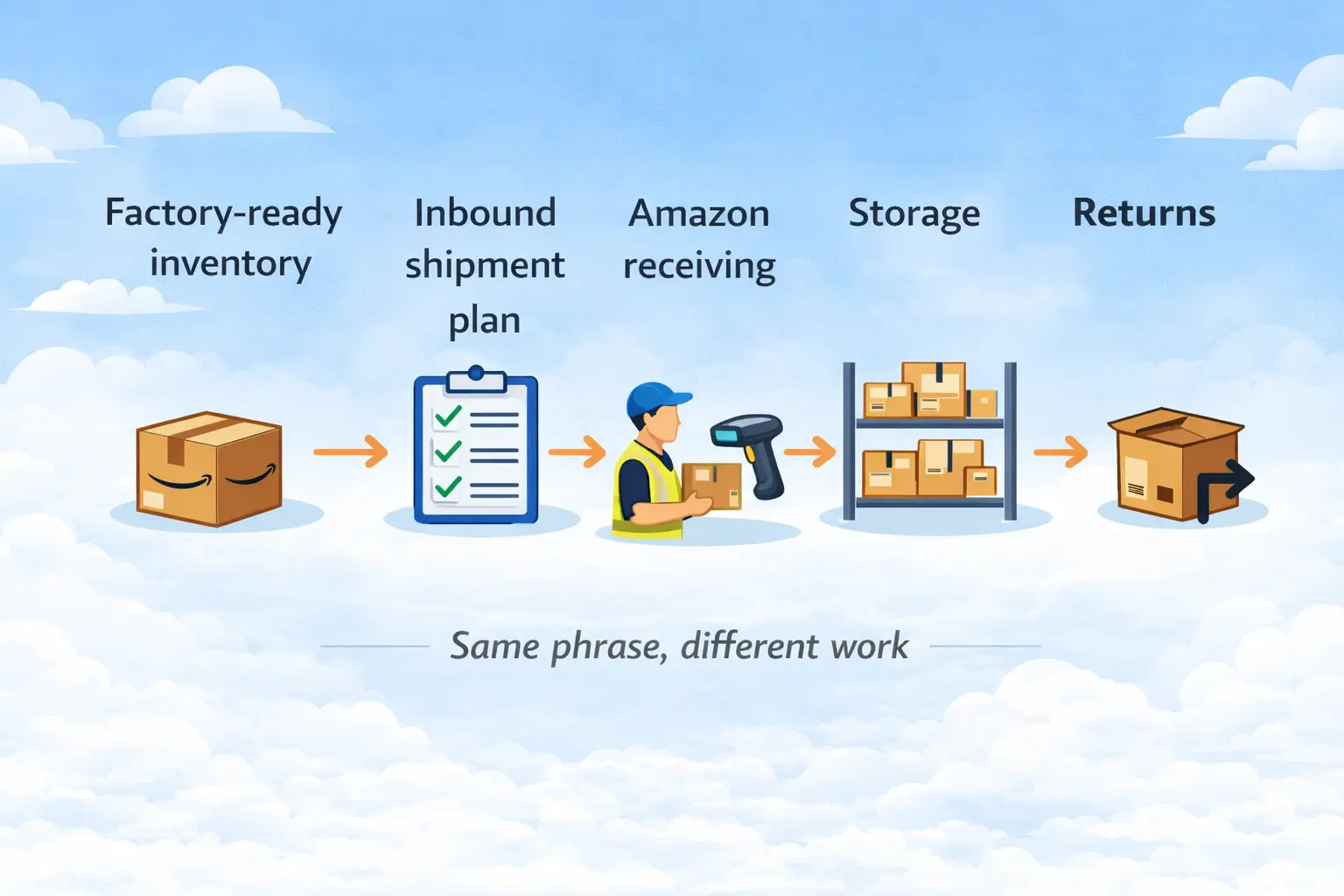
At a high level, FBA is a simple loop: you send inventory in → Amazon receives and stores it → Amazon fulfills orders → returns flow back through Amazon’s system. Once you see the steps, it becomes clear where your “job” sits as a seller.
Step-by-step (plain English)
- Create your product and listing. Your listing connects your offer to Amazon’s catalog and your FBA inventory.
- Prepare inventory for inbound. This includes labeling/packaging decisions and making sure units and cartons match your plan.
- Create an inbound shipment plan. You tell Amazon what you’re sending and how it’s packed, then book the carrier/delivery method.
- Send inventory to Amazon’s fulfillment network. Inventory moves to the assigned receiving location(s).
- Amazon receives and stores inventory. Your units become available for sale once received/processed (timing can vary).
- Amazon fulfills customer orders. When you get a sale, Amazon picks, packs, ships, and handles post-purchase operations.
Where issues often show up (and why that matters):
Inbound receiving tends to be sensitive to mismatches—what you said you sent vs what arrives, or how it’s labeled/packed vs how it’s expected. You can’t control every delay, but you can control the common preventables: accuracy, labeling clarity, carton planning, and clean handoffs.
If you mean “FBA seller”: what the job looks like day to day
An FBA seller’s job is the business side—product, listing, inventory, and inbound execution—while Amazon runs the fulfillment execution. If you’re expecting “set it and forget it,” the reality is: the work shifts upstream into planning and quality control.
A practical workload map (by stage)
1) Product & supplier work (before anything ships)
- Research demand and competition, then choose a product you can source reliably.
- Confirm specs, packaging expectations, and whether the product has category constraints (this is where surprises start).
- Build a repeatable supplier process: samples, QC expectations, and what “acceptable” looks like.
2) Listing & launch work (getting your offer to convert)
- Create the listing: title, images, bullets, and a clear value proposition.
- Set pricing and promotion decisions, then watch early conversion signals.
- Track customer feedback and returns to catch product/packaging issues early.
3) Inventory planning (the FBA job nobody talks about)
- Plan replenishment lead times (supplier production + transport + receiving variability).
- Avoid two expensive problems: stockouts (lost momentum) and overstock (storage risk).
- Build a simple “reorder trigger” based on sell-through and inbound lead time.
4) Inbound shipping & readiness (where sellers lose time and money)
- Create accurate shipment plans and carton plans.
- Make sure labels and packaging are consistent from supplier → prep → carrier → Amazon receiving.
- Keep proof and photos where possible so you can troubleshoot mismatches without guessing.
5) Ongoing ops (weekly/monthly rhythm)
- Weekly: check inventory health, stranded listings, pricing, and ad performance (if used).
- Monthly: review returns reasons, update listing assets, and improve packaging if damage/returns are trending.
- Quarterly: renegotiate suppliers, simplify SKU complexity, and upgrade systems (reporting, forecasting).
How the “job” changes as you scale
- 1–2 SKUs: You do more hands-on work, and small mistakes show up immediately.
- Many SKUs / multiple suppliers: Your job becomes coordination—consolidation, carton planning, and preventing preventable inbound chaos.
- With outsourcing: You may outsource execution (prep, freight, VA, PPC), but you still own the outcomes—scope, checks, and decision-making.
Before inventory reaches Amazon: prep + inbound shipping coordination checklist
Before Amazon can fulfill anything, inventory has to arrive FBA-ready and match what your inbound plan says. This section is the “pre-flight checklist” that prevents many avoidable headaches.
Pre-inbound checklist
- Confirm the right product + version is being produced (specs, color, bundle contents).
- Confirm packaging plan (unit packaging + any inserts/bundles) matches your listing and brand standards.
- Decide labeling approach (who applies labels, and how you’ll verify it’s correct).
- Standardize carton contents (units per carton) so your carton plan is stable and auditable.
- Carton integrity check (strength, protection for fragile items, seals, and void fill if needed).
- Count verification at handoff points (supplier → warehouse/prep → outbound).
- Create the inbound shipment plan and double-check quantities and carton counts.
- Match shipment plan to reality (carton count changes and last-minute edits are common failure points).
- Plan consolidation (if multi-supplier). Decide where you combine goods and how you verify each supplier’s contribution.
- Document the handoffs (who touched it, when, and what was confirmed) so troubleshooting is possible later.
- Choose shipping mode (air/sea/express) based on urgency, cost tolerance, and risk buffer (no guarantees).
- Carrier + delivery coordination (appointments or delivery requirements vary by destination and method).
- Keep simple evidence (photos of labels/cartons, counts, and packing method) for disputes or internal review.
- Final “ready-to-ship” sign-off: quantities, cartons, labels, and paperwork aligned.
Seller decides vs partner executes (clarity prevents mismatched expectations)
A lot of “FBA inbound pain” comes from not knowing what you must decide versus what a partner can execute for you.
| Task | Seller must decide | Partner can execute (typical) |
|---|---|---|
| Product + listing truth | ✅ Yes (you own it) | ❌ No (can advise, but not own) |
| Packaging and bundle rules | ✅ Yes (your brand + listing) | ✅ Yes (pack to your spec) |
| Labeling responsibility | ✅ Choose who/where/how verified | ✅ Apply labels, provide photos/checks |
| Carton plan strategy | ✅ Approve carton logic and constraints | ✅ Pack by plan, flag inconsistencies |
| Consolidation logic | ✅ Decide where and when to consolidate | ✅ Receive, sort, consolidate, report |
| Freight booking & handoffs | ✅ Approve service level and risk buffer | ✅ Coordinate booking and delivery |
| “Go / no-go” quality checks | ✅ Define what fails and what gets fixed | ✅ Perform checks and report issues |
Common FBA inbound mistakes (and how to prevent them)
Most inbound problems trace back to a small set of repeatable mistakes. These are “commonly seen” patterns—not guarantees—but they’re worth treating as your standard prevention list.
Mistake → consequence → prevention (use as a pre-flight check)
- Label confusion (wrong label type or inconsistent placement)
- What can happen: receiving exceptions, relabeling work, or inventory going “missing” in the system temporarily
- Prevention: standardize label placement rules, spot-check samples, and photo-proof cartons/units
- Shipment plan doesn’t match what ships (quantities/cartons changed but plan wasn’t updated)
- What can happen: receiving mismatch, reconciliation delays, and extra admin work
- Prevention: lock carton counts before pickup and require a final “counts approved” step before dispatch
- Mixed SKUs in cartons without clear logic
- What can happen: slower processing and harder troubleshooting
- Prevention: use consistent carton contents rules and carton labeling discipline
- Weak packaging for long transport (especially cross-border)
- What can happen: damage, returns, and extra prep rework
- Prevention: design packaging for the full journey, not just the factory-to-door moment; add protection where needed
- No documented handoff checks (you can’t prove what was shipped)
- What can happen: disputes become guesswork, and root-cause analysis fails
- Prevention: simple evidence: photos + carton counts at each handoff point
- Bundle/kitting inconsistency (missing inserts, wrong bundle composition)
- What can happen: customer complaints, returns, and listing issues
- Prevention: kitting SOP with a count checklist and periodic QC sampling
- Over-optimistic timing assumptions
- What can happen: stockouts or rushed shipping decisions
- Prevention: build buffer into planning; treat receiving and transport timing as variable
- No “exception plan” for supplier mistakes
- What can happen: delays while you decide what to do
- Prevention: pre-define decisions: rework, re-label, re-pack, or return-to-supplier options
- Poor carton planning for storage/handling
- What can happen: inefficiency, higher damage risk, and operational friction
- Prevention: keep cartons consistent, protect corners/edges, and avoid extreme weights where possible
- Outsourcing without scope clarity
- What can happen: “I thought you handled that” gaps (labels, photos, counts)
- Prevention: written scope + deliverables + what gets reported when something is off
Bridge to the decision section: If you’re debating FBA vs FBM, notice how many of these issues are inbound-to-Amazon problems. FBM changes the workload—but it doesn’t remove operations work.
FBA vs FBM: how your workload changes (decision table)
FBA vs FBM is mostly a choice about who does fulfillment operations. FBA shifts pick/pack/ship to Amazon; FBM keeps it with you (or your warehouse/3PL). The “best” option depends on your product, margins, and operational capacity.
| Decision criterion | FBA (Fulfilled by Amazon) | FBM (Fulfilled by Merchant) |
|---|---|---|
| Daily fulfillment work | Lower (Amazon executes shipping ops) | Higher (you execute shipping ops) |
| Control over packing inserts/unboxing | Often less flexible | Often more flexible |
| Inventory risk type | Inbound + storage planning becomes critical | Shipping speed + customer experience become critical |
| Returns/customer operations | More handled within Amazon’s FBA system | More of your responsibility (process + customer handling) |
| Best for… (generally) | Sellers who want to outsource fulfillment execution | Sellers who want control or have strong fulfillment ops |
| “Job” focus shifts to… | Product + inventory + inbound discipline | Fulfillment ops + customer operations + shipping performance |
Simple decision framing
- Choose FBA if you’d rather focus your time on product, listing, demand, and replenishment, and you can run clean inbound processes.
- Choose FBM if you need more control over fulfillment details, have reliable shipping operations, or your product economics don’t suit FBA-style cost structure.
Boundary notes: Policies and fees change, and product constraints vary by category. Treat this table as a workload model, not a promise of cost or performance outcomes.
If you mean “Amazon warehouse job”: fulfillment center roles vs being a seller
An Amazon fulfillment center job is paid employment supporting warehouse operations; an FBA seller is a business owner using those warehouse services. If you searched “FBA job” hoping to apply for work, this distinction matters.
| Topic | Fulfillment center employee | FBA seller |
|---|---|---|
| Relationship to Amazon | Employee | Selling partner (business) |
| Core work | Warehouse operations and process execution | Product + inventory + inbound + business decisions |
| “Success” measurement | Safety, quality, productivity, role performance | Profitability, inventory health, customer outcomes |
| Risk profile | Lower business risk (employment model) | Higher business responsibility and variability |
Common fulfillment center job families (high level):
- Warehouse/fulfillment associates (receiving, stowing, picking, packing)
- Process/operations support roles (coordination, quality, training)
- Operations leadership roles (team/shift/process management)
If you need exact role details, treat official job listings as the most accurate source for your location and job family.
If you mean “remote Amazon FBA jobs”: VA, PPC, account manager, sourcing
Remote “Amazon FBA jobs” usually mean support roles for sellers, not Amazon employment. The key to doing (or hiring) these roles well is scope clarity: what you do, what you deliver, and what you don’t promise.
Common remote roles (and what they really do)
| Role | What they do | Typical outputs | What they shouldn’t promise |
|---|---|---|---|
| VA (general ops) | Admin tasks, reports, basic listing support | Weekly dashboards, task completion | Guaranteed sales/rankings |
| PPC specialist | Manage ads and optimize targeting | Spend reports, ACoS/ROAS trends, tests | “Instant profit” outcomes |
| Account manager | Coordinate across listing/ads/inventory | Priority plan, weekly review notes | “We control everything” |
| Sourcing support | Supplier search + coordination | Shortlists, quotes, sample tracking | “Perfect supplier guaranteed” |
| Listing/content specialist | Improve on-page content | New copy, image briefs, A/B ideas | Guaranteed conversion lift |
Hiring (or applying) sanity checklist
- Ask for deliverables (“What will I receive weekly?”), not vague “optimization.”
- Define tool access and permissions (who can change what).
- Watch for red flags: anyone selling certainty (“guaranteed ranking,” “no-risk growth”) is usually overselling.
Costs & expectations: what you pay for (components) and why outcomes vary

FBA has multiple cost components, and seller outcomes vary because product economics and operational decisions vary. If you’re looking for a single “how much will I make?” answer, the honest answer is: it depends—and it’s better to model the drivers you can control.
Common cost components (no exact rates here)
- Selling-related fees (platform-related costs)
- FBA fulfillment-related fees (the “pick/pack/ship” component, conceptually)
- Storage-related fees (inventory sitting in the network)
- Inbound shipping costs (getting inventory to Amazon)
- Prep/packaging costs (whether done by you, a prep partner, or a service)
- Returns and product issues (damage, defects, customer dissatisfaction)
- Advertising/marketing costs (if you use ads to drive demand)
- Software/tools (reporting, repricing, research—optional but common)
Why results vary (a simple driver table)
| Driver type | Examples | How it affects outcomes |
|---|---|---|
| Product factors | Size/weight, fragility, seasonality | Changes cost structure and operational risk |
| Market factors | Competition, price pressure, conversion | Changes revenue potential and ad intensity |
| Operational factors | Lead times, inbound accuracy, stockouts | Changes continuity and avoidable “loss leaks” |
What to track early (more useful than income guesses)
- Landed cost per unit (including inbound + prep, as applicable)
- Inventory health (stockout risk vs overstock risk)
- Returns reasons (signals product/packaging problems)
- Sell-through and replenishment timing (your real “ops rhythm”)
Quick recap + when to get help (without overpromising)
“Amazon FBA job” can mean seller, warehouse employee, or remote support role—so pick the path first, then focus on the responsibilities you control. If you’re on the seller path, most preventable pain is solved by (1) clear inbound planning and (2) simple mistake-prevention checks.
If you’re an FBA seller, the practical next steps are:
- Use the pre-inbound checklist before every shipment
- Keep handoff evidence (counts + photos) so troubleshooting isn’t guesswork
- Treat timing/fees as variable; verify current details in official documentation
- Scale by simplifying: fewer preventable exceptions beats “more complicated systems”
Need help with the China → Amazon FBA part?
FBABEE supports Amazon sellers with China-side consolidation, FBA prep (labeling/packaging/kitting), and freight coordination to help reduce preventable inbound mistakes—especially for first-time shipments or multi-supplier projects.
Common situations where a prep/logistics partner can help (without promising outcomes):
- You’re shipping to FBA for the first time and need a clean pickup → prep → delivery workflow
- Multiple suppliers require consolidation and carton planning
- Your products are fragile, high-value, or operationally complex and mistakes are costly
- You need staged outbound planning to manage storage and replenishment rhythm
FAQ
What is an Amazon FBA job?
An “Amazon FBA job” usually means one of three things: running an FBA seller business, working at an Amazon fulfillment center, or supporting sellers remotely (VA/PPC/account manager/sourcing). The daily work is different in each path, so define the role by responsibilities—not the label.
How does Amazon FBA work?
With FBA, you send inventory to Amazon, Amazon receives and stores it, then picks/packs/ships orders when customers buy. Returns are handled within Amazon’s system at a high level. Exact processing details can vary by product type, inbound method, and marketplace.
What do you do day-to-day as an Amazon FBA seller?
Day to day, FBA sellers focus on product decisions, listings, inventory planning, and inbound shipments—plus reviewing performance (returns, conversion, stock health). FBA reduces fulfillment labor, but you still manage the business levers and prevent avoidable inbound mistakes.
What’s the difference between working at an Amazon fulfillment center and being an FBA seller?
A fulfillment center role is employment supporting warehouse operations (receiving, picking, packing, shipping). An FBA seller is a business owner who uses those services to fulfill customer orders. Job scope and requirements for warehouse roles vary by location and job family.
What remote “Amazon FBA jobs” exist (VA, account manager, PPC, sourcing)?
Common remote roles include VA (ops support), PPC specialist, account manager, listing/content specialist, and sourcing support. The best roles are defined by deliverables and cadence (reports, tasks, tests)—not vague promises. Be cautious of anyone claiming guaranteed sales or rankings.
FBA vs FBM — which should you choose?
Choose FBA if you want Amazon to execute fulfillment operations and you can manage clean inbound and replenishment. Choose FBM if you want more fulfillment control and can reliably handle shipping and customer operations. It’s a workload trade-off, not a universal “best” answer.
What needs to be done before you send inventory to Amazon FBA?
Before shipping to FBA, align product packaging, labeling approach, carton plan, and shipment plan accuracy—then coordinate carrier and handoffs. A simple checklist (counts, photos, carton consistency) prevents many common inbound mismatches. Requirements can vary by product category, so verify the latest details.
What are common mistakes that cause FBA inbound delays or rework?
Common issues include label confusion, shipment-plan mismatches, weak packaging, mixed cartons without clear logic, and missing handoff checks. Prevention is usually simple: standardize carton planning, verify counts, photo-proof labels, and keep scope clear when outsourcing prep or logistics.



