


What Is Amazon FBA Automation?
Amazon FBA automation usually refers to reducing hands-on work in an Amazon business by combining FBA (outsourced fulfillment) with repeatable processes and software tools—and sometimes outsourcing tasks to people or services.
- FBA automates fulfillment: you send inventory in, and Amazon can pick, pack, ship, and handle returns/customer service for those orders.
- Tools automate tasks: alerts, rules, templates, and reporting that reduce repetitive clicks.
- Outsourcing delegates execution: VAs, operators, or agencies run parts of the workload under your direction.
- What it’s not: a guaranteed “passive income” setup or a set-and-forget business.
The rest of this guide helps you separate these meanings so you can choose an automation approach that keeps you in control.
What “Amazon FBA Automation” Means (and What It Doesn’t)
In practice, “Amazon FBA automation” is an umbrella term that gets used in three different ways—and confusion starts when people mix them together.
- Meaning #1: FBA as fulfillment automation
Amazon handles fulfillment tasks after your inventory is received into its network. Learn the basics of what FBA includes here:
Fulfillment by Amazon (FBA). - Meaning #2: Task automation inside your operations
Software and rules reduce repetitive work (inventory alerts, pricing rules, ad rule sets, reporting dashboards). - Meaning #3: Outsourcing operations
People (VAs) or services run tasks for you, based on SOPs and permissions.
What “FBA automation” does not mean:
- Not a guarantee of profits or results. Outcomes depend on product selection, pricing, supply chain, and execution.
- Not “no work.” Even with strong automation, the account owner still needs oversight, approvals, and exception handling.
- Not a substitute for a reliable inbound workflow. If prep, labeling, carton planning, or shipment details are wrong, automation just makes mistakes happen faster.
Once you separate the meanings, it becomes easier to compare the two automation models most people are actually choosing between.
Tools vs Done-For-You Services: The Two Main Automation Models
Most “Amazon automation” decisions come down to (1) tools/process automation versus (2) done-for-you managed services. Both can be legitimate, but they have very different control and risk profiles.
| Model | What it does | What you still control | Common risks | Best fit |
|---|---|---|---|---|
| Tools + SOPs (you-run) | Automates repetitive tasks and standardizes workflows | Strategy, approvals, key decisions, exception handling | “Set-and-forget” errors; weak SOPs; poor monitoring | Sellers who want efficiency without giving up control |
| Done-for-you service (they-run) | Outsources execution to an operator/agency | Ideally: approvals, budgets, asset ownership, reporting expectations | Loss of visibility; unclear ownership; misaligned incentives; policy risk | Sellers who can manage governance, access, and contract controls |
How to choose, in plain terms:
- If you can document SOPs and review dashboards weekly, tools + SOPs are often the lowest-risk start.
- If you outsource, insist on clear scope + measurable reporting + controlled access + a real exit plan—or don’t proceed.
- Any offer promising “hands-off profits” should be treated as a warning sign, not a benefit.
Decision Guide: Tools vs VAs vs Agencies (How to Choose Without Losing Control)
There isn’t one “best” automation setup. The safer approach is to match your option to your complexity level, then add controls before you add delegation.
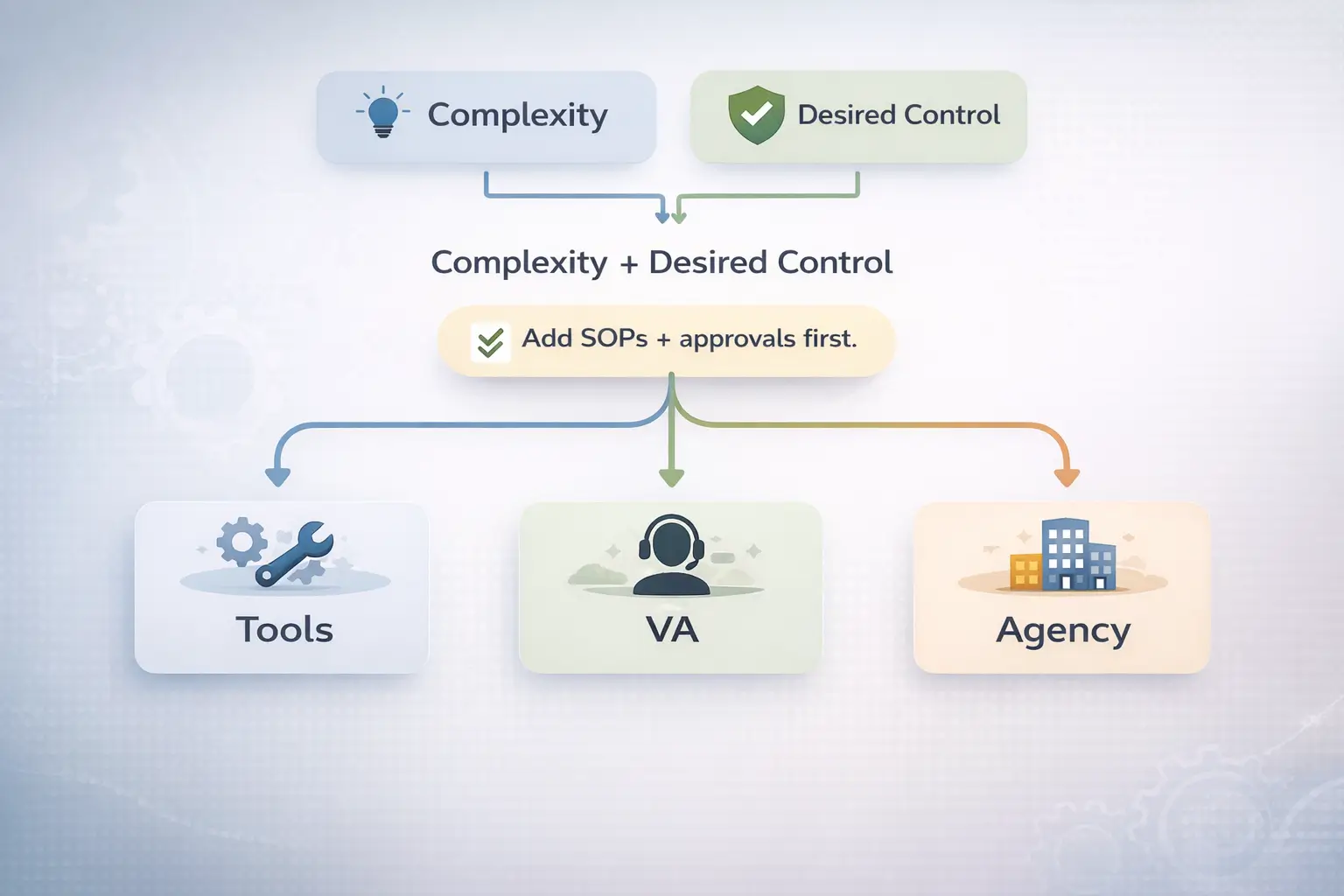
| Option | Best for | What it can handle | Oversight you still need | Key guardrails |
|---|---|---|---|---|
| Tools | Repeatable tasks and reporting | Alerts, rules, dashboards, templates | Review cadence, approvals, exception handling | Start small, monitor outcomes, document changes |
| VA / operator | SOP-driven execution | Listing ops, customer templates, reporting, routine follow-ups | Approvals, access control, audits | SOPs + checklists + least-privilege permissions |
| Agency / done-for-you | High workload you want delegated | Larger scope operations under a contract | Governance, reporting review, asset ownership, budgets | Scope clarity, KPIs, access rules, exit plan |
Scenario shortcuts:
- Beginner / early-stage: Standardize first (SOPs, inventory planning, inbound consistency), then automate reporting and alerts.
- Scaling brand (more SKUs): Add tools for visibility + a VA for routine execution, but keep approval gates for sensitive changes.
- Multiple suppliers / international sourcing: “Automation” often lives in the inbound process—clear prep rules, carton planning, and consistent handoffs.
What You Can Automate Realistically (and What Should Stay Manual)
You can automate many repetitive workflows in an Amazon business, but high-impact decisions still need human judgment and review.
Good candidates to automate:
- Inventory alerts (low stock, reorder points) and weekly replenishment reports
- Pricing rules within defined limits (not endless price chasing)
- Ad rule sets (budget caps, alerting on performance changes) with scheduled reviews
- Customer service templates for common questions (within platform rules)
- Operational reporting: refunds/returns trends, stranded inventory checks, inbound tracking logs
Keep human-led (or require approvals):
- Product selection and positioning (the “why this should exist” decisions)
- Compliance-sensitive decisions (restricted products, listing claims, documentation)
- Supplier negotiations and quality trade-offs
- Major listing edits, brand assets, and budget changes
Simple guardrails that prevent “set-and-forget” failures:
- Define rules and limits (what the automation can and cannot do).
- Add monitoring (alerts for exceptions, not just “good news”).
- Review on a cadence (weekly/monthly) and adjust based on outcomes.
Now zoom out: many sellers assume FBA “covers everything,” so it helps to be precise about where Amazon’s automation ends.
What FBA Automates (Fulfillment) vs What You Still Manage
FBA automates fulfillment after your inventory is successfully received into Amazon’s network, but you still manage the upstream work that determines whether fulfillment runs smoothly. Amazon’s overview of what FBA includes is here:
Fulfillment by Amazon (FBA).
| FBA handles (after receipt) | You still manage |
|---|---|
| Picking, packing, shipping eligible orders | Product sourcing, supplier coordination, and cashflow planning |
| Customer service and returns for many FBA orders | Inventory planning and replenishment decisions |
| Storage within the FBA network (per program terms) | Creating inbound shipment plans and preparing shipments correctly |
| Delivery experience tied to FBA shipment execution | Prep, labeling, packaging, carton planning, and documentation |
Where inbound prep and shipping fits:
- Prep and labeling must be correct before delivery to avoid delays, rework, or returns.
- Amazon publishes detailed prep/packaging guidance (example help pages):
Important operational note for US sellers:
- Amazon has stated that it will no longer offer prep and item labeling services for FBA shipments in the US store starting January 1, 2026:
FBA Prep Service. That makes seller-side prep (or a third-party prep workflow) even more central to “automation” in practice.
With that boundary clear, you can evaluate automation offers more safely—especially the ones that promise the most.
Is Amazon Automation Legit? Red Flags and Realistic Expectations
Amazon automation can be legitimate, but the riskiest version is the “done-for-you business” promise where you lose transparency and control. A good rule: risk rises as visibility drops.
Common red flags to watch for (especially in done-for-you offers):
- Promises of big money with little effort, or “guaranteed” returns
- Vague descriptions of what you’re buying (no clear scope, deliverables, or workflow)
- Unclear ownership of the Amazon account, listings, and brand assets
- Refusal to show real reporting dashboards, SOPs, and decision logs
- Pressure to pay quickly, high-pressure sales tactics, or “today-only” pricing
- You can’t explain how products are sourced, priced, and replenished
- You don’t have an exit plan (how you regain control and data if you leave)
What to require instead:
- A written scope of work with what’s included/excluded
- Reporting cadence, KPIs, and approval gates for sensitive changes
- Controlled access (role-based permissions where possible) and auditability
- Clear ownership clauses and a practical termination/transition plan
For general consumer-protection context, the FTC has warned that business opportunities and trainings promising big money are often scams:
FTC consumer alert.
This doesn’t mean every service is a scam—but it’s a strong reminder to verify before paying.
If you decide to outsource, the safest move is to treat vetting as a process, not a gut feeling.
How to Vet an Amazon Automation Service Before You Pay
Vetting is about turning “trust me” into scope, controls, and evidence—so you can keep ownership and visibility even when work is delegated.
A practical vetting flow:
- Write your goals and non-negotiables (control level, budget oversight, approvals, exit conditions).
- Get a scope document that lists tasks, deliverables, and what is explicitly not included.
- Review the operating model (who does what weekly, what decisions require your approval, what tools are used).
- Confirm access and reporting (permissions, dashboards, shared documentation, decision logs).
- Check ownership and sourcing clarity (account, listings, brand assets, inventory decisions).
- Review the contract and exit plan (data handover, termination steps, timelines, responsibilities).
- Start with a limited pilot if possible (narrow scope, short window, clear success criteria).
Must-ask questions (short list that catches most problems):
- Who owns the account, listings, brand assets, and advertising data?
- What exactly are your deliverables each week/month?
- What decisions can be made without my approval?
- How is inventory planned and replenishment decided?
- What reporting will I receive, and how often?
- What access do you need, and can it be limited by role?
- What happens if results are poor—what changes, and how quickly?
- What does “termination” look like—how do I regain control and files?
- How do you stay within Amazon policies (reviews, messaging, claims, restricted products)?
Boundary notes:
- For high-fee or complex agreements, consider professional contract review.
- Avoid sharing full credentials where possible; use controlled permissions and documented access policies.
If your main goal is to outsource inbound prep and shipping work (not hand over the whole store), a China-side logistics + prep workflow can reduce operational noise while you keep brand and account decisions in-house. Learn more about FBABEE’s services at https://fbabee.com/.
Even with great vetting, outsourcing doesn’t remove accountability—so it helps to be explicit about responsibility.
Compliance and Account Responsibility When You Outsource
The account owner remains responsible for compliance and account health, even if day-to-day tasks are delegated. Amazon’s seller policies and code of conduct are published in Seller Central:
Selling policies and seller code of conduct.
What typically remains the owner’s responsibility (high-level):
- Product authenticity and intellectual property risk management
- Product safety/compliance requirements relevant to your category
- Listing accuracy and substantiation of claims
- Customer experience standards and policy compliance
- Governance over who can access and change what
Controls that reduce “compliance drift” as you delegate:
- Approval gates for sensitive actions (listing edits, pricing floors, ad budgets, supplier changes)
- SOPs and checklists with version control
- Periodic audits (spot checks of listings, messages, policy-sensitive workflows)
- Least-privilege permissions and clear role definitions
- Documentation of decisions and exceptions
Boundary note: This is not legal or tax advice; requirements vary by product and jurisdiction. When in doubt, verify in official policy documentation and seek professional guidance where appropriate.
A major place compliance and accuracy show up is inbound operations—where “automation” often means standardization and fewer exceptions.
Streamline Supplier-to-FBA Inbound Operations (Inspection, Prep, Carton Planning, Shipping)
If you source from suppliers (especially multiple factories), “automation” is often less about software and more about repeatable handoffs: the same inputs, the same checks, and the same prep rules every time.
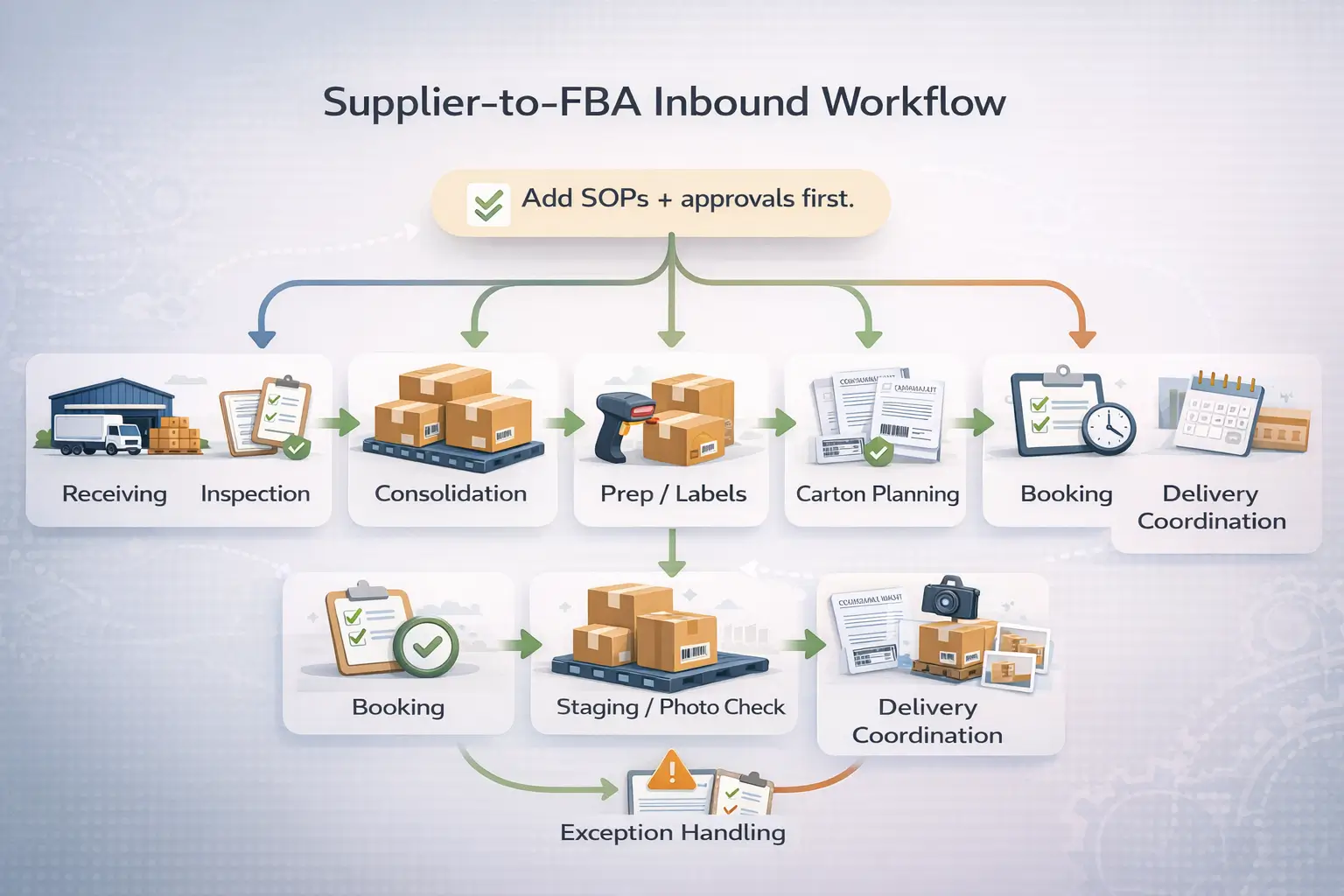
A repeatable supplier-to-FBA workflow (high-level):
- Supplier receiving plan (what ships where, and when).
- Receiving + basic inspection (match against PO, check visible defects, count/carton check).
- Consolidation (combine multiple supplier shipments into one outbound plan).
- Prep and labeling (apply the correct labels, packaging, and protection rules for the product).
- Carton planning (carton labels, carton contents accuracy, and shipment plan alignment).
- Documentation readiness (commercial invoice and shipment details as required for the lane).
- Freight booking (choose mode based on constraints; avoid assuming one mode is always best).
- Outbound staging + photo confirmation (confirm labels/cartons match the plan before dispatch).
- Delivery appointment/coordination (as required for the destination).
- Exception handling (how issues are reported and resolved when something doesn’t match).
Inputs you (the seller) should be ready to provide:
- Label files and labeling rules (per product)
- Packaging/prep requirements and any category constraints
- Carton rules and carton content expectations
- Inbound shipment plan information (where relevant)
- Clear escalation rules (what needs your approval vs what can be corrected automatically)
Common inbound mistakes that create rework:
- Wrong labels or missing scannable labels
- Carton contents that don’t match the shipment plan
- Prep that doesn’t meet packaging requirements
- Unclear responsibility when issues are found (no escalation path)
The goal is not “guaranteed speed”—it’s fewer preventable exceptions and a workflow that runs the same way every replenishment.
From there, you can tie the workflow into a phased automation roadmap.
A Realistic Automation Roadmap (Standardize → Tool → Delegate → Optimize)
A realistic roadmap keeps you from automating the wrong things first and helps you add delegation without losing control.
- Standardize: document SOPs for the top workflows (replenishment, inbound prep rules, reporting).
- Instrument: create dashboards and alerts so exceptions are visible early.
- Automate small tasks: rules and templates for repetitive work with defined limits.
- Delegate execution: add a VA/operator for SOP-driven tasks with approval gates.
- Strengthen inbound repeatability: lock down prep/carton standards and exception handling.
- Optimize: improve based on data (stockouts, returns reasons, inbound exception patterns).
Readiness milestones before you delegate more:
- SOPs are written and followed consistently
- KPIs are reviewed on a schedule (not only when there’s a fire)
- Exceptions are logged and resolved with a repeatable process
Automation doesn’t remove the need for owner oversight—it makes oversight more efficient when the system is designed well.
FAQ
Q: What are the biggest red flags in a done-for-you Amazon automation offer?
A: The biggest red flags are big-money promises with little effort, unclear ownership of the account/listings, vague scope, and refusal to provide transparent reporting. Be cautious if you can’t explain how products are sourced, priced, and replenished, or if there’s no practical exit plan. A legitimate provider should be willing to define scope, show dashboards, set approval gates, and document what happens if performance is poor.
Q: What questions should you ask before hiring an Amazon automation agency?
A: Start with ownership and control: who owns the account, listings, brand assets, and advertising data, and what decisions require your approval. Then ask about scope and reporting: what deliverables you get weekly/monthly, which KPIs are tracked, and what access they need. Finally, confirm the exit plan: how you regain data and control if you end the agreement, and what timelines and responsibilities apply.
Q: How do you decide between toolsools, a VA, and an agency for “automation”?
A: Choose based on complexity and the control you want to keep. Tools work best for repeatable tasks and visibility. A VA works when you have SOPs and need execution support, but you still want approval gates and audits. Agencies can handle larger scopes, but only if you can enforce governance: clear scope, controlled access, and reliable reporting. If you can’t maintain visibility and approvals, the risk usually rises.
Q: Can you really run an Amazon store passively with “automation”?
A: Not in a reliable, low-risk way. Automation can reduce repetitive work, but the owner still needs to oversee inventory planning, compliance, and key decisions—especially when exceptions happen. “Passive” claims often ignore realities like supplier issues, listing changes, and policy risks. A safer goal is a business that runs on SOPs and dashboards, where your role is approvals and strategy rather than daily firefighting.
Q: What does Amazon FBA handle for you, and what do you still have to manage?
A: FBA can handle fulfillment tasks like pick/pack/ship and, for many orders, customer service and returns once inventory is received into Amazon’s network. You still manage sourcing, inventory planning, inbound shipment preparation, and compliance. That includes making sure your products are prepped and labeled correctly and that inbound details match what’s delivered. See Amazon’s overview here:
Fulfillment by Amazon (FBA).
Q: How can you streamline shipping and prep from suppliers (e.g., China) to Amazon FBA?
A: Streamlining usually means standardizing the inbound workflow: consistent receiving checks, consolidation rules, prep/label requirements, carton planning, and an exception process when something doesn’t match. The seller’s role is to define standards and provide the correct label and carton inputs; the execution partner’s role is to follow the SOP and report exceptions quickly. This reduces preventable rework and keeps replenishment more predictable without relying on unrealistic speed guarantees.
Summary and Next Steps
Key takeaways:
- “FBA automation” can mean FBA fulfillment, task automation with tools, or outsourcing—separate the meanings before you decide.
- The safest automation starts with SOPs, visibility, and review cadence, not “set-and-forget” promises.
- FBA can simplify fulfillment, but inbound prep and accuracy still determine whether operations run smoothly.
- If you outsource, control comes from scope clarity, permissions, reporting, and an exit plan—not from trust alone.
Scenario-based next steps:
- If you’re early-stage: standardize replenishment and inbound prep rules, then automate reporting and alerts.
- If you’re scaling: add delegation only after SOPs and dashboards are stable, with approval gates for sensitive changes.
- If you manage multiple suppliers: treat inbound standardization as a core “automation lever” that reduces exceptions.
FBABEE is an independent logistics and prep partner and is not affiliated with or a subsidiary of Amazon.
If you’re preparing a first China-to-FBA shipment, consolidating multiple suppliers, or dealing with repeated inbound exceptions, a China-side receiving + prep + consolidation workflow can help you operationalize repeatable replenishments. See https://fbabee.com/ to learn more.



