

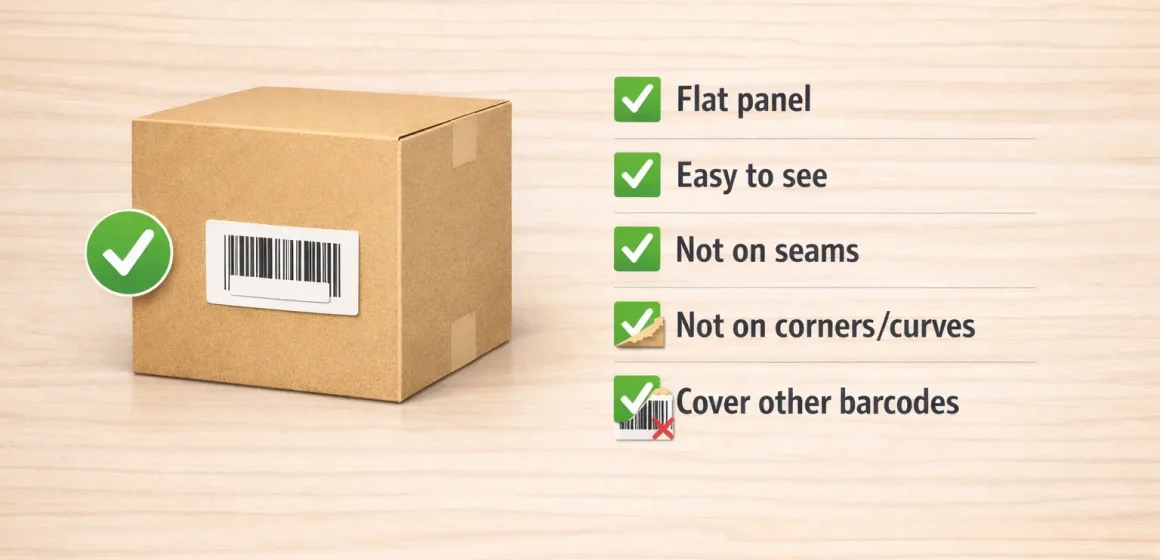
If you’re sending inventory to Amazon FBA, “FNSKU placement requirements” usually come down to two decisions: which barcode identity you’re using (FNSKU vs UPC/EAN) and whether the barcode will scan reliably on the sellable unit. Amazon has also announced barcode requirement changes starting March 31, 2026—so treat any big labeling run as a “verify first” moment in Seller Central.
FNSKU placement
If you only remember three rules, make them these: choose the right barcode identity, place the label on a flat scannable spot, and don’t leave another barcode visible.
1) Barcode identity (FNSKU vs UPC)
- If your shipment/listing requires Amazon barcodes, you’ll use an FNSKU label on each sellable unit.
- If your shipment/listing allows manufacturer barcodes (UPC/EAN/GTIN), you may not need FNSKU stickers—but you still need to confirm your current setting and any upcoming changes.
2) Placement (do/don’t)
- Do: flat, easy-to-see, on the outside of the sellable unit packaging.
- Don’t: seams/flaps, corners, or tight curves (labels tear, wrinkle, or distort).
3) Cover other barcodes
- Aim for one scannable barcode on the sellable unit.
- If a UPC/EAN is printed elsewhere on the packaging, cover it so the intended barcode is the only one that can be scanned.
Boundary conditions
- Packaging type (polybag, overwrap, curved bottle) changes what “flat enough” means—scan test after any prep materials are applied.
FNSKU vs UPC/EAN: when you need an Amazon barcode (and what changes)
With the quick rules in mind, decide whether you’re using an Amazon barcode (FNSKU) or a manufacturer barcode (UPC/EAN/GTIN) for this shipment—because that choice drives everything else (stickers, covering, and how you design packaging).
Key points
- FNSKU is the Amazon barcode used to identify and track your inventory for FBA.
- UPC/EAN/GTIN is the manufacturer barcode. Some listings can use it for FBA, but eligibility and settings vary.
- Amazon has communicated barcode requirement changes starting March 31, 2026, so re-check settings before large production runs.
Quick comparison (what changes operationally)
| Decision | What you do in practice | What can go wrong |
|---|---|---|
| Use FNSKU | Print/apply an FNSKU label per sellable unit (or have labeling done) | Wrong barcode scanned; relabel/rework risk |
| Use UPC/EAN | Usually no unit stickers if the listing/shipment allows it | You arrive expecting “no labels,” but FBA requires Amazon barcodes for that SKU |
How to verify (high-level)
- Check your shipment/listing prompts in Seller Central for the SKU you’re shipping.
- If you’re unsure, treat your next inbound as a small test batch and confirm the label type required.
- Re-check before big runs (and again as the March 31, 2026 change approaches).
Boundary conditions / caveats
- “Allowed to use UPC” is not universal; follow what Seller Central requires for your specific SKU/shipment.
- If your packaging shows multiple barcodes, you still need a visibility plan (next section).
Where to place the FNSKU label (do’s and don’ts)
Once barcode identity is settled, place the FNSKU on a flat, visible part of the sellable unit so it stays scannable through prep, packing, and receiving.
Key points
- Good placement optimizes scannability and durability (no wrinkles, no peeling).
- Your goal is a barcode that can be scanned without opening or removing packaging.
- If you add prep materials (polybag, overwrap, tape), the barcode must remain visible and scannable afterward.
Do (placement checklist)
- Choose a flat panel on the outside of the sellable unit packaging.
- Keep the label easy to find (not hidden under folds).
- Apply to a clean, dry surface; press edges firmly.
- Keep the barcode area unobstructed (no tape across the bars).
Don’t (high-failure zones)
- Don’t place labels over seams/flaps where they can tear.
- Don’t place on corners or tight curves where the barcode distorts.
- Don’t put the label where cartons are likely to abrade it (sharp edges, friction points).
Quick verification
- Do a “4-side check” so the label isn’t folded or partially hidden.
- Scan test a few units in normal lighting.
Boundary conditions / caveats
- If you must cover a UPC/EAN, the cover label still needs a flat placement.
- For polybags and curved items, use the packaging playbook below.
Covering other barcodes: avoid multiple scannable barcodes
After you apply an FNSKU, aim for one scannable barcode on the sellable unit. If a UPC/EAN remains visible elsewhere, the wrong code can be scanned.
Key points
- The most common miss is a UPC/EAN on a different face that nobody checked.
- Covering needs to be opaque and durable—a half-cover that lifts later doesn’t help.
- Some barcodes (for example, certain authentication or serial-number labels) may be exceptions depending on your program setup—avoid over-labeling those without checking.
What to do (practical checklist)
- Check all faces of the sellable unit for barcodes (front/back/sides/bottom).
- Cover non-target barcodes so they cannot be scanned.
- Don’t stack multiple FNSKUs; cover non-target barcodes cleanly, then leave the intended barcode visible and scannable.
- Re-scan after covering to confirm the intended barcode is what scans.
Boundary conditions / caveats
- If the unit will be polybagged or shrink-wrapped, the final outer layer still needs one scannable barcode (next section).
- Textured/porous packaging can cause edge lift; adjust label stock or outer packaging as needed (best practice).
Placement by packaging type: polybags, overwrap, curved containers
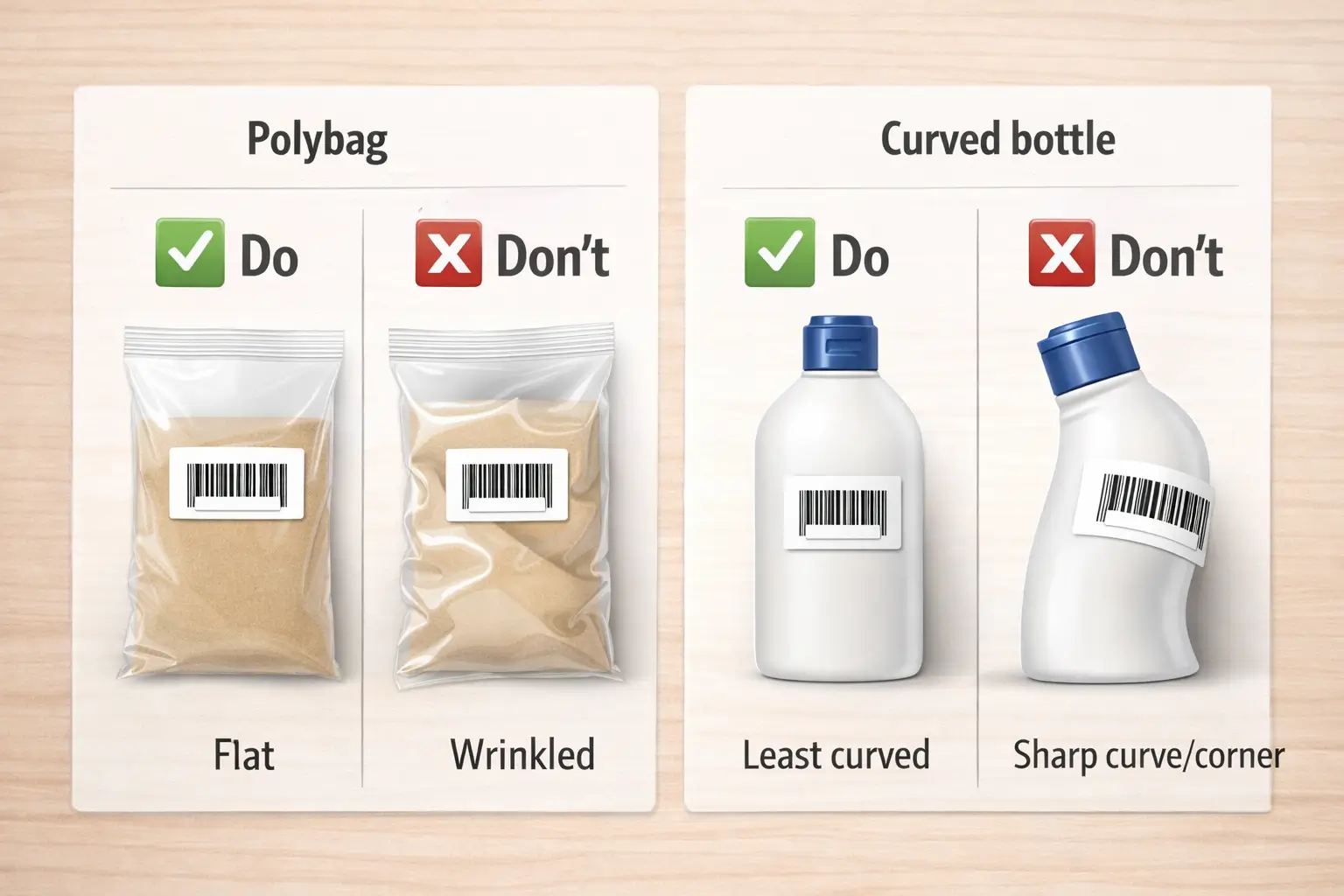
Once barcode visibility is handled, place the barcode on the outermost sellable layer—the barcode should scan without opening or removing packaging.
Key points
- Think in layers: the barcode that matters is the one on the final sellable outer layer.
- Polybags shift; curved bottles bend barcodes—verification beats guessing.
- Always scan test after any prep materials are applied.
Packaging playbook (do / don’t / verify)
| Packaging type | Do | Don’t | Verify |
|---|---|---|---|
| Polybag (single unit) | Label on a smooth area where the bag stays tight and flat | Label near folds that wrinkle when the bag shifts | Scan test, then move the bag and re-scan |
| Overwrap / shrink wrap | Barcode on the wrapped outer surface where it stays flat | Barcode under ripples/wrinkles | Scan test after wrapping |
| Curved bottle/jar | Least-curved area; align to minimize bend | Wrap barcode around a sharp curve/corner | Scan test from normal angles; reposition if inconsistent |
| Textured/porous surface | Use stock that adheres well; press edges | Thin labels lifting at edges | Visual edge check + re-scan after light handling |
If you’re stuck (options)
- Move the label to a flatter area (even if it’s the back panel) as long as it’s easy to find.
- Add a smoother outer layer (box/overwrap) if the unit surface can’t hold a scannable label.
- Standardize one solution per packaging type and document it.
Boundary conditions / caveats
- Very small or highly curved surfaces may require packaging changes—don’t force a distorted barcode.
- Polybags can shift in transit; placement should anticipate movement and friction.
Scannability checks: print quality + quick verification before shipping
After you’ve chosen placement, a simple scan-and-visual check is the fastest way to catch labels that look “fine” but won’t scan reliably.
Key points
- Common scan killers: blur, low contrast, glare, wrinkles, peeling edges.
- Verify before units are packed into cartons (it’s cheaper to fix then).
- Make the check repeatable across suppliers and SKUs.
Quick scannability checklist
- Print is sharp (no smudges).
- Barcode lies flat (no bubbles/folds).
- Edges are fully adhered (no lifting corners).
- Re-scan after any prep materials are applied.
60-second routine
- Scan once in normal lighting.
- Rotate the unit; scan again from a different angle.
- If scans are inconsistent, fix the label or change placement before shipping.
Boundary conditions / caveats
- Surface condition matters: dusty/oily/rough packaging increases peel risk.
- One successful scan isn’t proof—curvature and glare can create inconsistency.
Generate and print FNSKU labels in Seller Central (high-level steps)
Once placement rules are clear, generate labels in a way that reduces “wrong SKU / wrong label” errors: keep it verification-based and consistent.
Key points
- The biggest hidden mistake is printing the correct-looking label for the wrong SKU.
- Standardize one template per printer/label stock; avoid ad hoc scaling.
- Build a handoff package so factories and prep teams apply labels the same way.
High-level steps
- Confirm whether this shipment requires Amazon barcodes or manufacturer barcodes for each SKU.
- Generate the correct labels for the SKUs you’re shipping.
- Choose a template that matches your printer/stock; print a small test batch.
- Scan test a few units.
- Distribute one instruction sheet (photos + checklist) to whoever applies labels.
Handoff checklist (what to send)
- SKU list + packaging type per SKU
- Barcode visibility rule (one scannable barcode; cover non-target barcodes)
- 2–4 reference photos showing the exact target label zone
- QC acceptance checks (scan test + 4-side barcode check + photo proof)
Boundary conditions / caveats
- Seller Central UI changes; rely on what the shipment requires rather than memorizing clicks.
- If multiple teams touch the goods (factory → consolidation → prep), one shared instruction set is essential.
Common placement mistakes + a pre-ship QC checklist
After you know the rules, the most useful improvement is a repeatable QC routine that catches mistakes under time pressure.
Key points
- Top failure modes: seams/corners/curves, extra barcodes left visible, labels covered by tape/prep, polybag wrinkles.
- QC works best when it’s visual (photos) and binary (pass/fail).
- Multi-supplier shipments need standardization.
Common mistakes
- Label on a seam/flap → tears or distorts.
- Label on a corner/curve → inconsistent scanning.
- UPC/EAN still visible somewhere → wrong barcode can be scanned.
- Label covered by tape/prep → barcode can’t be scanned.
- Polybag label wrinkles after packing → distortion.
Pre-ship QC checklist
- ✅ Barcode identity confirmed for this shipment (FNSKU vs UPC/EAN)
- ✅ Label on flat, visible zone (not seam/corner/curve)
- ✅ Only one scannable barcode visible (4-side check)
- ✅ Scan test passed after any prep materials
- ✅ Label edges fully adhered
- ✅ Photo proof captured (front/back + close-up of barcode area)
Boundary conditions / caveats
- Polybags and curved items need extra scan testing because they shift/distort.
- If suppliers use different packing methods, the same instruction can behave differently in transit.
Factory vs prep center: where labeling usually works best (decision guide)
If you’re seeing inconsistent placement, moving labeling to a prep center can standardize outcomes—but factory labeling can work well when packaging is simple and the supplier is disciplined.
Key points
- Trade-off: fewer touches (factory) vs stronger control and QC evidence (prep center).
- Multi-supplier sourcing increases variation; a single checkpoint can reduce “same SKU, different placement” issues.
- The handoff package (photos + checklist) matters more than where the sticker is applied.
Decision guide (typical fit, not a guarantee)
| Your situation | Factory labeling often fits when… | Prep center labeling often fits when… |
|---|---|---|
| Packaging complexity | Simple boxes with a clear flat panel | Polybags, overwrap, curved/textured items |
| Supplier count | One supplier, stable packaging | Multiple suppliers or frequent changes |
| Error history | Consistent past results | Prior barcode/placement rework |
| QC evidence needs | Basic spot checks | Photo proof + standard pass/fail checks |
Minimum handoff package
- SKU list + packaging type per SKU
- Barcode visibility rule + which barcodes to cover
- Annotated reference photos per SKU
- QC checklist + photo requirements
Boundary conditions / caveats
- Outcomes depend on the team applying labels; this is a decision aid, not a promise.
- If you consolidate multiple suppliers, a prep checkpoint can also standardize cartons and documentation (best practice).
If you’re consolidating multiple suppliers in China and want one checkpoint for receiving, photo QC, FNSKU labeling, and shipping into Amazon FBA, FBABEE can help you standardize the handoff and reduce rework.
Unit label vs carton/shipping labels: don’t mix them up
Even experienced teams get tripped up because “Amazon labels” can mean different things—your unit’s FNSKU label is not the same as the shipping/carton label on the outer box.
Key points
- Unit (FNSKU) label: identifies the sellable unit/SKU (goes on the unit packaging).
- Carton/shipping label: identifies the outer carton for routing (goes on the carton).
- Don’t swap them to “fix” a unit labeling problem—each label has a different job.
| Label type | What it identifies | Where it goes | Common mistake |
|---|---|---|---|
| FNSKU / Amazon barcode label | The sellable unit (SKU identity) | On the unit’s sellable packaging | Put it inside packaging or on a seam/curve |
| Carton/shipping label | The shipment carton (routing) | On the outside of each carton | Putting carton labels on units (or forgetting cartons need labels) |
Boundary conditions / caveats
- Shipment setups vary; follow your shipment instructions for carton label placement.
- Keep unit-label placement rules separate from carton-label rules.
Packaging design planning: make future relabeling easier
Once you’ve stabilized your workflow, design packaging so it always has a consistent, scannable barcode zone.
Key points
- Reserve a flat “barcode zone” so labels don’t end up on seams/corners.
- If a UPC must exist for retail, leave space to cover it cleanly when using FNSKU for FBA.
- Document placement and update it whenever packaging changes.
Planning checklist
- Choose a flat panel that won’t rub in cartons.
- Avoid covering critical warnings/instructions.
- Maintain one reference photo per packaging version.
Boundary conditions / caveats
- Marketplace/category rules can differ; verify before permanent redesign decisions.
- If redesign isn’t possible, use an outer sellable layer (box/overwrap) as a workaround.
FAQ
Q1: What is an FNSKU label, and when is it used for FBA?
A: An FNSKU is Amazon’s barcode for tracking units at FBA, used when your shipment/listing requires Amazon barcodes.
Q2: FNSKU vs UPC/EAN: which barcode should I use for Amazon FBA?
A: Use the barcode identity your shipment/listing requires in Seller Central; settings and eligibility vary.
Q3: Where should I put the FNSKU label on the product packaging?
A: Flat, visible, scannable area on the sellable unit—avoid seams, corners, and tight curves.
Q4: Do I need to cover the UPC/EAN when applying an FNSKU label?
A: Aim for one scannable barcode on the sellable unit; cover other visible barcodes unless you’ve verified a program-specific exception.
Q5: How do I label polybagged products so the barcode is scannable?
A: Put the label where the bag stays tight and flat, then re-scan after packing because polybags can wrinkle and shift.
Q6: How do I label curved or cylindrical products (bottles, jars)?
A: Use the least-curved area possible and scan test; if scans are inconsistent, change placement or outer packaging.
Q7: What are the most common FNSKU placement mistakes?
A: Seams/corners/curves, extra barcodes left visible, tape or prep materials covering the barcode, and polybag wrinkles.
Q8: What’s the difference between an FNSKU unit label and carton/shipping labels?
A: Unit labels identify the sellable unit; carton/shipping labels identify the outer carton—don’t swap them.
Summary: a repeatable “labeling handoff” you can use with any supplier
To keep labeling consistent, standardize four things: barcode identity, placement photo, barcode visibility rule, and QC checklist.
Your one-page handoff (copy/paste)
- SKU list + packaging type per SKU
- Barcode identity for this shipment (verify in Seller Central)
- Placement photo(s): exact target zone + “avoid seams/corners/curves”
- Barcode visibility rule: one scannable barcode; cover other visible barcodes
- QC acceptance: scan test (after prep) + 4-side barcode check + photo proof
If you want help building a China-side labeling and QC checkpoint (especially for multi-supplier consolidation), share your SKU list and packaging photos—then your prep team can apply one repeatable standard before shipping to FBA.



