

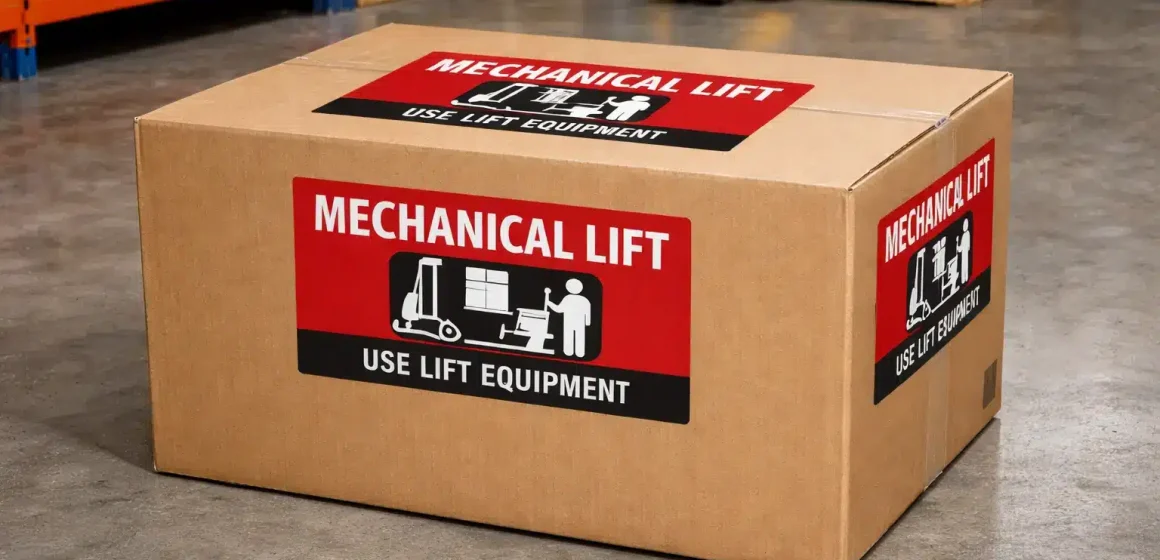
If you’re searching “Mech Lift label,” you probably want one thing: a fast, correct decision on whether your carton needs a Mechanical Lift label, plus the simplest way to place it so it’s visible during handling.
Do you need a Mech Lift label? (Decision bullets + mini-table)
If your carton contains one single item over certain weight thresholds, you’ll need a lift label—Team Lift or Mechanical Lift—placed on the top and sides of the box. Source: Amazon Seller Forums (Amazon staff reply).
Team Lift vs Mech Lift at a glance
| If your carton contains… | Label to use | Where to place it |
|---|---|---|
| One single item over the standard 50 lb limit | Team Lift | Top and sides of the box |
| One single item over 100 lb | Mechanical Lift (“Mech Lift”) | Top and sides of the box |
These thresholds and “top and sides” placement are quoted by an Amazon staff reply in Seller Forums (and reflect the “Box weight” guidance they reference). Source: Amazon Seller Forums (Amazon staff reply).
Decision bullets (apply in order)
- Step 1 — Check what’s inside the carton: If the carton contains multiple items, it generally must stay under the standard weight limit; the “single item” exception is about a carton containing one heavy item. Source: Amazon Seller Forums (Amazon staff reply).
- Step 2 — If it’s one single heavy item:
- Over 50 lb → use Team Lift label (top and sides). Source: Amazon Seller Forums (Amazon staff reply).
- Over 100 lb → use Mechanical Lift label (top and sides). Source: Amazon Seller Forums (Amazon staff reply).
- Step 3 — Edge-case reminder: Boxes containing jewelry or watches have a lower weight limit (Amazon staff cites 40 lb). Source: Amazon Seller Forums (Amazon staff reply).
- Step 4 — Don’t guess: Amazon requirements can change; if your case is unusual (mixed packs, odd packaging), verify the latest guidance in Amazon Seller Central or open a support case. Source: Amazon Seller Forums (Amazon staff reply).

What “Mech Lift” means in Amazon FBA inbound handling
After the quick decision, the simplest definition is this: a Mechanical Lift (Mech Lift) label is a safety/handling signal that a carton contains a single very heavy item and should be moved using equipment rather than only manual lifting. Source: Amazon Seller Forums (Amazon staff reply).
In practice, it helps receiving teams handle heavy cartons more safely and consistently—so the label only works if it’s easy to spot (which is why placement matters).
Mech Lift vs Team Lift: quick comparison and which to use
If you’re choosing between the two, the rule is straightforward: Team Lift is for a single item over 50 lb; Mechanical Lift is for a single item over 100 lb, and both should be labeled on the top and sides of the carton. Source: Amazon Seller Forums (Amazon staff reply).
| Topic | Team Lift | Mechanical Lift (“Mech Lift”) |
|---|---|---|
| What it signals | Two people should lift | Use mechanical equipment |
| Trigger (single item) | Over 50 lb | Over 100 lb |
| Placement | Top and sides | Top and sides |
The “single item” detail is not trivia—it’s the difference between a compliant heavy carton and an avoidable inbound problem. Source: Amazon Seller Forums (Amazon staff reply).
Carton weight vs single oversized item: the decision tree that prevents mistakes
Once label types are clear, the real trap is this: the exception applies when the carton contains one single heavy item—not when you pack multiple heavy items together. Source: Amazon Seller Forums (Amazon staff reply).
Here’s a practical way to apply the rule without overthinking it.
Quick decision tree (single item vs multi-item carton)
- Count the “sellable units” in the carton. If it’s more than one unit, treat it as a multi-item carton and keep it under the standard weight limit. Source: Amazon Seller Forums (Amazon staff reply).
- If the carton contains one single item:
- Over 50 lb → Team Lift label on top and sides. Source: Amazon Seller Forums (Amazon staff reply).
- Over 100 lb → Mechanical Lift label on top and sides. Source: Amazon Seller Forums (Amazon staff reply).
- Common mistake to avoid: Two 55 lb items in one carton doesn’t become “okay” because you add a Team Lift label—the carton is still a multi-item carton and the single-item exception logic doesn’t apply. (If you’re unsure, split cartons.) Source: Amazon Seller Forums (Amazon staff reply).
If your supplier packed cartons wrong: fastest fixes before pickup
If you discover a “bad carton” before it’s handed to the carrier, you usually have three practical options (best-practice, not a policy promise):
- Split the carton into two cartons under the standard limit (often the cleanest fix).
- Repack to make it truly “single item per carton” (if you had multiple units inside).
- Relabel after repack and run a quick visibility check before dispatch.
The key is timing: fixing this before international shipping is typically faster and cheaper than rework after arrival.
Where to place the Mech Lift label on a box (top + sides)
After you decide you need a Mechanical Lift label, placement is simple: put it on the top and sides of the box so it’s visible during handling. Source: Amazon Seller Forums (Amazon staff reply).
Placement steps (fast and repeatable)
- Choose clean, flat surfaces on the carton (avoid edges and seams).
- Apply the Mech Lift label on the top of the carton. Source: Amazon Seller Forums (Amazon staff reply).
- Apply the label on the sides so handlers can see it from multiple angles. Source: Amazon Seller Forums (Amazon staff reply).
- Do a 10-second visibility check: no tape over it, no folds, no corners.
Do / Don’t
- Do keep the label flat and readable (no wrinkles, no folding over corners).
- Do avoid placing it on a seam where cutters and opening can destroy it.
- Don’t cover it with packing tape or strap it through the label area (best practice: tape can reduce readability).

Placement checklist (and how to avoid covering other labels)
Mech Lift labels often share space with other required shipping labels. As a baseline, Amazon’s shipment-label guidance stresses placing labels on flat surfaces and keeping them uncovered and scannable. Source: Amazon FBA Shipping Label Guide (PDF).
A quick way to avoid label collisions:
- Put your FBA box ID label and the carrier label on their own flat surfaces, and keep both uncovered. Source: Amazon FBA Shipping Label Guide (PDF).
- Treat the Mech Lift label as a separate “handling signal” label: keep it readable and not hidden by tape or other labels (best practice).
(Examples of carriers include UPS and FedEx; the principle is the same: barcodes and safety labels should be easy to scan/see.) Source: Amazon FBA Shipping Label Guide (PDF).
Does it change for SPD vs LTL/pallet shipments?
The short answer: the lift-label logic is about the carton’s safe handling, so it still matters even if you ship via small parcel or on pallets—the shipping method may add labeling layers, but it doesn’t erase carton handling. Source: Amazon FBA Shipping Label Guide (PDF).
A helpful way to think about it:
- SPD (small parcel): carton labels + carrier labels must remain readable and not folded over edges. Source: Amazon FBA Shipping Label Guide (PDF).
- LTL/FTL (palletized): you add pallet labeling, but cartons still get handled after the pallet is unpacked, so carton-level visibility still matters. Source: Amazon FBA Shipping Label Guide (PDF).
When in doubt, follow the current inbound guidance for your delivery method inside Amazon Seller Central (it can vary by program and region).
What can go wrong if labels are missing or wrong
If labels are missing, wrong, or unreadable, the most common outcomes are extra handling, delays, and rework, especially when cartons are heavy or don’t match the shipment information. Source: Amazon FBA Shipping Label Guide (PDF).
Amazon staff have also warned that overweight-carton policies are strictly enforced and sending overweight cartons may lead to blocking of future shipments (this is not a guarantee—enforcement depends on context, but it’s a real risk signal). Source: Amazon Seller Forums (Amazon staff reply).
Pre-dispatch prevention checklist (the “last 5 minutes” audit)
Before pickup, do a quick audit (best practice):
- Confirm carton content pattern: single item vs multi-item carton. Source: Amazon Seller Forums (Amazon staff reply).
- Confirm correct lift label: Team Lift vs Mechanical Lift, if applicable. Source: Amazon Seller Forums (Amazon staff reply).
- Check visibility: labels are flat, not folded, not taped over. Source: Amazon FBA Shipping Label Guide (PDF).
- Check shipping labels: box ID + carrier label are on flat surfaces and uncovered. Source: Amazon FBA Shipping Label Guide (PDF).
Common Mech Lift labeling mistakes and quick fixes
If you’re already doing the basics, most failures are physical—not conceptual. The fix is usually quick if you catch it early.
Mistakes → fixes
- Label placed on a seam / edge → move it to a flat panel where it won’t get cut or crushed.
- Label wrinkled or folded → replace with a fresh label and press flat.
- Label covered by tape → re-label; keep tape away from the printed warning area.
- Wrong label type (Team vs Mech) → re-check the “single item” logic first, then re-label. Source: Amazon Seller Forums (Amazon staff reply).
How to get Mech Lift labels fast (print, buy, outsource)
If you need Mech Lift labels quickly, the practical reality is that you’ll usually provide them yourself (print or purchase), rather than expecting them to be generated automatically in your shipment workflow. Source: Amazon Seller Forums (Amazon staff reply).
An Amazon staff reply notes they do not provide “Team lift” or “Mechanical lift” labels at the moment, and sellers may need to generate them (and use the ship-to country’s local language). Source: Amazon Seller Forums (Amazon staff reply).
Options (choose based on speed vs consistency)
| Option | Best for | Watch-outs |
|---|---|---|
| Print your own labels | Fast, flexible | Use durable label stock; keep print high-contrast |
| Buy pre-printed stickers | Consistency at scale | Stockouts; verify visibility after taping |
| Outsource to a prep partner | Multi-supplier consolidation | Align label placement with final QC |
Printing and materials checklist (so labels don’t fail in transit)
A minimal best-practice checklist:
- Use high-contrast print (easy to read at a glance).
- Use adhesive labels that stick to corrugate (avoid peeling corners).
- Apply on clean, dry surfaces and avoid taping over the label area.
- Treat placement as part of QC, not an afterthought.
Prep-center workflow: weigh → flag → repack → label → QC
If you want fewer “surprise heavy cartons,” the most effective fix is process control: weigh cartons, flag exceptions, correct packing patterns, then label and QC before dispatch. (Best practice; not an Amazon requirement statement.)
A practical workflow looks like this:
- Receiving: check cartons against packing list and count sellable units per carton.
- Weigh station: record carton weight and flag anything over your internal target. (Your target should reflect the standard limit logic.) Source: Amazon Seller Forums (Amazon staff reply).
- Exception handling: repack/split cartons if the “single item” exception doesn’t apply. Source: Amazon Seller Forums (Amazon staff reply).
- Label station: apply Team Lift / Mechanical Lift labels when required (top and sides). Source: Amazon Seller Forums (Amazon staff reply).
- Final QC: confirm labels are readable and not covered; confirm shipping labels remain uncovered and scannable. Source: Amazon FBA Shipping Label Guide (PDF).
Need help fixing heavy cartons before pickup? FBABEE can consolidate multi-supplier cartons in China, repack/split heavy cartons, apply lift labels, and run a final visibility/QC check before dispatch—useful when you don’t want inbound problems caused by avoidable packing mistakes.
Carton planning to avoid Mech Lift cartons (trade-offs)
The easiest way to “avoid Mech Lift problems” is often to avoid creating borderline cartons in the first place: plan cartons around the single-item rule, and don’t bundle multiple heavy units into one carton. Source: Amazon Seller Forums (Amazon staff reply).
Practical levers
- Split cartons earlier (before export) when multiple units make cartons heavy.
- Ask suppliers for carton-level weights before pickup (so you can fix before transit).
- Standardize carton rules across suppliers (same packing pattern, same labeling expectations).
Trade-offs (what you’re really choosing)
| Choice | Upside | Downside |
|---|---|---|
| Fewer, heavier cartons | Fewer labels, fewer cartons to manage | Higher risk of exceptions, rework, and handling issues |
| More, lighter cartons | Easier compliance and handling | More cartons, more labeling/QC work |
FAQ
Q: What is a Mech Lift (Mechanical Lift) label in Amazon FBA?
A: It’s a handling/safety label used when a carton contains one single very heavy item—so teams know the carton should be moved with mechanical help rather than only manual lifting. In Amazon’s Seller Forums, an Amazon staff reply ties “Mechanical Lift” to cartons containing a single item over 100 lb and specifies placement on the top and sides. Source: Amazon Seller Forums (Amazon staff reply).
Q: When do you need a Mechanical Lift label for an FBA shipment carton?
A: You typically need it when the carton contains one single item that exceeds 100 lb; Amazon staff guidance also notes cartons generally shouldn’t exceed the standard 50 lb limit unless the carton contains one single heavy item. If you’re unsure whether your case qualifies as “single item,” verify in Seller Central or open a support case. Source: Amazon Seller Forums (Amazon staff reply).
Q: Mech Lift vs Team Lift: which one should I use?
A: Team Lift is used when a carton contains one single item over 50 lb, while Mechanical Lift is used when that single item exceeds 100 lb. Both labels are described as being placed on the top and sides of the box. If the carton contains multiple items, treat it as a multi-item carton and avoid relying on lift labels as a workaround. Source: Amazon Seller Forums (Amazon staff reply).
Q: Is the rule based on the box weight or a single oversized item inside?
A: The key distinction is whether the carton contains one single item. Amazon staff guidance describes a standard carton weight limit (50 lb) with an exception for cartons containing one single item heavier than that limit; the lift labels apply within that “single item” framing. For multi-item cartons, splitting cartons is usually the cleanest fix. Source: Amazon Seller Forums (Amazon staff reply).
Q: Where do you place the Mechanical Lift label on the box (how many sides)?
A: Amazon staff guidance specifies placing the Mechanical Lift label on the top and sides of the box. In practice, choose flat panels that won’t be cut or damaged, and keep the warning visible during handling. Avoid covering it with tape and don’t place it over seams or corners where it can wrinkle or tear. Source: Amazon Seller Forums (Amazon staff reply).
Q: Do I still need Mech Lift labels if I ship on pallets (LTL/FTL)?
A: Shipping method adds layers (like pallet labels), but cartons still get handled and unpacked at the fulfillment center. Amazon’s shipment-label guidance explicitly applies across shipment methods (including SPD and LTL), and stresses carton-level label readability and scannability. Treat lift labels as carton-level handling signals regardless of palletization. Source: Amazon FBA Shipping Label Guide (PDF).
Q: What happens if I send a heavy carton without the right lift label?
A: Missing or wrong labels can lead to operational friction—extra handling, rework, and receiving delays—especially if carton details don’t match shipment information. Amazon’s shipment-label guidance warns that improper carton labeling can cause delays and other issues, and an Amazon staff forum reply warns that overweight-carton policies may be strictly enforced. Outcomes vary by situation, so treat this as a risk signal, not a certainty. Sources: Amazon FBA Shipping Label Guide (PDF); Amazon Seller Forums (Amazon staff reply).
Q: Where can I download or buy Mech Lift labels (print vs sticker roll)?
A: Many sellers either print Mech Lift labels themselves or buy pre-printed stickers for consistency. An Amazon staff reply notes sellers may need to generate Team Lift/Mechanical Lift labels and use the ship-to country’s local language. Choose the option that fits your volume: print for flexibility, buy for standardization, or outsource labeling to a prep partner when consolidating multiple suppliers. Source: Amazon Seller Forums (Amazon staff reply).
Summary: a quick checklist + when to get help
If you want the “do this now” version, here it is:
- Confirm single item vs multi-item carton first. Source: Amazon Seller Forums (Amazon staff reply).
- If single item:
- >50 lb → Team Lift (top and sides)
- >100 lb → Mechanical Lift (top and sides) Source: Amazon Seller Forums (Amazon staff reply).
- Keep labels visible: flat surfaces, no seams/corners, no tape over important labels. Source: Amazon FBA Shipping Label Guide (PDF).
- If suppliers packed cartons wrong, fix it before pickup (split/repack/relabel).
If your shipment involves multiple suppliers, mixed cartons, or “already packed wrong” heavy cartons, getting a prep/forwarding partner involved early can reduce rework and delays—especially when you need consolidation, repacking, labeling, and QC done before export.



