Table of Contents
If you’re shipping products with expiration dates into Amazon FBA, the “hard part” is rarely printing a date—it’s keeping that date readable after prep, and packing cartons in a way that avoids confusion at receiving. This guide focuses on the decisions and checks that prevent the most common inbound headaches.
Not the same thing: expiration date labels vs FBA shipping labels
If you’re worried that “labels expired,” first confirm which label type you mean—product expiration labels and FBA box/shipping labels solve different problems. In practice, you fix expiration-label issues by improving date visibility and carton grouping, while you fix shipping-label issues by reprinting the correct labels for the current shipment workflow.
Key points (label-type cheat sheet)
- Product expiration date label (human-readable date): Tells Amazon associates (and customers) the product’s shelf-life date.
- FNSKU / product barcode label: Identifies the unit to Amazon (often required for labeled inventory).
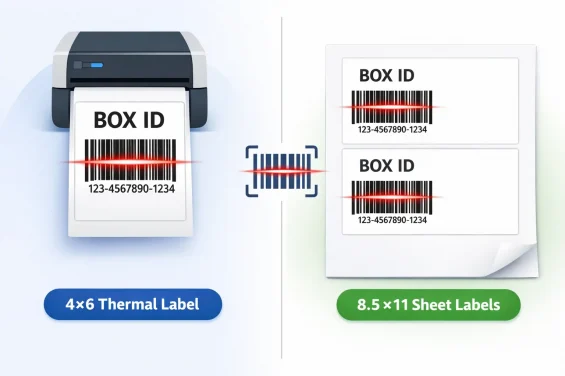
- FBA box label / shipment carton label: Identifies the carton for a specific inbound shipment.
- Carrier shipping label (UPS/FedEx/etc.): Moves the carton through the carrier network; it’s not the same as the FBA box label.
How to use this distinction
- If the question is “Is my product date readable and unambiguous after prep?” → you’re in the expiration-label world.
- If the question is “Are these the correct box labels for this exact shipment and carton count?” → you’re in the shipment label world.
- If anything changed in the shipment plan (carton count, destinations, shipment recreated), it’s usually safer to reprint the box labels rather than guessing.
Boundary conditions / caveats
- “Shipping labels expire” is often workflow-dependent, not a universal fixed countdown; avoid relying on hearsay timelines.
- Print quality matters: smeared or scaled barcodes can fail even if the label is “technically correct.”
FBA expiration date labeling
You need an expiration date label that stays visible and unambiguous after prep, and you need carton packing that avoids mixing multiple expiration dates for the same ASIN in one box. The fastest way to prevent problems is: standardize format, standardize placement, and separate cartons by ASIN + expiration date when needed.
Fast checklist (do these first)
- Use a clear, human-readable date format and avoid ambiguous day/month ordering.
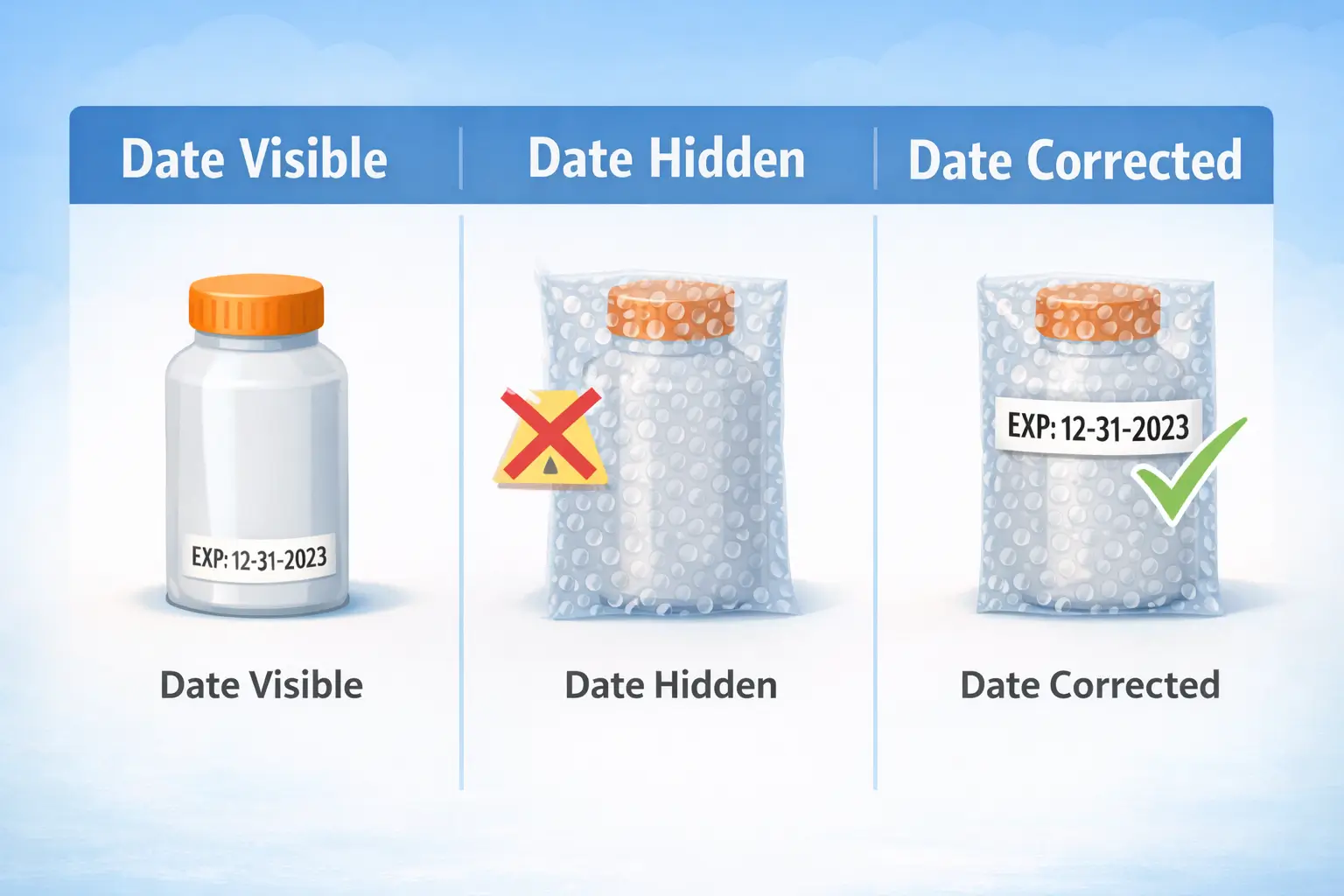
- If you overpack (polybag/bubble wrap), ensure the expiration date is visible on the outside of the prepped unit.
- When shipping to FBA, keep one expiration date per ASIN per box (separate boxes if the same ASIN has multiple dates).
- Add a quick pre-ship check: sample-scan barcodes + visually confirm the date is readable on finished packaging.
Mini-table: what to do and why
| Situation | Do this | Why it helps |
|---|---|---|
| Date printed in an unusual format | Add a sticker label in a consistent format | Reduces misreads and receiving confusion |
| Product is bubble-wrapped / overpacked | Put the date label on the outside of the final prep layer | Keeps the date accessible at receiving |
| Same ASIN has multiple expiration dates | Split into separate boxes by expiration date | Prevents carton-level mismatches |
Boundary conditions / caveats
- Requirements can vary by category; when in doubt, verify the latest guidance inside Seller Central.
- If you’re doing kitting/bundles, don’t hide the date inside opaque wrapping.
What counts as an expiration-dated product (and what to confirm in Seller Central)
In Amazon FBA terms, an “expiration-dated product” can include items that have an explicit expiration/manufacturing date—or products that effectively have a shelf life even if the packaging doesn’t show a date. The safest approach is to treat “anything that loses effectiveness or is consumed/used over time” as a candidate and verify what Amazon expects for your category in Seller Central.
Key points (scope triggers)
- You’re typically in-scope if your product (or its packaging) has a printed expiration or manufacturing date.
- You may still be in-scope if the product has a recommended shelf life or “loses effectiveness over time” (even without a printed date).
- Bundles can become expiration-dated if any included component is expiration-dated.
What to confirm before you ship (practical checks)
- In your listing/product setup, confirm whether your item is treated as expiration-dated / lot-controlled for FBA.
- Confirm whether you must provide expiration date information during shipment creation for the ASIN.
- Confirm whether your inventory requires labeled inventory (FNSKU) rather than commingled.
Boundary conditions / caveats
- “Best-by / sell-by” handling can be category-dependent; don’t assume one universal interpretation.
- If you’re not sure whether Amazon considers your product expiration-dated, verify in Seller Central or Seller Support before sending inventory.
Where the date must be visible: unit, overpack, and outer carton
Your expiration date label needs to be readable on the finished, prepped unit—not just somewhere under bubble wrap, polybags, or bundle wrappers. A good rule of thumb: if an associate can’t quickly find the date without unwrapping, you’re inviting delays and rework.
Key points (placement logic)
- Unit-level visibility: If the consumer unit is what Amazon handles, the date should be visible on that unit (or its final prep layer).
- Overpack visibility: If you add bubble wrap/polybag, the date needs to remain visible on the outside of that prep layer.
- Bundles/multipacks: If you create a bundle, ensure the date is visible on the outermost sellable package (don’t bury it inside opaque wrapping).
- Carton clarity: For cartons containing expiration-dated items, keep carton contents organized so the date logic is consistent (especially when multiple expiration dates exist across lots).
Mini decision table: where to put the date
| Your packaging situation | Where the date should be readable | Quick check |
|---|---|---|
| Date printed on unit packaging, no extra prep | On the unit | Can you read it in 2 seconds? |
| Unit is polybagged / bubble-wrapped | On the outside of the polybag/bubble wrap (or visible through it) | Can you read it without opening? |
| Bundle wrapper added | On the bundle exterior | Does the bundle hide the original date? |
| Display box inside a master carton | On the sellable unit (and ensure carton packing avoids mixed expirations) | Sample one unit per carton |
Boundary conditions / caveats
- If you change packaging after the factory prints dates, you need a second visibility check at prep.
- If your prep process covers the barcode and you add a new barcode label, treat the expiration date the same way: it should remain accessible on the final surface.
Accepted date formats (including medical devices) + examples
Use a date format that’s easy to read and hard to misinterpret—especially if your supply chain spans regions that use different day/month ordering. In many Amazon-facing workflows, sellers standardize on numeric formats like month-day-year or month-year to reduce ambiguity.
Key points (format strategy)
- Pick one format for all suppliers and prep partners, then enforce it with a photo sample.
- Prefer formats that avoid DD–MM ambiguity when shipping into US FBA workflows.
- If your packaging uses a different format, an added sticker label in a consistent format can reduce confusion.
Mini-table: practical formats to standardize
| Format style | Example | When it’s useful |
|---|---|---|
| Month–Day–Year | 12-31-2026 | Best when day precision matters |
| Month–Year | 12-2026 | Best when only month/year is printed/required |
| Month abbreviation variant | 31-JAN-2026 | Can be readable for humans, but keep it consistent |
How to enforce this across suppliers
- Provide a single approved example (photo or mock label) to every supplier.
- Require a pre-production photo sample showing the date on final packaging.
- At prep, do a spot check: confirm the printed date matches your chosen format and is readable.
Boundary conditions / caveats
- Some categories may have stricter requirements (including medical/device-like categories); verify your category’s rules in Seller Central if unsure.
- Lot codes alone may not be treated as a substitute for a readable expiration date label.
Shipping multiple expirations: carton-planning playbook
If the same ASIN has multiple expiration dates, the safest operational approach is to separate boxes by expiration date so each box is internally consistent. This reduces carton-level confusion and makes receiving faster because the associate doesn’t need to reconcile mixed dates inside one carton.
Key points (the carton rule you can execute)
- Keep only one expiration date per ASIN per box.
- You can ship multiple ASINs in the same box if each ASIN inside that box has only one expiration date.
- If the same ASIN has multiple expiration dates, ship those lots in separate boxes.

How to apply this in real life
- If your supplier ships partial lots: have your prep/warehouse re-sort by expiration date before final packing.
- If you consolidate multiple suppliers: define a single “grouping logic” so every inbound carton can be mapped to one expiration date per ASIN.
Boundary conditions / caveats
- If you ignore carton grouping, you can create receiving friction even when unit labels are correct.
- Some categories may have additional shelf-life constraints; keep carton grouping clean and verify category rules separately.
Step-by-step: group → label → pack → verify (a carton workflow you can hand to a prep team)
Use this workflow when you have multiple expiration dates across lots, or when you’re consolidating multiple suppliers into one outbound shipment.
- Collect lot info
- For each inbound lot: ASIN, quantity, and expiration date as printed.
- Group by ASIN
- Don’t mix ASINs until you’ve grouped each ASIN’s lots.
- Group each ASIN by expiration date
- Create a separate “pack group” for each expiration date.
- Label/verify unit dates (after prep)
- If you overpack, confirm the date is readable on the final surface.
- Pack cartons by pack group
- Each carton: one ASIN can be included, or multiple ASINs—but each ASIN inside must have only one expiration date.
- Carton marking + count reconciliation
- Ensure carton labels match the shipment plan and that carton counts reconcile with your pack groups.
- Final QC before handoff
- Spot-check: date visibility + barcode scan + carton label scan.
Boundary conditions / caveats
- Don’t introduce numeric shelf-life cutoffs unless you can confirm your category’s current rule in Seller Central.
Common mistakes and a pre-ship checklist
Most expiration-date inbound problems come from a small set of preventable mistakes: the date is missing, covered, ambiguous, or inconsistent across cartons and lots. A simple checklist run at supplier + prep + final handoff can prevent expensive relabeling or delays later.
Key mistakes to watch
- Date not visible after prep: bubble wrap/polybag hides it.
- Ambiguous date format: DD–MM vs MM–DD confusion across regions.
- Mixed expirations in one carton (same ASIN): carton contents don’t match one date per ASIN.
- Poor print quality: smudged ink, low contrast, or scaled barcode/labels.
- Conflicting markings: “manufactured date” present with no clear expiration label after repackaging.
How to prevent them (controls that scale)
- Standardize one format and require a photo sample before mass production.
- At prep, use a finished-unit inspection (after overpack) rather than checking the raw unit only.
- Keep an “expiration grouping sheet” (ASIN → expiration date → carton IDs) when multiple lots exist.
Boundary conditions / caveats
- Outcomes vary by category and FC; treat issues as typical risks, not guaranteed outcomes.
- If suppliers change packaging mid-run, repeat the sample approval step.
Pre-ship checklist (supplier + prep + final handoff)
Supplier (before goods leave the factory)
- [ ] Date format matches the approved example (photo verified).
- [ ] Date is readable (contrast, size, not on a fold/seam).
- [ ] If multiple lots exist, cartons are separated by lot/expiration date groups.
Prep / consolidation warehouse (after all prep is applied)
- [ ] Date is readable on the outside of the final prepped unit (polybag/bubble wrap/overpack).
- [ ] Barcodes are scannable (spot-scan units and carton labels).
- [ ] For each ASIN, each carton contains only one expiration date.
- [ ] Bundle wrappers do not hide the original date; over-label if needed.
Final handoff (before carrier pickup / container loading)
- [ ] Shipment carton labels match the current shipment plan and carton count.
- [ ] Cartons are not mixed across expiration groups for the same ASIN.
- [ ] A quick “exception photo set” is saved (one photo per lot/expiration group).
Factory vs prep center: who should label and who should verify
If you have multiple suppliers, repacking, or kitting, labeling at a central prep point can reduce coordination risk—even if the factory can print dates. The best workflow is often hybrid: factory prints where possible, and the prep center verifies visibility after prep (and over-labels only when needed).
Key points (decision criteria)
- Factory-first works best when: one supplier, stable packaging, and proven print consistency.
- Prep-center labeling works best when: multiple suppliers, packaging changes (overpack), or past labeling errors.
- Hybrid works best when: you want factory speed but need a second QC gate after consolidation and prep.
Comparison table: factory vs prep vs hybrid
| Option | Pros | Cons | Best fit |
|---|---|---|---|
| Factory prints dates | Fast, low handling | Risk if packaging changes later | Single supplier, simple prep |
| Prep center labels dates | Central control, consistent format | More handling time/cost | Multi-supplier, kitting, overpack |
| Hybrid (print + verify) | Best balance, catches hidden-date issues | Requires SOP discipline | Most scaling sellers |
How to choose (quick guide)
- If you change packaging after factory (polybag/bubble wrap/bundle) → choose prep verification (prep or hybrid).
- If you have 2+ suppliers for the same ASIN → choose centralized QC (prep or hybrid).
- If you’ve had inbound issues before → add a second checkpoint at consolidation, even if the factory prints correctly.
Boundary conditions / caveats
- No workflow eliminates errors; the goal is earlier detection and fewer preventable mistakes.
- If you outsource prep, insist on a repeatable SOP: photo sample approval + spot-check scanning + carton grouping checks.
When packaging shows best-by, manufacturing date, and expiration date
When packaging shows multiple date types, your job is to prevent confusion by making the relevant expiration information clear and consistent on the finished unit. In many cases, sellers over-label to standardize format and avoid a “manufactured date” being mistaken for an expiration date.
If/then guide (clarity-first)
- If the product shows an expiration date but in a confusing format → add a sticker in your standard format (and keep the printed date from causing ambiguity).
- If the product shows only a manufactured date and your category requires an expiration date → verify category guidance, then label consistently to avoid mixed interpretation.
- If the product shows best-by / sell-by wording → treat it as a “date the customer will interpret,” and keep it readable and consistent across lots.
- If kitting/repacking introduces new outer packaging → ensure the outermost layer still communicates the correct date clearly.
A safe over-label workflow (when needed)
- Approve a single label example (format + placement).
- Apply consistently across the entire lot/expiration group.
- QC: confirm you did not create conflicting markings on the final surface.
Boundary conditions / caveats
- Don’t advise hiding legally required packaging information; focus on clarity and consistency.
- If you’re unsure which date type Amazon expects for your category, verify in Seller Central before sending inventory.
How to track expirations by lot for replenishment
Track expirations by lot so you can replenish cleanly and avoid mixing old and new dates in the same inbound flow. You don’t need fancy software—just a consistent set of fields and a simple “first-expire-first-out” planning habit.
Key points (what to track)
- Lot/batch identifier (your internal lot ID)
- Expiration date (in your standard format)
- Quantity per lot
- Supplier/source + production window
- Shipment ID / carton IDs (so you can trace what was sent)
Simple process (tool-agnostic)
- Create one row per lot/expiration date.
- When you prep and pack, link cartons to the lot row (carton IDs).
- Replenish using “first-expire-first-out” so older lots don’t get stranded behind newer lots.
Boundary conditions / caveats
- Amazon’s internal inventory routing can be complex; tracking is about giving you visibility and control over what you send and when.
Category nuances: when to double-check the rules
Some categories get stricter scrutiny because shelf life and safety matter more. If any of the triggers below apply, it’s worth verifying the current guidance in Seller Central before you ship.
Verify triggers
- Your product is ingestible (food, beverage, supplements) or applied to the body (topicals).
- Your product is temperature-sensitive or can melt/degrade in transit/storage.
- Your product behaves like a medical/device category where format/lot control can be stricter.
- Your product is a bundle where one component is expiration-dated.
Boundary conditions / caveats
- Avoid relying on “universal” day-count rules from third-party sources; category requirements can change.
FAQ
Q: What is an expiration-dated product in Amazon FBA, and what must sellers do before sending it in?
A: It’s an item that has an expiration/manufacturing date—or effectively has a shelf life—so Amazon expects clear date visibility and (often) lot-controlled handling. Confirm whether your ASIN is treated as expiration-dated in Seller Central, standardize your date format, and ensure the date stays readable after any prep/overpack.
Q: What expiration date formats are accepted for FBA (including medical devices)?
A: Use a format that’s readable and unambiguous in US workflows—many sellers standardize on month–day–year or month–year. If your category has stricter rules (including medical/device-like categories), verify the exact format in Seller Central and enforce it with supplier photo samples.
Q: Where should the expiration date appear—on units and on outer cartons too?
A: Prioritize visibility on the finished, prepped unit—especially if you polybag or bubble-wrap. If the date becomes hidden after prep, add a label to the outermost prep layer so it’s readable without unwrapping.
Q: Can you ship the same ASIN with different expiration dates in one box? What should you do instead?
A: The safer approach is no: separate cartons so each box contains only one expiration date per ASIN. If the same ASIN has multiple expiration dates, ship those dates in separate boxes and keep carton marking consistent.
Q: What happens if the expiration date is missing, covered, or unclear when Amazon receives it?
A: It can trigger receiving friction: relabeling, delays, or inventory being treated as problematic depending on category and situation. The best prevention is a pre-ship checklist: confirm date visibility after prep, confirm format clarity, and avoid mixing expiration dates for the same ASIN in one carton.
Q: Should you label at the factory or at a prep center—and when does each make sense?
A: Factory labeling works best when packaging is stable and quality is consistent. Prep-center labeling (or a hybrid verify-and-over-label approach) is better when you have multiple suppliers, overpacking/kitting, or past errors—because it adds a centralized QC gate after consolidation.
Q: Do Amazon FBA shipping labels expire, and how is that different from expiration-date labels?
A: Product expiration labels are about shelf life; shipment/box labels are about identifying cartons for a specific inbound shipment. Instead of relying on a “valid for X days” rule, treat shipment labels as tied to your shipment workflow—if the shipment is recreated or labels are re-generated, reprint to match the current plan and ensure barcodes scan cleanly.
Summary and next steps
If you remember only three things: keep the date readable after prep, standardize one unambiguous format, and separate cartons when the same ASIN has multiple expiration dates. Those three habits eliminate most preventable inbound problems.
Do-this-first recap
- Confirm your ASIN is treated as expiration-dated / lot-controlled (when applicable).
- Ensure the date is readable on the finished prepped unit (especially with overpack).
- Don’t mix multiple expiration dates for the same ASIN in one carton—separate boxes by expiration date.
- Run the pre-ship checklist (supplier → prep → handoff) every shipment.
If you’re sourcing from multiple factories in China (or doing kitting/overpacking), the most common failure point is not “knowing the rules”—it’s keeping one consistent labeling + carton-grouping workflow across suppliers, the prep stage, and the final shipment plan. If you want help building a repeatable SOP (photo sample approval, consolidation QC checkpoints, carton grouping by expiration date, and final label verification), an independent China-side prep and logistics partner like FBABEE can support the process end-to-end—without implying any Amazon affiliation.