

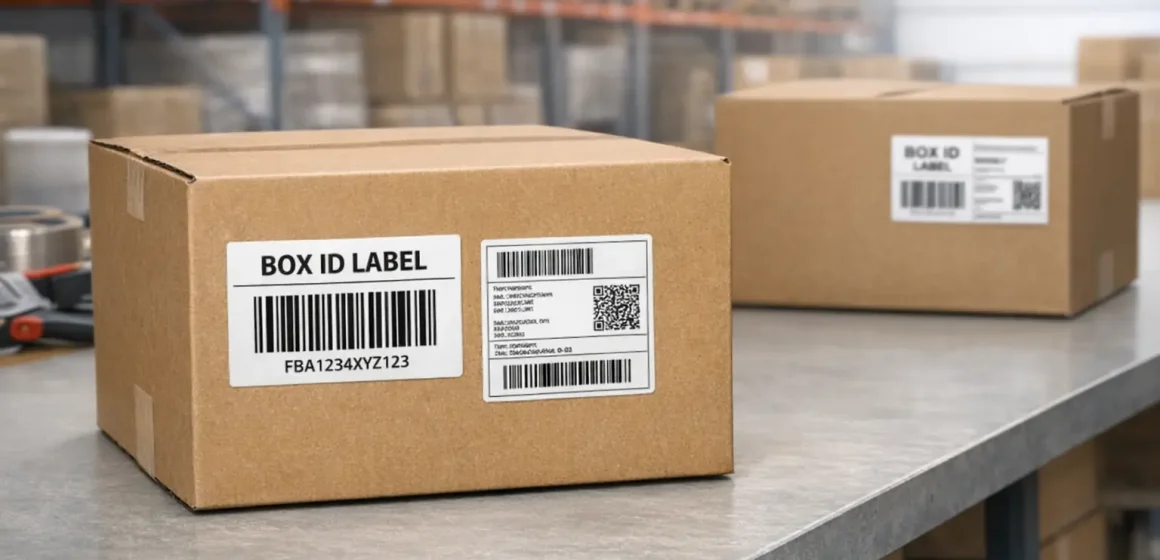
What “Amazon FBA box label placement” actually means
In Amazon inbound terms, “box label placement” means putting the shipment’s FBA Box ID (carton) label (and usually a carrier label) on the outside of every shipping carton so it can be scanned during transit and at the fulfillment center. Done right, it helps Amazon match each physical box to the box contents you declared during shipment creation, which reduces avoidable relabeling and receiving exceptions.
It also implies one key decision up front: are you shipping small parcels (SPD) or pallets (LTL/FTL)? Palletized shipments add pallet-level labeling and visibility checks, but they don’t replace carton-level Box ID labels.
Don’t confuse carton labels with product labels (FNSKU/UPC)
Carton labels identify the shipping box in your inbound shipment; product labels (FNSKU/UPC/EAN) identify the sellable unit inside the box. If you mix them up, you can end up with perfectly labeled products inside a carton that Amazon can’t reliably identify at receiving (or a carton label slapped on an individual unit, which doesn’t solve inbound carton tracking).
This guide focuses on carton/shipment label placement. If your units also require product labeling, handle that separately in your prep plan.
What labels go where (and the 3 mistakes to avoid)
For most shipments, each carton needs its own FBA Box ID (carton) label, and each carton needs a carrier label for transportation—both placed flat, uncovered, and on a clean surface. If you’re shipping pallets (LTL/FTL), you’ll also add pallet labels on the outside of the stretch wrap, but cartons on the pallet still need their Box ID labels.
Quick “what goes where”
| Label | What it’s for | Where to place it |
|---|---|---|
| FBA Box ID (carton) label | Identifies the specific carton for Amazon inbound receiving | Flat surface on the carton; barcode not folded over edges/corners |
| Carrier label (UPS/FedEx/other) | Identifies the package for the carrier’s network | Also on a flat carton surface; do not cover the Box ID barcode |
| FBA pallet label (LTL/FTL only) | Identifies the pallet shipment at the dock | On all four sides of the pallet, outside the stretch wrap |
3 mistakes to avoid
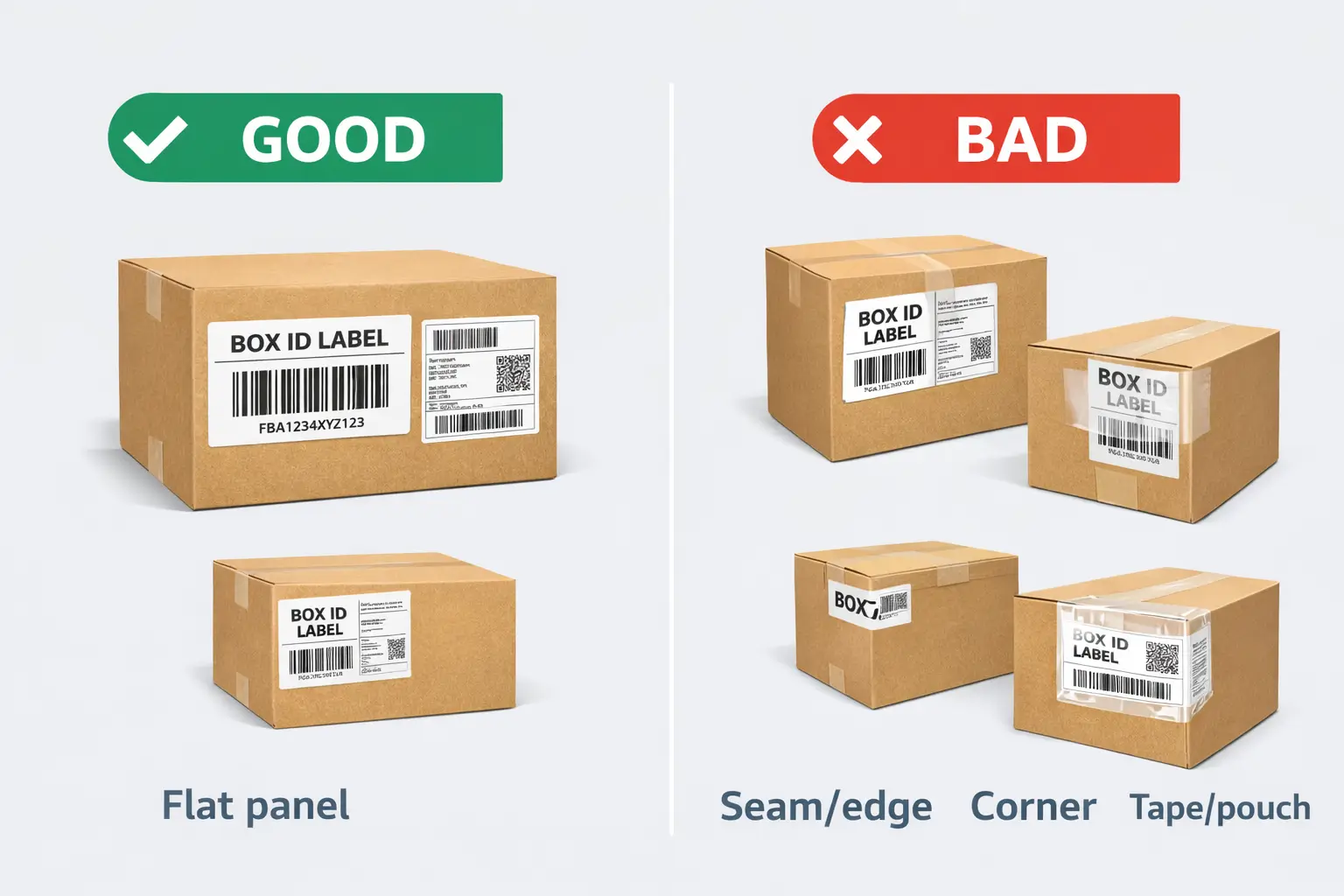
- Putting labels across seams/edges/corners (barcodes can crease and fail to scan).
- Covering labels with tape or putting them in a plastic pouch (scan issues).
- Reusing cartons without removing/covering old labels or extra barcodes (mis-scans).
Required labels on an FBA carton: Box ID vs carrier vs pallet
Each carton in an FBA shipment should have a unique Box ID (carton) label—and carrier and pallet labels serve different jobs rather than replacing it. The easiest way to keep this straight is to separate labels by what they identify:
| Label type | Identifies | Where it goes | How you usually get it |
|---|---|---|---|
| FBA Box ID (carton) label | One specific carton in one shipment | On the outside of each carton | Generated in your shipment workflow (Seller Central / shipment software) |
| Carrier label | A package in the carrier’s network | On the outside of each carton | From the carrier or from your shipping workflow (depends on program) |
| Pallet label (palletized only) | A pallet in a pallet shipment | On the outside of the pallet (outside wrap) | Generated in your shipment workflow when you choose palletized delivery |
| Product label (FNSKU/UPC/EAN) | An individual sellable unit | On the unit packaging | From Seller Central (FNSKU) or manufacturer barcode (UPC/EAN) |
Two practical takeaways:
- Pallet labels don’t replace carton labels. They help identify the pallet at the dock, while the Box ID label is what ties a specific carton to its declared contents.
- Carrier labels don’t replace Box ID labels. A carrier label gets the box delivered; the Box ID label helps Amazon receive it correctly.
Boundary note: The exact label set can vary by shipment mode and workflow. Always confirm the final label PDFs generated for your shipment before your cartons leave the warehouse.
Where to place Box ID and carrier labels on the carton
Place labels so they stay flat, uncovered, and scannable through real handling—carton cutters, conveyors, and stacking. In practice, that means using a clean flat panel and avoiding anything that bends, obscures, or distorts the barcode.
Placement routine (works for most cartons)
- Pick a flat side panel (not on a flap seam or opening).
- Apply the Box ID label first, fully flat (no wrinkles, no folds over edges).
- Apply the carrier label on the same face (or an adjacent face) where it won’t overlap or cover the Box ID barcode.
- Press/smooth both labels so they adhere; re-apply if corners lift.
- Do a quick “scanability check”: barcodes unobstructed, readable, and not taped over.
Placement do’s and don’ts (quick checklist)
Rule of thumb: flat, uncovered, and away from seams/edges.
Do
- Put both labels on a flat surface so barcodes don’t fold over edges or corners.
- When possible, keep labels about 1.5 inches away from corners, edges, and seams so they’re less likely to get damaged.
- Keep labels uncovered (no tape over barcodes; no plastic pouch).
- If you need protection from abrasion, use better label stock or a cleaner carton—not tape over the barcode.
Don’t
- Place labels close to seams/openings where they can be cut or torn when the box is opened.
- Place labels across corners/edges or wrap them around the box.
- Overlap labels (barcode-on-barcode is a fast way to create scan failures).
If space is tight: prioritize keeping barcodes flat and unobstructed, even if that means putting the carrier label on another face.
Reused cartons: old labels, extra barcodes, and when to repack
You can reuse cartons only if the outside of the box has one clear “identity”—the correct labels for this shipment, with no other scannable shipping barcodes competing for attention. Extra labels and printed barcodes are a common cause of mis-scans.
Reused-carton triage (remove vs cover vs repack)
- If you can remove old labels cleanly: remove them fully.
- If you can’t remove them: fully cover old labels/barcodes with opaque material so they can’t be scanned.
- If the carton is damaged, heavily wrinkled, or labels won’t stick: repack into a clean carton.
Cleanup + relabel steps
- Inspect all sides for old carrier labels, FBA labels, and printed barcodes.
- Remove old labels or cover them so they are no longer scannable.
- Apply the new Box ID + carrier labels using the placement routine above.
- Confirm only the intended barcodes are visible and flat.
SPD vs palletized LTL/FTL: what changes (cartons + pallets)
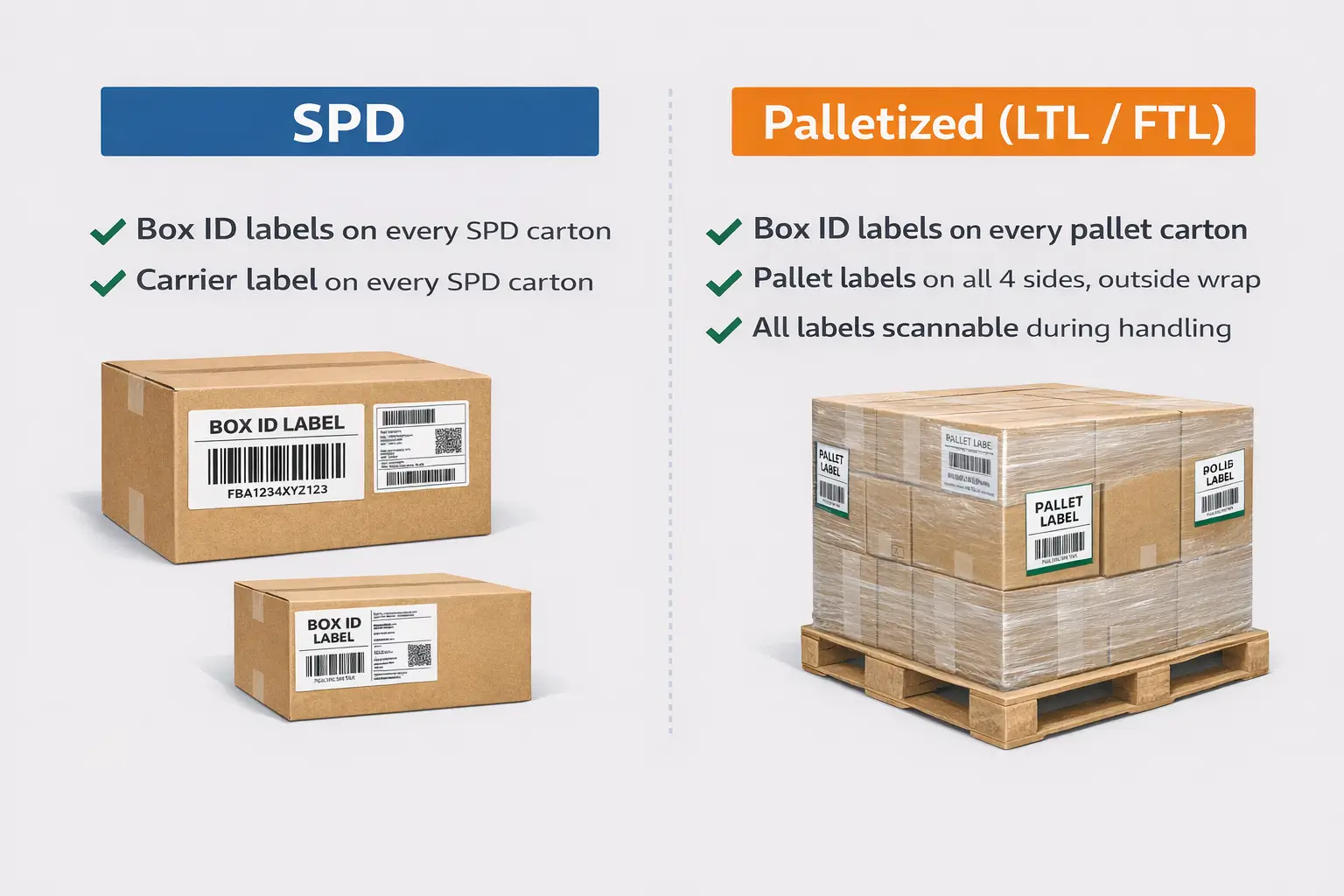
The label rules don’t get “stricter” on pallets—they get layered. Palletized shipments add pallet labels and visibility requirements, but cartons still need to be identifiable.
| Topic | Small Parcel Delivery (SPD) | Palletized (LTL/FTL) |
|---|---|---|
| Carton labels | Each carton gets its own Box ID label | Each carton still gets its own Box ID label |
| Carrier labels | Each carton gets a carrier label | Carrier documents/labels vary by carrier; cartons may still have carrier labels depending on program |
| Pallet labels | Not used | Each pallet needs pallet labels; place them on all four sides, outside the stretch wrap |
| Visibility | Labels must be scannable during parcel handling | Labels must remain visible and scannable after wrapping and dock handling |
Pallet visibility checklist (before and after stretch wrap)
Aim for labels that stay visible after wrapping.
- Before wrapping, confirm every carton’s Box ID label is flat and readable.
- Place pallet labels on the outside of the stretch wrap and on all four sides.
- After wrapping, do a walk-around: pallet labels visible; carton labels not fully hidden by opaque wrap layers or corner guards.
- If a label area will be rubbed by strapping or sharp edges, move the label to a safer flat panel first.
Boundary note: Some programs and destinations have additional pallet requirements. Verify your shipment’s carrier/delivery requirements in Seller Central for the most current instructions.
Send to Amazon: where to print box labels and when to reprint
Your safest workflow is to treat the labels you print as shipment-plan specific: the Box ID label set is generated for that shipment, and each label is intended for one carton.
Typical label-print flow (stable even if screens move)
- Create or edit the shipment in Send to Amazon.
- Complete the packing/box content steps required by your workflow.
- Use the workflow action to Print box labels and download the PDF.
- Share the PDF with whoever is labeling (supplier, prep team, or 3PL) only after carton counts and packing are finalized.
When you should reprint (common cases)
- If you change the number of cartons or the declared box contents after printing, reprint the full set so labels match the latest shipment data.
- If labels are damaged, smudged, or printed at the wrong scale, reprint rather than “patching” them with tape.
Print-quality tips (keep it practical)
- Avoid printer scaling; print at the intended size so barcodes remain scannable.
- Don’t photocopy or reuse labels for different cartons—Box ID labels are meant to be unique per carton.
Common label placement mistakes (and quick fixes)
Most labeling problems are not “mystery Amazon issues”—they’re predictable scanability failures or label-to-carton mix-ups. Fixing them is usually faster than shipping and hoping for the best.
| Mistake | Why it’s risky | Quick fix |
|---|---|---|
| Label over a seam/edge/corner | Barcode can crease, tear, or get cut | Reapply on a flat panel; keep barcode fully on one face |
| Tape over the barcode or label in a pouch | Glare/warping blocks scanners | Reprint and apply uncovered; use better label stock instead |
| Wrinkled/smudged/light print | Scanner can’t read consistently | Reprint; verify printer settings and label material |
| Old labels/barcodes left on a reused carton | Mis-scan or misrouting | Remove or fully cover old labels with opaque cover |
| Wrong Box ID on the wrong carton | Contents mismatch triggers exceptions | Stop and relabel: match each Box ID label to the correct carton contents |
| Labels overlapped | Barcode-on-barcode causes scan failure | Separate labels; ensure each barcode is unobstructed |
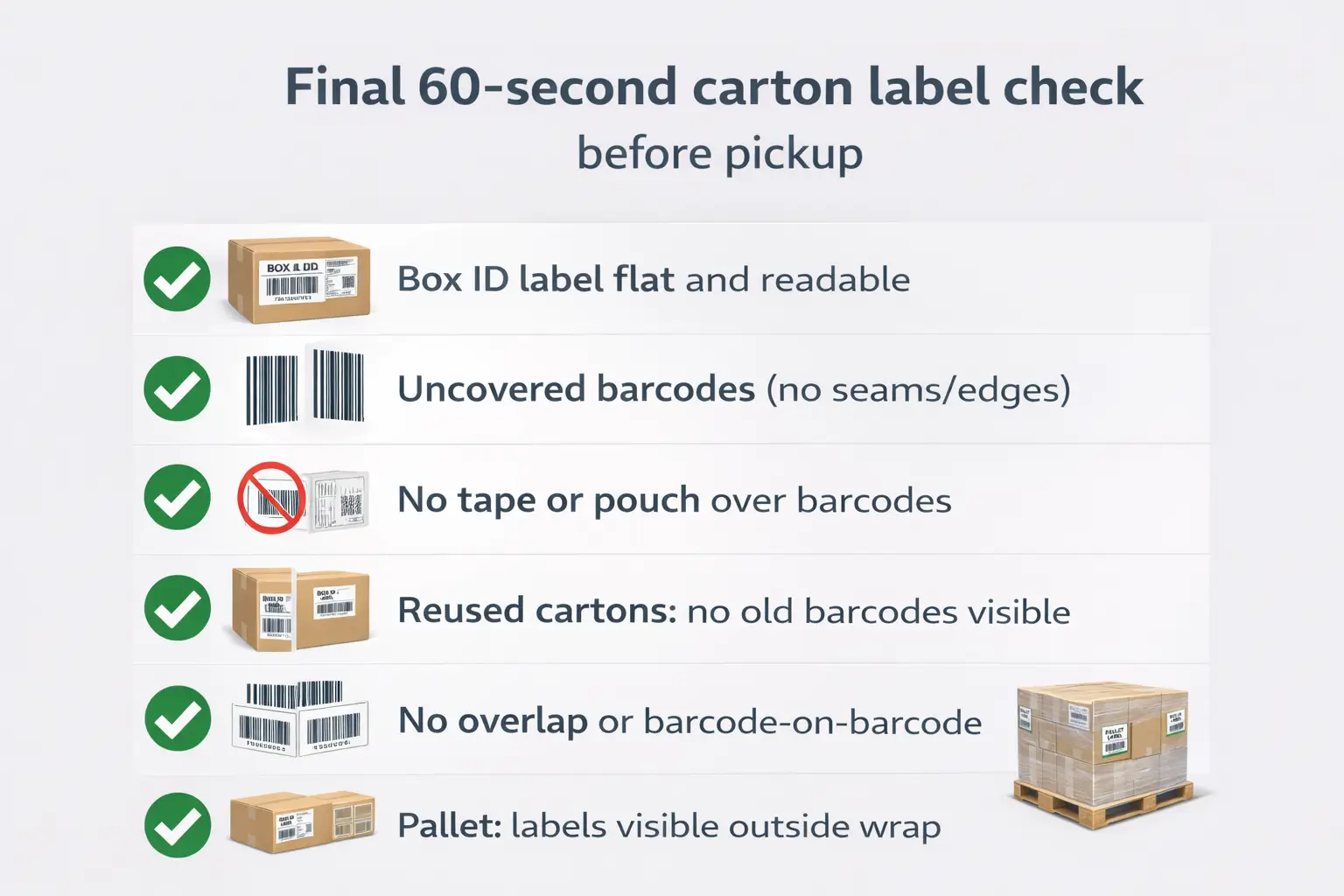
Final 60-second check (before pickup / handoff)
- Box ID label: flat, readable, not folded over an edge.
- Carrier label: present, not covering Box ID barcode.
- No tape/pouch over either barcode.
- Reused cartons: no extra scannable labels/barcodes.
- Pallets: pallet labels visible on all sides outside wrap.
If you catch an issue late, relabeling or repacking before pickup is usually cheaper than dealing with inbound exceptions later.
Master cartons and case packs: which carton gets the Box ID label
If you ship multiple case packs inside a master carton, apply the Box ID label to the master carton, not to the inner case packs. This keeps the inbound identity attached to the carton Amazon actually receives and handles.
If you’re mixing SKUs or using partial cases, make sure the carton’s Box ID label matches how you declared box contents for that carton in your shipment workflow.
Who should label: supplier vs prep center (plus checkpoints)
The “best” labeling owner is the one who can control carton contents and reduce handoffs. As a rule of thumb, supplier labeling works for simple, single-supplier shipments, while prep-center labeling is safer when you consolidate, repack, or ship multi-SKU cartons.
Choose supplier labeling when
- One factory ships directly, cartons are uniform, and you’re not consolidating.
- You can provide clear label placement instructions and get photo confirmation.
Choose prep-center labeling when
- You’re consolidating cartons from multiple suppliers (high risk of label mix-ups).
- Cartons need repacking, barcode cleanup, kitting, or box-content verification.
Checkpoints that prevent the common failures
- Confirm you’re using the latest label PDF for the final shipment plan and destination.
- Confirm carton condition (reused cartons cleaned; no extra barcodes).
- Apply labels using the same placement routine every time.
- Do a quick photo proof (a few clear photos per shipment batch) so issues can be caught before pickup.
If you’re shipping from multiple suppliers in China and carton labels keep getting mixed up, a consolidation + prep workflow can centralize labeling and reduce rework. FBABEE supports China-side warehousing, consolidation, and FBA prep so you can ship to Amazon with clearer checkpoints.
FAQ
Q: What labels are required on each Amazon FBA shipping box (Box ID vs carrier vs pallet)?
A: In most cases, each carton needs its own FBA Box ID (carton) label plus a carrier label for shipping. If you ship pallets (LTL/FTL), you also add pallet labels, but pallet labels don’t replace carton-level Box ID labels.
Q: Where should I place the FBA Box ID label and the carrier label on a carton?
A: Put both labels on a flat carton surface where the barcodes won’t fold over edges or corners. Keep the labels uncovered (no tape or pouch) and avoid seams or openings that can cut or tear the label.
Q: Can I reuse boxes for FBA, and how do I deal with old labels or extra barcodes?
A: Yes, as long as you remove or fully cover old labels and barcodes so only the current shipment’s labels are scannable. If the carton is damaged or labels won’t adhere, repack into a clean box.
Q: Does label placement differ for small parcel (SPD) vs palletized LTL/FTL shipments?
A: The carton rules stay the same, but palletized shipments add pallet labels and visibility requirements. Pallet labels typically go on all four sides of the pallet on the outside of the stretch wrap.
Q: Where do I download and print FBA box labels in Send to Amazon?
A: Use the Send to Amazon shipment workflow and look for the action to “Print box labels” to download the PDF. Because screens can change, follow the prompts in your shipment steps and confirm you’re printing the latest label set.
Q: What are the biggest labeling mistakes to avoid when sending inventory to FBA?
A: The most common ones are labels placed over seams/edges, tape or pouches covering barcodes, and reused cartons with old barcodes still visible. A quick pre-pickup scanability check catches most problems.
Q: Should my supplier label cartons, or should a prep center handle labeling and checks?
A: It depends on complexity: supplier labeling can work for simple, single-supplier shipments, while a prep center is safer for consolidation, repacking, or mixed-SKU cartons. The key is having one owner responsible for barcode cleanup, placement, and final verification.
Summary: a final pre-pickup check and next steps
If you only do one thing, make it this: ensure every carton has the right Box ID label and it’s flat, uncovered, and the only scannable shipping identity on the box. That one habit prevents most inbound label problems.
Final checklist
- Correct Box ID label on the correct carton (matches declared box contents).
- Carrier label present, not covering Box ID barcode.
- No tape or pouch over barcodes.
- Reused cartons cleaned (old labels removed/covered).
- Palletized shipments: pallet labels visible on all sides outside stretch wrap.
Need help coordinating labels across multiple suppliers or prepping cartons before shipping to Amazon? FBABEE can act as a China-side consolidation and FBA prep point (labeling, kitting, inspection, and freight coordination) so your inbound cartons leave with fewer avoidable surprises.



