

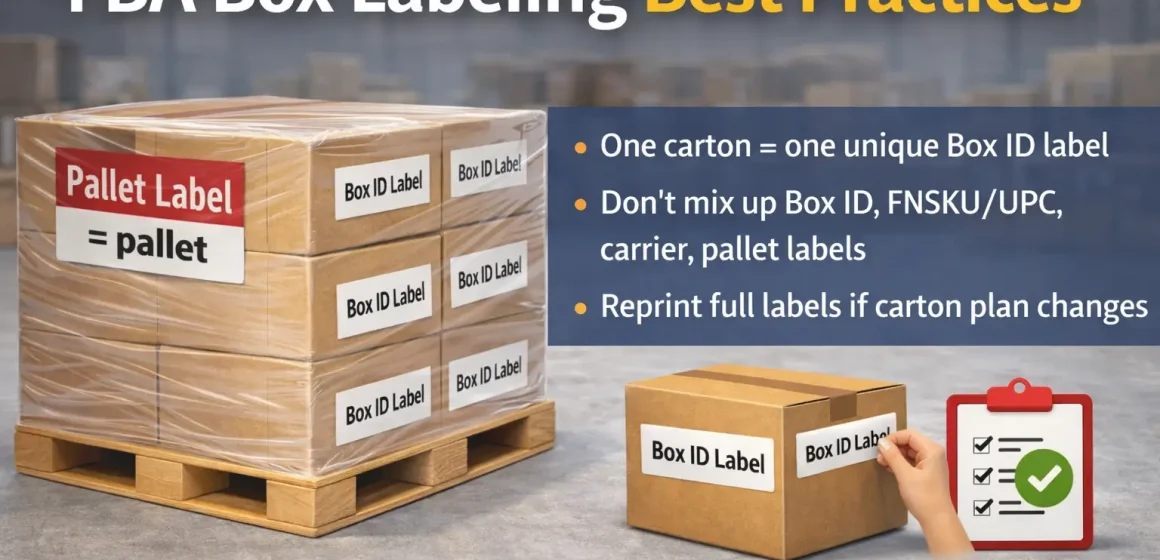
How many FBA Box ID labels per box (and which “box label” you mean)
Most “how many box labels?” problems come from mixing up label types. For Amazon FBA inbound shipments, the key rule is: each shipping carton needs its own unique FBA Box ID (carton/shipment) label, and it must stay scannable.
| If you mean… | Typical name | Goes on… | How many per carton? |
|---|---|---|---|
| “FBA box label / shipment label” | FBA Box ID (carton) label | Each shipping carton | 1 unique label per carton (minimum) |
| “UPS/FedEx label” | Carrier label | Each parcel (SPD) carton | As required by your carrier |
| “Product barcode label” | FNSKU/UPC label | Each sellable unit (or unit packaging) | Depends on your barcode settings |
Key points
- If you have 30 cartons, you need 30 different Box ID labels (don’t reuse/photocopy).
- Some sellers place a second copy of the same carton’s Box ID label for redundancy, but the “must-have” is that the carton’s label is correct and scannable.
- “Box” can mean a sellable unit box or a master carton—define which one is actually arriving at Amazon.
Boundary conditions
- Amazon requirements and workflows can change (SPD vs palletized LTL/FTL). Treat the labels generated in your shipment workflow as the authoritative output for that shipment.
- If you reuse cartons, remove or fully cover old shipment labels first.
Don’t mix these up: Box ID vs FNSKU/UPC vs carrier vs pallet labels
Once you name the label correctly, the rules are predictable. Box ID labels identify cartons for Amazon receiving; product labels identify units; carrier labels identify parcels; pallet labels identify pallets—and none of them replace the others.
| Label type | Identifies | Where it goes | What it’s not |
|---|---|---|---|
| FBA Box ID / carton label | One specific shipping carton | Outside of the carton | A carrier tracking label |
| Product label (FNSKU/UPC) | One sellable unit | On the unit or unit packaging | A carton label |
| Carrier label | Carrier tracking + routing | Outside of the carton | A carton identity label |
| Pallet label | The pallet | Outside of wrapped pallet | A carton identifier |
Boundary conditions
- Unit-level barcode requirements can depend on your account settings; verify in Seller Central for your SKU.
- If you ship case packs inside a master carton, the master carton is the shipping carton (see scenarios).
The core rule: one carton, one unique Box ID (minimum vs best practice)
With label types clear, the carton rule becomes straightforward. Every shipping carton needs a unique Box ID label from your shipment workflow, and it must match the carton’s physical contents.
Key points
- Minimum: one unique Box ID label per carton.
- Do not: reuse, photocopy, or swap Box ID labels between cartons.
- Optional redundancy: you can place a second copy of the same carton’s label on another face if it won’t cover barcodes.
Boundary conditions
- If carton count or contents change after printing, reprint/relabel (see playbook).
- Keep carrier labels from overlapping the Box ID barcode area.
If your carton count keeps changing (common with multi-supplier consolidation), lock a “final carton plan” before printing. FBABEE can consolidate cartons in China and apply Box ID labels only after the plan is final—so you avoid relabel work.
Placement checklist: where Box ID + carrier labels go so they scan
Even correct labels fail if scanners can’t read them. Place Box ID and carrier labels on flat faces, keep them uncovered, and keep barcodes away from edges, corners, and seams.
<
Placement checklist
- Place both labels on flat surfaces so barcodes don’t fold over edges/corners.
- Keep labels uncovered (don’t tape over them; don’t use a plastic pouch).
- Keep labels away from seams/openings where box cutters can damage them.
- Don’t overlap the carrier label over the Box ID barcode.
- Remove/cover old labels if reusing cartons.
- Don’t put pallet labels on individual cartons (pallet labels belong on pallets).
Boundary conditions
- If the carton surface is glossy/curved/textured, choose the flattest face and press labels down evenly.
- For branded retail cartons, test placement so it stays flat and doesn’t cover required markings.
Decision guide for common scenarios (SIOC, master cartons, pallets)
Most confusion comes from packaging layers. The only “special cases” are cases that change what the shipping carton actually is: SIOC (one unit per box), master cartons, and palletized shipments.
One unit = one box (SIOC): do you still need a Box ID label?
SIOC isn’t an exemption from carton labeling. If the unit box is the shipping carton that arrives at Amazon, it needs its own unique Box ID label.
- Will this exact box be delivered to Amazon?
- Yes → label it with a unique Box ID label.
- Will you place unit boxes into a larger outer carton?
- Yes → the outer carton becomes the shipping carton; label that outer carton.
- Palletizing?
- Pallet labels go on pallets, but carton labels still stay on cartons.
Master cartons and case packs: what gets labeled, and what usually doesn’t
Define the levels and it becomes simple. Apply the Box ID label to the master carton (outer shipping carton), and you generally don’t need Box ID labels on the case packs inside it.
Boundary conditions
- Mixed-SKU master cartons increase the importance of accurate box content information.
- If you change “partial case” or SKU mix after printing, treat it as a carton-plan change and reprint labels.
Pallet shipments (LTL/FTL): pallet labels vs box labels
Pallet labels are additive, not a replacement. Use pallet labels on the wrapped pallet, and keep Box ID labels on each carton because pallets can be unwrapped or broken down.
Boundary conditions
- Place pallet labels on the outside of stretch wrap so they remain visible.
- Verify your shipment’s pallet build requirements in Seller Central during shipment creation.
If box count or contents change: reprint/relabel playbook
Changes after printing are one of the highest-risk moments. If carton count or contents change, update the shipment workflow and reprint the full label set so labels still match the final cartons.

- Freeze the current carton plan (count + what’s in each carton).
- Update shipment details to match the final plan.
- Reprint the full set of Box ID labels.
- Relabel cartons and verify before pickup (labels flat, clear, uncovered).
- If using a prep center, require photo proof + carton count reconciliation.
Boundary conditions
- If you use 2D barcodes or templates for box content information, “contents changed” may also require regenerating those.
- This reduces mismatch risk; it doesn’t guarantee receiving speed.
Mistakes that cause delays: a prevention checklist
Most problems are scannability or identity mismatches. Avoid unreadable labels, duplicate labels, and conflicting labels to reduce receiving friction.
- Barcode folds over an edge/corner → label a flat face.
- Label covered with tape/pouch → keep it uncovered.
- Carrier label overlaps Box ID barcode → separate placement.
- Old shipment labels left on reused cartons → remove/cover old labels.
- Same Box ID label used on multiple cartons → print unique labels per carton.
- Blurry/smudged print → reprint before pickup.
Working with a prep center/forwarder: handoff checklist (what they need from you)
Outsourcing prep can help—if everyone works from the same carton plan. Your prep partner needs your final carton plan, the correct label files for that plan, and a simple verification method.
Handoff checklist
- Final carton plan: carton count, SKU mix per carton, and which cartons are master cartons vs SIOC cartons.
- Case-packed vs mixed-SKU status for each carton group.
- Box ID label files generated from the shipment workflow (matching the final plan).
- Your box content method (manual entry/template/2D barcode), if applicable.
- A “no reused labels” rule + remove/cover old labels on reused cartons.
- Photo verification standard + carton count reconciliation before pickup.
Boundary conditions
- If carton count isn’t final, delay printing—printing early is the fastest path to relabel work.
- Keep “best practices” separate from “Amazon requirements” when documenting your SOP.
Printing quality essentials (scale, clarity, rework-safe habits)
Poor print quality creates scan failures even with correct labels. Print at the correct scale, keep barcodes sharp, and do a quick check before cartons leave your warehouse.
- Print at 100% / actual size (avoid “fit to page”).
- Don’t ship faint, smudged, or cut-off barcodes—reprint.
- Apply labels evenly (no bubbles/wrinkles across the barcode).
FAQ: the 8 most common FBA box label questions
Q: What is an FBA Box ID (shipment/carton) label?
A: It’s the carton label that uniquely identifies a specific shipping box in your FBA shipment so Amazon can receive it accurately. It’s different from product barcode labels and carrier tracking labels.
Q: What’s the difference between a Box ID label, a product label (FNSKU/UPC), and a carrier label?
A: Box ID labels identify cartons for Amazon receiving, product labels identify individual units, and carrier labels are for UPS/FedEx (or another carrier). None of them are interchangeable.
Q: How many FBA Box ID labels should you put on each box?
A: Minimum is one unique Box ID label per shipping carton. You can add a second copy of the same carton’s label for redundancy, but never reuse the same label across different cartons.
Q: Do you need Box ID labels when shipping one unit per box (SIOC)?
A: Yes—if that unit box is the shipping carton arriving at Amazon. If you place unit boxes into a master carton, the master carton is what needs the Box ID label.
Q: Where do Box ID labels and carrier labels go on the carton?
A: Put both on flat faces, keep them uncovered, and don’t let barcodes fold over edges/corners. Keep the carrier label from overlapping the Box ID barcode.
Q: Can you cover an FBA box label with tape or put it in a plastic pouch?
A: It’s safest not to. Covered labels are harder to scan and are a common cause of label issues.
Q: If you change the number of boxes after printing labels, do you have to reprint?
A: Usually yes. Update shipment details to match the final carton plan, then reprint the full label set so labels still match the cartons.
Q: For pallet shipments, do you still need Box ID labels on each box (in addition to pallet labels)?
A: Yes. Pallet labels identify the pallet; Box ID labels identify cartons, and cartons can be separated from pallets during receiving.
Quick summary + what to do next
Four rules to avoid most FBA box label mistakes:
- Define the shipping carton first (unit box vs master carton).
- One carton = one unique Box ID label from your shipment workflow.
- Place labels flat and uncovered; don’t overlap barcodes.
- If the carton plan changes, reprint/relabel so labels match the final cartons.
Important disclaimer: FBABEE is an independent logistics and prep partner and is not affiliated with Amazon or its subsidiaries.
If you want a quick sanity check before your first shipment (or a big consolidation), FBABEE can review your carton plan and help coordinate consolidation, labeling, and handoff steps in China.



