

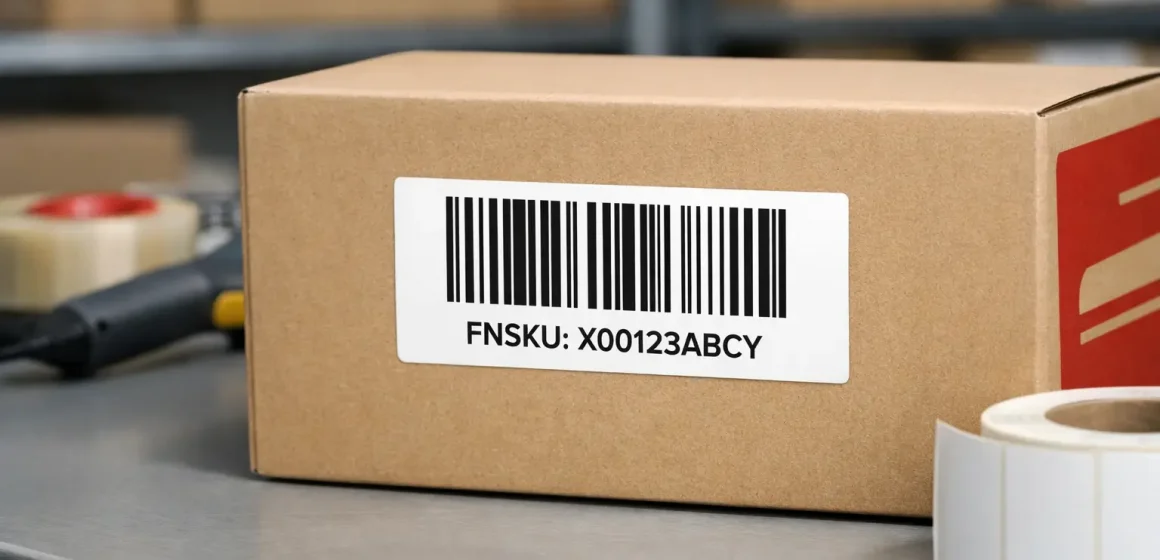
If you’re shipping inventory into Amazon FBA in the US, FNSKU labeling becomes simple when you treat it as two steps: (1) choose the barcode path and (2) execute printing + placement so each unit scans cleanly at receiving.
This guide is practical and process-focused, but Amazon requirements can change by program, product type, and account settings—so always confirm what Seller Central shows for your SKU and shipment before you send inventory.
Amazon FNSKU label requirements at a glance (US)
You usually only need to “worry about FNSKU requirements” when Amazon expects you to use Amazon barcodes (FNSKU labels) instead of relying on the manufacturer barcode (UPC/EAN). Once you’re on the FNSKU path, the main job is making sure one scannable barcode is visible and the label meets Amazon’s basic print/material rules.
1) Quick decision mini-table (what you’ll do next)
| What you’re trying to do | What you should check in Seller Central | What you’ll typically do next |
|---|---|---|
| Use UPC/EAN and avoid unit stickers | Your SKU/shipment prompts and barcode choice/eligibility messaging (wording varies) | If allowed, ship using manufacturer barcode without adding FNSKU (don’t mix methods on the same unit). |
| Use FNSKU for FBA tracking | Your SKU/shipment prompts show Amazon barcode labeling is required or preferred | Generate FNSKU labels → print without scaling → apply to each unit and cover other scannable barcodes. |
2) Specs at a glance (FNSKU label “requirements”)
Seller Central guidance commonly describes these baseline requirements for Amazon barcodes:
- Label size range: between 1″×2″ and 2″×3″ (examples like 1″×3″ or 2″×2″ are often cited as within-range).
- Print + stock: black ink on white, non-reflective labels with removable adhesive.
3) Placement rules that prevent 80% of problems
- Put the FNSKU on a flat, visible surface (not wrapped around corners/seams).
- Cover other visible, scannable barcodes so scanners don’t “see” multiple codes. (Some Seller Central guidance explicitly notes exceptions like serial number barcodes or Transparency labels.)
- After prep (polybag/bubble wrap), each unit should still have an exterior scannable barcode or label.
4) Minimum QC checklist (before you carton up)
- Do a quick scan test on a sample from each batch/SKU.
- Confirm only one scannable barcode is visible on the outside.
- Check adhesion/contrast (no glare, no smudges, no wrinkles).
FNSKU vs UPC/EAN: what it is and when you need it
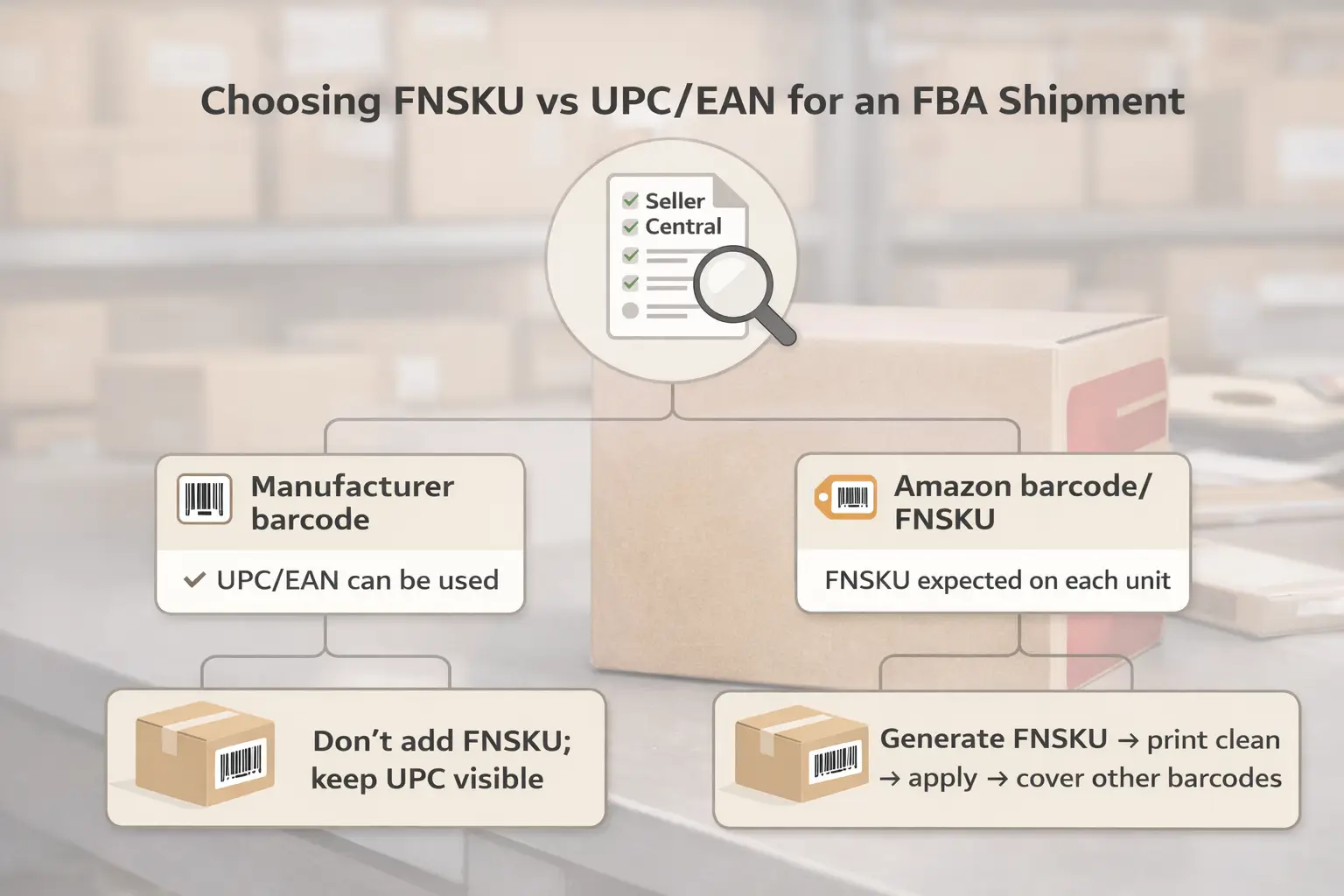
Now that you’ve seen the “at a glance” rules, the real unlock is understanding what FNSKU is in plain English. An FNSKU is an Amazon barcode label you apply to a unit when Amazon expects Amazon barcodes rather than relying on the manufacturer barcode (UPC/EAN).
What an FNSKU is (and how it differs from ASIN and UPC/EAN)
The easiest way to keep the identifiers straight is to separate “catalog identity” from “scannable barcode.”
- ASIN: identifies the product listing in Amazon’s catalog (a catalog ID).
- UPC/EAN/GTIN: manufacturer barcodes used in retail supply chains (often already printed on packaging).
- FNSKU (Amazon barcode): a barcode label used for Amazon/FBA tracking when Amazon barcodes are used for that unit.
If you’re sourcing from multiple factories, the practical risk isn’t the definition—it’s consistency: pick one barcode path per SKU/shipment plan and make sure every party (supplier, prep team, warehouse) follows the same rule set.
Decision tree: when FNSKU is required vs when UPC/EAN may be allowed
With definitions clear, here’s the decision logic that keeps you out of trouble: follow the barcode method Seller Central expects for that SKU and shipment, then execute labeling accordingly (because the exact eligibility language can vary by account, program, and product).
Use this as a practical “if/then” guide, not as a universal promise:
| If Seller Central indicates… | What that usually means operationally | What you do |
|---|---|---|
| Manufacturer barcode is acceptable for your SKU/shipment | You may be able to ship using UPC/EAN without adding FNSKU stickers | Don’t add FNSKU; keep the existing barcode scannable and consistent. |
| Amazon barcodes are required/preferred for your SKU/shipment | Amazon expects an Amazon barcode label on each unit | Generate FNSKU labels → print cleanly → apply on a flat surface → cover other scannable barcodes. |
What to verify before you print thousands of labels
- Confirm which barcode method your shipment workflow is expecting for that specific SKU (don’t assume SKU A and SKU B behave the same).
- Confirm your team is not accidentally creating “mixed-method” units (some with UPC visible, some with covered UPC + FNSKU).
- If you’re planning around the March 31, 2026 update, don’t guess—check the update section later in this guide and confirm your current Seller Central messaging.
FNSKU label size, material, and print specs (requirements)
Once you know you need FNSKU, the most important “requirements” are the ones that affect scan reliability. Use a label that meets the common Seller Central baseline: black on white, non-reflective, removable adhesive, and within the 1″×2″ to 2″×3″ size range.
Copy/paste “supplier SOP” (baseline spec block)
- Size: 1″×2″ to 2″×3″
Examples often cited within-range: 1″×3″, 2″×2″ - Label stock: white and non-reflective
- Adhesive: removable (so the label doesn’t damage packaging when corrected)
- Ink: black (high contrast for scanners)
Practical notes (without over-optimizing)
- Choose a label size that fits your packaging without wrapping edges—scan issues often come from placement, not just size.
- If your packaging is small or cylindrical, you may need a different prep approach (e.g., an outer bag with a scannable barcode on the outside).
Printing FNSKU labels without scan problems (printers, scaling, QA)
After specs are clear, the next risk is mechanical: printing. Most scan failures happen because the barcode gets distorted (scaling) or becomes low-contrast/smudged—so your goal is “print clean, print consistent, and verify with a quick scan test.”
Inkjet vs laser vs thermal (practical trade-offs)
- Thermal: often the most consistent for barcode clarity when paired with the right label rolls; good for high volume.
- Laser: can be reliable for sheet labels; watch for toner flaking on some label stock.
- Inkjet: can work, but is more likely to smudge or bleed if the label stock isn’t compatible (especially in humidity).
Rather than chasing a “best printer,” use a simple QA loop that catches problems before you ship.
The QA loop that saves you rework
- Test print a small batch on the exact label stock you’ll use.
- Print without resizing/scaling (avoid “fit to page” style options).
- Scan test multiple labels from the sheet/roll (including edges/corners of a sheet).
- Do a quick physical check: no smears, no wrinkles, no low contrast, no glossy glare.
Quick fixes when scans feel unreliable
- If the barcode looks “squeezed” or “stretched,” re-check print scaling settings first.
- If scans fail intermittently, switch label stock (non-reflective) or adjust print darkness/quality until scans are consistent.
- If labels peel during handling, switch to a better adhesive/stock (still removable) and apply on a clean, dry surface.
How to generate and print FNSKU labels in Seller Central (UI-robust)
With printing pitfalls understood, you can keep the workflow simple. You generally generate FNSKU/item labels from the places in Seller Central where you manage inventory or build an FBA shipment, then download a label file and print it without scaling.
UI-robust step list (works even when menus change)
- Confirm the barcode method Seller Central expects for the SKU/shipment you’re creating (this drives whether you need FNSKU labels).
- In either your inventory management area or during shipment creation, look for the function that outputs item labels / product labels for FBA.
- Choose a label format appropriate for your printer setup (sheet vs thermal).
- Download the label file and print without resizing.
- Apply labels and run the QC checks (scan test + barcode visibility).
File control tips (especially for multi-supplier consolidation)
If two suppliers are labeling the same SKU, mix-ups happen when “the right PDF” is unclear. Keep control with:
- A single “source of truth” label file per SKU/batch (versioned).
- File naming that includes SKU + batch/date (whatever your team uses consistently).
- A short supplier note: “Use only this version; do not regenerate labels without approval.”
Where to place the FNSKU label (and what barcodes must be covered)
Once labels are generated and printed, correct placement is the difference between “scan-ready” and “rework.” Place the FNSKU on a flat, visible surface and cover other visible scannable barcodes so only one scannable barcode remains on the outside.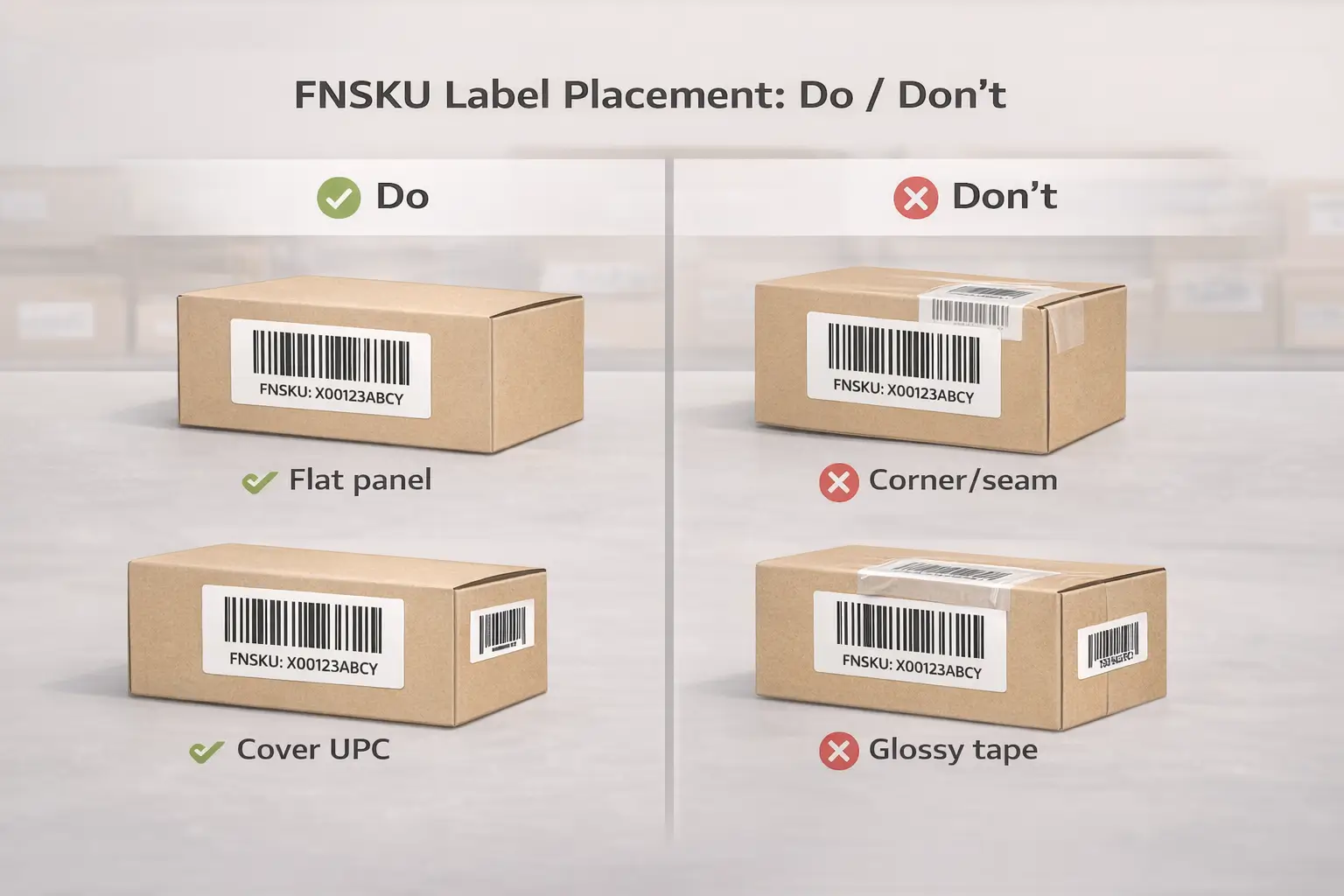
Do/Don’t placement rules (flat, visible, not on edges)
Use this quick table as a supplier/prep checklist:
| Do | Don’t | Why it matters |
|---|---|---|
| Place on a flat, accessible panel | Wrap across seams, corners, or openings | Wrinkles/curves reduce scan reliability |
| Keep the barcode clean and unobstructed | Put under glossy tape that creates glare | Glare can cause scan failures |
| Ensure one scannable barcode is visible | Leave UPC/EAN or other scannable codes exposed | Multiple codes can cause scan confusion |
About covering other barcodes
Seller Central guidance is frequently quoted as: cover other visible barcodes (with noted exceptions such as certain serial number or Transparency labels).
Practically, your goal is simple: a warehouse scanner should not “see” two different product barcodes on the outside of the unit.
If the unit is polybagged or bubble-wrapped: keep the barcode externally scannable
After prep, Amazon’s packaging guidance emphasizes that each unit should have an exterior scannable barcode or label.
For polybags specifically, Seller Central discussions often quote that the bag should have a barcode scannable through the bag or a label on the outside.
Practical ways to stay safe:
- If the bag is clear and the barcode scans cleanly through it, your barcode may be readable—but don’t assume; scan test.
- If there’s any doubt, put the scannable barcode/label on the outside of the bag.
Common FNSKU labeling mistakes (and the prevention table you can audit)
With printing and placement covered, the next step is prevention. Most labeling problems are predictable—and you can prevent them with a simple “mistake → why it fails → prevention” system plus a short QC checklist.
Mistakes → why they fail → prevention (audit-friendly table)
| Mistake | Why it fails at receiving | Prevention you can standardize |
|---|---|---|
| Multiple scannable barcodes visible (UPC + FNSKU both exposed) | Scan confusion: the “wrong” code gets scanned | Cover other visible scannable barcodes; spot-check before cartonizing |
| Label on a curve, corner, or seam | Wrinkles/distortion reduce readability | Use a flat panel; if packaging is too small, use an outer bag with an exterior scannable barcode |
| Barcode printed too light / smudged | Low contrast or blur causes scan failures | Change label stock/print settings; scan test a sample batch |
| Glossy surface glare (tape or label stock) | Reflectivity interferes with scanning | Use non-reflective label stock; avoid glare-heavy tape |
| Wrong label version used (multi-supplier mix-up) | Units get mislabeled and inventory mismatches | Version control label PDFs; require supplier confirmation with photos/scan checks |
| Label peels off during handling | Missing label at receiving | Apply to clean/dry surface; choose better removable stock; add spot-checks in packing |
The minimum QC checklist (fast, repeatable)
- Scan test at least one unit from each SKU/batch.
- Confirm only one scannable barcode is visible on the outside.
- Check adhesion and readability after any prep step (bag/wrap).
- For multi-supplier shipments, require a “label confirmation” photo for the first batch.
If you’re consolidating multiple suppliers in China: a prep center can apply FNSKU labels, run scan checks, and keep label file versions consistent before freight—helpful when a single mix-up would be costly. (FBABEE is an independent logistics/prep provider, not affiliated with Amazon.)
Unit vs carton vs pallet labels (what each label is for)
After unit-level mistakes, it helps to separate the “what” from the “where.” FNSKU labels go on individual units, while carton/pallet labels identify shipping containers and are used differently during receiving.
| Label type | Applied to | Purpose (plain English) | Common confusion to avoid |
|---|---|---|---|
| Unit label (FNSKU / Amazon barcode) | Each sellable unit | Identifies the item when it’s scanned | Don’t assume carton labels replace unit labels |
| Carton label | Each shipping carton | Helps route/receive cartons | Doesn’t identify individual units inside |
| Pallet label | Palletized shipments | Helps receive and track pallets | Not required for every shipment type |
Rule of thumb: if Amazon expects FNSKUs, each unit still needs to be scannable—even if your cartons are labeled correctly.
Who should label: supplier vs prep center vs Amazon label service
Once label types are clear, you can choose the lowest-risk execution path. Supplier labeling can work for simple, single-factory flows—but when you have multiple suppliers, many SKUs, or inconsistent factory execution, a prep step (or Amazon’s label service) can reduce mix-ups.
Quick decision guide (trade-offs, not absolutes)
- Supplier labels (often OK when):
- One supplier per SKU, stable packaging, and the factory can follow a simple SOP.
- You can enforce a scan-check and photo confirmation on the first batch.
- Prep center labels (often safer when):
- Multiple suppliers ship into one consolidation point.
- You have variants that are easy to mix (size/color) and need stronger QC.
- You want one team to control label files, placement rules, and scan checks.
- Amazon FBA Label Service (sometimes useful when):
- You don’t want to label yourself and your workflow supports Amazon applying labels for a per-item fee (fee varies; confirm in Seller Central).
“Handoff package” checklist (what to send your supplier or prep team)
- The correct label PDF (versioned) and which SKU/batch it applies to
- Placement do/don’t rules (flat surface, cover other barcodes)
- Prep notes (if polybagged/wrapped, barcode must remain externally scannable)
- QC requirement: scan test + first-batch photo confirmation
March 31, 2026 barcode change (US): what to review before you ship
If you’re planning shipments for 2026, avoid guessing. Seller Central help pages display a notice that starting March 31, 2026, barcode requirements are changing, and indicate that brand owners can continue to use manufacturer barcodes without stickers.
What to do now (conservative checklist)
- Check what Seller Central says for your account and SKU (don’t rely on secondhand summaries).
- If you rely on manufacturer barcodes, review any Seller Central messaging tied to Brand Registry / brand representative status. A Seller Central FAQ page indicates that to use manufacturer barcodes after March 31, 2026, you must be enrolled in Brand Registry as a brand representative (confirm current wording in your account).
- For any SKU that is moving to Amazon barcodes, update your supplier/prep SOP:
- label files, placement rules, and scan checks
- Re-check your process each time you create a new shipment plan, since prompts can change over time.
Wrap-up: a minimum viable “scan-ready” checklist + when to get help
After covering requirements, execution, and the update watchlist, you can simplify your operation into one routine. A scan-ready SOP is just: confirm barcode path → print clean labels → place them correctly → verify with quick QC before you ship.
Minimum viable SOP (copy/paste into your internal checklist)
- Confirm the barcode method expected for each SKU/shipment in Seller Central.
- If using FNSKU:
- Use compliant label stock and size range (baseline)
- Print without resizing and scan test a sample
- Apply on a flat surface and cover other scannable barcodes
- After any prep (bag/wrap), confirm there’s an exterior scannable barcode/label
- For multi-supplier consolidation: require first-batch scan/photo confirmation and label file version control.
When it’s worth getting help (common triggers)
- First-time FBA shipment from China with unclear labeling/prep ownership
- Multi-supplier consolidation where a label mix-up would be expensive
- High-value or complex shipments where rework risk is unacceptable
If you want one team to consolidate suppliers, apply FNSKU labels, and run scan/QC checks before freight, FBABEE can help as an independent China-side prep and logistics partner (not affiliated with Amazon). Use your own Seller Central settings as the final authority for barcode rules.
FAQ: quick answers to common FNSKU labeling questions
What is an FNSKU on Amazon?
An FNSKU is an Amazon barcode label used for FBA tracking when Amazon expects Amazon barcodes for a unit (instead of relying on the manufacturer barcode). If you’re on the FNSKU path, the unit should present one scannable barcode on the outside.
Do I need an FNSKU label or can I use UPC/EAN for FBA?
It depends on what Seller Central expects for your SKU and shipment: some flows allow manufacturer barcodes, while others require Amazon barcodes (FNSKU). Confirm the SKU/shipment prompts before you print labels, and avoid mixing methods on the same unit.
What size does an Amazon FNSKU label need to be?
Seller Central guidance is frequently quoted as requiring Amazon barcodes to be within 1″×2″ to 2″×3″. Choose a within-range size that fits your packaging without wrapping edges.
Can I print FNSKU labels with an inkjet printer (and what should I watch out for)?
Yes, it can work, but watch for smudging, low contrast, and label stock compatibility. Print without resizing, then scan test a small batch on the exact labels you’ll use.
Where do I place the FNSKU label, and do I have to cover the UPC?
Place the label on a flat, visible surface and cover other visible scannable barcodes so only one scannable barcode remains. Seller Central guidance commonly notes to cover other visible barcodes (with certain exceptions).
How do I generate and print FNSKU labels in Seller Central?
Use the parts of Seller Central where you manage inventory or create shipments to generate item/product labels, choose a printer-friendly format, and print without scaling. The exact menu names can change, so follow function-based prompts.
What are the most common FNSKU labeling mistakes that cause delays or relabeling?
The biggest ones are multiple barcodes visible, labels placed on curves/seams, and barcodes that are distorted or low-contrast. Prevent them with a scan test, barcode visibility check, and simple label file version control.
What is changing on March 31, 2026 for Amazon FBA barcode requirements?
Seller Central help pages display a notice that barcode requirements are changing on March 31, 2026, and indicate brand owners can continue using manufacturer barcodes without stickers. A Seller Central FAQ also references Brand Registry enrollment for using manufacturer barcodes after that date—confirm the current details in your account before changing SOPs.



