Amazon FBA virtual assistant in 60 seconds
An Amazon FBA virtual assistant (Amazon VA) is a remote operator who helps run day-to-day Amazon tasks—as long as the tasks are clearly defined, access is controlled, and quality checks exist. If you’re overwhelmed by repetitive Seller Central work, a VA can be a strong “execution layer,” but they can’t replace strategy, financial control, or physical inventory handling.
Key points
- Think “repeatable workflows + reporting,” not “someone to run my whole business.”
- The safest early wins are low-risk, repeatable tasks (reporting, support triage, simple listing hygiene).
- The highest risks come from too much access, unclear SOPs, and no QA loop.
- If your “FBA work” includes receiving, labeling, kitting, consolidating, or shipping cartons, that’s not virtual work—plan for a prep center or freight forwarder.
Quick decision snapshot (mini-table)
| If you need help with… | A VA can do it? | What you need besides a VA |
|---|---|---|
| Listing hygiene + catalog checks | Yes (often) | SOP + approval gate for high-impact edits |
| Customer message triage | Yes (often) | Escalation rules + brand voice templates |
| Inventory monitoring + alerts | Yes (often) | Reorder rules + owner decisions on cash/inventory |
| PPC campaign changes | Sometimes | Specialist skills + tighter review process |
| Shipment planning coordination | Coordinate only | A partner to physically prep/ship cartons |
| Receiving, labeling, kitting, consolidation | No | Prep center / warehouse partner |
| Booking freight, customs handling, final delivery | No (execution) | Freight forwarder (execution + compliance coordination) |
Boundary conditions / caveats
- “Amazon VA” can mean anything from admin support to full account management—scope varies widely.
- Security controls reduce risk but don’t eliminate it; design for “least privilege.”
- This guide is general; Seller Central UI and requirements can change.
What an Amazon FBA virtual assistant is and is not
An Amazon FBA virtual assistant is a remote specialist who executes Amazon-related workflows, usually inside Seller Central and your team’s tools, based on your SOPs. They are not an Amazon employee, not a substitute for ownership decisions, and not a physical prep/shipping operation.
Key points
- “Amazon VA” is a specialization: they understand Amazon tools and workflows better than a general VA.
- The value is leverage: they take repeatable tasks off your plate so you can focus on higher-leverage decisions.
- The failure mode is scope blur: hiring “one person to do everything” without controls creates errors and risk.
Role comparison (table)
| Role | Best for | Typical strengths | Common limitations |
|---|---|---|---|
| General VA | Admin support across many tasks | Scheduling, inbox, basic research | Usually not Amazon/Seller Central fluent |
| Amazon VA | Seller Central + Amazon ops workflows | Listings, cases, reporting, SOP execution | Needs clear scope + QA; skill varies |
| Agency | Bundled services + coverage | Team capacity, specialized roles | Can be expensive; must manage accountability |
| Specialist (PPC, creative, finance) | High-skill tasks | Deep expertise in one domain | Not a catch-all; needs coordination |
| Owner / operator | Strategy + approvals | Product, cash, direction, risk ownership | Limited time; must define “done” |
How to use this table
- Start by listing your top 10 recurring tasks.
- Mark which are “execution” vs “decision.”
- Assign execution to a VA where SOPs exist; keep decisions owner-led.
Boundary conditions / caveats
- Many sellers say “Amazon VA” when they mean “Amazon operator”; don’t assume a standard skill set.
- A VA can coordinate with vendors, but you still own final approvals and risk decisions.
What an Amazon VA actually does and what to outsource first
An Amazon VA typically handles repeatable operational tasks like listings maintenance, case follow-ups, reporting, and customer support workflows—but only safely when the access level matches the task risk and there’s a QA loop.
Key points
- Start with low-risk tasks that don’t require sensitive access.
- For any task that can “break” your listing, inventory, or account health, add an approval gate.
- “What a VA can do” should be defined as deliverables (outputs), not vague responsibilities.
Task matrix (task → access → QA → approval gate)
| Task category | Example deliverables | Access needed (typical) | QA method | Owner approval gate? |
|---|---|---|---|---|
| Reporting & dashboards | Weekly KPI snapshot, inventory risk list | Read-only tools, reports | Spot-check calculations | No (usually) |
| Customer support triage | Tag messages, draft replies, escalate | Messaging tools / limited access | Review first 20 replies | Yes (early), then sample |
| Listing hygiene | Fix typos, update bullets per SOP | Listing edit permissions | Change log + “before/after” doc | Yes for high-impact edits |
| Case management support | Draft case notes, follow up, track status | Support/case access | Template + supervisor review | Yes for escalations |
| Inventory monitoring | Stockout alerts, reorder reminders | Reports + spreadsheets | Confirm thresholds match SOP | Owner decides reorder |
| Shipment plan coordination | Create draft shipment plan, label packets | Shipment workflow access | Checklist of required fields | Yes (always) |
| PPC execution | Draft campaign changes, negative keywords list | Ads access | Review in staging sheet | Yes unless specialist-led |
| Finance/tax/payment | Payment settings, bank/tax updates | Sensitive access | N/A | Owner-only (recommended) |
Safe-to-outsource-first (checklist)
- Weekly reporting and data cleanup (spreadsheets, dashboards)
- Customer support triage + templated replies (with escalation rules)
- Listing hygiene: basic updates that follow a written template
- Case tracking: documenting issues, collecting evidence, following up
- Inventory monitoring alerts (not the purchasing decision)
High-risk / don’t outsource (until controls are strong)
- Bank/tax/payment settings, user management, and anything tied to payouts
- Policy-sensitive actions where mistakes could impact account health
- Large-scale listing edits without review gates
- Anything requiring broad admin access “just to save time”
- Physical inventory steps (receiving, labeling, kitting, consolidation, shipping cartons)
Boundary conditions / caveats
- “Safe” depends on SOP clarity and QA maturity; if you can’t define “done,” outsourcing will create rework.
- Some tasks require specialist skill (PPC, advanced catalog troubleshooting, bookkeeping).
When to hire an Amazon VA and when to wait
You should hire an Amazon VA when you have repeatable tasks that are consistently overdue and you can define “done” with SOPs and checks. You should wait if you’re still changing strategy daily or you can’t review outputs consistently.
Key points
- Hiring too early can amplify chaos; hiring too late can trap you in busywork.
- The real “cost” is not only the VA—it’s training, QA, and your attention.
- A VA is an execution multiplier; they don’t replace owner decisions.
Decision checklist (hire now vs wait)
Hire now if
- Customer messages or cases are piling up and you’re missing response windows
- Inventory checks and replenishment reminders are inconsistent
- Listing hygiene issues (typos, missing attributes) linger for weeks
- You’re doing the same spreadsheet/reporting work every week
- You can commit time for onboarding + QA for the first weeks
Wait (or reduce scope) if
- You don’t have clear priorities (everything is “urgent”)
- You can’t write a one-page SOP for your top recurring tasks
- You’re not able to review work outputs at least weekly
- You need “a strategist” but are hiring for “a VA” (wrong role)
Common failure modes (and how to prevent them)
- Scope creep: start with 3–5 tasks, not “manage my Amazon account.”
- No QA loop: require screenshots/notes, review samples, and tighten approvals early.
- Access sprawl: align permissions to tasks and review access when scope changes.
Boundary conditions / caveats
- Time zones and response expectations matter; define what “urgent” means in writing.
- Owner-only responsibilities usually include cash decisions, major pricing strategy, and high-stakes approvals.
How to hire and vet an Amazon VA

Hiring an Amazon VA works best when you define scope first, screen for proof, and use a short test + trial period instead of trusting a resume alone.
Key points
- Start with deliverables: “Weekly report + customer triage + listing hygiene,” not “help me grow.”
- Use a test task that mirrors your actual workflow.
- A trial period with QA gates is often safer than granting broad access upfront.
Hiring steps (repeatable process)
- Write a scope card (one page): tasks, tools, weekly cadence, and what “done” looks like.
- Pick the hiring channel: freelancer marketplace, referral, or agency—based on whether you need one operator or a team.
- Screen for proof: ask for anonymized examples (reports, SOP snippets, task notes).
- Run a test task (paid is best): the same workflow they will do weekly.
- Evaluate communication: clarity, documentation habits, and escalation judgment.
- Define access rules: separate user access, least privilege, and no credential sharing.
- Start a trial period: limited scope + clear success criteria.
- Decide on cadence: daily check-in early, then weekly once stable.
Test task rubric (what “good” looks like)
- Accuracy: follows instructions and catches obvious inconsistencies
- Documentation: leaves a clear audit trail (notes + screenshots)
- Judgment: knows when to stop and ask
- Communication: concise, proactive, and not defensive about QA
- Repeatability: can they turn this into a checklist/SOP?
Example test tasks (choose one)
- Build a weekly “inventory risk” sheet from your reports and explain the logic.
- Triage 20 customer messages with draft replies + escalation tags.
- Audit one listing using a checklist, then propose changes in a review doc (not directly in Seller Central).
Boundary conditions / caveats
- Don’t hire one person to do everything unless you already have strong SOPs and a manager to oversee.
- Never treat “I can manage your entire store” as a positive signal without proof and guardrails.
How to onboard and manage your VA with SOPs and QA gates
A strong onboarding plan is a short, structured ramp: start with access setup + SOP walkthroughs, then supervised tasks, then gradual autonomy with sampling and approvals.
Key points
- You’re building a system, not just delegating tasks.
- QA is heaviest early; it should shrink as consistency improves.
- Reporting cadence prevents “silent drift” and repeated mistakes.
Week-by-week onboarding plan (example)
- Week 1 (setup + shadowing): tools access, SOP walkthroughs, complete small tasks with full review.
- Week 2 (supervised execution): repeat the same 3–5 tasks; add templates and checklists; daily check-ins.
- Week 3 (controlled autonomy): allow routine tasks without pre-approval; keep sampling and require change logs.
- Week 4 (stabilize + expand): add one new task at a time; update SOPs based on real issues.
SOPs to write first (shortlist)
- Customer messages: templates + escalation rules
- Weekly reporting: what to pull, how to calculate, how to present
- Listing hygiene: checklist + “what requires approval”
- Case tracking: what evidence to collect + how to document
QA gates checklist
- Require “before/after” notes for any listing edits
- Use a review doc for proposed changes (especially for sensitive tasks)
- Sample-review a fixed number of outputs each week (then adjust based on errors)
- Define escalation triggers (“stop and ask” rules)
Boundary conditions / caveats
- Onboarding is slower if you have no SOPs; the first output is often the SOP itself.
- Keep tools simple until you’re stable; complexity can hide mistakes.
Seller Central access and account safety basics
The safest way to work with an Amazon VA is separate user access + least-privilege permissions + two-step verification, paired with documentation and approvals for high-impact actions.
Key points
- Separate user accounts are the cleanest way to control permissions and offboard later.
- Least privilege means “only what they need for the tasks you assigned.”
- Two-step verification (2SV) is a core account protection control in Seller Central.
Permissions and controls (table)
| Task scope | Permission posture | Extra controls to add |
|---|---|---|
| Reporting only | Read-only wherever possible | Shared dashboard, no sensitive settings |
| Customer support triage | Limited tools access | Templates + escalation rules |
| Listing hygiene | Narrow listing permissions | Change log + approval gate for major edits |
| Case follow-ups | Support access only | Standard notes + evidence checklist |
| Shipment plan drafts | Shipment workflow access (limited) | Owner approval before final submission |
| Anything tied to payouts/settings | Avoid delegating | Owner-only access recommended |
How permissions are handled in Seller Central (high-level) – Seller Central includes a “User permissions” area where account owners can invite users and control tool access. – Seller Central documentation also states that two-step verification is required to access Seller Central, and provides guidance on enabling it.
Practical safety checklist
- Use separate user access (not shared credentials)
- Turn on 2SV for every user
- Use a password manager for shared tools (not for sharing Seller Central credentials)
- Require change logs and screenshots for sensitive workflows
- Review permissions whenever scope changes
- Define offboarding steps (remove access, rotate credentials for non-Seller tools)
Boundary conditions / caveats
- Seller Central UI can change; follow Amazon’s current help guidance for the latest steps.
- Security controls reduce risk but don’t eliminate it; keep approvals for high-impact actions.
Amazon VA pricing explained: models, drivers, hidden costs
Amazon VA pricing usually makes the most sense when you choose a model that matches your scope: hourly for flexible support, retainer for predictable workloads, and per-task for clearly defined deliverables.
Key points
- “Cost” isn’t just rate—training, QA, and rework can outweigh headline numbers.
- The more defined the SOPs, the lower your management overhead tends to be.
- Specialized work (e.g., PPC) often needs specialist pricing and tighter review.
Pricing model comparison (table)
| Model | Best for | Watch-outs |
|---|---|---|
| Hourly | Early-stage, shifting priorities, ad-hoc tasks | Scope creep; unclear deliverables |
| Retainer | Stable weekly workload, consistent recurring tasks | Paying for downtime if scope is too small |
| Per-task / project | Very defined outputs (reports, audits, cleanup) | Needs tight SOPs; disputes if “done” isn’t defined |
What drives total cost (without fake precision)
- Scope complexity: number of SKUs, frequency of changes, task variety
- Skill level: admin support vs Amazon-specialist workflows
- Documentation maturity: SOP quality reduces training and rework
- QA intensity: tight approvals early; sampling later
- Time zone overlap: affects speed of feedback cycles (not “good vs bad,” just operational reality)
Hidden costs you can control
- Write SOPs once, reuse them
- Add checklists and templates to reduce mistakes
- Introduce one new task at a time, not five
Boundary conditions / caveats
- Rates vary widely by market conditions and specialization, so avoid “typical” numbers unless you have fresh dataset-quality benchmarks.
- If you’re truly buying strategy (not execution), you may need a consultant or agency instead.
Amazon VA vs prep center vs freight forwarder
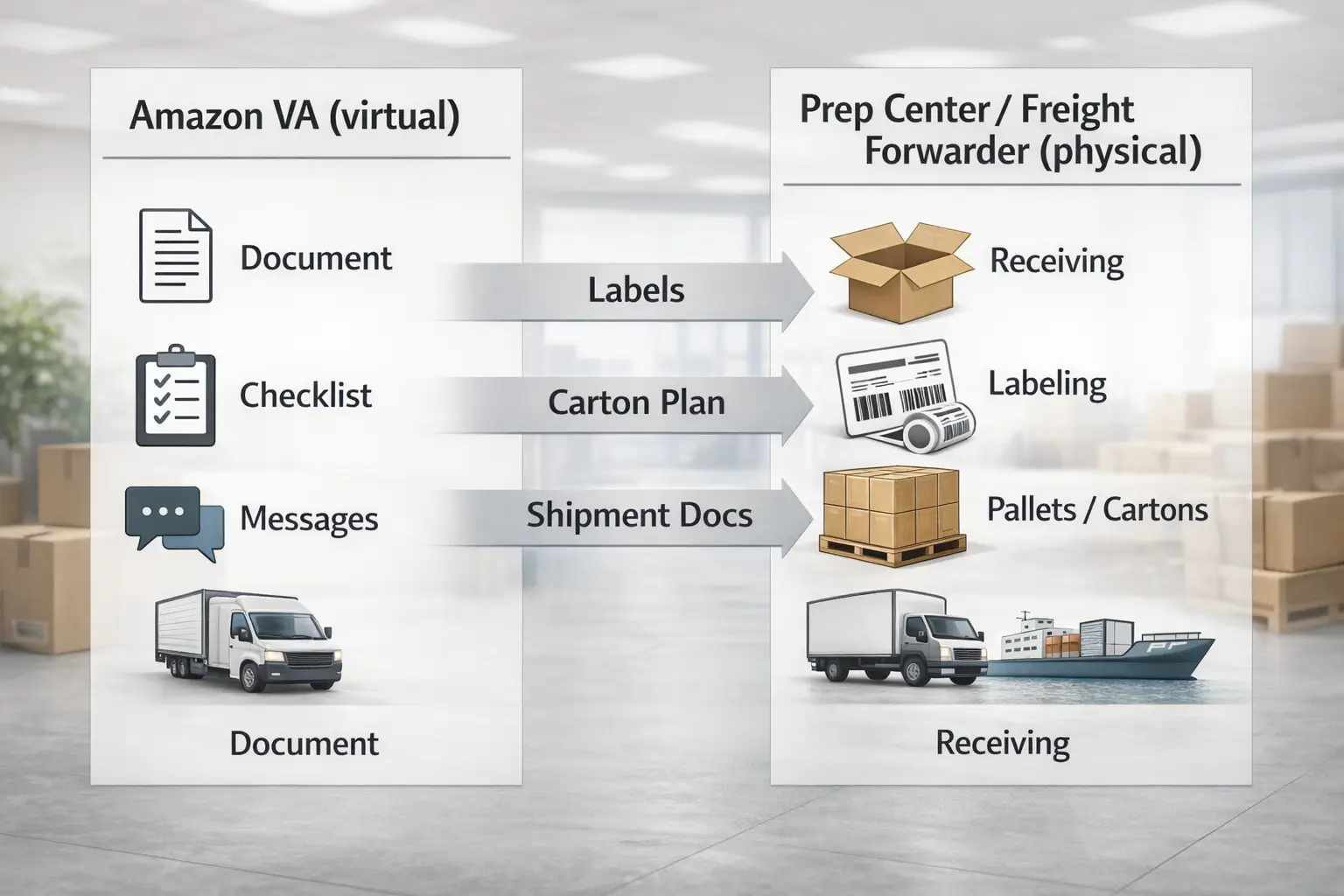
A VA can coordinate documents, labels, and communication, but they can’t physically receive goods, prep cartons, or move freight—that’s where a prep center and freight forwarder fit.
Key points
- Virtual coordination ≠ physical execution.
- Many “FBA tasks” break down at handoffs: labels, carton plans, and shipment documents.
- Multi-supplier setups increase the need for consolidation and physical quality checks.
Comparison table: who does what?
| Need | Amazon VA | Prep center | Freight forwarder |
|---|---|---|---|
| Seller Central task execution | Yes | No | No |
| Supplier coordination (messages, docs) | Yes (coordination) | Sometimes | Sometimes |
| Receiving inventory | No | Yes | Sometimes (via partners) |
| Labeling / kitting / packaging | No | Yes | No |
| Consolidation across suppliers | No | Yes | Sometimes (via warehouse) |
| Booking transport | No | No | Yes |
| Customs coordination / delivery routing | No | No | Yes |
| Proof of physical condition | No | Yes | Sometimes (inspection via partner) |
Handoff checklist (to reduce inbound mistakes)
- Final SKU list and carton plan (what’s in each carton)
- Label packet: carton labels, item labels (if needed), pallet labels (if used)
- Photos or confirmation for any special packaging requirements
- Shipment plan details and destination FC requirements (where applicable)
- Clear “ownership” rules: who confirms counts, who fixes discrepancies, who updates Seller Central
Optional visual (diagram placeholder)
Boundary conditions / caveats
- Physical workflows vary by your setup (single supplier vs many) and by where inventory is staged.
- No partner can guarantee “zero problems,” but clear handoffs reduce preventable errors.
If your “VA tasks” include supplier pickups, multi-factory consolidation, labeling, carton planning, and delivery into Amazon warehouses, you’ll usually need a physical partner (prep center and/or freight forwarder) alongside any VA. FBABEE supports China-side consolidation and FBA prep plus door-to-door freight coordination—useful when your main bottleneck is physical execution, not Seller Central clicks.
Is the Amazon VA role in demand and what it changes for hiring
Demand for Amazon VAs tends to rise when more sellers need operational support, but what matters for you is how specialized the role is and how strict you are about proof and testing.
Key points
- “In demand” doesn’t guarantee quality; it usually increases the need for better screening.
- Specialized skills are harder to evaluate without a test task and trial.
- Broad “account manager” claims should be treated carefully unless backed by evidence.
Practical hiring implications
- Treat portfolios as “signals,” not proof—run a scope-matched test.
- Ask for documentation habits (SOPs, checklists, change logs).
- Use a trial period with limited permissions before expanding scope.
Boundary conditions / caveats
- Demand varies by specialization (admin vs PPC vs catalog troubleshooting) and can change over time.
- Avoid relying on hype claims; rely on your own vetting process.
How to become an Amazon VA
To become an Amazon VA, focus on Amazon tool familiarity, documentation habits, and safe work practices—then build proof with practice projects that don’t require risky client access.
Key points
- Learn the language of Amazon operations (listings, inventory, cases, shipments).
- Build a portfolio from “simulated” tasks: audits, report templates, SOP examples.
- Treat security as non-negotiable: no credential sharing and no “shortcuts.”
Simple roadmap (steps)
- Learn Seller Central basics (navigation, reports, common workflows).
- Build spreadsheet/report templates for weekly reporting and inventory alerts.
- Practice writing SOPs and checklists for repeatable tasks.
- Create sample deliverables (listing audit doc, customer triage template, case tracker).
- Start with entry-level execution tasks; expand scope only with proof and supervision.
Boundary conditions / caveats
- Never ask for a client’s main login credentials; a professional setup uses controlled access.
- Stay within platform rules and ethical boundaries; long-term trust beats short-term hacks.
FAQ
What is an Amazon FBA virtual assistant?
An Amazon FBA virtual assistant is a remote worker who helps sellers execute recurring Amazon tasks (often inside Seller Central) based on SOPs and reporting. They support day-to-day operations, but they’re not an Amazon employee and they don’t replace the owner’s strategy or financial control.
- Best for: repeatable workflows with clear “done” definitions
- Not for: physical prep/shipping or high-stakes owner decisions
What does an Amazon virtual assistant do?
Amazon VAs commonly handle listing hygiene, support triage, case follow-ups, reporting, and operational documentation. The exact task list depends on your SOPs, permission settings, and whether you use approvals for high-impact actions.
- Start with: reporting + triage + basic listing hygiene
- Add later: shipment coordination drafts (with approvals)
What tasks should you not outsource to an Amazon VA?
Avoid delegating sensitive settings (payouts, taxes, bank details) and any high-impact actions you can’t review. Also avoid large-scale listing edits without approvals and anything “policy-sensitive” unless you have specialist oversight.
- Keep owner-only: payments, tax, user management
- Add controls: approvals + change logs for risky edits
What Seller Central access should an Amazon VA have and how do you reduce risk?
Use separate user access and least-privilege permissions aligned to the VA’s task scope, and ensure two-step verification is enabled for every user. Amazon’s Seller Central help pages describe user permissions management and 2SV requirements.
- Match permissions to tasks; review when scope changes
- Add QA: approvals, change logs, and documentation
How do you hire and vet an Amazon FBA virtual assistant?
Define scope first, then screen for proof, run a scope-matched test task, and start with a limited trial period. Hiring guides from marketplaces and industry resources commonly emphasize task clarity and vetting.
- Test task + trial > resume-only hiring
- Require documentation habits (notes, checklists, screenshots)
How much does an Amazon virtual assistant cost?
Pricing varies widely, so the safest way to think about cost is by model: hourly for flexible support, retainer for predictable workloads, or per-task for defined deliverables. Your total cost also depends on training time, QA intensity, and scope complexity.
- Drivers: specialization, SOP maturity, QA needs
- Hidden costs: rework when scope isn’t defined
When do you need a prep center or freight forwarder instead of a VA?
When the work is physical—receiving goods, labeling, kitting, consolidating, and shipping cartons—or when you need transport booking and customs coordination, you need a prep center and/or freight forwarder. A VA can coordinate documents but can’t execute physical steps.
- VA: virtual coordination + Seller Central workflows
- Partners: physical handling + transport execution
Summary and next steps
If you remember one thing, remember this: an Amazon VA is valuable when you match tasks to access level and QA, then scale scope gradually. Start with 3–5 repeatable tasks, build SOPs, control permissions, and expand only after consistent outputs.
Key points
- Define scope as deliverables (outputs), not vague responsibility.
- Use a test task + trial period to reduce hiring risk.
- Separate virtual coordination from physical execution (prep/forwarder).
One-week action plan
- List your top 10 recurring tasks and tag them (low-risk vs high-risk).
- Write SOPs for the top 3 repeatable tasks.
- Decide your QA gate (approve all vs sample review).
- Draft a one-page scope card and a paid test task.
Boundary conditions / caveats
- Don’t delegate what you can’t review.
- Keep sensitive settings owner-only wherever possible.
If you’re juggling multiple Chinese suppliers and your real pain is consolidation, labeling, carton planning, and getting inventory into Amazon warehouses, consider pairing your VA with a physical China-side partner. FBABEE supports consolidation, FBA prep, and door-to-door freight coordination so your VA can focus on coordination and documentation while physical steps get executed by a warehouse/logistics team.