Table of Contents
What Amazon Account Level Reserve Is (and why your payout looks lower)
Amazon’s Account Level Reserve is money Amazon temporarily sets aside from your seller proceeds to help cover potential obligations (like refunds or disputes). When a reserve is applied, it can make your available payout look lower even when sales are strong.
- What it affects: the portion of your balance that can be included in your next disbursement.
- Where you’ll notice it: in Seller Central Payments/Statement views as part of what’s “unavailable.”
- What it’s for: a risk-control buffer tied to potential post-order costs (not automatically a penalty).
- What to do first: confirm whether your “unavailable balance” is reserve-only or includes other holds, then review timing and account/payment signals.
- Keep in mind: exact behavior can vary by account and marketplace—always verify what you see in Seller Central.
Account Level Reserve basics: meaning, where it shows up, and what it’s not
In plain terms, Account Level Reserve is a portion of your seller proceeds that Amazon may hold back temporarily, which reduces what’s immediately available for disbursement. It’s easiest to understand when you separate “reserve” from other balance labels you’ll see in Payments.

Reserve vs. unavailable vs. available (quick comparison)
| Term you see in Payments | What it usually means | Why it matters for payouts | What to check |
|---|---|---|---|
| Account Level Reserve | A portion of proceeds held temporarily as a buffer for potential obligations | Reduces what can be disbursed now | Whether the reserve amount changed recently and whether it’s rolling over |
| Unavailable balance | Funds not currently eligible for disbursement (reserve and/or other holds) | Explains why your payout can be lower than expected | What’s included in “unavailable” (don’t assume it’s reserve-only) |
| Available balance | Funds currently eligible to be included in your next disbursement | Closest indicator of near-term cash-out | Your disbursement schedule, bank status, and any holds shown in Payments |
Where to find it in Seller Central (and what to capture if you need support)
Exact menus can vary, but a common path is:
- Go to Seller Central and open Payments.
- Open Statement View (or the equivalent statement/balance view available to your account).
- Look for a line item labeled Account Level Reserve and review the breakdown of available vs. unavailable.
- Check your disbursement schedule and the most recent statement period for changes.
If you need to contact support, it helps to capture:
- A screenshot of the statement/balance breakdown showing reserve and unavailable/available amounts
- The statement period dates
- Any visible payment holds or disbursement status messages
For Amazon’s official definition, see Seller Central Help (login may be required):
– Amazon Seller Central Help: “What is account level reserve?” https://sellercentral.amazon.com/gp/help/external/G200136810
Why Amazon holds funds in Account Level Reserve
Amazon uses Account Level Reserve as a risk-control mechanism: it may hold part of your proceeds temporarily to help ensure funds are available if certain post-order obligations occur. When a reserve is applied, the practical effect is simple—less of your balance is eligible for immediate payout.
Common obligation categories (examples, not exhaustive) include:
- Refunds and returns that may post after the original order
- Payment disputes/chargebacks (where applicable)
- Claims and other post-order adjustments that can reduce proceeds
This isn’t automatically a “punishment.” Many sellers encounter reserve behavior during specific phases (for example, early selling history or periods of unusual volatility). Amazon also notes that reserve behavior can vary by seller account and conditions—avoid assuming there’s a single universal formula.
A useful official overview appears in the Seller Forums staff guide (login may be required):
– Amazon Seller Forums (staff): “Your Complete Guide to Account Level Reserves” https://sellercentral.amazon.com/seller-forums/discussions/t/ee6bc4f7-34a3-43f3-8061-be2eccd02529
What typically influences the size of your reserve
Reserve amounts can vary based on account history and patterns that may change perceived risk or uncertainty. Amazon does not publicly document a single universal formula, so treat the items below as common contributing factors rather than guaranteed triggers.
Common factors (what they can affect, and what you can check)
| Factor (high-level) | How it may relate to reserve behavior | What you can check |
|---|---|---|
| New selling history or sudden change in sales patterns | Higher uncertainty can coincide with more conservative holds | Compare current statement periods to prior periods; look for sudden reserve changes |
| Return/refund patterns | Higher post-order adjustments can increase uncertainty | Returns and refunds trends in your account reports |
| Disputes/claims activity (where applicable) | Potential obligations can increase the need for a buffer | Any open disputes/claims indicators and their timing vs. reserve changes |
| Account reviews or policy/compliance issues (high-level) | Some account conditions can affect payout eligibility | Account Health notifications and any payout-related messages |
| Bank/disbursement setup changes | Errors or verification events can delay payouts (sometimes alongside “unavailable” balances) | Disbursement settings, bank status, and any verification prompts |
If you’re a new seller or scaling quickly, it can help to treat reserves as a “cash-flow reality” and plan inventory and shipping with more buffer (see the planning section below).
How reserve release timing works (payout mechanics, explained without promises)
There isn’t a single fixed “release day” that applies to every account. Instead, reserve availability is best understood as a logic flow that can change with account conditions, order lifecycle timing, and your regular disbursement schedule.
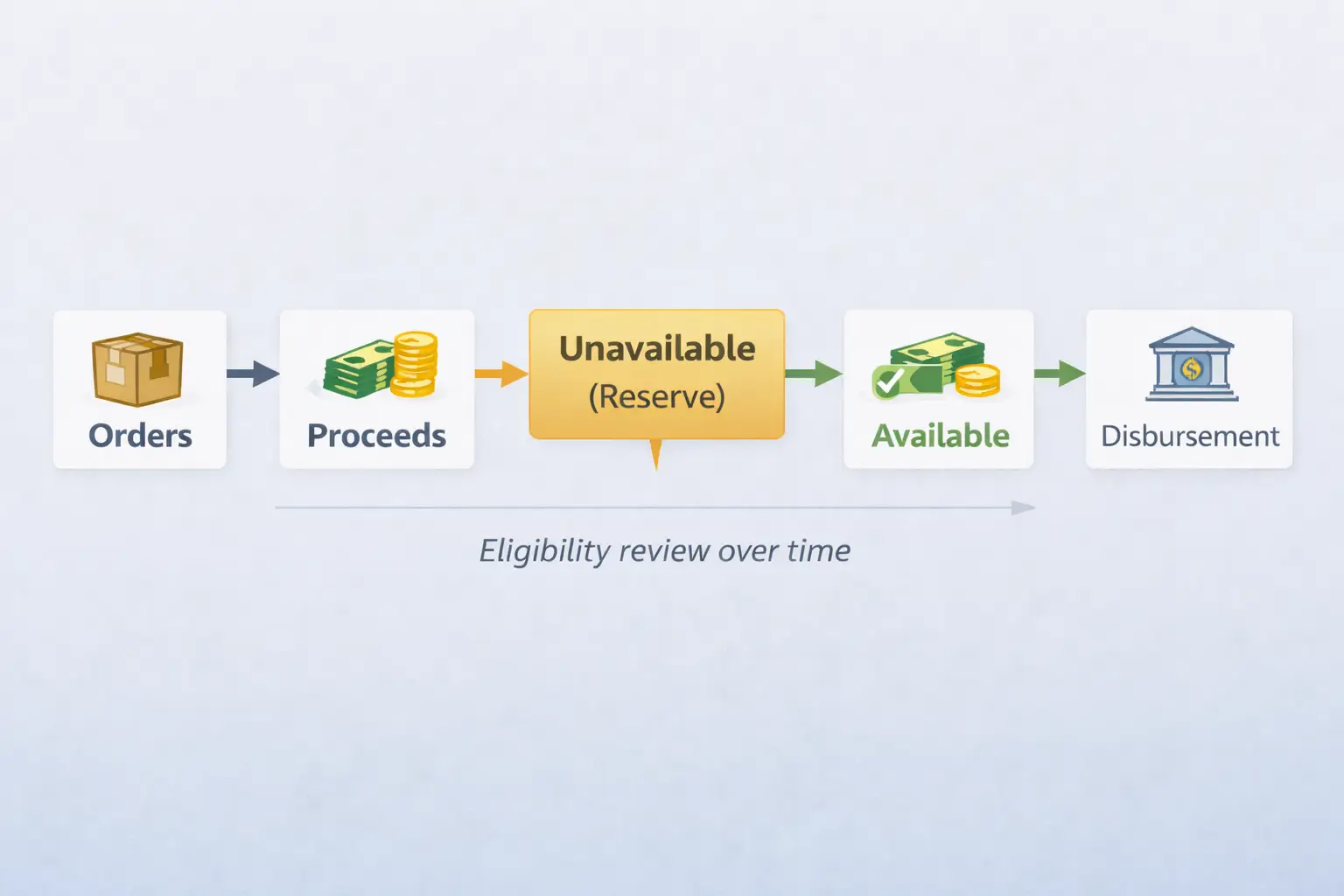
A simple logic flow for how reserves can be released
- Orders generate proceeds, but not all proceeds become immediately eligible for disbursement.
- Amazon may place part of proceeds into unavailable balance as Account Level Reserve.
- Over time, as order-related uncertainty decreases and obligations are resolved or become less likely, some funds may become eligible to move from reserve/unavailable into available.
- Your next disbursement reflects what is available at the time of disbursement—reserves can reduce that amount.
- If new activity or unresolved obligations remain, you may see reserve amounts carry over (it can feel “stuck” even though statements are updating).
Why it can feel delayed or roll over
A few common, non-exhaustive reasons include:
- Your statement/disbursement schedule updates, but eligibility changes lag behind order lifecycle timing.
- “Unavailable balance” includes items beyond reserve (so available funds don’t increase as expected).
- Account/payment settings or verification issues affect what can be disbursed even if sales continue.
For a broader official explanation of seller payments (and how disbursements work), see:
– Amazon Seller blog: “Amazon seller payments” https://sell.amazon.com/blog/amazon-seller-payments
Troubleshooting: reserve is high, negative, or not clearing (what to check, then what to do)
If your reserve jumps suddenly, turns negative, or your payouts slow down, use a structured check path. The goal is to confirm what’s actually happening in Payments before assuming it’s an error.
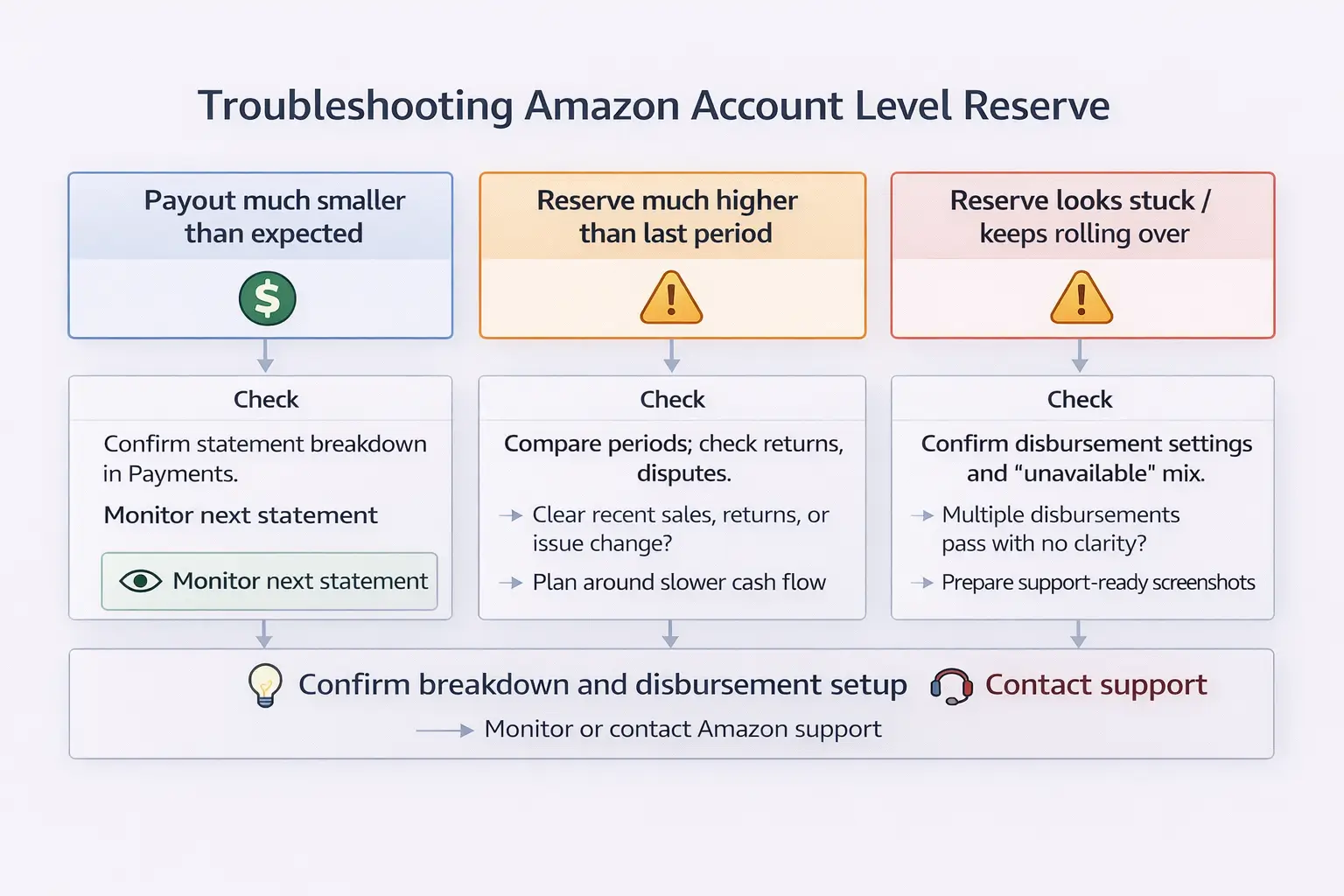
A practical decision tree (symptom → checks → next action)
- Symptom: “My payout is much smaller than expected.”
- Check: In Payments/Statement View, confirm available vs. unavailable and whether Account Level Reserve is the main driver.
- Next action: If unavailable includes multiple holds, identify each hold category (don’t treat all unavailable as reserve).
- Symptom: “Reserve is much higher than last period.”
- Check: Compare statement periods—did the reserve change alongside returns/refunds, claims/disputes, or account notifications?
- Next action: If there’s a clear recent change (e.g., spikes in post-order adjustments), plan around tighter cash flow and monitor the next statement period.
- Symptom: “Reserve looks stuck / keeps rolling over.”
- Check: Confirm your disbursement schedule, and whether “unavailable” contains items other than reserve.
- Next action: If multiple periods pass with no clarity and no visible explanation, prepare support-ready screenshots and open a case.
- Symptom: “Reserve is negative” or “payouts stopped.”
- Check: Confirm the statement breakdown, disbursement settings, and any payout or verification messages.
- Next action: Treat this as a review-trigger situation—gather your statement screenshots and contact Seller Support for account-specific clarification.
What you can control vs. what you can’t
You can often influence the conditions around reserves (not the exact reserve model):
You can control (risk-reducing habits):
- Keep product quality and listing accuracy high to reduce avoidable returns/refunds.
- Resolve customer issues and disputes promptly where applicable.
- If you fulfill orders yourself (FBM), ensure reliable shipping, valid tracking, and on-time delivery signals.
- Keep bank/disbursement settings accurate and complete.
You can’t control (model/policy internals):
- The exact reserve calculation methodology.
- Account-level risk models and how they weight different signals.
- Some timing dependencies tied to statement periods and order lifecycle behavior.
A short, bounded note on FBA vs. FBM (as it relates to timing signals)
- With FBA, Amazon handles fulfillment and delivery confirmation signals, so you typically focus more on statement breakdown and account/payment settings.
- With FBM, shipping and tracking quality can affect delivery timing signals, which may influence when funds are eligible to be disbursed (as applicable).
Avoid absolutes: fulfillment method is only one piece of the picture, and behavior can still vary by account and marketplace.
Cash-flow & replenishment planning when Amazon holds funds in reserve (FBA sellers)
When reserve behavior reduces payouts, the best countermeasure is operational: plan inventory and shipments around tighter short-term cash flow and longer lead times, without assuming Amazon’s reserve rules will change.

A practical checklist to avoid stockouts while payouts are constrained
- Calculate runway: how many weeks of sellable inventory you have for your top SKUs.
- Confirm lead times: factory production time + prep time + shipping/inbound variability.
- Set a conservative reorder trigger: don’t wait until you “feel” low—use a buffer.
- Prioritize top sellers first: fund replenishment for highest-velocity SKUs before long-tail items.
- Use staged replenishment: consider splitting replenishment into smaller waves so you aren’t cash-heavy all at once.
- Consolidate smartly: if you source from multiple suppliers, consolidate cartons and prep requirements to reduce coordination overhead and rework.
- Stay compliant on prep/cartons: label accuracy and carton planning prevent inbound disruptions that can create additional operational stress.
Optional mini-table: cash pressure → shipment cadence approach (non-promissory)
| Cash pressure level | A practical approach (examples) |
|---|---|
| High | Prioritize only top SKUs; ship in smaller waves; avoid overproducing long-tail items |
| Medium | Stage replenishment with a buffer; consolidate suppliers; maintain a “minimum cover” target |
| Low | Optimize for continuity and inbound stability; keep buffers but avoid unnecessary overstock |
If payout timing is impacting replenishment decisions, operational planning can help reduce stockout risk. FBABEE supports multi-supplier consolidation, FBA prep (labels/carton planning), and staged shipment planning from China to Amazon fulfillment networks. To request a shipment plan, prepare: SKU list, carton counts/dimensions, target marketplace, and any preferred delivery window.
FAQ
What is Account Level Reserve on Amazon?
It’s a portion of your seller proceeds that Amazon may temporarily hold as a buffer for potential obligations. When it applies, it reduces the funds eligible for your next disbursement. Exact behavior can vary by account and marketplace, so confirm the breakdown in Seller Central.
Where do I see Account Level Reserve in Seller Central (Payments report / Statement View)?
- Open Seller Central → Payments.
- Go to Statement View (or your account’s equivalent statement/balance view).
- Find the line item for Account Level Reserve and review available vs. unavailable amounts.
- Check the statement period and your disbursement status.
If you contact support, capture the statement breakdown and the statement period dates.
Why is my money in “unavailable balance” or reserve—what is Amazon trying to cover?
Amazon may hold funds as a buffer for potential post-order obligations. Common examples include:
- refunds and returns
- disputes/chargebacks (where applicable)
- claims and other post-order adjustments
There isn’t a single universal public formula, and behavior can vary by account/marketplace—verify your statement breakdown in Seller Central.
How long does Amazon hold funds in Account Level Reserve, and when are they released?
A practical way to think about release timing is logic-based rather than a fixed number of days:
- Proceeds are generated, but some may be held as reserve/unavailable.
- As order-related uncertainty decreases and obligations are resolved, funds may become eligible to move into available.
- Your next disbursement reflects what’s available at that time.
If funds roll over, confirm whether “unavailable” includes items beyond reserve and review your disbursement status in Seller Central.
What factors influence how big my Account Level Reserve is?
Reserve amounts can vary based on account conditions and patterns. Common contributing factors may include:
- changes in sales volume or selling history
- returns/refunds patterns
- disputes/claims activity (where applicable)
- account reviews or payout/verification signals
Avoid assuming a single threshold or formula; use your statement comparisons and account notifications to understand changes.
How can I reduce Account Level Reserve (what can I control vs. what I can’t)?
You can control (risk-reducing habits):
- reduce avoidable returns by improving product quality and listing accuracy
- resolve disputes and customer issues promptly (as applicable)
- keep disbursement settings and bank info correct
- for FBM, use reliable shipping and valid tracking
You can’t control:
- the exact reserve calculation methodology
- account-level risk models and their weights
- some timing dependencies tied to statement periods and order lifecycle behavior
If changes are sudden or confusing, gather your statement screenshots and ask Seller Support for account-specific clarification.
What does it mean if my Account Level Reserve is negative or my payouts stopped?
- Confirm the statement breakdown (available vs. unavailable and reserve line items).
- Check disbursement settings and bank/verification prompts.
- Review any account notifications that could affect payouts.
- If it’s still unclear, open a support case with your statement screenshots and dates.
Negative values and payout stops can be case-specific—avoid guessing and use support-ready information.
Does Account Level Reserve work differently for FBA vs FBM sellers?
At a high level, the reserve is an account-level concept, but timing signals can differ “as applicable”:
- FBA: delivery/fulfillment signals are handled by Amazon.
- FBM: your shipping and tracking quality can affect delivery timing signals.
Because behavior can vary by account and marketplace, treat this as a context note, not a rule.
Summary & Next Steps
Account Level Reserve can be frustrating, but it’s manageable when you separate terminology, timing, and action:
- Reserve can reduce available payout even when sales are strong—confirm the statement breakdown first.
- “Unavailable balance” may include reserve and other holds—don’t assume it’s all reserve.
- Release timing is best understood as a logic flow tied to statements and eligibility, not a single promised day.
- If reserve is high, negative, or feels stuck, use a structured check path and gather support-ready screenshots.
- Plan replenishment around tighter short-term cash flow: runway, buffers, staged replenishment, and consolidation.
If you’re planning a first-time FBA shipment, consolidating from multiple suppliers, or trying to avoid stockouts during payout delays, build a simple staging plan (prioritize top SKUs, keep buffers, and avoid overcommitting cash to long-tail inventory).