Table of Contents
If you’ve ever had an FBA shipment delayed at receiving, it’s usually not because you “forgot a label”—it’s because the right label wasn’t used, wasn’t scannable, or got mixed up during handoffs (supplier → consolidation/prep → pickup → FBA). This guide gives you a practical label map, then walks you through printing, placement, and QA checkpoints—especially for split shipments and multi-supplier setups.
This is operational guidance, not official policy advice. Requirements can change, and edge cases exist—always verify what your shipment workflow shows in Seller Central for your specific FC and shipping method.
The FBA label checklist (unit vs box vs pallet)
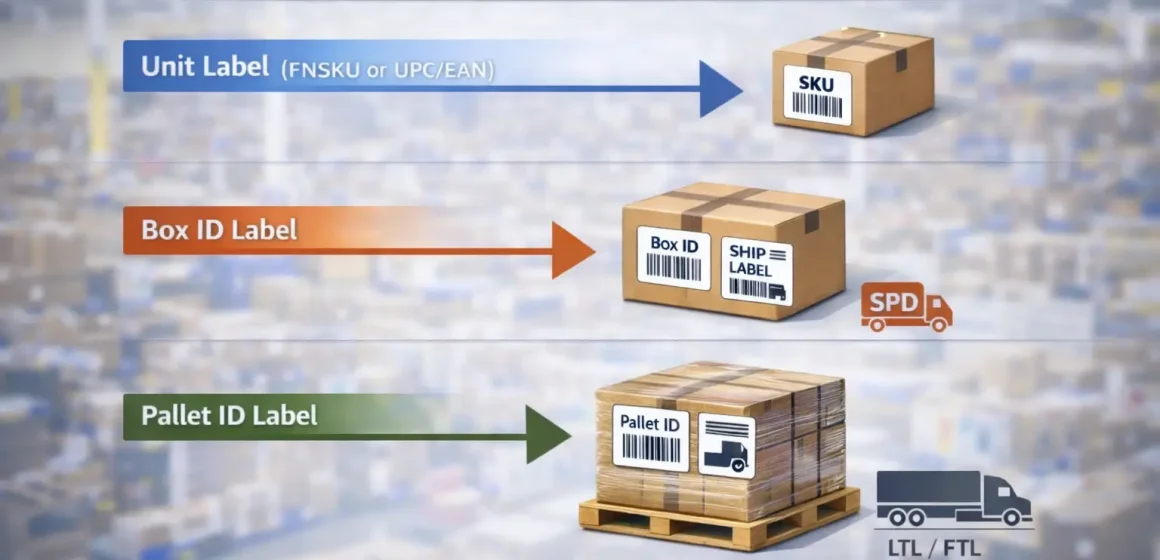
To ship to FBA smoothly, you typically need (1) unit identification (barcode decision), (2) a unique box/shipment label for every carton, and (3) pallet labels for palletized freight—plus a carrier label when you use small-parcel delivery. (sellercentral.amazon.com)
| Label type | Goes on | When you need it | Where you usually get it |
|---|---|---|---|
| Unit label (FNSKU) or manufacturer barcode (UPC/EAN) | Each sellable unit | Depends on your barcode eligibility/choice (time-sensitive) | Product labeling settings / shipment workflow guidance (sellercentral.amazon.com) |
| FBA Box ID / shipment label | Each carton/box | Every box in the shipment needs its own label (don’t reuse or photocopy) | Shipment workflow / Shipping Queue (“print box labels”) (sellercentral.amazon.com forums) |
| FBA Pallet ID label | Each pallet | LTL/FTL/FCL palletized shipments (and other palletized workflows) | Shipment workflow (“print pallet labels”) (sellercentral.amazon.com) |
| Carrier label | Each carton/box | Small Parcel Delivery (SPD) / courier shipments | Carrier system or Seller Central shipping label flow (varies) (sellercentral.amazon.co.za) |
Boundary notes (read before you act):
- Barcode rules are time-sensitive (see the barcode section below), so treat eligibility as “verify in your account,” not as permanent. (sellercentral.amazon.com)
- Pallet rules can vary by FC and mode; follow your shipment workflow prompts and the delivery requirements for your destination. (sellercentral.amazon.com)
Label types, explained (and what people mix up)
Once you know the checklist, the key is not confusing unit identification with shipment routing: unit labels help identify products, while box/pallet labels help route and receive shipments. Mixing these up is one of the fastest ways to create relabeling work or delays.
At a high level:
- Unit level: FNSKU label or eligible manufacturer barcode (UPC/EAN) to identify each unit. (sellercentral.amazon.com)
- Carton level: A unique FBA Box ID / shipment label printed for the shipment and applied to every carton. (sellercentral.amazon.com forums)
- Pallet level: FBA Pallet ID labels on each pallet for palletized freight. (sellercentral.amazon.com)
Unit labels: FNSKU vs UPC/EAN (what “stickerless” really means)
If you’re deciding between UPC/EAN and FNSKU, the simple answer is: use the barcode method your account and product are eligible for, and treat eligibility as something you verify—not assume. (sellercentral.amazon.com)
Practical interpretation:
- FNSKU (Amazon barcode): You label each unit with the FNSKU so units are tied to your listing and traceable in FBA workflows.
- Manufacturer barcode (UPC/EAN): Some products/brands can use the manufacturer barcode without applying an Amazon barcode sticker—but rules are changing (see the barcode decision section). (sellercentral.amazon.com)
- “Stickerless/commingled” is often used loosely; instead of relying on the label, rely on what your barcode preference/eligibility screens show.
Boundary note: Starting March 31, 2026, Amazon states barcode requirements are changing; eligibility to keep using manufacturer barcodes can depend on brand/registry status and selling role. Treat this as time-sensitive and verify the current rule inside Seller Central. (sellercentral.amazon.com)
Shipment labels: Box ID vs Pallet ID (why pallets still need carton labels)
Even when you ship on pallets, the practical rule is: pallet labels help identify the pallet, but cartons still need their own Box ID labels so they’re scannable when the pallet is unpacked. (sellercentral.amazon.com forums)
What that means operationally:
- A Box ID label is carton-specific and tied to the shipment plan. It should be visible on the outside of the carton.
- A Pallet ID label identifies the pallet as a handling unit in LTL/FTL/palletized workflows, and is typically placed on the outside of stretch wrap on multiple sides. (sellercentral.amazon.com)
Boundary note: “Who applies pallet labels” depends on who palletizes (supplier, consolidation/prep warehouse, or a 3PL). Don’t assume your supplier will do it unless you explicitly assign it.
Carrier labels vs Amazon labels (how to keep both visible)
Carrier labels and FBA shipment labels solve different problems; the answer is: you usually need both visible on the carton, placed so neither barcode is covered, folded, or taped over. (sellercentral.amazon.com)
Quick rule of thumb:
- Keep the FBA Box ID label next to the carrier label on a flat carton surface.
- Avoid edges/corners where barcodes fold, and avoid seams/openings that will be cut or torn. (sellercentral.amazon.com)
Where to get/print labels in Amazon Seller Central
Once you know which labels you need, the answer is: print your box and pallet labels from your shipment workflow, and treat labels as shipment-specific (don’t reuse or photocopy them). (sellercentral.amazon.com forums)
A simple workflow that works for most sellers:
- Create/confirm your shipment (including how cartons are packed and how many cartons you’re sending).
- Go to Print box labels (or the equivalent label-print step in your shipment flow) and download the carton/Box ID labels. (sellercentral.amazon.co.za)
- If your shipment is palletized freight, go to Print pallet labels and generate the Pallet ID labels. (sellercentral.amazon.com)
- Print the full set of labels and avoid reusing labels for other cartons—each label is unique to a box/shipment context. (sellercentral.amazon.com forums)
- If you edit the shipment plan (carton count, packing configuration, split shipments), re-check whether your label set changed, then re-distribute the updated labels to whoever applies them.
- Stage cartons by destination (especially for multi-FC splits), then apply labels and run a quick QA scan (see the split-shipment section).
A short change-control checklist (worth doing every time):
- Put the shipment name/ID + FC destination in the filename when you save PDFs (prevents “wrong file, right carton” mistakes).
- Only one “current” label folder per shipment; archive older versions.
- If a supplier is labeling, send one PDF package per FC when the shipment is split (avoid mixing label sets).
You’ll also see the question: “Does Amazon provide shipping labels?” In practice, Amazon provides the FBA shipment label PDFs through the workflow, but you still control printing and correct application. (sellercentral.amazon.co.za)
Handoff checklist: sending labels to a supplier or prep partner
Once labels are printed, the answer is: treat labels like controlled documents—send the right label set, with carton mapping, to the right party, at the right time.
Minimum “handoff package” to send:
- Box label PDFs (grouped by FC if split)
- Carton plan (carton number → contents/SKUs → FC)
- Packing rules (“don’t put labels on seams/openings; keep barcodes uncovered”)
- A “don’t apply shipment labels until final FC is confirmed” note (prevents wrong-label rework)
Boundary note: If your shipment is likely to change (split shipments, carton count updates), it’s often safer to apply shipment labels later in the chain (e.g., at consolidation/prep) rather than at multiple suppliers.
Carton label placement that stays scannable
After printing, the answer is: place the FBA Box ID label next to the carrier label on a flat carton surface, keep barcodes uncovered, and avoid seams/openings/edges where labels get damaged. (sellercentral.amazon.com)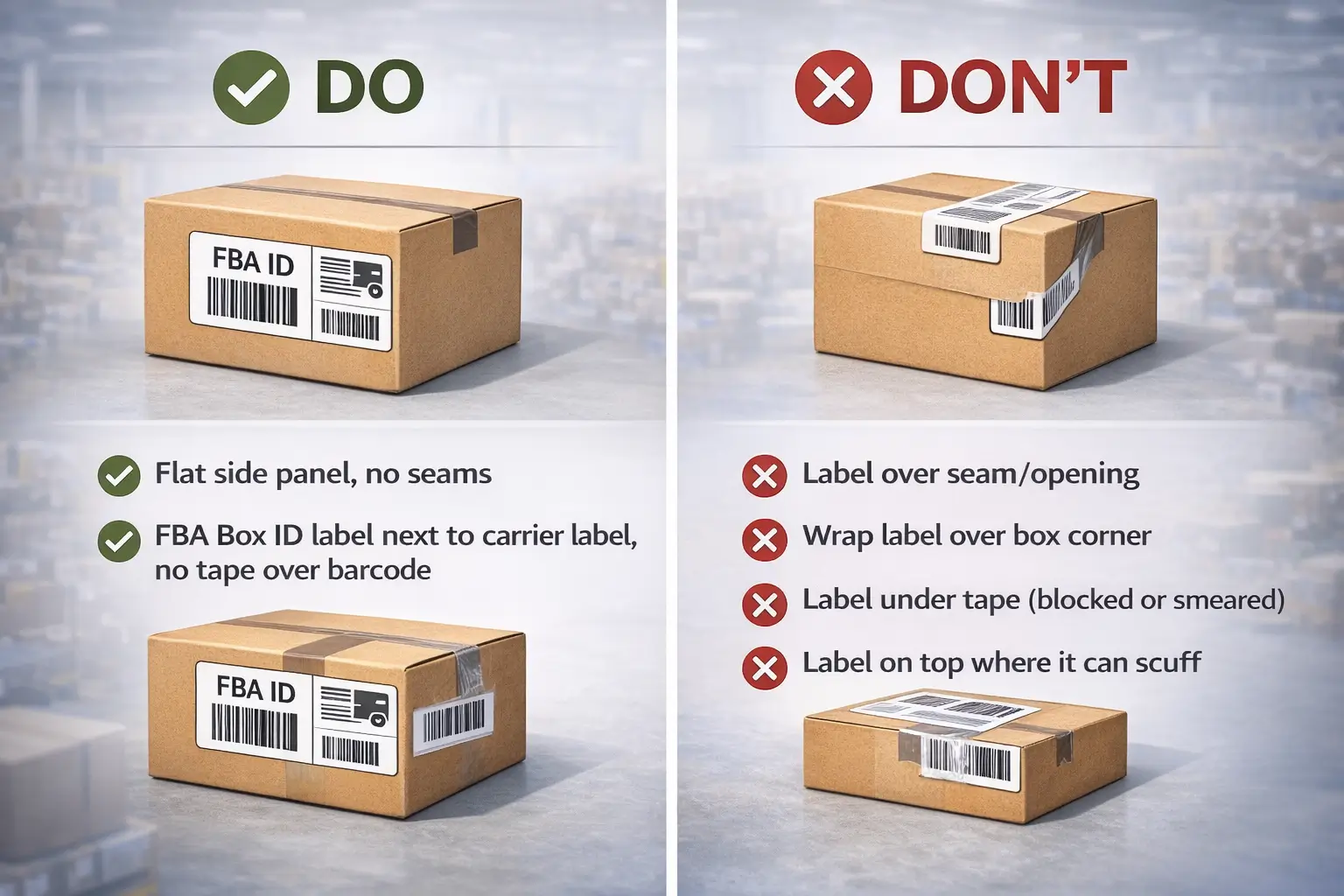
Do / Don’t placement checklist:
- Do place labels on a flat surface where the barcode won’t fold over corners. (sellercentral.amazon.co.uk)
- Do keep the FBA label next to the carrier label so both can be scanned. (sellercentral.amazon.com)
- Do keep labels uncovered and readable (no stretch wrap, no opaque tape over barcodes). (sellercentral.amazon.com forums)
- Don’t place labels on a seam or opening (they can be cut/damaged when opened). (sellercentral.amazon.com)
- Don’t wrap labels over edges/corners where barcodes crease. (sellercentral.amazon.com forums)
- Don’t “salvage” smeared or torn labels—reprint and replace before pickup (it’s cheaper than fixing at receiving).
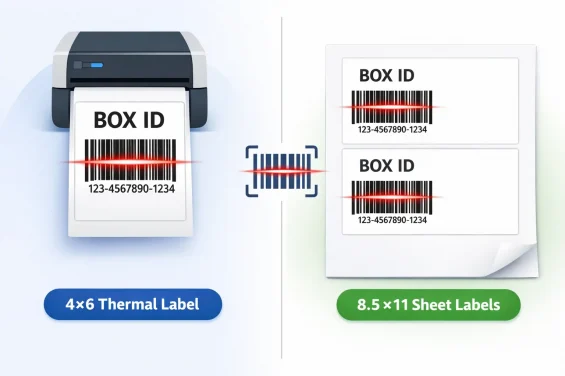
One high-signal printing detail (optional, but official): Seller Central guidance commonly references label formats such as 3 1/3 × 4 inches and a 4 × 6 thermal option—use print preview and avoid “fit to page” scaling that shrinks barcodes. (sellercentral.amazon.com forums)
Pre-pickup scan-check (30 seconds per pallet/stack):
- Randomly scan 3–5 cartons per batch: Box ID barcode reads cleanly.
- Verify each carton’s label matches the correct FC (especially if split).
- Ensure no older labels remain visible that could confuse scanning.
What to do with old labels, duplicates, and damaged barcodes
When you inherit old cartons or rework shipments, the answer is: remove or fully cover old barcodes/labels and make sure only the current Box ID is scannable.
Quick “label hygiene” rules:
- If a carton has multiple old labels, fully cover/remove the outdated ones so the scanner hits the current barcode first.
- If you accidentally placed two different Box ID labels on one carton, treat it as a rework carton: remove both and apply the correct one cleanly.
- If a barcode is damaged or taped over, reprint and replace—don’t rely on “it might still scan.”
SPD vs LTL/FTL vs FCL: what changes (and what doesn’t)
Shipment mode changes how freight is handled, but the answer remains: cartons need their own Box ID labels, and palletized freight adds pallet label requirements and visibility constraints. (sellercentral.amazon.com)
| Mode | Typical handling unit | What labels are usually required | The “gotcha” to avoid |
|---|---|---|---|
| SPD (small parcel) | Individual cartons | Box ID label + carrier label on each carton (sellercentral.amazon.co.za) | Carrier label covering Box ID barcode |
| LTL / FTL (palletized) | Pallets + cartons | Box ID on each carton and Pallet ID labels on the pallet (often four sides) (sellercentral.amazon.com forums) | Stretch wrap or pallet build hides carton labels |
| FCL (container) | Depends: floor-loaded or palletized | If palletized: treat like LTL/FTL; if floor-loaded: cartons still need Box ID labels (sellercentral.amazon.com) | Assuming “container = no pallet rules” (it depends) |
Boundary notes:
- Exact LTL/FTL/FCL requirements can include additional delivery and appointment constraints; always align with the help pages and your shipment workflow for the destination FC. (sellercentral.amazon.com)
- If you split cartons for multiple FCs onto pallets, your QA burden goes up—stage and verify per FC before wrapping.
Pallet label placement basics (visibility through wrap and handling)
For palletized freight, the answer is: place pallet labels on the outside of stretch wrap on multiple sides so they’re visible during unloading, and keep carton labels visible for unpacking. (sellercentral.amazon.com)
Constraint-based guidance that’s hard to get wrong:
- Put one copy on each side of the pallet, centered near the top, on the outside of the stretch wrap (common Seller Central guidance). (sellercentral.amazon.com)
- Use clear stretch wrap when possible so underlying labels aren’t hidden. (sellercentral.amazon.ae)
- Don’t place carton labels only on inward-facing sides of cartons—receiving teams need them visible when the pallet is unpacked. (sellercentral-europe.amazon.com forums)
UPC/EAN vs FNSKU: the barcode decision (time-sensitive notes)
The decision comes down to this: if you’re eligible to use manufacturer barcodes for your products, you may avoid unit stickers—but starting March 31, 2026, Amazon states barcode requirements are changing, so verify your eligibility and role before you commit. (sellercentral.amazon.com)
A simple decision tree (safe, non-hyped):
- If your shipment workflow indicates Amazon barcode (FNSKU) required or recommended → label each unit with the FNSKU.
- If it indicates manufacturer barcode allowed → you may ship using UPC/EAN, but confirm:
- your brand/role status (some guidance points to Brand Registry roles after March 31, 2026), and
- whether your products are still eligible at that time. (sellercentral.amazon.com)
- If you’re not sure → the safer operational default is to use FNSKU labeling for traceability (without claiming it’s “always required”).
What “time-sensitive” really means here: Amazon’s help pages explicitly flag a March 31, 2026 change; treat any blog/forum advice that doesn’t mention the change as potentially outdated. (sellercentral.amazon.com)
Split shipments (multi-FC): carton-level QA to prevent wrong labels
When Amazon splits your shipment, the answer is: you must keep label sets separated by FC and add a carton-level QA checkpoint before pickup—because “wrong FC label on the right carton” is hard to fix later. (sellercentral.amazon.com forums)
A prevention workflow you can actually run:
- Print and save label PDFs by FC (one folder per FC / shipment split).
- Create a simple carton map: carton number → contents → FC destination.
- Physically stage cartons by FC (separate zones, separate pallets, separate piles).
- Apply Box ID labels only within the correct FC zone (never from a mixed stack).
- Run a carton-level QA scan before wrapping/pickup:
- spot-check cartons in each zone
- confirm the label set matches the zone FC
- If you palletize:
- ensure carton labels remain visible
- wrap after QA, not before
- If the shipment plan changes, re-issue labels and repeat staging + QA (don’t “patch” with partial relabeling).
Carton-level QA checklist (print this):
- [ ] Carton has exactly one current Box ID label visible
- [ ] Box ID label is not on seam/opening, not folded on corners (sellercentral.amazon.com forums)
- [ ] Box ID label matches the FC zone it’s staged in
- [ ] Carrier label (if SPD) does not cover the Box ID barcode (sellercentral.amazon.co.za)
- [ ] No old labels remain visible that could confuse scanning
- [ ] For pallet shipments: pallet labels are applied outside wrap, and carton labels remain visible (sellercentral.amazon.com)
If you regularly ship split loads (multiple FCs) or coordinate multiple suppliers, consider having a consolidation/prep partner run this QA before pickup—especially during peak season or when shipment plans change late. A small QA step often costs less than rework after the freight has already moved.
Multi-supplier workflow: who labels what, when
With multiple suppliers, the answer is: assign label responsibilities to the party that has the best control point (often consolidation/prep), and never let multiple suppliers apply shipment labels unless you have strict file/version control.
A practical responsibility matrix:
| Task | Seller | Supplier | Consolidation / Prep partner |
|---|---|---|---|
| Create shipment plan & confirm FC splits | ✅ | ||
| Provide carton plan + label PDFs (by FC) | ✅ | ✅ (if delegated) | |
| Apply unit labels (FNSKU) | ✅ / ✅ (depends) | ✅ (common fallback) | |
| Apply Box ID labels | ⚠️ (only if FC is final and controlled) | ✅ | |
| Palletize + apply Pallet ID labels | ⚠️ (if supplier palletizes) | ✅ | |
| Carton-level QA (scan + staging) | ✅ (oversight) | ✅ |
Minimum handoff package (send this every time):
- Box label PDFs grouped by FC
- Carton plan (carton number → contents → FC)
- “Placement rules” one-pager (flat surface; no seams; barcodes uncovered; don’t fold over corners) (sellercentral.amazon.com)
- Change-control rule: “If the shipment plan changes, stop and re-issue labels.”
Boundary notes:
- If you expect FC splits or late changes, applying shipment labels at a single consolidation point usually reduces errors.
- If a supplier ships direct to FBA, you still need a QA step (photos/spot scans) before pickup.
Common labeling mistakes and fast fixes
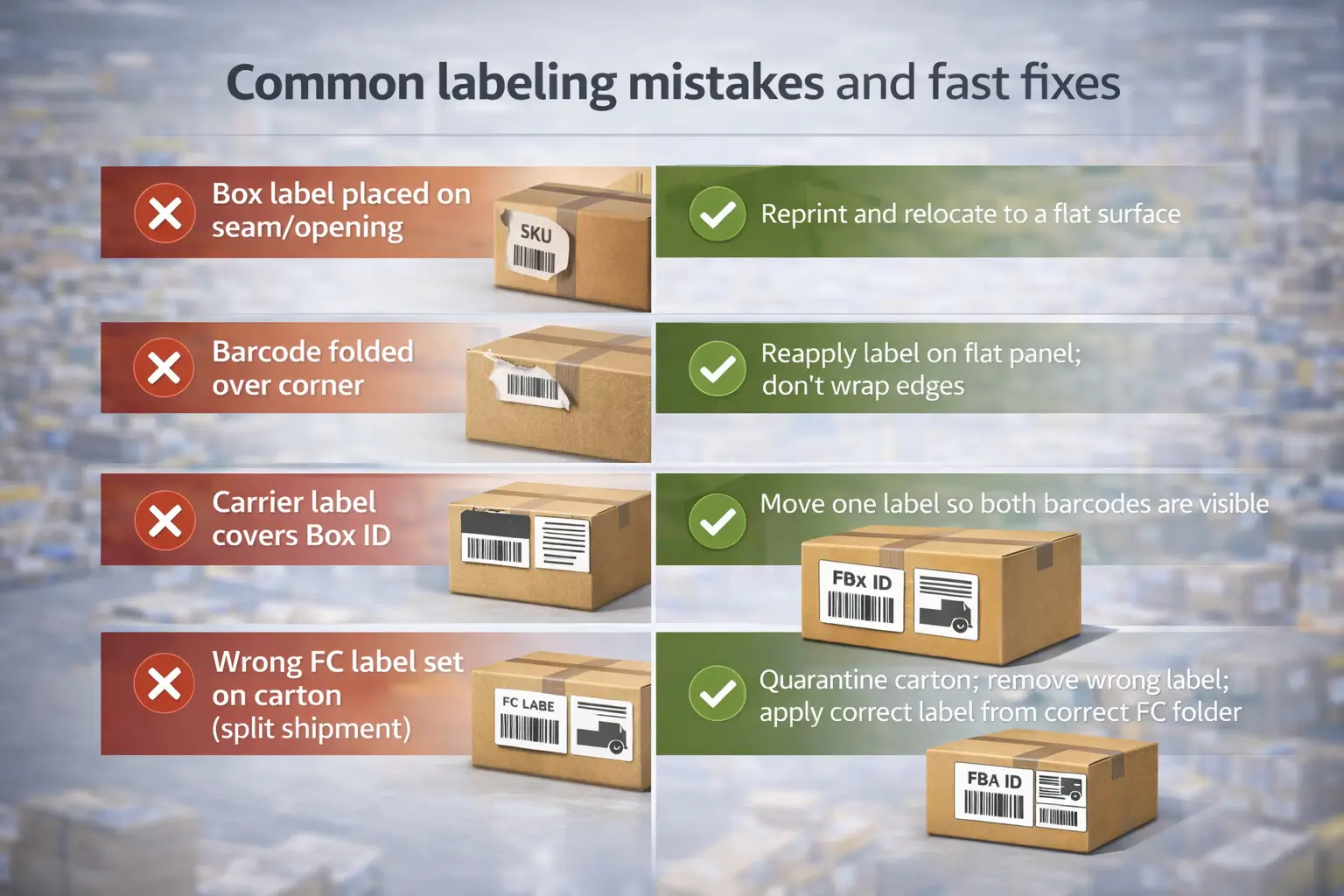
When something goes wrong, the answer is: fix the scannability and correctness before the shipment moves—because once it’s in transit, correction options get slower and more expensive.
| Mistake | What it causes | Fast fix you control |
|---|---|---|
| Box label placed on seam/opening | Label gets torn when opened | Reprint and relocate to a flat surface (sellercentral.amazon.com) |
| Barcode folded over corner | Scan failures | Reapply label on flat panel; don’t wrap edges (sellercentral.amazon.com forums) |
| Carrier label covers Box ID | Receiving can’t scan Box ID first | Move one label so both barcodes are visible (sellercentral.amazon.co.za) |
| Wrong FC label set on carton (split shipment) | Misrouting / rework risk | Quarantine carton; remove wrong label; apply correct label from correct FC folder |
| Pallet labels under wrap / only one side | Missed scans during unloading | Apply labels outside wrap on multiple sides (sellercentral.amazon.com) |
| Old labels still visible | Scanner hits wrong barcode | Remove/fully cover outdated labels; keep only the current one |
Prevention bullets (simple but high-impact):
- One shipment = one label set; don’t reuse or photocopy labels. (sellercentral.amazon.com forums)
- Stage by FC and run carton-level QA before wrap/pickup.
- If a label looks questionable, reprint—don’t ship hoping it scans.
Print quality & materials (best-practice guardrails)
Most printing guidance is best practice, but the answer is: use settings and materials that keep barcodes crisp, flat, and adhesive through transit—without scaling or smudging.
Best-practice guardrails:
- Turn off “fit to page” or auto-scaling that shrinks barcodes; use print preview.
- Choose label stock/adhesive that won’t peel under handling (especially for long-distance freight).
- If you use thermal printing, confirm you’re printing in the intended format (some guidance references 4×6 as an option). (sellercentral.amazon.com forums)
- Avoid glossy coverings or heavy tape directly over the barcode.
Boundary note: If you can’t verify a “spec” (DPI, exact paper type) in Seller Central guidance, treat it as a recommendation, not a rule.
FAQ
Q: What labels are required for an Amazon FBA shipment (unit/product labels, box labels, and pallet labels)?
A: Most shipments involve three layers: unit identification (FNSKU or eligible UPC/EAN), a unique Box ID label on every carton, and Pallet ID labels for palletized freight. Small-parcel shipments also need a carrier label on each box. Requirements can vary by mode and eligibility, so verify in your shipment workflow. (sellercentral.amazon.com)
Q: Where do I generate and print FBA box labels and pallet labels in Seller Central?
A: Use your shipment workflow to print labels: download Box ID/box labels from the “print box labels” step, and generate Pallet ID labels from the “print pallet labels” step for palletized freight. Treat labels as shipment-specific—don’t reuse or photocopy them. (sellercentral.amazon.co.za)
Q: Where should I place FBA box labels (and carrier labels) so they stay scannable?
A: Place the Box ID label next to the carrier label on a flat carton surface. Keep barcodes uncovered and avoid seams/openings and corners where labels can tear or fold. If a label is damaged or taped over, reprint and replace before pickup. (sellercentral.amazon.com)
Q: SPD vs LTL/FTL: what changes in labeling requirements?
A: SPD typically requires a Box ID label plus a carrier label on each carton. LTL/FTL adds pallet labeling (often multiple sides) while cartons still need their own Box ID labels so they’re visible when pallets are unpacked. Always follow the destination FC’s delivery requirements. (sellercentral.amazon.co.za)
Q: Do I need FNSKU labels if my products already have UPC/EAN barcodes?
A: It depends on your product’s barcode eligibility and your account settings. Amazon notes barcode requirements are changing starting March 31, 2026, and eligibility to keep using manufacturer barcodes may depend on brand/role status. If you’re unsure, FNSKU labeling is often the safer traceability choice. (sellercentral.amazon.com)
Q: Does Amazon provide shipping labels for sellers?
A: For FBA shipments, Seller Central provides the shipment label PDFs (Box ID and, when applicable, Pallet ID) through your shipment workflow. Sellers are still responsible for printing them correctly and applying them in the right place so barcodes remain scannable. (sellercentral.amazon.co.za)
Q: What are the biggest FBA labeling mistakes to avoid?
A: The biggest mistakes are reusing labels, placing labels on seams/corners, covering barcodes with tape or other labels, and mixing FC label sets during split shipments. Prevent them with version-controlled PDFs, staging by FC, and a quick carton-level QA scan before pickup. (sellercentral.amazon.com forums)
Summary: a minimal “labeling handoff package” + next steps
If you only keep one thing from this guide, the answer is: make labeling a controlled workflow—print the right label set, apply it on flat surfaces, and add QA checkpoints at the handoff points.
Copy-paste “handoff package” (send to suppliers/prep partners):
- Shipment name/ID + destination FC list
- Box label PDFs (grouped by FC if split)
- Carton plan (carton number → contents → FC)
- Placement rules: “flat surface; no seams; barcodes uncovered; don’t fold over corners” (sellercentral.amazon.com)
- Change-control: “If shipment plan changes, stop and re-issue labels.”
If you’re shipping from multiple China suppliers or handling frequent split shipments, a consolidation/prep partner can reduce risk by centralizing labeling and running carton-level QA before pickup. If you want help coordinating consolidation, prep, and mode selection (SPD vs pallet freight), FBABEE can support door-to-door flows and prep workflows—without claiming any official Amazon affiliation.