

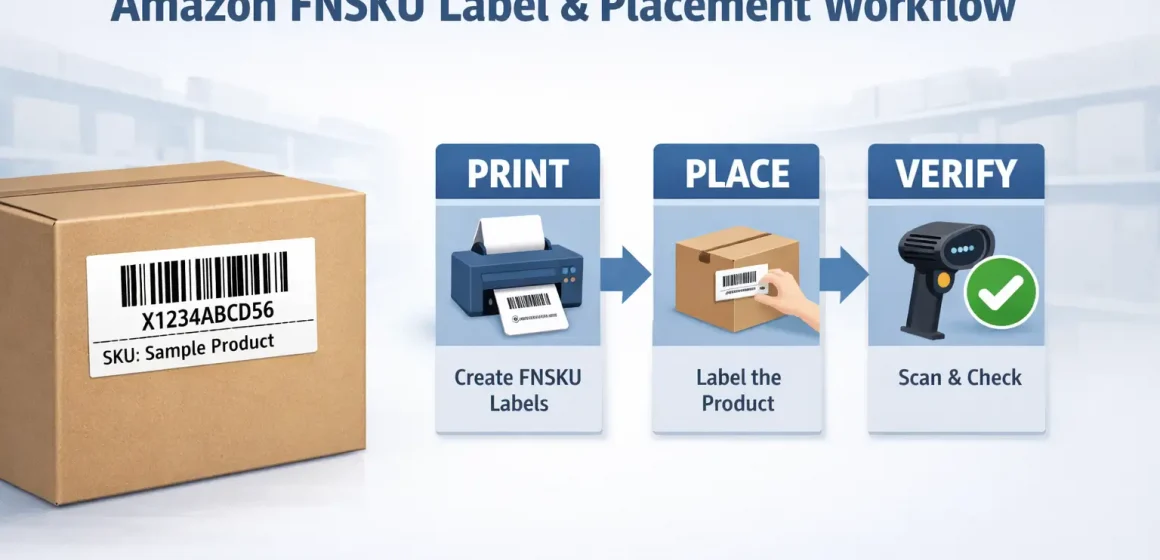
If you’re sending inventory to Amazon FBA, an FNSKU label is a seller-specific barcode Amazon can use to identify your units in receiving and fulfillment. The job is simple: print the right label, place it so the right barcode scans, and verify it before you seal cartons.
Amazon FNSKU label example + the 3-step workflow
If you just need to recognize and execute, start here. An FNSKU label is an Amazon barcode tied to your SKU/offer, and (when you’re using Amazon barcodes) it should be the only scannable barcode on the sellable unit.
Fast Answer Box (copy/paste for a supplier or prep team)
| What you need | The short version |
|---|---|
| What an FNSKU is | Seller-linked Amazon barcode for an FBA unit |
| Where you get it | Seller Central item label printing (inventory or shipment workflow) |
| What “done right” looks like | One clean, scannable barcode on the sellable unit |
| Quick QC | Scan-test a few units before sealing cartons |
The 3-step workflow (print → place → verify)
- Print the correct FNSKU labels in Seller Central for the exact SKU you’re shipping.
- Place the label on a flat, easy-to-scan surface and avoid barcode conflicts.
- Verify with a quick scan test and a visual check that no other barcode can scan instead.
FNSKU vs ASIN vs SKU vs UPC/EAN: what each identifier means
Before you print thousands of labels, clarify the identifiers. ASIN is the catalog product, UPC/EAN is the manufacturer barcode, and FNSKU is a seller-linked Amazon barcode used for certain FBA tracking setups.
| Identifier | What it identifies | Common mistake |
|---|---|---|
| ASIN | The product listing in Amazon’s catalog | Treating ASIN as a scannable barcode |
| SKU / MSKU | Your internal code for a listing | Printing labels for the wrong variation |
| UPC / EAN (GTIN) | Manufacturer barcode on the item | Leaving it scannable when you intend FNSKU to be scanned |
| FNSKU | Seller-linked unit barcode for FBA tracking | Mixing labels across similar variants |
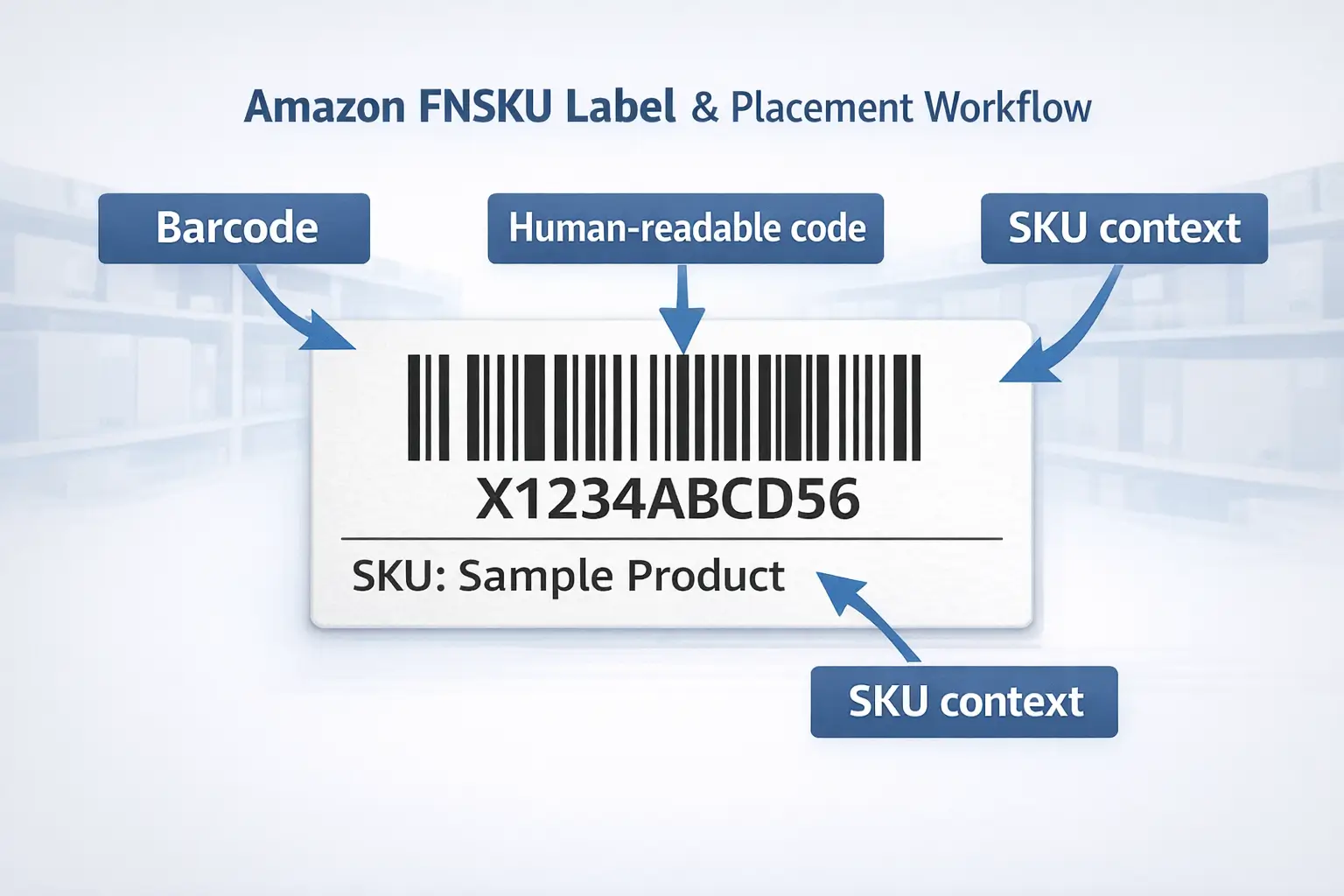
What’s on an FNSKU label (fields you’ll actually see)
Label layouts vary, but validation is consistent. Expect a scannable barcode plus a human-readable code (often an “X…” style string) and sometimes SKU context text.
- Barcode (lines) + human-readable code
- Optional SKU/variation context (template-dependent)
- Clean printing (high contrast, not warped)
FNSKU vs UPC/EAN for FBA: how to choose (and what “virtual tracking” changes)
Once identifiers are clear, choose the method you can execute consistently. If your SKU is set to use Amazon barcodes, apply FNSKU labels; if your SKU is eligible to use manufacturer barcodes (sometimes via settings/programs like “virtual tracking”), you may not need FNSKU stickers—but you must follow what your account/SKU requires.
| Choice | What gets scanned | What you do | Best fit when… |
|---|---|---|---|
| FNSKU | Seller-linked Amazon barcode | Print + apply labels | Multi-supplier handoffs, repackaging, or lots of variants |
| UPC/EAN | Manufacturer barcode | Keep UPC/EAN scannable | Stable retail packaging and your settings allow it |
Decision bullets:
- If you consolidate from multiple factories or do kitting/bundling, FNSKU is often easier to standardize per SKU.
- If your retail packaging is stable and your settings allow manufacturer barcodes, UPC/EAN can reduce labeling work.
- If you’re not 100% sure, check barcode preference for the SKU before you decide to skip labeling.
Decision tree: when FNSKU is the safer default (especially with multiple suppliers)
If you have many handoffs, ambiguity creates rework. Use FNSKU as the default when standardization matters more than saving a few minutes of labeling.
Choose FNSKU by default when you have:
- Multiple suppliers for one SKU (or frequent supplier switching)
- Repackaging/inserts that might cover or distort the UPC/EAN
- Similar-looking variants where mix-ups are likely
Choose manufacturer barcodes when:
- Packaging is stable and consistently printed
- Your account/SKU settings explicitly allow it
- You can audit barcode quality before goods leave the factory
How to find and print FNSKU labels in Seller Central (two common paths)
UI paths vary, but the concept is stable. You usually print FNSKU item labels either from an inventory context or during shipment creation, then download a PDF and print a test page before running volume.
Path A: Inventory / listing context
- Locate the SKU in your inventory list (Manage Inventory area).
- Use an action like Print item labels (wording varies).
- Select quantity and label format (sheet vs roll), then download the PDF.
- Test print one page and confirm the label matches the intended SKU/variation.
Path B: Shipment workflow (“Send to Amazon”)
- Create/edit a shipment in “Send to Amazon.”
- In the labeling step, choose Print item labels (and “who labels” if shown).
- Download the PDF and test print before labeling the full batch.
Before you print: the 60-second check to avoid generating the wrong labels
Mistakes here snowball later. Confirm the SKU/variation and the barcode method you intend to use (Amazon barcode/FNSKU vs manufacturer barcode) before you generate and print labels.
Quick check:
- Verify the exact variation (size/color/version) you’re shipping.
- Confirm the SKU’s barcode preference/tracking method in your workflow.
- Apply one label to a physical unit and scan-test it.
Label format + print setup that scans reliably
After you have the right PDF, printing is QC. Pick a label format you can apply cleanly, print at the correct scale, and scan-test a few units so you don’t discover issues after cartons are sealed.
- Roll labels: faster for volume; fewer alignment headaches.
- Sheet labels: fine for small batches; do a test print and watch scaling.
Quick checklist:
- Print at 100% / actual size (avoid “fit to page”).
- Barcodes should be high contrast and not streaked.
- Scan-test 2–3 labeled units before full production.
Where to place an FNSKU label (and when you should cover the UPC)
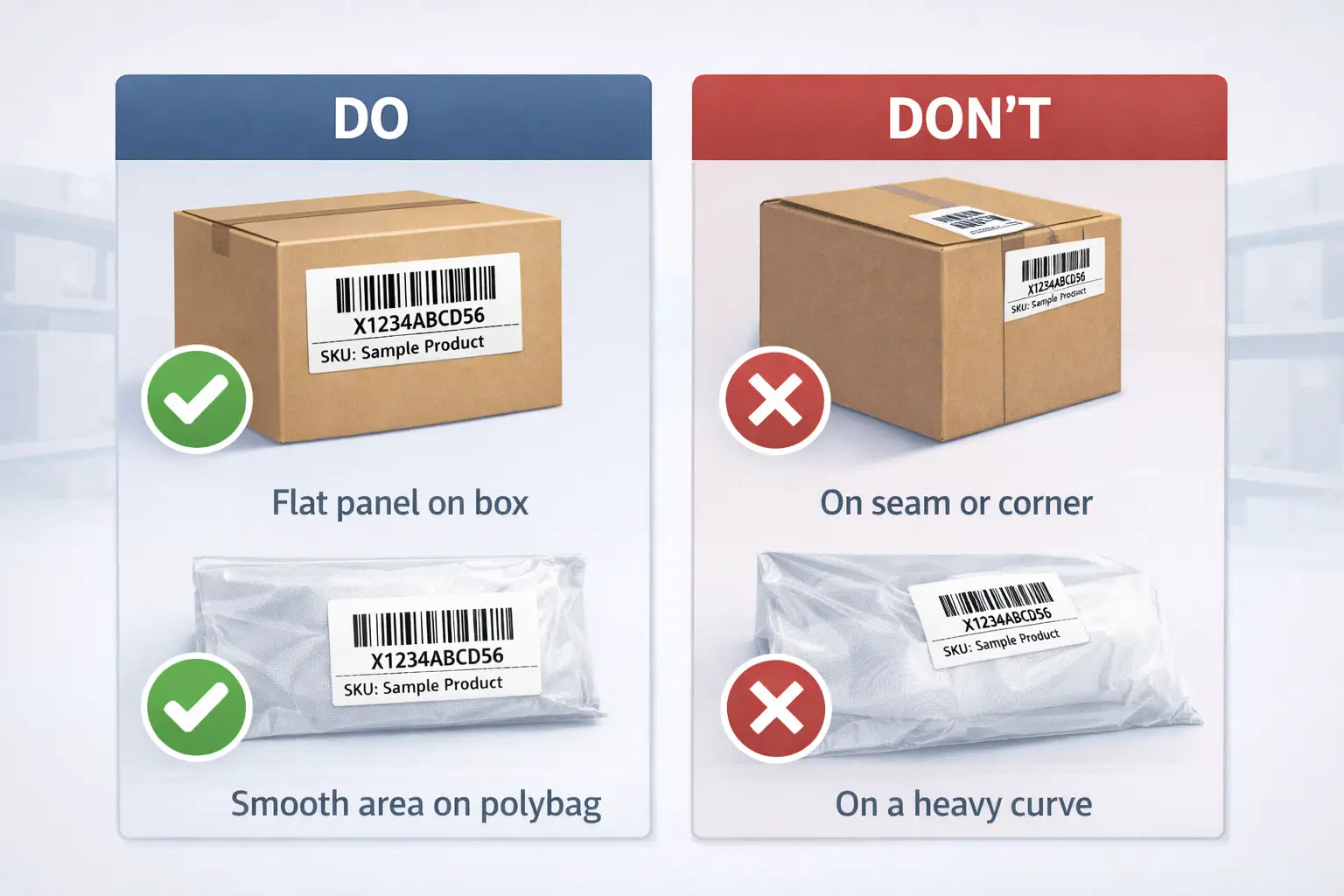
Printing correctly doesn’t help if the wrong barcode gets scanned. Place the FNSKU on a flat, easy-to-scan surface, and prevent barcode conflicts so scanners don’t read a UPC/EAN when FNSKU is the intended barcode.
Placement do/don’t checklist
Do:
- Flat, smooth area on the sellable unit
- Fully visible (not on folds/seams/corners)
- One intended scannable barcode for the sellable unit
Don’t:
- Put labels on heavy curves or edges
- Leave multiple scannable barcodes visible “just in case”
- Cover required safety/regulated info (category-dependent)
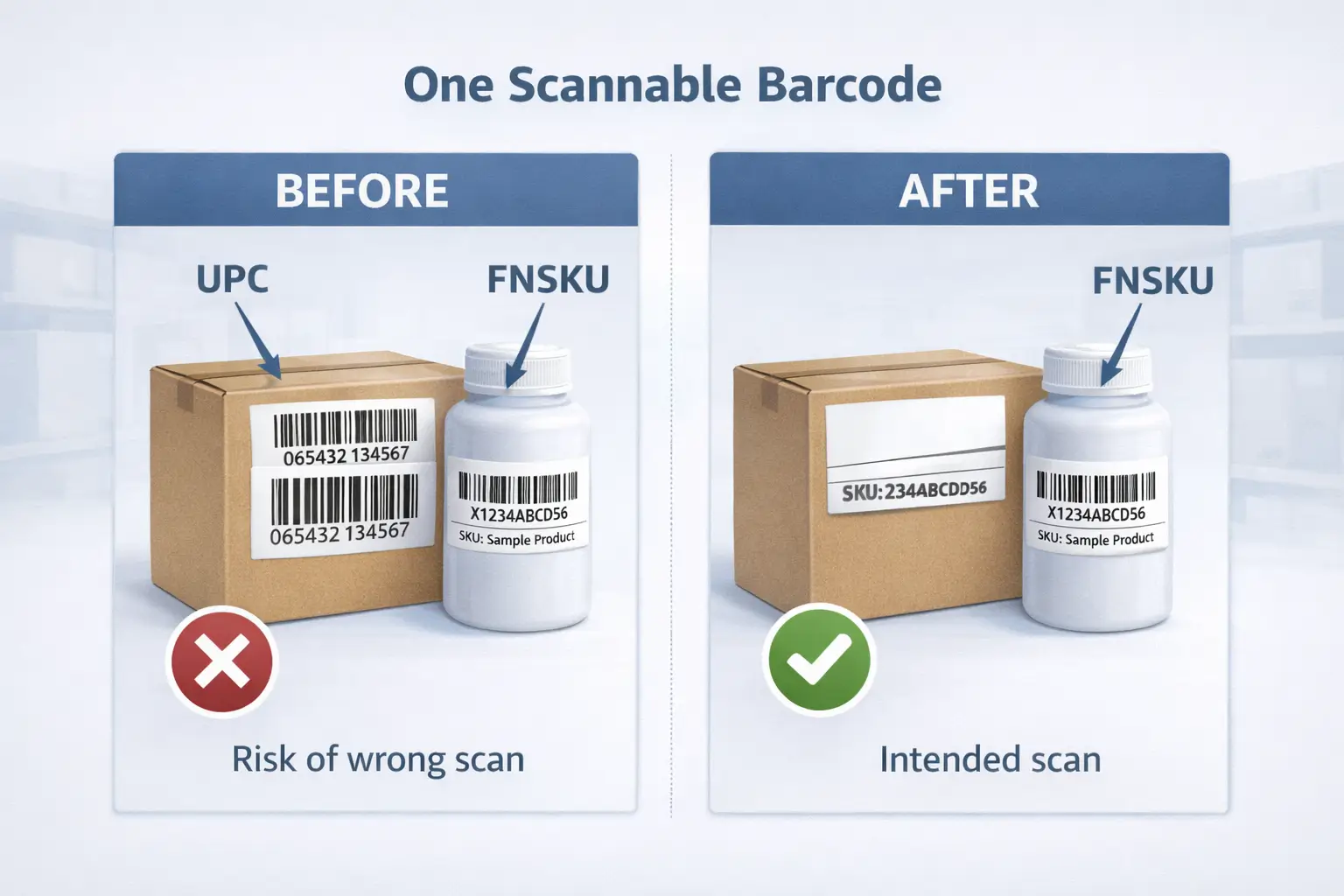
When should you cover the UPC?
It depends on what’s meant to be scanned. If FNSKU is intended to be scanned, you generally want the UPC/EAN to be non-scannable (often by covering it); if your SKU uses manufacturer barcode tracking, don’t cover the barcode Amazon is supposed to scan.
Bundles, multipacks, and kits: label the sellable unit
Special packaging changes the target. Label the outer packaging that customers buy as one unit (the sellable unit), not random internal components.
- Multipack sold as one unit: label the outer pack.
- Bundle/kit: label the finished, assembled bundle after kitting.
- Multi-supplier components: consolidate → kit/pack → label the final sellable unit consistently.
Common FNSKU labeling mistakes + a pre-carton-seal self-check
Most receiving issues are predictable. The big risks are barcode conflicts, poor print/placement quality, and putting the right label on the wrong variation—so run a small QC loop before cartons are sealed.
Common mistakes:
- Two scannable barcodes visible (FNSKU + UPC/EAN)
- Labels on seams/corners/curves (intermittent scan failures)
- Smudged/faded/low-contrast barcodes
- Wrong label on a similar-looking variant
Pre-carton-seal self-check:
- Scan-test a small sample per SKU/variant.
- Confirm no other barcode can be scanned accidentally.
- Confirm labels are fully adhered and not wrinkled/warped.
- Take one quick photo set per SKU for QA and supplier feedback.
Who should label: DIY vs Amazon Label Service vs a prep partner
As you scale, labeling becomes a responsibility decision. DIY, Amazon labeling options, and a prep partner each trade off control, time, and error risk—so choose the model you can execute repeatably.
| Option | Best for | Watch-outs | What to provide |
|---|---|---|---|
| DIY | Low volume, maximum control | Time sink at scale | Label PDF + placement SOP + scan test |
| Amazon labeling option | Reducing pre-FBA labor | Availability/eligibility varies | Correct shipment workflow/settings |
| Prep partner | Multi-supplier, consolidation, kitting | Needs clear handoff + QC expectations | Label PDF + SKU list + exceptions |
Use-when triggers:
- DIY: you can QC every SKU without slowing shipments.
- Amazon labeling: your workflow supports it and complexity is low.
- Prep partner: you need consolidation/kitting or consistent QC before FBA.
Factory pre-print vs sticker labels: when pre-printing is worth it
Pre-printing can save handling—but it reduces flexibility. Pre-print only when SKU/packaging and barcode method are stable; otherwise, stickers keep you adaptable when variants and workflows change.
Change-control checklist:
- Can you freeze SKU/variation mapping for the next run?
- Will you need different labels for different channels/marketplaces?
- Do you have a rework plan if printing is wrong or scannability is poor?
Don’t confuse item labels with carton/pallet labels (quick comparison)
Don’t solve the wrong problem in Seller Central. FNSKU labels identify units; carton/pallet labels identify shipment packaging for routing and receiving.
| Label type | Goes on | Purpose |
|---|---|---|
| FNSKU item label | Sellable unit | Unit identification for scanning |
| Carton label | Outer carton | Shipment routing/receiving |
| Pallet label (if used) | Pallet | Pallet identification for inbound handling |
FAQ (quick answers)
What is the Amazon FNSKU label?
An Amazon FNSKU label is a seller-linked barcode label used for FBA tracking in workflows that use Amazon barcodes. If your SKU is configured to use Amazon barcodes, you print the FNSKU in Seller Central and apply it to each sellable unit.
What does an FNSKU look like?
It’s typically a black-and-white barcode label with a human-readable code (often starting with “X…”) and sometimes SKU context text. The exact layout depends on the template you print.
How to get FNSKU labels on Amazon?
Use Seller Central to print item labels from an inventory context or during shipment creation (“Send to Amazon”). Download the PDF, test print one page, and confirm it matches the variation you’re shipping.
Is FNSKU the same as ASIN?
No. ASIN identifies the catalog product; FNSKU identifies seller-linked inventory for scanning in certain FBA workflows.
FNSKU vs UPC: which barcode should I use for FBA?
Use the barcode method your SKU requires: if it uses Amazon barcode tracking, apply FNSKU labels; if your settings allow manufacturer barcodes, keep the UPC/EAN scannable and consistent. When in doubt, confirm barcode preference before production or labeling.
Do I need to cover the UPC when applying an FNSKU label?
If FNSKU is intended to be scanned, you generally want the UPC/EAN to be non-scannable (often by covering it). If your SKU uses manufacturer barcode tracking, don’t cover the barcode Amazon is supposed to scan.
Should I use Amazon labeling, label myself, or use a prep center?
Label yourself when volume is low and QC is easy. Use Amazon labeling when it’s available and you want to reduce labor. Use a prep partner when you have multiple suppliers, need consolidation/kitting, or want a repeatable QC step before FBA.
Quick recap + next steps
Keep the path short. Print the right label, place it so only the intended barcode scans, and verify before cartons are sealed.
Checklist:
- Decide barcode method per SKU (FNSKU vs manufacturer barcode) and document it.
- Test print + scan-test a few units per SKU/variant.
- Enforce “one scannable barcode” on the sellable unit.
- Run the pre-carton-seal self-check on every shipment.
- If multiple suppliers are involved, send a one-page SOP (label PDF + placement rules + exceptions).
If you’re sourcing from multiple Chinese suppliers, the hard part is keeping labeling consistent across factories, consolidation, kitting, and outbound shipments. FBABEE supports Amazon sellers with China-side receiving, consolidation, FBA prep (labeling/kitting), and door-to-door shipping to FBA or your 3PL—so you can standardize one SOP and reduce rework risk.



