

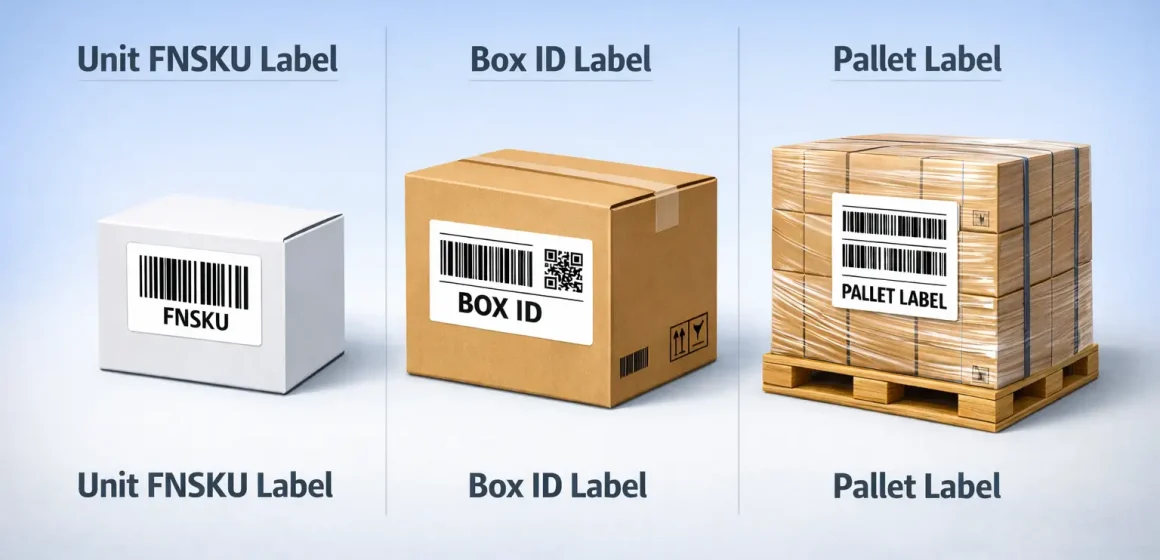
What is an Amazon FBA label (and which label do you actually need)?
Most sellers use “Amazon FBA label” to mean the scannable unit barcode label Amazon uses to identify inventory in its fulfillment network—often an FNSKU label. Depending on how you ship, you may also need box (shipment) labels and pallet labels.
Fast way to think about it (3 layers):
- Unit label (often FNSKU): identifies each sellable unit.
- Box ID label: identifies each carton in a specific inbound shipment.
- Pallet label: identifies each pallet (only if you send palletized freight).
| Label type | What it identifies | When you need it (typical) |
|---|---|---|
| Unit label (often FNSKU) | Each sellable unit | When units must be individually barcode-labeled for FBA |
| Box ID label | Each carton in your inbound shipment | When you create a shipment and send cartons to FBA |
| Pallet label | Each pallet | When you deliver palletized freight (LTL/FTL/FCL) |
If you’re unsure, don’t start by buying a printer—start by confirming (1) your barcode choice and (2) whether you’re shipping cartons only or pallets.
Glossary + disambiguation: FBA label vs FNSKU vs UPC/EAN (and “FBA” vs “private label”)
Now that you know “FBA label” can mean different things, the key is learning the few terms that control what you must print and apply. In practice, most labeling confusion comes from mixing up barcode types and shipment label types.
Core terms (plain English):
- FNSKU: An Amazon barcode that identifies a unit as belonging to a specific seller’s offer (commonly used for FBA unit labels).
- UPC/EAN/GTIN (manufacturer barcode): The barcode that comes from the brand/manufacturer, used widely in retail.
- Barcode preference (setting concept): Controls whether Amazon expects you to use an Amazon barcode (like an FNSKU) vs a manufacturer barcode on eligible items.
- Stickerless / commingled (high-level concept): A setup where eligible inventory may be identified by manufacturer barcodes rather than seller-specific labels (rules and eligibility can change over time—always verify your current settings).
- FBA vs private label (don’t confuse these):
- FBA is a fulfillment method (Amazon stores and ships).
- Private label is a brand model (you sell under your own brand).
You can be private label and use FBA—or not.

What “FBA label service” means today (US context): sellers historically used Amazon-paid prep/labeling services or third-party prep. If you relied on Amazon to do unit labeling for you, you should double-check current availability for your store and shipment workflow—and plan to have labeling completed before inventory arrives at FBA.
The 3 label types for inbound shipments: unit vs box vs pallet (comparison table)
Once the vocabulary is clear, the quickest way to avoid mistakes is to match the label type to the job it performs. Unit labels, box labels, and pallet labels are not interchangeable—and printing the right one from the right place matters.
| Label type | Purpose | Where you typically generate it | Where you place it | Common pitfall |
|---|---|---|---|---|
| Unit label (often FNSKU) | Identifies each sellable unit for scan + tracking | Your listing/inventory tools (item label printing) | On the unit’s packaging, flat + scannable | Leaving a second barcode visible on the unit |
| Box ID label (shipment label) | Identifies each carton for a specific inbound shipment | Shipment workflow (Send to Amazon / shipment creation) | On each carton (one per box) | Mixing up box labels across different FC destinations |
| Pallet label (pallet ID) | Identifies each pallet in a palletized delivery | Shipment workflow (pallet label printing) | On the outside of the pallet (multiple sides) | Forgetting that boxes on the pallet still need their own box ID labels |
Two practical reminders:
- Box labels are shipment-specific. You can’t safely apply them until you’re confident the shipment plan (and FC destinations) is final.
- Carrier labels aren’t the same as FBA labels. You’ll usually have carrier tracking labels in addition to Amazon’s shipment labels.
FNSKU vs manufacturer barcode (UPC/EAN): how to choose (comparison table)
After you’ve separated label types, the biggest decision is whether each unit needs an Amazon barcode label at all. In general, you choose FNSKU when you want seller-specific traceability, and you consider manufacturer barcodes only when your listing and settings are eligible.
| Choice | What it is | Why sellers choose it | Trade-offs / what to watch | Best-fit scenarios (typical) |
|---|---|---|---|---|
| Use an Amazon barcode (often FNSKU) | Amazon-generated unit barcode label | Clear seller-specific identification; reduces “barcode ambiguity” | Requires printing + applying labels; needs QC at origin | Private-label sellers, bundle/set sellers, multi-supplier workflows where control matters |
| Use manufacturer barcode (UPC/EAN/GTIN) when eligible | Keep the barcode already on the packaging | Less labeling labor if eligible; simpler factory workflow | Eligibility and rules can change; misconfiguration can trigger rework | Brand owners with consistent packaging + verified eligibility/settings |
Decision checkpoints (before you print thousands of labels):
- Verify the product’s barcode setting / eligibility in your seller tools.
- Consider operational risk: if multiple suppliers, frequent packaging changes, or many SKUs, seller-specific labeling plus strong QC is often easier to manage.
- Watch for time-sensitive rule changes: if Amazon announces updates to barcode requirements, treat manufacturer-barcode workflows as “verify-first,” not “assume forever.”
How to generate + print labels in Seller Central (step list)
You print the right labels faster when you separate item labels from shipment labels. Item labels identify units; shipment labels identify cartons/pallets for a specific inbound shipment.
- Confirm what you’re printing (unit vs shipment label).
Decide: do your units need an Amazon barcode label, and are you shipping cartons only or pallets? - Generate unit (item) labels when needed.
Use your listing/inventory workflow to find the “print item labels” option, choose quantity, and download the label file. - Generate box (and pallet) labels during shipment creation.
Create your inbound shipment, then print Box ID labels for each carton. If you’re shipping pallets, print pallet labels from the shipment flow as well. - Do a print test before full production.
Print one page/label and confirm it’s crisp and scannable. If the output looks “shrunk,” blurred, or clipped, fix the print settings before you continue. - Lock the label files and share the exact PDFs with whoever applies them.
Avoid “recreating” labels from screenshots or re-typed IDs. Use the same source files across factory, consolidation, and prep. - Run QC before cartons are sealed.
A quick scan test + a small sampling plan catches most issues before they turn into rework.
How to apply labels so they scan (do/don’t checklist)
Printing the correct label is only half the job; placement is what makes it reliably scannable. If Amazon can’t scan labels quickly, your shipment is more likely to need manual handling or relabel work.
Unit label (FNSKU) placement — Do
- Place the label on a flat, smooth, dry surface of the unit packaging.
- Make sure the barcode is fully visible (not wrapped around an edge, corner, or seam).
- If the unit already has a UPC/EAN, cover or fully block the other barcode so scanners read the intended one.
- Keep labels clean: avoid wrinkles, bubbles, smudges, or glossy tape glare.
Unit label (FNSKU) placement — Don’t
- Don’t place labels on curves, folds, or across openings that will be torn.
- Don’t leave multiple scannable barcodes visible on the same unit (unless Amazon explicitly instructs otherwise for your case).
- Don’t “resize” barcode labels by shrinking them to fit—fix placement or packaging instead.
Box ID label placement — Do
- Place the label on a flat side of the carton, where it’s easy to scan.
- Use one Box ID label per carton as generated for that shipment.
- If the carton has multiple external labels, keep the Box ID label unobstructed.
Box ID label placement — Don’t
- Don’t place Box ID labels on seams, corners, or areas likely to be damaged by tape/straps.
- Don’t mix Box ID labels between different shipments or different FC destinations.
Common labeling mistakes that cause delays (QC checklist)
Most labeling problems are preventable if you treat labeling as a controlled process with checks at handoff points. A simple QC checklist can save you from the two biggest headaches: mis-scans and carton mix-ups.
Top mistakes checklist (common in real workflows)
- Multiple barcodes visible on the unit (scanner reads the “wrong” one)
- Wrong unit label applied to the wrong SKU/variation
- Box ID labels applied to the wrong cartons (especially when shipments split to multiple FCs)
- Labels printed at the wrong scale or with low contrast (barcode won’t scan reliably)
- Labels placed across edges/seams or on wrinkled polybags
- Labels covered by shiny tape that creates glare
- Label files “rebuilt” from screenshots instead of using the original PDFs
- Labeling done before packaging is finalized (packaging changes make labels inaccurate)
- Mixed SKUs in one staging area without clear separation and counting controls
- No photo proof / sample verification before full labeling run
Quick QC routine (works for factory, consolidation, or prep)
- Pre-run check (before mass labeling): print test, confirm scan works, confirm SKU matches label.
- In-run sampling: every carton batch / every SKU batch, spot-check a few units for correct label + placement.
- Pre-seal carton check: verify the right Box ID label is on the right carton for the correct destination.
- Handoff record: keep simple proof (counts by SKU, photos of labeled master carton, notes on exceptions).
Handoff checks (supplier → consolidation → outbound)
- Label file version: everyone uses the same PDFs (no “old versions”).
- SKU separation: labeled inventory is stored by SKU/batch to prevent mixing.
- Carton planning: box labels are applied only after carton contents and shipment plan are confirmed.
Shipping from China: where labeling should happen (decision tree)
If you source from China, the best labeling point is the earliest place you can label accurately and verify consistently. The goal is to prevent relabeling later—because relabel work after consolidation or after arrival is slower and more expensive.
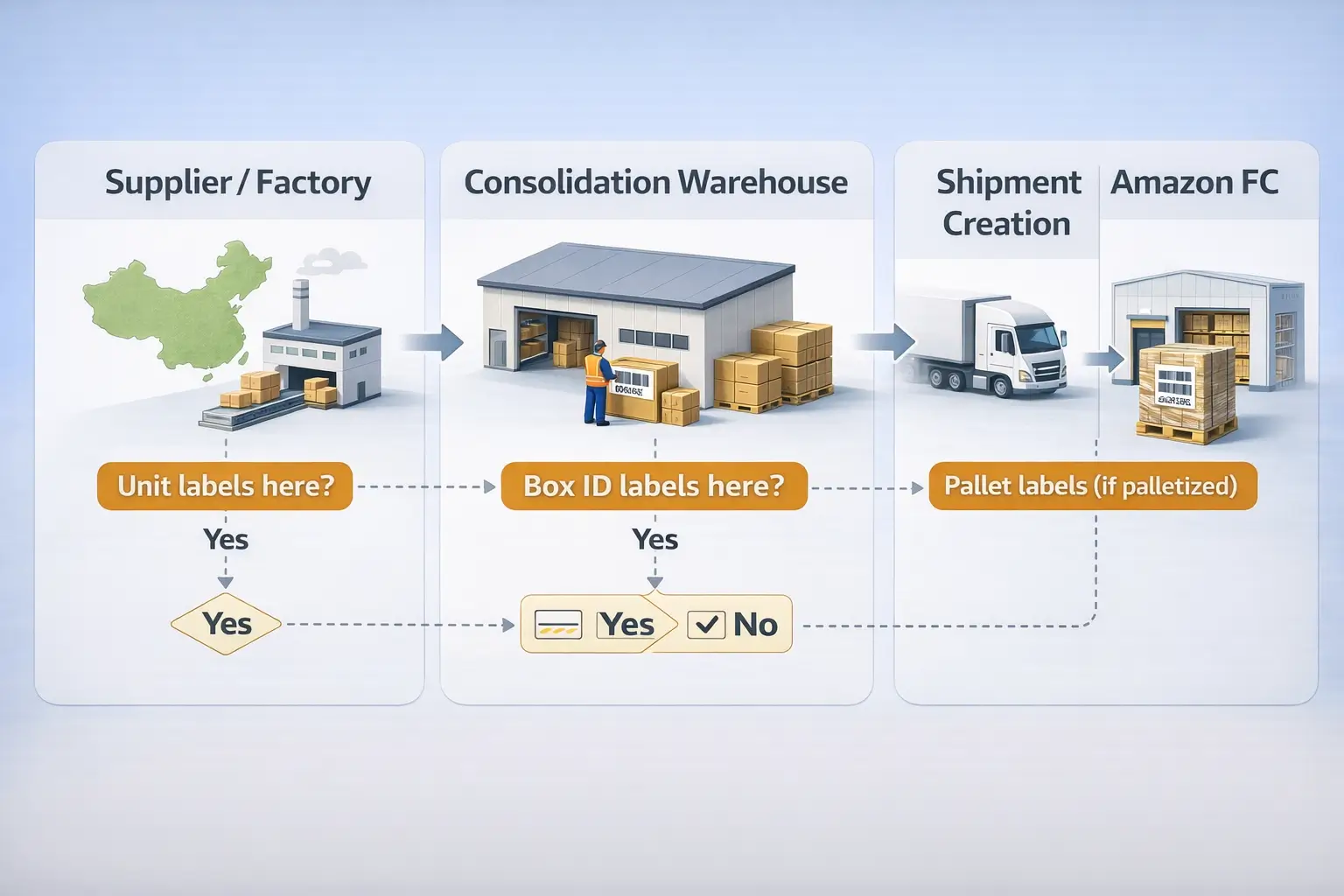
Decision tree (factory vs consolidation vs prep center)
Step 1 — Are your SKUs and packaging final?
If not, don’t label yet. Lock packaging first, then lock label files.
Step 2 — How complex is your sourcing and shipment plan?
- Single supplier, stable SKUs, simple cartons:
Factory labeling can work well if you provide locked PDFs, require photo proof, and do a sampling check. - Multiple suppliers, many SKUs, frequent changes:
Labeling at a single consolidation point is often safer because you centralize control, reduce mixing risk, and can coordinate carton planning. - Complex prep (bundles/sets, polybags, fragile packaging, inserts):
A prep center workflow can be more reliable because it combines labeling with prep rules and consistent QC.
Step 3 — Are you splitting shipments to multiple fulfillment centers?
If yes, be careful with Box ID labels: they’re created per shipment and can change if you change carton contents or destinations. Many sellers delay applying Box ID labels until the shipment plan is finalized.
US store note (workflow planning): if you previously relied on Amazon to do item labeling/prep, plan your process so units are fully labeled and prepped before inventory arrives at Amazon’s fulfillment network.
Tools & materials: printers, label stock, and a quick scan test (table)
Your tooling doesn’t need to be fancy, but it does need to produce consistent, scannable barcodes at your volume. Choose tools based on throughput and who’s doing the work (factory vs consolidation vs prep).
| Option | Best for | Pros | Watch-outs |
|---|---|---|---|
| Sheet labels + office printer (laser/inkjet) | Low-to-medium volume labeling | Easy to start; common in small ops | Slower for big runs; higher risk of misalignment/scaling if settings aren’t controlled |
| Thermal label printer + roll labels | Medium-to-high volume labeling | Fast, consistent output; good for repeated workflows | Requires correct setup; label stock choice matters (adhesion + durability) |
| Outsource labeling to a controlled prep step | Multi-supplier / high-complexity workflows | Centralized QC and process control | Requires clear SOPs, file control, and accountability at handoffs |
Quick scan test (takes 2 minutes):
- Print a small sample set.
- Scan with a handheld scanner (or a reliable scanning app as a sanity check).
- Confirm: barcode reads consistently, text isn’t clipped, and no other barcode is likely to be scanned instead.
FAQ
What is an Amazon FBA label?
Q: What is an Amazon FBA label?
A: Most sellers use the term to mean the unit barcode label used to identify inventory for FBA—often an FNSKU label. Depending on shipping method, you may also need Box ID (shipment) labels and pallet labels.
Is an Amazon FBA label the same as an FNSKU?
Q: Is an Amazon FBA label the same as an FNSKU?
A: Often yes in everyday seller language—people say “FBA label” when they mean the FNSKU unit label. But “FBA labels” can also include shipment labels (Box ID and pallet labels), which serve a different purpose.
What labels do I need for an Amazon FBA shipment (unit, carton/box, pallet)?
Q: What labels do I need for an Amazon FBA shipment (unit, carton/box, pallet)?
A: Typically: (1) unit labels if your products require Amazon barcodes, (2) one Box ID label per carton for inbound shipments, and (3) pallet labels only when you ship palletized freight. The exact mix depends on your shipment setup and barcode settings.
Should I use FNSKU labels or a manufacturer barcode (UPC/EAN) for FBA?
Q: Should I use FNSKU labels or a manufacturer barcode (UPC/EAN) for FBA?
A: Use FNSKU when you want stronger seller-specific traceability and control, especially in complex workflows. Consider manufacturer barcodes only when your listing/settings are eligible—then verify settings and plan for rule changes over time.
How do I print Amazon FBA labels from Seller Central?
Q: How do I print Amazon FBA labels from Seller Central?
A: Print unit (item) labels from your listing/inventory tools, and print Box ID/pallet labels from your shipment workflow during inbound shipment creation. Always do a print test before a full run.
Where should I place FNSKU labels—and do I need to cover the existing barcode?
Q: Where should I place FNSKU labels—and do I need to cover the existing barcode?
A: Place them on a flat, scannable area of the unit packaging and avoid edges/seams. If another barcode (like a UPC) is visible, you typically want to cover or block it so the intended barcode is scanned.
What are the most common Amazon FBA labeling mistakes that cause delays?
Q: What are the most common Amazon FBA labeling mistakes that cause delays?
A: The big ones are: multiple barcodes visible, wrong label on the wrong SKU, wrong Box ID label on cartons (especially split shipments), and labels printed/scaled poorly so they don’t scan reliably. A simple sampling + handoff QC routine prevents most of these.
For China-sourced products, should labels be applied at the factory, during consolidation, or at a prep center?
Q: For China-sourced products, should labels be applied at the factory, during consolidation, or at a prep center?
A: Factory labeling can work for simple, stable SKUs with strong proof checks. If you have multiple suppliers or frequent changes, labeling at a single consolidation point often reduces mix-ups. If prep is complex (bundles/polybags/inserts), a prep-center workflow can be more reliable—provided label files and QC steps are controlled.
Summary: a simple “labeling workflow” checklist + next steps
If you remember only one thing: label type + barcode choice + QC at handoffs prevents most inbound problems.
Practical checklist:
- Decide: FNSKU vs manufacturer barcode (verify settings before printing)
- Identify label types needed: unit vs box vs pallet
- Generate labels from the correct place: item labels vs shipment workflow labels
- Print test + scan test before mass printing
- Apply labels correctly (flat, scannable; avoid multiple visible barcodes)
- QC before sealing cartons, and verify Box ID labels match the shipment plan
- For China sourcing: pick the labeling point you can control and verify (factory vs consolidation vs prep)
Need help making this repeatable across multiple suppliers and SKUs?
If you’re consolidating inventory from several factories, the “hard part” is usually label file control, SKU separation, carton planning, and QC at handoffs. A structured consolidation + prep workflow can reduce relabel rework and shipment exceptions—especially for split-FC shipments and fast replenishment cycles.



