

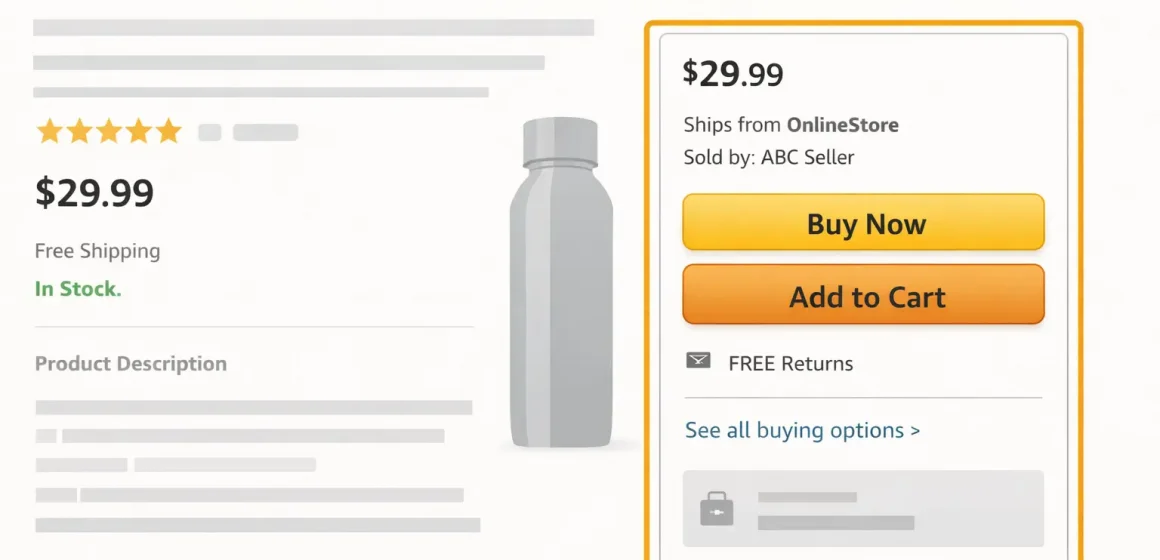
Fast Answer: What the Amazon Buy Box means for FBA sellers
The Amazon “Buy Box” is commonly called the Featured Offer in Amazon’s seller resources—the offer shown with Buy Now and Add to Cart on many product detail pages. For FBA sellers, getting (and keeping) that placement usually depends on being eligible, staying in stock, and offering a competitive overall offer compared with other sellers.
Key points
- Buy Box = Featured Offer placement (offer-based, not “listing ownership”).
- Eligibility is the gate; “winning” is the competition among eligible offers.
- FBA can help the delivery promise, but it’s not a guarantee.
Boundary conditions
- Factors and eligibility checks can vary by category and competition; avoid “exact formula” claims.
Buy Box basics: Featured Offer, offers, and where shoppers see it
The Featured Offer is the default purchase option shown on many listings; other offers are still available via “Other sellers” (or similar). When multiple sellers share one ASIN, Amazon may feature one offer to simplify the buying decision.
Key points
- One ASIN can have multiple offers (price, condition, shipping promise can differ).
- Some listings show no Featured Offer at times (often called suppression).
Boundary conditions
- UI labels and layout vary by device/category.
Official reference (definition/terminology)
https://sell.amazon.com/blog/buy-box-featured-offer
Buy Box vs Featured Offer: what’s the difference (and why the name changed)
“Buy Box” is the common nickname. “Featured Offer” is Amazon’s frequent formal label for the same concept: the offer shown with the main purchase buttons.
Key points
- Same placement, different wording.
- Shoppers can still pick other offers.
Boundary conditions
- Naming and placement can change; focus on the concept.
Offer vs listing: why multiple sellers can compete on the same ASIN
A listing (ASIN) is the shared product page; your offer is your specific total price, condition, delivery promise, and seller performance signals. The Featured Offer is selected from offers.
Key points
- Multiple offers can exist on one ASIN.
- Even a single-offer listing can lose the Featured Offer if the offer is not eligible or not competitive.
Boundary conditions
- Competition rules vary by category and restrictions.
How the Featured Offer is chosen: eligibility gates and competitive factors
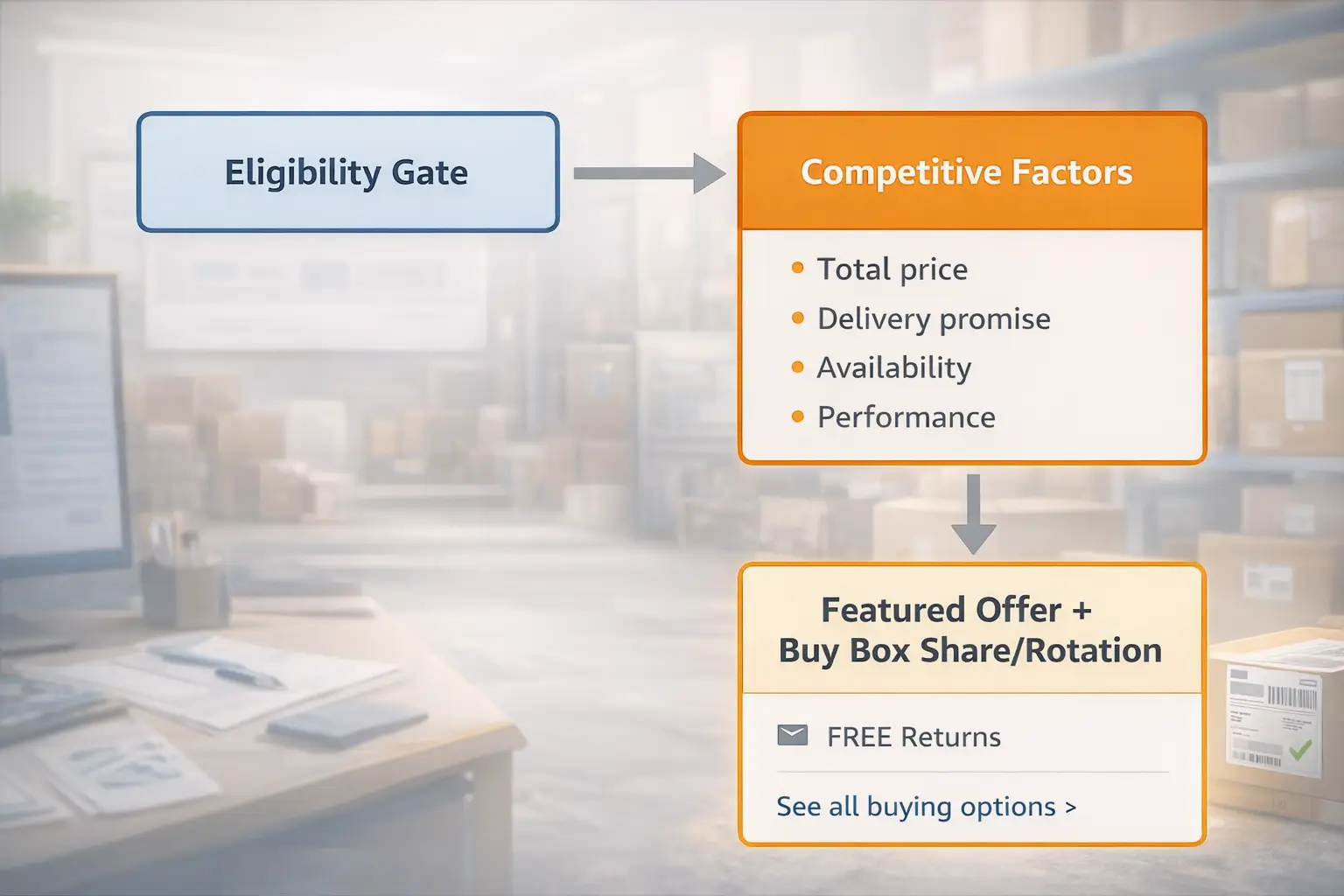
Featured Offer selection is best understood as two steps: (1) Amazon checks whether your offer is eligible to compete, then (2) compares eligible offers across multiple factors like total price, delivery promise, availability, and performance signals.
Key points
- It’s multi-factor, not price-only.
- More than one eligible offer can rotate (Buy Box share).
Boundary conditions
- Amazon doesn’t publish fixed weights; treat any “exact percentage” claims cautiously.
Official reference (eligibility help)
https://sellercentral.amazon.com/gp/help/external/G200418100
Eligibility vs winning: the two-step model (mini-table)
| Step | What it means | What to check first |
|---|---|---|
| Eligible? | You meet baseline requirements to compete. | Selling plan, offer condition/compliance, account health signals. |
| Competitive? | Amazon compares eligible offers and features one. | Total price, delivery promise, in-stock status, performance signals. |
Key points
- “Not eligible” ≠ “lost to another seller.”
- Fix eligibility before you optimize price.
Boundary conditions
- Criteria can change; verify in Seller Central.
High-level factors that influence Buy Box share (without guessing weights)
Amazon generally tries to feature the offer that best balances customer value and reliability—so the “best” offer is usually competitive on total price and delivery promise, while staying available and maintaining solid performance.
Key points
- Total price competitiveness (not always item price alone).
- Delivery promise (speed/reliability to the buyer).
- Availability (in-stock consistency).
- Seller performance signals (trust/service outcomes).
| Factor category | What you can control (examples) |
|---|---|
| Total price | Pricing strategy; shipping charges (FBM); avoid sudden spikes |
| Delivery promise | Fulfillment method; handling time (FBM); stock placement |
| Availability | Forecasting; replenishment cadence; reduce inbound exceptions |
| Performance | Packaging/QC; customer support; avoid preventable defects |
Boundary conditions
- What matters most can vary by category and buyer location.
Eligibility checklist: why your offer is not eligible (and what to check first)
If your offer is not eligible, resolve the gate before you try to “win” with tactics.
Checklist (category-based)
- Professional selling plan status (commonly required).
- Correct offer condition and compliant offer setup for the ASIN.
- Competitive total price for the customer.
- Acceptable account health/performance standing.
- Accurate fulfillment/shipping settings (especially for FBM).
- Policy compliance (listing/offer integrity).
What to check first
- Confirm eligibility status in Seller Central.
- Validate offer condition and setup for the ASIN.
- Review account health notifications.
- Re-check total price competitiveness (include shipping if FBM).
Boundary conditions
- Avoid relying on third-party “minimum metrics” unless clearly official and current.
FBA vs FBM: how fulfillment changes Buy Box competitiveness
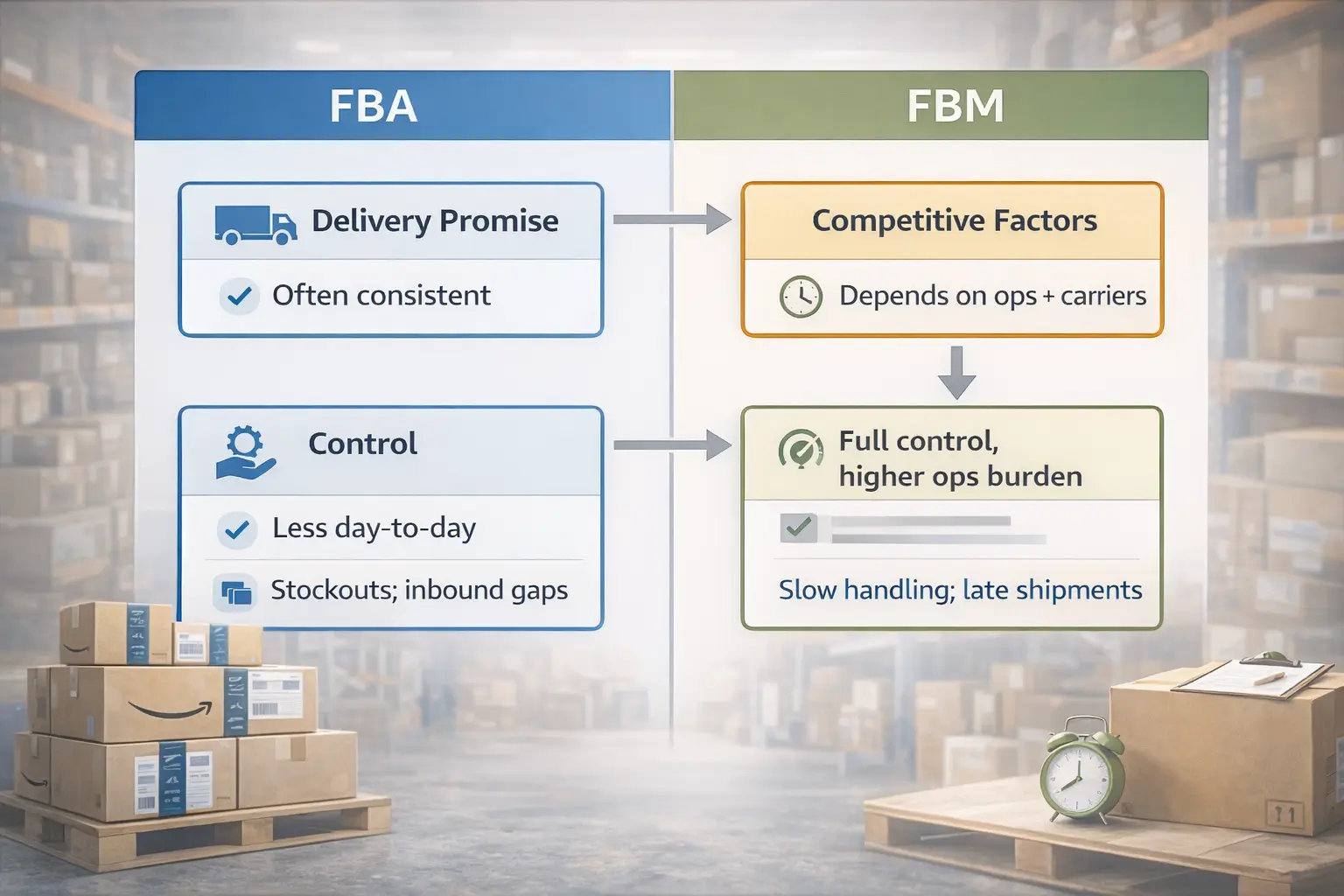
FBA often helps because it can improve the customer-facing delivery promise and fulfillment consistency, but it does not guarantee the Featured Offer if competitors have a stronger overall offer.
Key points
- FBA can strengthen delivery promise; FBM can still win with fast shipping + strong metrics + competitive total price.
- Your biggest risk as an FBA seller is often availability (stockouts or inbound delays).
| Dimension | FBA | FBM |
|---|---|---|
| Delivery promise | Often consistent | Depends on your ops + carriers |
| Control | Less day-to-day fulfillment control | Full control, higher ops burden |
| Common failure modes | Stockouts; inbound timing gaps | Slow handling; late shipments |
| When it can compete best | Prime-focused customers; stable replenishment | Fast shipping regions; strong ops; lower total price |
Boundary conditions
- “FBA helps” is a trend, not a rule.
Quick comparison table: why FBA often helps (and what it does not solve)
FBA can reduce fulfillment variability, but it won’t fix uncompetitive pricing, chronic stockouts, or offer/listing compliance issues.
Key points
- Use FBA for delivery promise consistency.
- Keep replenishment disciplined to avoid being unavailable.
Boundary conditions
- Outcomes vary by category and competition.
When FBM can beat an FBA offer (realistic scenarios)
FBM can win when the FBM offer is more competitive overall.
Scenarios
- Faster delivery to a region customers are shopping from.
- Lower total price (including shipping).
- Stronger seller performance signals and fewer service issues.
- Your FBA offer is constrained by low stock or inbound timing gaps.
Boundary conditions
- Treat this as a checklist for diagnosis, not a universal rule.
Improve Buy Box chances safely: what to change first (prioritised checklist)
The highest-leverage path is usually: eligibility → availability → delivery promise → total price → performance signals → monitoring.
Prioritised steps
- Confirm Featured Offer eligibility (fix “not eligible” first).
- Prevent stockouts (plan replenishment earlier; stabilize sellable status).
- Make the delivery promise competitive (FBA or fast, reliable FBM settings).
- Keep total price competitive (include shipping where applicable).
- Reduce preventable defects (late shipments, cancellations, packaging issues).
- Monitor share and test changes one at a time.
| Symptom | Check first |
|---|---|
| Featured Offer missing | Eligibility → total price → availability |
| Share drops after restock cycles | Sellable availability + inbound timing |
| FBM wins vs your FBA offer | Total price + delivery promise |
Boundary conditions
- This improves probability; it does not guarantee outcomes.
The prioritised checklist (eligibility → availability → competitiveness → monitoring)
Rule of thumb: If you can’t tell what changed, check in this order: eligibility → availability → delivery promise → total price → performance signals.
Boundary conditions
- Verify account-specific indicators in Seller Central before making large changes.
Sustainable levers: price, delivery promise, availability, and performance signals
Key points
- Compete on total value (total price + delivery promise + reliability), not just “lowest price.”
- Availability is a prerequisite; repeated gaps undermine stability.
| Lever | Do | Avoid |
|---|---|---|
| Price | Set a floor and monitor total price | Racing to the bottom |
| Delivery promise | Use realistic handling times | Overpromising |
| Availability | Replenish earlier | Reorder after stockout |
| Performance | Fix recurring defects | Ignoring small issues |
Boundary conditions
- Don’t treat third-party numeric targets as universal requirements.
Common Buy Box myths and mistakes (and safer replacements)
Myth → reality
- Lowest price always wins → multi-factor, value + reliability.
- FBA guarantees the Buy Box → can help, not guaranteed.
- Repricing is the only lever → eligibility and availability often come first.
- If the Buy Box disappears, someone stole it → it may be suppressed or you may be ineligible.
Boundary conditions
- Avoid “exact formula” advice; focus on controllables.
Diagnose what changed: rotation, suppression, and Buy Box share drops
Suppressed, lost, and rotating are different states—so the first step is classification, then ordered checks.

| What you see | What it may mean | Check first |
|---|---|---|
| No Featured Offer shown | Suppressed / ineligible / not competitive | Eligibility → total price → availability |
| Another seller featured most | Losing competition | Total price → delivery promise → availability |
| Share fluctuates | Rotation | Track share vs price/stock changes |
Troubleshooting flow (quick)
- Check eligibility and account health notifications.
- Confirm in-stock + sellable status (especially for FBA).
- Compare total price and delivery promise vs top offers.
- Audit offer integrity (condition/variation/listing issues).
Boundary conditions
- Suppression can have multiple causes; don’t assume one fix fits all.
Suppressed vs lost vs rotating: the quick cheat sheet (table)
| State | Meaning | First checks |
|---|---|---|
| Suppressed | No Featured Offer displayed | Eligibility, total price, availability |
| Lost | Another offer is featured | Total price, delivery promise, performance |
| Rotating | Multiple offers share exposure | Track trends; stabilize offer value |
Boundary conditions
- Category/region context matters.
How to monitor Buy Box share and spot drops early
Buy Box share is how often your offer is featured over time. A simple log helps you find causes faster.
Monitoring routine
- Track weekly for priority ASINs: eligibility status, in-stock/sellable, total price, delivery promise.
- Log major changes: price moves, restocks, new competitors, listing edits.
- Diagnose before making multiple changes at once.
Boundary conditions
- Reporting access varies; use what you have and keep the same log habit.
Inventory continuity for FBA: stockouts and inbound timing (operations lens)
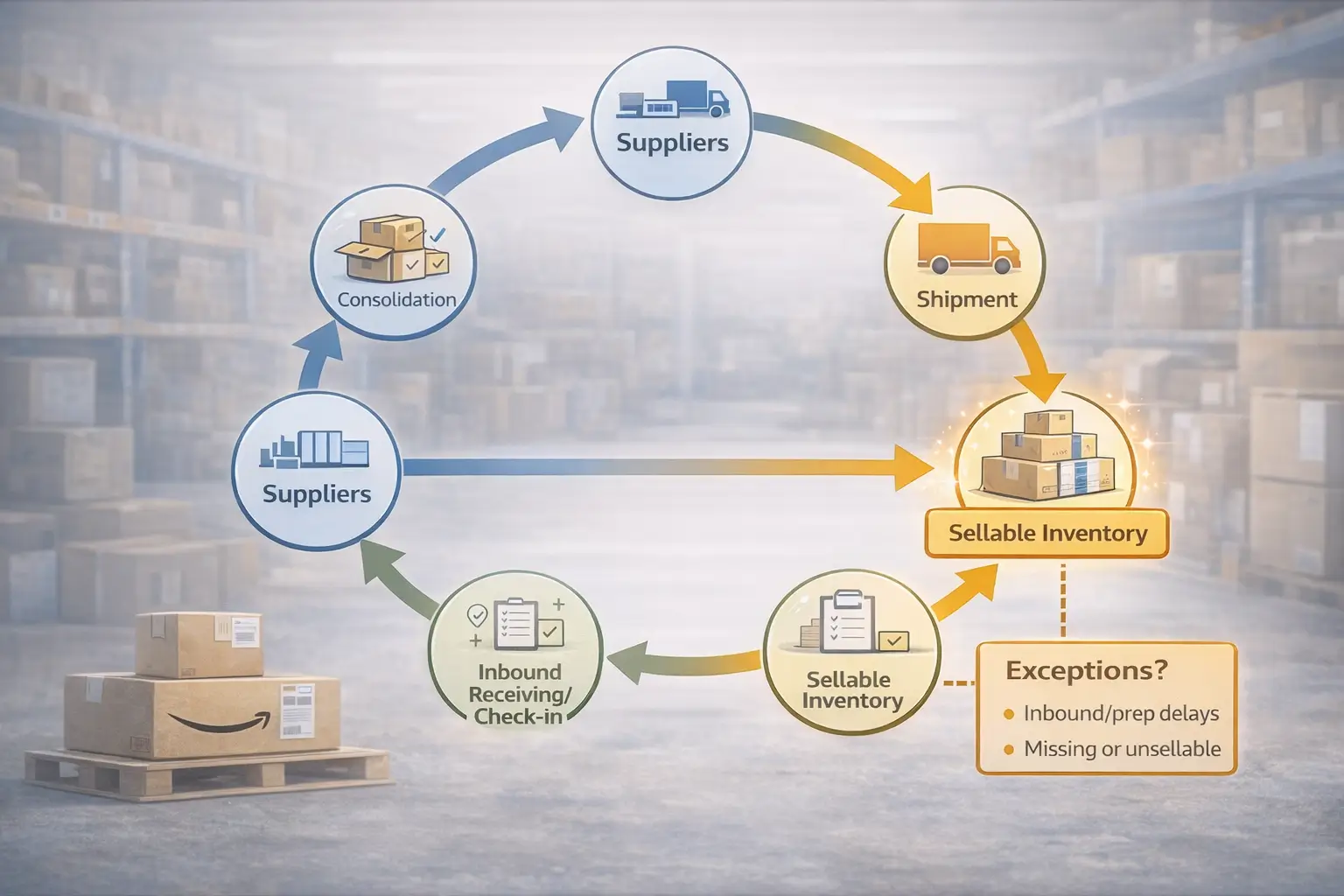
For FBA sellers, stockouts and inbound timing can indirectly reduce Featured Offer competitiveness because they affect whether customers see your offer as available now—and what delivery promise they see.
Cause → effect
- Stockout → you can’t be featured because you’re unavailable.
- Inbound/prep exceptions → inventory arrives but isn’t sellable → unexpected gaps.
- Irregular replenishment → repeated gaps → unstable share over time.
Best-practice checklist
- Plan replenishment earlier (especially before peak).
- Consolidate multi-supplier shipments where possible.
- Complete FBA prep correctly (labels, packaging, carton accuracy).
- Track sellable status after restock and resolve exceptions quickly.
Boundary conditions
- Receiving/check-in timing varies; avoid assuming fixed timelines.
How stockouts can reduce Buy Box share (cause → effect)
Stockouts reduce share because the Featured Offer is a purchase path; if your offer isn’t available, it can’t be featured.
Cause → effect bullets
- Stockout → cannot be featured.
- Competitors stay in stock → they capture more share.
- Low stock → weaker delivery promise in some contexts → reduced share.
Boundary conditions
- Recovery depends on category and competition.
Inbound timing and prep readiness: how inventory becomes sellable (checklist)
Prep/inbound readiness checklist
- Confirm labeling and packaging requirements before dispatch.
- Keep carton counts/contents organized and documented.
- Avoid SKU/variation mismatches that create reconciliation issues.
- Plan shipments to reduce last-minute relabeling or splits.
Boundary conditions
- Timelines vary; focus on reducing avoidable exceptions.
When to consider extra help with inbound and prep (optional, conversion-friendly)
If you’re coordinating multiple suppliers in China and shipping to US FBA, a China-side partner like FBABEE can support consolidation, inspection, FBA prep, and door-to-door shipping to reduce inbound exceptions and help you run a steadier replenishment cadence. This supports availability and compliance, but it does not promise any specific Featured Offer outcome.
Before reaching out, prepare:
- Target marketplace and destination (US FBA or a warehouse/3PL)
- SKU list + packaging requirements (fragile, bundles, inserts)
- Supplier count and pickup locations
- Shipping window expectations and replenishment cadence
Boundary conditions
- Buy Box outcomes still depend on competition, price, and seller performance.
FAQ: Buy Box (Featured Offer) questions sellers ask most
What is the Amazon Buy Box (Featured Offer)?
It’s the offer shown with the main purchase buttons on many product pages (often labeled the Featured Offer).
Boundary: Some listings show no Featured Offer at times.
How does Amazon choose which seller gets the Buy Box?
Amazon checks eligibility first, then compares eligible offers across total price, delivery promise, availability, and performance signals.
Boundary: No fixed “weights” are published.
What are the minimum requirements to be eligible for the Featured Offer?
Eligibility commonly requires a Professional selling plan and meeting performance/offer requirements; verify in Seller Central.
Boundary: Criteria can change.
Does FBA help you win the Buy Box compared with FBM?
Often yes, because of delivery promise consistency—but it’s not guaranteed if other factors are weaker.
Boundary: Depends on category and competition.
Why does the Buy Box rotate between sellers (and what does Buy Box share mean)?
Rotation can happen when multiple eligible offers are similarly competitive; share is your exposure percentage over time.
Boundary: Patterns vary by category/region.
What is Buy Box suppression, and what should I check first?
Suppression usually means no Featured Offer is displayed. Check eligibility, total price competitiveness, and availability first.
Boundary: Multiple causes are possible.
Summary and next steps for FBA sellers
Summary
- Buy Box is often labeled the Featured Offer in seller resources.
- Start with eligibility, then compete on total value: delivery promise, availability, and performance.
- For FBA, inventory continuity (avoid stockouts and inbound exceptions) supports stability.
Next steps
- If you’re “not eligible”: fix the gate first.
- If you’re losing to another seller: compare total price + delivery promise + availability.
- If the Featured Offer disappears: classify suppressed vs lost vs rotating, then follow the ordered checks.
Boundary conditions
- No checklist guarantees Featured Offer placement; verify account-specific indicators in Seller Central.



