

Fast Answer: NAICS code for Amazon FBA (what most sellers use + how to choose)
Direct answer: There isn’t one universal “Amazon FBA NAICS code.” FBA is a fulfillment method—your NAICS code should match your principal business activity (what your business primarily does), and the NAICS year/version your form uses.
Official NAICS reference starting point (Census): https://www.census.gov/naics
Key points (micro-bullets)
- Many Amazon sellers are classified as e-commerce/nonstore retail in NAICS-style terms, so 454110 (NAICS 2017 “Electronic Shopping and Mail-Order Houses”) often shows up in searches and older guidance. (Definition reference: https://www.census.gov/naics/?input=454110)
- Commonly used ≠ universally correct: wholesale-heavy businesses or service providers (prep/3PL/warehouse) can need different categories.
- Verify your NAICS year/version because codes/labels can change. NAICS changes context: https://www.census.gov/library/stories/2024/11/naics-changes.html
- Issuer dropdown/list overrides: if your form provides a list, pick from that list for that form.
- Keep a one-line rationale: “We selected X because we primarily do Y activity (matches the NAICS description).”
Boundary conditions
- Don’t rely on a single forum post or a directory site as the final authority.
- Don’t assume a code is “wrong” just because a vendor tool shows “inactive”—verify the NAICS year/version and your issuer’s requirements.
NAICS basics: what it is and why you’re asked for it
Direct answer: NAICS (North American Industry Classification System) is a standard way to describe what a business does, and many forms ask for it to categorize businesses for reporting, eligibility, underwriting, or risk modeling.
Official NAICS overview: https://www.census.gov/naics
Key points
- You may see NAICS requested in: business registration workflows, banking/merchant onboarding, insurance, vendor compliance, or tax-related paperwork.
- NAICS has revisions (e.g., 2017 vs 2022). A code can be labeled differently depending on the version or the database a tool uses. NAICS changes context: https://www.census.gov/library/stories/2024/11/naics-changes.html
- The safest approach is issuer-first: follow the form’s NAICS year/version and any provided dropdown list.
Boundary conditions
- Some issuers accept only one code; others allow multiple. Follow the form instructions.
Common NAICS codes for Amazon sellers (with a scenario table)
Direct answer: Many Amazon sellers map to e-commerce/nonstore retail categories, which is why codes like 454110 (NAICS 2017) show up often. But the right code still depends on your principal activity and your form’s NAICS version.
Reference point for 454110 in NAICS 2017: https://www.census.gov/naics/?input=454110
Scenario table (examples, not guarantees)
| Your primary activity (how you mainly get paid) | Commonly seen NAICS candidate/family | Why this comes up | Notes / guardrails |
|---|---|---|---|
| Selling products online to consumers (Amazon storefront; you’re the retailer) | “Electronic shopping / nonstore retail” family (e.g., 454110 in NAICS 2017) | Online retail selling is often grouped under nonstore/e-commerce retail | Verify your form’s NAICS year; labels/families can differ by version |
| Selling a wide variety of products (multi-category) | Nonstore retail / general merchandise retail families (version-dependent) | Some issuers treat “general” sellers differently than niche sellers | Choose by principal activity and issuer dropdown; don’t guess based on one blog |
| Primarily wholesale (B2B) | Wholesale trade family (varies by product type) | Wholesale is a different activity than retail selling | If wholesale drives revenue, don’t default to online retail codes |
| Primarily services (prep/warehousing/logistics for other sellers) | Transportation/warehousing or services families (activity-based) | Services ≠ retail selling | Use service activity descriptions; see the services section below |
How to defend your choice (simple rule)
- Match your business to the official description for the code you select, and keep a short rationale.
Boundary conditions
- This table is guidance, not a guarantee of what an issuer will accept.
- If your form gives you a dropdown list, pick from that list even if it doesn’t match what you found elsewhere.
Why NAICS 454110 may show as “inactive” (and how to verify the right NAICS year)
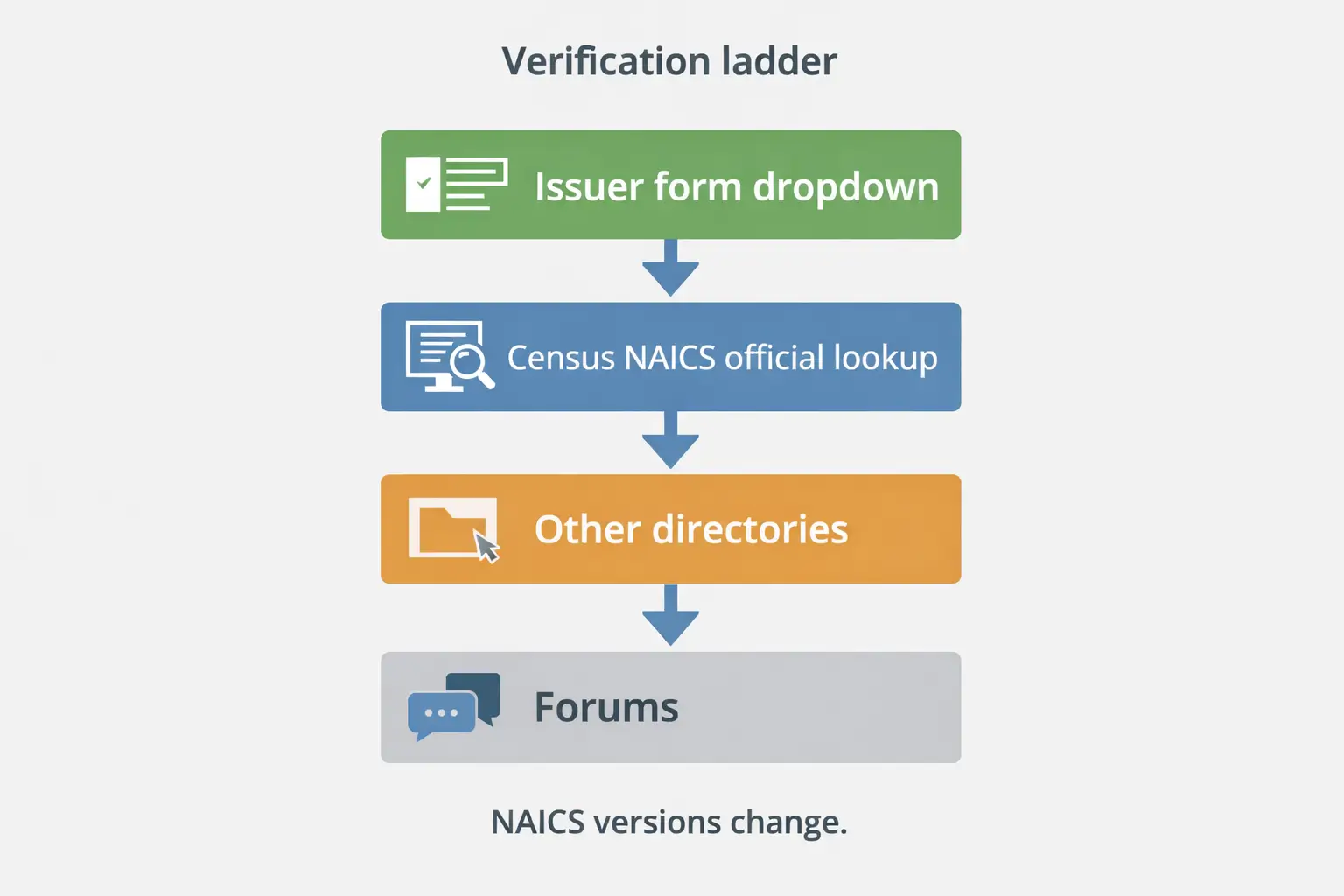 Direct answer: “Inactive” usually reflects tool/database/version differences, not necessarily that the code is “invalid.” NAICS is revised over time, and some vendor tools or websites label older codes differently or lag updates.
NAICS change context: https://www.census.gov/library/stories/2024/11/naics-changes.html
Why you might see “inactive”
- The tool is using a different NAICS year than your form.
- The tool’s database is outdated or uses its own labeling (common with directory sites).
- NAICS updates can change how retail is categorized, especially around methods of selling.
What to do next (verification steps)
- Check your form: does it specify NAICS 2017, NAICS 2022, or just “NAICS”?
- Use an official lookup to confirm the description for the code you’re considering:
- Example: NAICS 2017 lookup for 454110: https://www.census.gov/naics/?input=454110
- If there’s a dropdown/list, choose from that list. That list is the authority for that form.
- If the portal rejects a code, treat it as a format/version signal and re-check the issuer’s allowed list and NAICS year/version.
Source ladder (most reliable → least reliable for “what to enter on a form”)
| Source | Use it for | Reliability note |
|---|---|---|
| Issuer’s dropdown/list on the form | What will be accepted for that form | Highest authority for that form |
| Census NAICS official resources | Definitions, structure, and change context | Best baseline for what a code means |
| Directory sites | Discovery (finding candidate codes) | Can lag or simplify; verify with official sources |
| Forums/social posts | Understanding common confusion | Not authoritative for final selection |
Boundary conditions
- Do not claim exact cross-year mappings unless you have an official concordance; verify the year your form uses and pick the best-fit allowed description.
What’s the difference between NAICS code 4541… and other retail codes?
Direct answer: “4541…” is commonly associated with nonstore/electronic shopping retail families in older NAICS versions, while other retail codes may be product-line or general merchandise classifications. Which fits depends on your principal activity and the NAICS year/version your issuer uses.
Reference example (NAICS 2017 454110): https://www.census.gov/naics/?input=454110
Comparison table (conceptual, version-aware)
| Code family / label (examples) | What it generally describes | When it tends to fit | Version/issuer guardrail |
|---|---|---|---|
| 4541… family (nonstore/electronic shopping in older versions) | Retail selling where the “storefront” is not a physical store (e.g., online/catalog) | Online retail sellers whose principal activity is direct-to-consumer retail | Verify the NAICS year; labels can change in newer revisions |
| General merchandise retail (version-dependent) | Retail selling across many categories | Multi-category sellers where “general merchandise” best matches issuer options | Use issuer dropdown definitions; don’t assume one universal code |
| Product-line retail categories (version-dependent) | Retail selling concentrated in a product category | Sellers dominated by one product line (per issuer classification model) | Issuer may force a product-line choice; follow the list |
Boundary conditions
- If your form provides only certain options, choose the best match from the allowed list and document your rationale.
How to choose the correct NAICS code for your Amazon business (step-by-step)
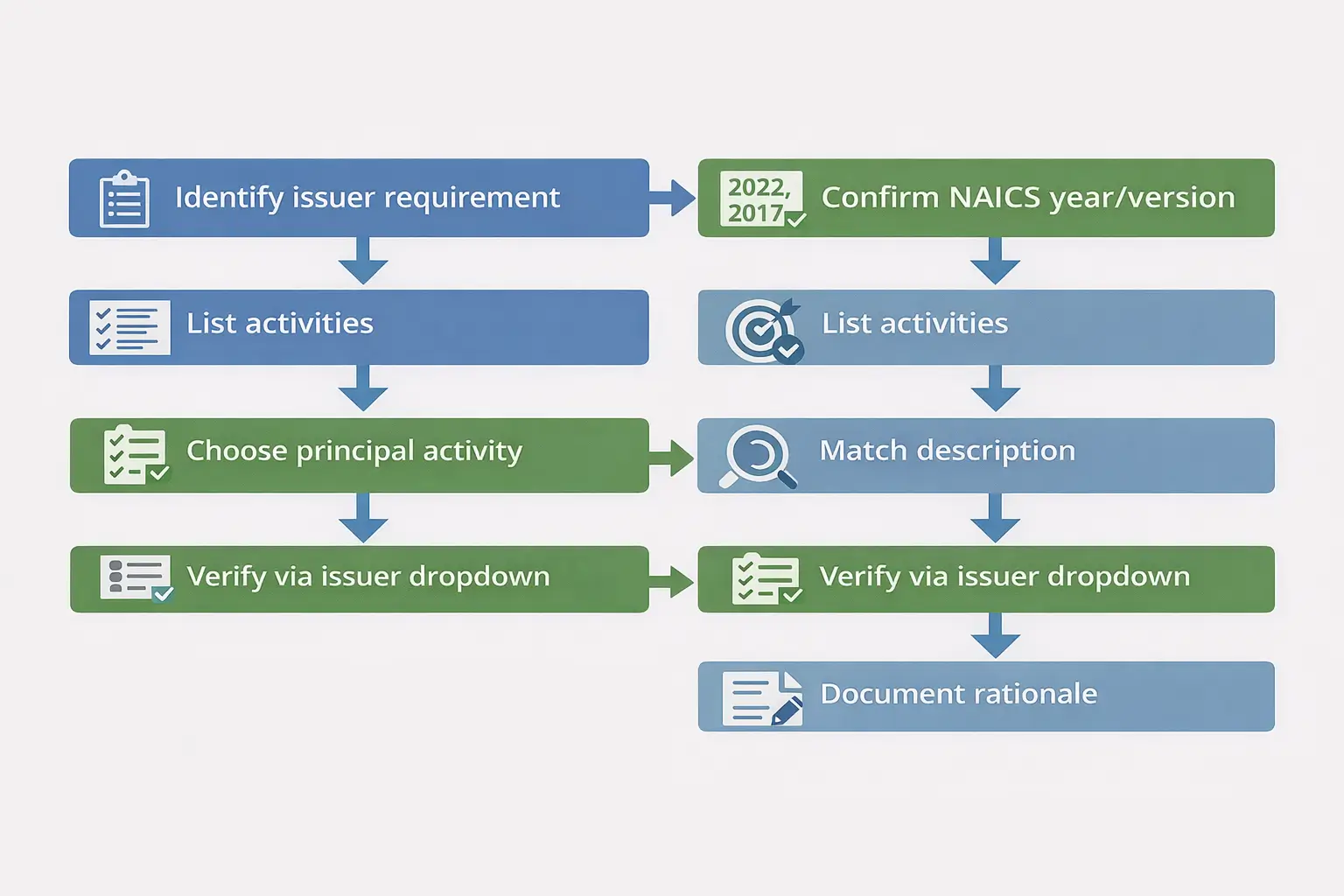
Direct answer: Choose the NAICS code that best matches your principal business activity, using the NAICS year/version your form requires, and prioritizing the issuer’s dropdown/list if provided.
Steps (6–8)
- Read the field label: NAICS, NAICS 2017, NAICS 2022, or “industry code”?
- Check for a dropdown/list: if present, pick from it.
- List your activities: retail selling, wholesale, services (prep/warehouse/logistics), multi-channel, etc.
- Pick your principal activity: what you primarily do (often revenue/time driver).
- Match the description: choose the code whose official description fits best (use Census NAICS resources when possible).
- Confirm acceptance: make sure the issuer accepts the code/year or choose the closest match from the dropdown.
- Write a one-line rationale and save it for future applications.
- Re-check after major changes (wholesale shift, new service line, etc.).
Before you submit (quick checklist)
- Does the code format match what the form expects?
- Are you using the NAICS year/version the issuer expects?
- Did you choose based on your principal activity (not “FBA”)?
- If there’s a dropdown/list, did you choose from that list?
- Did you save your one-line rationale?
Boundary conditions
- Some issuers accept multiple activity codes; many require one. Follow the form.
- For high-stakes filings, confirm expectations with the issuer or a qualified advisor.
Retail vs wholesale vs services: if you’re not “just a seller”
Direct answer: If you primarily sell goods to consumers, you’re usually a retail activity. If you primarily sell to other businesses, you may be wholesale. If you’re paid mainly for prep/warehousing/logistics services, you’re a services activity—these are different classification buckets.
Mini-table (role → primary activity → how to classify)
| You are… | Primary activity | What to do |
|---|---|---|
| Amazon seller (retail) | Selling goods to end customers | Choose the retail/e-commerce family that best matches your activity and issuer options |
| Wholesale-heavy business | Selling to businesses (B2B) | Choose a wholesale trade code that matches your product line |
| Prep center / 3PL / warehouse | Providing storage/prep/handling services | Classify as services/warehousing based on what you’re paid for |
| Hybrid business | Both sales and services | Choose principal activity if only one code allowed; document rationale |
Boundary conditions
- Don’t classify a services business as “Amazon seller retail” just because your clients sell on Amazon.
Where to verify NAICS codes reliably (and what to do with issuer dropdowns)
Direct answer: Use a verification ladder: issuer dropdown/list first, then official NAICS resources (Census) for definitions, then directories for discovery only.
Verification sources table
| Source | Best for | Notes |
|---|---|---|
| Issuer’s dropdown/list on the form | What will be accepted for that form | Highest authority for that form |
| Census NAICS site | Official definitions and change context | Best baseline for what a code means |
| Directories/blogs | Discovery and examples | Can lag or oversimplify; verify officially |
| Forums | Seeing common confusion | Not authoritative |
Helpful official references:
- NAICS resources: https://www.census.gov/naics
- NAICS changes context: https://www.census.gov/library/stories/2024/11/naics-changes.html
- Example lookup for 454110 (NAICS 2017): https://www.census.gov/naics/?input=454110
Verification checklist
- Confirm NAICS year/version required by the issuer.
- Confirm the code description matches your principal activity.
- Use issuer dropdown/list for acceptance.
- Save a one-line rationale.
Boundary conditions
- If a portal rejects your code, treat it as a signal to re-check the issuer’s year/version and allowed list.
Common mistakes (wrong code, wrong NAICS year) and how to fix them
Direct answer: Most NAICS mistakes come from choosing a code based on “Amazon/FBA” instead of your activity, or from using the wrong NAICS year/version.
Mistakes checklist
- Choosing a code just because a blog says “this is the Amazon FBA NAICS.”
- Ignoring the form’s NAICS year/version (or assuming all lookups use the same year).
- Using a directory site as the final authority without checking official definitions.
- Ignoring an issuer dropdown/list and typing a code the portal won’t accept.
- Picking based on product category alone when the issuer wants a broader activity description (or vice versa).
- Mixing SIC and NAICS requirements.
- Not documenting your rationale (then you can’t explain your choice later).
- Panicking over unrelated codes (e.g., “213112”) seen in random tools without verifying the source.
If/then fixes
- If your portal rejects your code, then check whether the form expects a specific NAICS year/version and whether you must choose from a dropdown list.
- If a tool says “inactive,” then verify the code in official NAICS resources and confirm the year/version used by your issuer.
- If you’re multi-activity (retail + wholesale + services), then pick the principal activity (or list multiple codes if allowed) and document your rationale.
- If you already filed a code and suspect it’s wrong, then contact the issuer to ask about amendment/resubmission options (varies by issuer).
- If you see unrelated codes (like 213112) in a tool, then treat it as a lookup artifact and verify against issuer instructions and official NAICS definitions.
Boundary conditions
- Correction processes vary by issuer; don’t assume you can substitute codes without permission.
FAQ
- Q: What is the NAICS code for Amazon sellers?
A: There isn’t one universal code for all Amazon sellers. Many online retail sellers are commonly associated with nonstore/e-commerce retail families (for example, 454110 appears in NAICS 2017 as “Electronic Shopping and Mail-Order Houses”), but you should choose based on your principal activity and the NAICS year/version your form requires. https://www.census.gov/naics/?input=454110 - Q: What is the NAICS code for online selling?
A: “Online selling” is typically treated as a retail/nonstore/e-commerce activity in NAICS-style terms, but the exact code label can depend on the NAICS year/version and the issuer’s allowed list. Use the issuer dropdown if provided and match the best-fit official description. https://www.census.gov/naics - Q: What is the difference between NAICS code 4541…
A: “4541…” is commonly associated with nonstore/electronic shopping retail families in older NAICS versions, while other retail codes may be general merchandise or product-line retail categories. Choose based on your principal activity and the NAICS year/version your issuer uses. https://www.census.gov/naics/?input=454110 - Q: Why does NAICS 454110 show as inactive?
A: “Inactive” often reflects tool/database or NAICS year/version differences. NAICS updates can change labels and groupings, and vendor tools can lag. Verify the year your form uses, check official NAICS resources, and prioritize the issuer’s dropdown/list for acceptance. NAICS changes context: https://www.census.gov/library/stories/2024/11/naics-changes.html - Q: Does FBA vs FBM change my NAICS code?
A: Usually no. FBA vs FBM is a fulfillment choice; NAICS is about your business activity (retail vs wholesale vs services). Choose based on what your business primarily does. - Q: How do I choose the correct NAICS code if I sell multiple products/channels?
A: Identify your issuer’s NAICS year/version, list your activities, pick your principal activity, match to the best-fit official description, then choose from the issuer list if provided and document a one-line rationale. - Q: Where can I verify NAICS codes reliably?
A: Start with your issuer’s dropdown/list (if provided), then use official Census NAICS resources for definitions and change context. https://www.census.gov/naics - Q: What are common mistakes choosing NAICS for Amazon sellers?
A: Common mistakes include assuming one “Amazon FBA NAICS,” using the wrong NAICS year/version, relying on directories/forums as authority, ignoring issuer dropdown lists, and not documenting your rationale. Fix by using the issuer-first verification ladder and matching the official description to your principal activity.
Summary & next steps
Direct answer: The “right” NAICS code for an Amazon FBA seller depends on your principal business activity and the NAICS year/version your form uses—not on FBA itself. Use the issuer-first verification ladder, match the best-fit official description, and save a one-line rationale.
Next steps
- Check whether your form specifies NAICS 2017 vs 2022 (or provides a dropdown list).
- Identify your principal activity (retail vs wholesale vs services).
- Use official NAICS resources to confirm descriptions, then select the best-fit option from the issuer’s allowed list.
- Save your rationale so you can reuse it across applications.
Note: If you’re sourcing from overseas and need help building reliable inbound workflows (consolidation, labeling/prep, carton planning, and delivery into FBA), FBABEE provides FBA-focused logistics and prep support. Learn more at https://fbabee.com/
Boundary conditions
- This guide is for classification guidance only; acceptance depends on the issuer’s requirements and NAICS year/version.


