

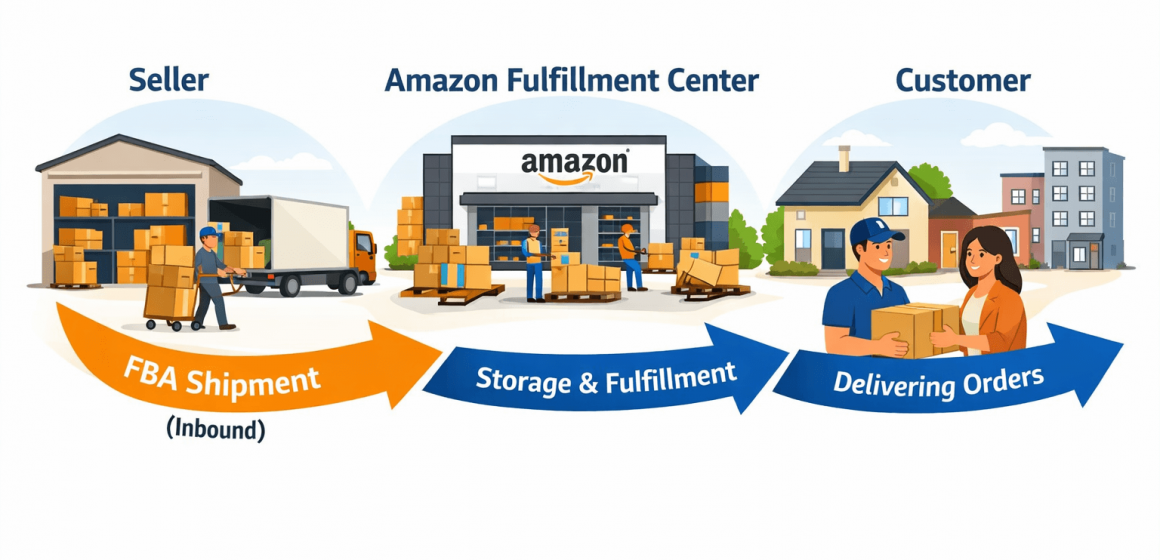
Fast Answer: What is an Amazon FBA shipment?
Direct answer: An Amazon FBA shipment usually means an inbound inventory shipment you create in Seller Central to send your products (in cartons or pallets) to Amazon fulfillment centers so Amazon can store and fulfill orders for you.
Official baseline for “what FBA is”: https://sell.amazon.com/fulfillment-by-amazon
Key points
- It’s inbound: you (or your prep center/3PL) are shipping inventory to Amazon, not Amazon shipping to customers.
- An FBA shipment typically includes: what SKUs/quantities you’re sending, the ship-from location, packing/carton details, and labels tied to that shipment.
- After you create it, you usually get a shipment ID and printable labels (and you can track shipment status).
- “Send to Amazon” is the Seller Central workflow many sellers use to create/manage inbound shipments: https://sell.amazon.com/blog/send-to-amazon-shipment-creation
Guardrail (common confusion):
Shipping to Amazon (inbound FBA shipment) ≠ Amazon shipping to customers (outbound fulfillment).
Boundary conditions
- Exact screens and fields can change in Seller Central—use this guide as “typical steps,” then verify the current workflow in your account.
- Receiving speed and outcomes can vary; avoid assuming a fixed timeline.
Next question prompt: Are you trying to understand the meaning of “FBA shipment,” or do you need the step-by-step process to create one?
How FBA shipping works (inbound to Amazon vs outbound to customers)
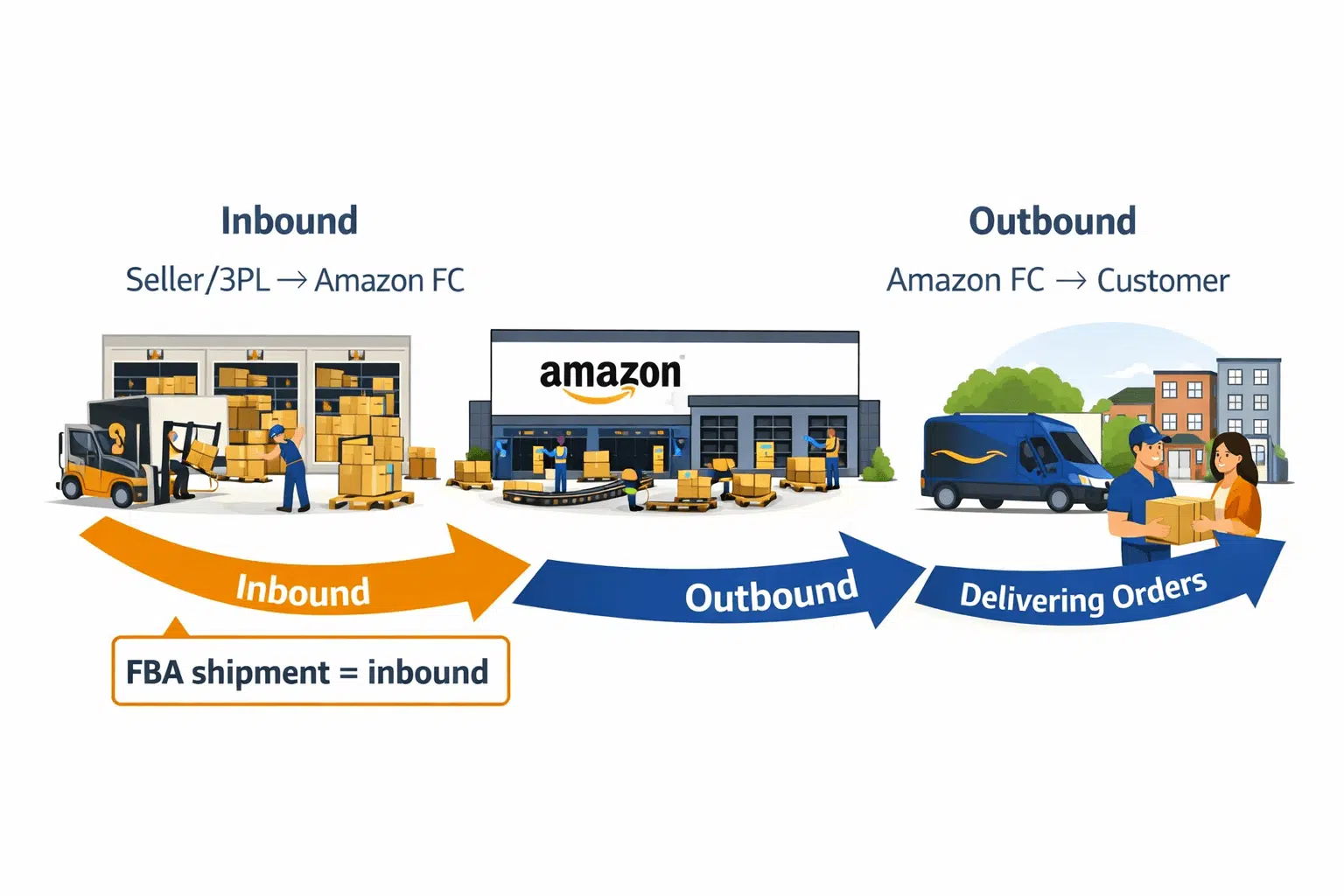
Direct answer: FBA “shipping” has two legs. Your FBA shipment covers the inbound leg (you send inventory to Amazon). After Amazon receives it, Amazon handles the outbound leg (fulfilling customer orders from their network).
Official baseline: https://sell.amazon.com/fulfillment-by-amazon
End-to-end flow (typical steps)
- You prepare inventory (labels, packaging, carton/pallet planning) at your ship-from location.
- You create an inbound shipment in Seller Central (shipment details + labels).
- Inventory ships to Amazon fulfillment centers and moves through receiving.
- Amazon stores inventory and makes it available for customer orders.
- Amazon fulfills orders (pick/pack/ship) when customers buy.
Inbound vs outbound (quick comparison)
| Topic | Inbound (your FBA shipment) | Outbound (Amazon fulfillment) |
|---|---|---|
| What it is | Shipping inventory to Amazon | Shipping customer orders to buyers |
| Who controls it most | You / your 3PL / your carrier choices | Amazon fulfillment network processes |
| What you must provide | Accurate SKUs/qty, carton details, labels, ship-from | Replenishment inventory so Amazon can fulfill |
What is “FBA selling on Amazon?” (plain English)
- Sellers list and sell products on Amazon.
- Using FBA means sellers send inventory to Amazon, and Amazon handles fulfillment once it’s received.
Boundary conditions
- Fulfillment responsibilities can vary by program and settings; keep expectations aligned to current Seller Central guidance.
- Don’t assume inbound = immediate availability; receiving and check-in take time.
Next question prompt: Do you need help choosing a ship-from setup (supplier vs prep center/warehouse), or do you already have inventory ready to ship?
Who pays for shipping on Amazon FBA? (A shipping-leg breakdown)
Direct answer: “Who pays” depends on which shipping leg you mean. Sellers typically pay for inbound shipping to Amazon (carrier/freight charges and related prep). Amazon’s outbound delivery is generally part of the FBA fulfillment service structure (via Amazon fees), rather than a separate “seller-paid outbound label” in the same way as FBM.
Official context: https://sell.amazon.com/fulfillment-by-amazon
Who pays mini-table (high-level, non-numeric)
| Shipping/cost leg | Typically paid by | What this means in practice |
|---|---|---|
| Inbound shipping (ship-from → Amazon FC) | Seller (or seller’s business) | You pay your carrier/freight/3PL costs to deliver inventory to Amazon |
| Prep/labeling to meet inbound requirements | Seller | You pay for materials/labor or a prep service to make inventory inbound-ready |
| Outbound fulfillment (Amazon FC → customer) | Built into FBA service fees (seller pays fees) | Amazon fulfills customer orders and charges fees; exact fee structure varies by product and program |
| Returns handling (fulfillment-related) | Depends on settings and services | Some returns steps are managed within Amazon processes; costs vary—verify your settings and fees |
Where to verify current costs (without relying on stale numbers)
- Start with Amazon’s pricing/fee entry point: https://sell.amazon.com/pricing
- In Seller Central, use the current fee documentation/calculators and the shipment workflow for current options and charges.
- For inbound shipping costs, verify with your carrier/forwarder/3PL based on carton count, weight/dimensions, and ship-from location.
Boundary conditions
- Avoid assuming exact fees or rates; they can change.
- Some “shipping” costs are carrier charges (outside Amazon) and some are Amazon service fees—keep them separate when budgeting.
Next question prompt: When you say “shipping cost,” do you mean your inbound shipping cost to Amazon, or the fees Amazon charges to fulfill orders?
How to create an Amazon FBA shipment in Seller Central (Send to Amazon)
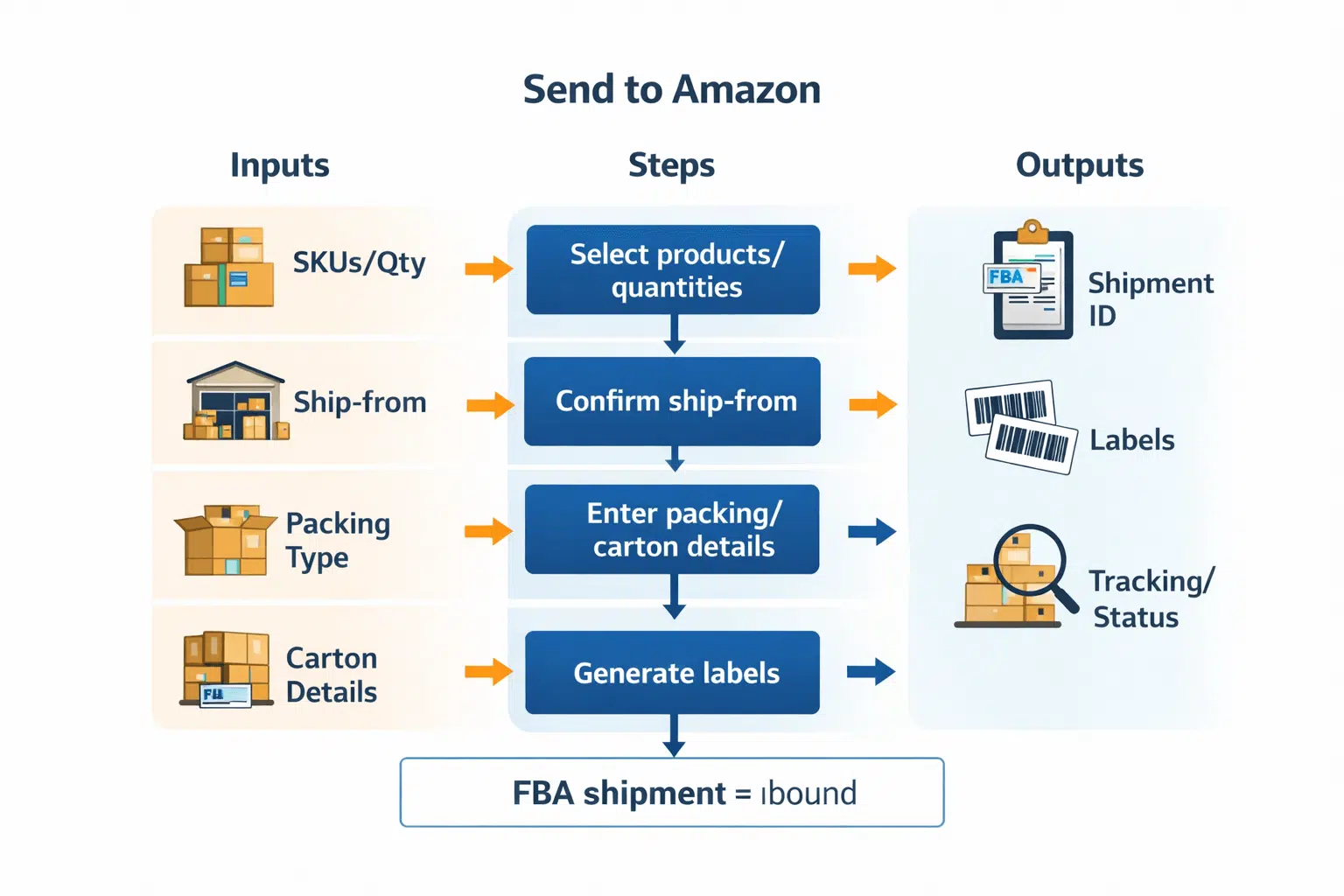
Direct answer: You create an FBA shipment in Seller Central (often via Send to Amazon) by selecting what you’re sending, confirming the ship-from location, entering packing/carton details, generating labels, and then shipping the inventory to the assigned Amazon fulfillment centers.
Official workflow references:
Seller Central Help (Send to Amazon) and
Send to Amazon explainer
Shipping plan vs shipment ID (plain English)
- A shipping plan is the set of inbound details (what you’re sending and how).
- A shipment (identified by a shipment ID) is the trackable inbound record tied to labels, destinations, and status updates.
Typical steps (6–9)
- Choose products and quantities you want to send to FBA.
- Set your ship-from location (warehouse, prep center, 3PL, etc.).
- Choose packing type and confirm whether you’re sending mixed SKUs or case-packed units.
- Enter carton details (carton count and, where required, carton weights/dimensions).
- Handle prep and labeling so each unit/carton is identifiable and scannable.
- Select the shipment mode (small parcel vs palletized/LTL) based on how you’re shipping.
- Review and confirm the shipment plan details and destinations.
- Generate and print labels and save the files with your shipment ID.
- Ship and track the shipment status in Seller Central.
Inputs → outputs checklist (table)
| What you must provide (inputs) | What you get back (outputs) |
|---|---|
| SKUs and quantities | A shipment record + shipment ID |
| Ship-from address | Assigned destination(s) / routing details (as provided by the workflow) |
| Packing configuration (how units are packed) | Required labels (unit/carton/pallet as applicable) |
| Carton count + carton details (as required) | Shipment status tracking (inbound/receiving updates) |
| Prep/label decisions | Printable labels and shipment documentation artifacts |
Practical tips (to reduce rework)
- Decide your ship-from before you start, so the shipment plan matches reality.
- Keep a simple record: carton count, SKU list, quantities per carton, and photos—this helps troubleshooting later.
Boundary conditions
- Seller Central screens and required fields can change; follow the current prompts in your account.
- Don’t skip carton/label steps—missing data is a common cause of delays and relabeling.
Next question prompt: Are you shipping a few cartons (small parcel) or a large shipment you plan to palletize?
Labels, packing configuration, and carton details (what matters most)
Direct answer: Most inbound problems come from mismatched labels, carton details, or quantities. Getting unit IDs and carton identification correct is one of the fastest ways to reduce receiving confusion and rework.
Workflow baseline: https://sellercentral.amazon.com/gp/help/external/G6925SDD66GDLXJW
Label and detail mini-table (what goes where and why)
| Label/detail | Where it goes | Why it matters | Common failure if wrong/missing |
|---|---|---|---|
| Unit/product label (scannable unit identifier) | On each sellable unit (as required) | Helps identify and receive units correctly | Relabeling, delays, or hard-to-reconcile units |
| Box/carton label | Outside of each carton | Links cartons to the shipment record | Cartons can’t be matched; “missing cartons” issues |
| Carton contents / packing configuration | In the shipment record | Supports receiving and discrepancy resolution | Quantity mismatches; extra investigation |
| Carton count + weight/dimensions (as required) | In the shipment record | Supports routing and planning | Shipment creation errors or operational mismatches |
Best-practice bullets (evergreen)
- Keep each carton’s physical contents consistent with your recorded carton details.
- Avoid mixing look-alike SKUs unless your carton contents records are reliable.
- Apply labels cleanly and visibly (not covered by tape, not damaged).
Boundary conditions
- Exact labeling rules can vary by product type and settings; verify the current requirements shown in Seller Central for your shipment.
- Small mismatches in carton counts or contents can create long troubleshooting later.
Next question prompt: Do you already have accurate carton contents (SKU-by-carton and quantities), or do you need a consolidation step first?
Small parcel vs LTL/pallet shipments to FBA (conceptual chooser)
Direct answer: Small parcel shipments are carton-based and simpler to execute. LTL/pallet shipments are palletized freight that can be better for large inbound volumes but require more planning and coordination.
Comparison table (conceptual)
| Aspect | Small parcel (cartons) | LTL / palletized freight |
|---|---|---|
| Typical handling unit | Individual cartons | Pallets containing cartons |
| Best for | Smaller, simpler shipments | Larger shipments where pallet handling helps |
| Operational complexity | Lower | Higher (pallet planning + coordination) |
| What you must get right | Carton labels + carton details | Pallet/carton labeling + consistent pallet builds |
Decision bullets (non-numeric)
- If you’re sending a small number of cartons, small parcel is usually simpler.
- If you’re sending a large volume of cartons, palletizing can improve handling consistency but adds planning overhead.
- Choose the mode that matches how your inventory is packed and how reliably you can provide carton/pallet details.
Boundary conditions
- Specific carrier requirements and Amazon inbound rules can change; follow the current guidance shown in your shipment workflow.
Next question prompt: Are you optimizing for simplicity (small parcel) or bulk handling efficiency (palletized/LTL)?
Shipment status “inbound/receiving”: what it means and what to check
Direct answer: “Inbound” and “receiving” generally mean Amazon has your shipment in transit to or at a fulfillment center and is processing it. If the status seems stuck or quantities don’t match, start with a structured checklist before escalating.
What to check first (checklist)
- Shipment ID and the correct shipment record (confirm you’re viewing the right shipment).
- Carton count shipped vs carton count in the shipment record.
- Whether every carton has the correct carton label and it matches the shipment record.
- Ship-from address and shipment details match what actually shipped.
- Your records: carton contents, quantities, and photos (if available).
- Carrier/forwarder proof of shipment/delivery (dates, tracking references).
If/then fixes (practical)
- If the shipment shows “inbound” longer than expected, then confirm delivery occurred and that carton labels/counts match the shipment record.
- If received quantities don’t match what you sent, then compare your carton contents records, the shipment record carton data, and what actually shipped.
- If cartons are marked missing, then verify carton label application and carton count accuracy in the shipment record.
- If you can’t reconcile a discrepancy, then gather a clean evidence packet (shipment ID, carton counts, photos, carrier proof) before contacting support.
Boundary conditions
- Receiving and reconciliation outcomes vary by shipment and FC; avoid assuming a guaranteed resolution path.
- Focus on “first checks” to reduce avoidable errors and prepare documentation if needed.
Next question prompt: Is your issue primarily status stuck, quantity mismatch, or missing cartons/labels?
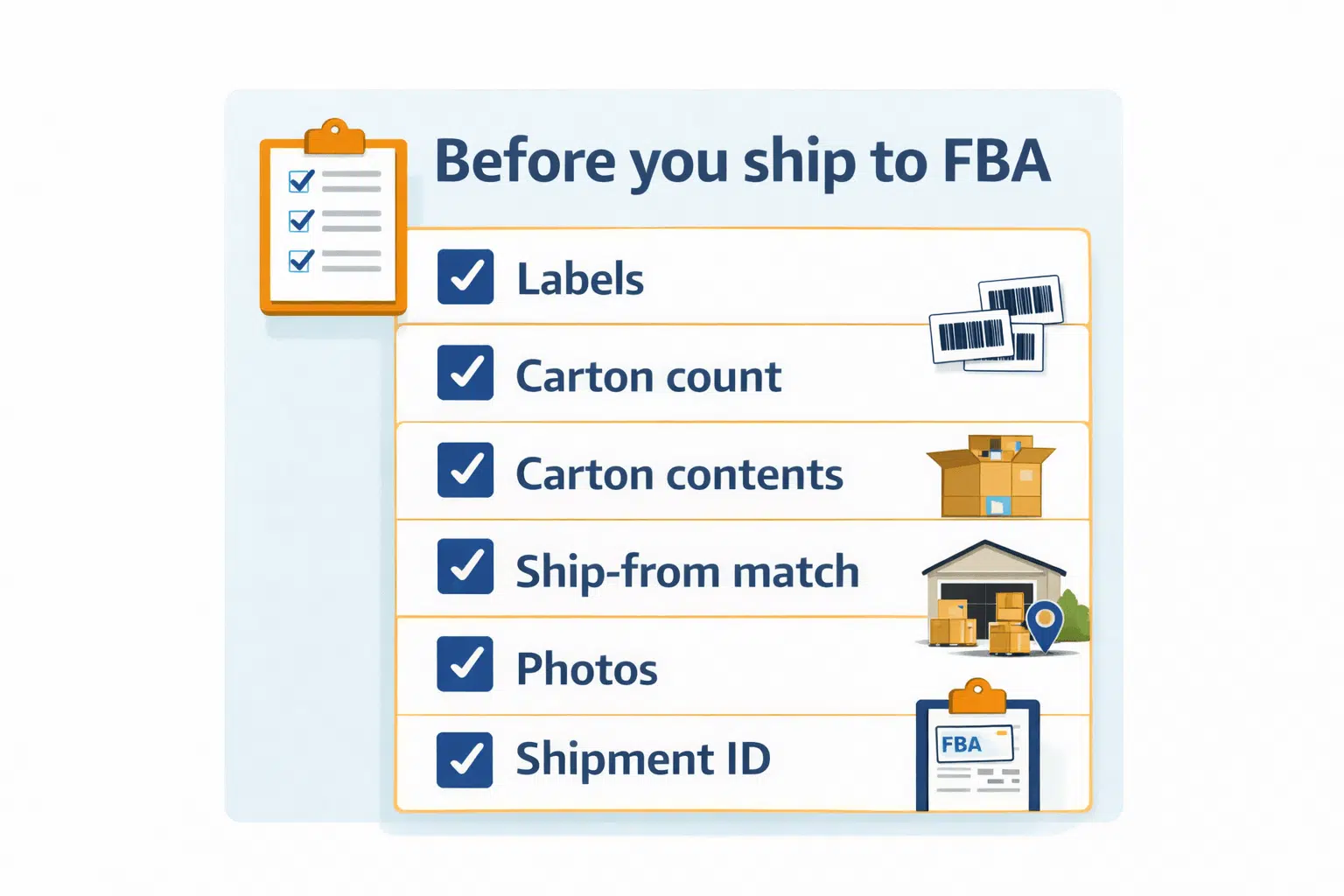
Direct answer: Most shipment problems are preventable. The biggest risks are label mistakes, incorrect carton details, and quantity mismatches—especially when inventory is consolidated from multiple suppliers.
Common mistakes (checklist)
- Creating the shipment with the wrong ship-from (then shipping from a different location).
- Missing or incorrect carton labels (or labels that don’t match the shipment record).
- Inaccurate carton count or missing carton details in the shipment record.
- Incorrect carton contents (SKU/quantity-by-carton doesn’t match what was packed).
- Mixing multiple SKUs without reliable carton contents tracking.
- Labels applied inconsistently (covered, damaged, unreadable).
- Shipping before reconciling cartons packed vs shipment record.
Pre-ship prevention checklist (6–10 items)
- Confirm ship-from address matches the physical ship-from.
- Confirm SKU list and total quantities match your packing list.
- Confirm carton count and carton details match what’s physically packed.
- Apply the correct carton label to every carton and confirm it matches the shipment record.
- If mixed SKUs, confirm carton contents records are complete and accurate.
- Take quick photos of labeled cartons and carton counts.
- Save shipment ID and label PDFs in one folder for easy reference.
- If using a 3PL/prep center, confirm their SOP for labeling, carton contents, and exceptions.
Boundary conditions
- These steps reduce risk but don’t guarantee perfect receiving outcomes.
- Requirements can differ by product and settings; always follow the current prompts in Seller Central.
Next question prompt: Which step is hardest for your operation—accurate carton contents, labeling at scale, or ship-from coordination?
Cross-border (optional): a typical flow from overseas suppliers to an FBA shipment
Direct answer: For cross-border sourcing, the FBA shipment still starts in Seller Central, but upstream steps often include supplier pickup and consolidation so ship-from and carton/label work stays consistent.
Typical flow (conceptual)
- Supplier(s) finish production and prepare goods for pickup.
- Inventory is received at a consolidation/prep location (warehouse, prep center, or 3PL).
- Prep/labeling/carton planning is completed so cartons are consistent and traceable.
- You create the FBA shipment in Seller Central using the prep location as the ship-from.
- Inventory ships to Amazon fulfillment centers and moves through receiving.
Role of a prep center/forwarder (inbound context)
- Acts as the ship-from operator and helps maintain consistent carton/label standards.
- Reduces multi-supplier complexity by consolidating into one controlled shipment plan.
Boundary conditions
- No transit time or cost claims here—cross-border flows vary by route, mode, and shipment specifics.
- Verify requirements and documentation needs per shipment in Seller Central.
Next question prompt: Are you shipping from one supplier or consolidating from multiple suppliers?
FAQ
- Q: What is the meaning of FBA shipment?
A: An FBA shipment usually means an inbound inventory shipment you create in Seller Central to send products to Amazon fulfillment centers for storage and fulfillment. It is not the same as Amazon shipping customer orders (outbound). https://sell.amazon.com/fulfillment-by-amazon - Q: How does FBA shipping work?
A: Inbound: you ship inventory to Amazon fulfillment centers using a shipment you create in Seller Central. Outbound: after Amazon receives inventory, Amazon fulfills customer orders from its network. https://sell.amazon.com/fulfillment-by-amazon - Q: Who pays for shipping on Amazon FBA?
A: Sellers typically pay for inbound shipping to Amazon (carrier/freight/3PL). Outbound fulfillment is generally part of the FBA fee structure (fees vary), so verify current costs in Seller Central and the official pricing hub. https://sell.amazon.com/pricing - Q: What is FBA selling on Amazon?
A: Sellers list and sell products on Amazon, and with FBA they send inventory to Amazon so Amazon can store it and fulfill orders after it’s received. - Q: How do you create an Amazon FBA shipment in Seller Central?
A: Use Send to Amazon (or the current inbound workflow): choose products/quantities, confirm ship-from, enter packing/carton details, generate labels, and ship to the assigned fulfillment centers. Workflow baseline: https://sellercentral.amazon.com/gp/help/external/G6925SDD66GDLXJW - Q: What labels do you need for an FBA shipment (product vs box labels)?
A: You typically need correct unit identification (as required for your setup) and carton labels that match your shipment record. Carton contents and packing configuration also matter for receiving accuracy. Verify the label requirements shown in your shipment workflow. https://sellercentral.amazon.com/gp/help/external/G6925SDD66GDLXJW - Q: What does “inbound” or “receiving” mean in shipment status?
A: It generally means the shipment is in transit to or at the fulfillment center and is being processed through receiving. If it appears stuck or quantities don’t match, verify carton labels/counts and carton contents records first. - Q: What are common mistakes with Amazon FBA shipments?
A: Common mistakes include wrong/missing labels, incorrect carton count or carton contents records, ship-from mismatches, and shipping before reconciling what’s packed vs what’s in the shipment record.
Summary & next steps
Direct answer: An Amazon FBA shipment is your inbound inventory shipment to Amazon fulfillment centers. Reduce delays and discrepancies by keeping shipment records, carton details, and labels consistent—and by saving basic documentation (carton counts + photos + shipment ID).
Key takeaways
- Treat “FBA shipment” as inbound to Amazon; keep outbound fulfillment separate.
- Create shipments with an inputs → outputs mindset: what you enter drives labels and tracking.
- Most issues come from labels, carton details, and quantity mismatches—use a pre-ship checklist.
- If status or quantities look wrong, start with “first checks” before escalating.
Next steps
- If you haven’t shipped before: create a small test inbound shipment to learn the workflow with low risk.
- Build a repeatable SOP: ship-from confirmation → carton contents record → labels → final reconciliation → ship.
- For high-value or multi-supplier shipments: consider a consolidation/prep step so carton/label standards are consistent.
Note: If you’re sourcing from overseas and want a controlled ship-from setup (consolidation, labeling/prep, carton planning, and coordinated delivery into FBA), FBABEE provides FBA-focused logistics and prep support. Learn more at https://fbabee.com/
Boundary conditions
- Seller Central workflow details and fees can change—verify current requirements in your account.
- This guide reduces risk but does not guarantee receiving speed or discrepancy outcomes.
Next question prompt: What’s your current inbound pain point—creating the shipment, labels/carton accuracy, or inbound/receiving discrepancies?


