If you sell on Amazon using FBA, “PPC” is the advertising system most sellers use to buy visibility inside the Amazon store. This guide explains what it means, how it works, and how to start without wasting spend.
Fast Answer: What Is Amazon PPC in Amazon FBA?
Amazon PPC (pay-per-click) is Amazon’s sponsored advertising model where you promote products (or your brand) and typically pay when a shopper clicks your ad. “FBA” describes how orders are fulfilled; PPC is about getting shoppers to see and click your listings in the first place. (Source: Amazon Ads CPC guide)
- PPC is the billing model (“pay when someone clicks”); CPC is the metric that describes the cost of those clicks. (Source: Amazon Ads CPC guide)
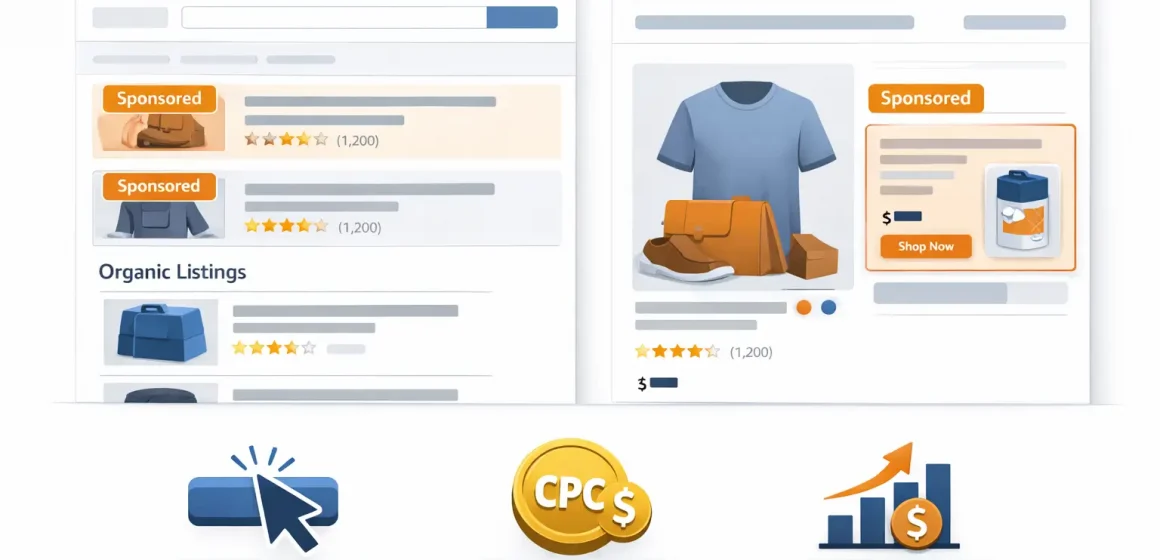
- You’ll usually see PPC as “Sponsored” placements, such as Sponsored Products promoting a specific listing. (Source: Sponsored Products overview)
- FBA handles storage/packing/shipping; PPC handles paid visibility and traffic.
A couple of realities to keep in mind:
- PPC can increase visibility, but it doesn’t guarantee sales, profit, or organic ranking improvements.
- Placements and eligibility can vary by account, category, and marketplace.
Understanding the simple “how it works” model will make every other PPC decision easier.
How Amazon PPC Works (In 5 Steps)
Amazon PPC works by matching your ads to shopping contexts (like search terms or product pages), entering an auction, and charging you when a shopper clicks—then reporting performance so you can adjust. (Source: Amazon Ads CPC guide)
- You control targeting (what you want to show up for) and your bid (what you’re willing to pay for a click).
- Amazon runs an auction that considers factors beyond bid to determine placement and final click cost. (Source: Amazon Ads CPC guide)
- You evaluate performance using metrics like clicks, CTR, and ACoS. (Source: Amazon Ads performance metrics)
- Choose what to advertise (a product listing, a brand destination, or an audience depending on the ad type).
- Choose targeting (keywords, products, or audiences—depending on campaign type).
- Set bids and budgets (how aggressively you want to compete and how much you’re willing to spend).
- Enter auctions when shoppers search or browse relevant pages; Amazon selects ads for available placements.
- Pay when a shopper clicks (in CPC-based formats), then measure results and refine.
A couple of realities to keep in mind:
- Settings and available controls can change; verify details in your Amazon Ads console.
- “Better” results depend heavily on your listing quality and conversion, not just ads.
Once you have the mechanism clear, it’s much easier to choose the right ad type for your goal.
Quick clarity: When you pay (clicks vs impressions)
For PPC (pay-per-click) campaigns, you pay when a shopper clicks your ad—not simply when they see it. That click cost is reported as CPC (cost per click). (Source: Amazon Ads CPC guide)
- Impressions = how many times your ad was shown.
- Clicks = how many times shoppers clicked.
- CPC = the average amount you paid per click. (Source: Amazon Ads performance metrics)
A couple of realities to keep in mind:
- Some ad products and buying models can be priced differently (for example, per thousand impressions in some contexts).
- Always confirm the cost type shown in your campaign settings and reports.
Now let’s look at where ads can show up—because placements depend on ad type and targeting.
Where Amazon PPC ads can appear (high level)
Amazon PPC placements can appear in search results and on product detail pages, and some formats can extend beyond the Amazon store depending on the campaign type. (Source: Sponsored Products overview)
- Search results placements: ads can appear at the top of, alongside, or within shopping results. (Source: Sponsored Products overview)
- Product detail page placements: ads can appear on product pages to capture shoppers comparing options. (Source: Sponsored Products overview)
- Display-style placements: display campaigns can reach audiences across Amazon properties and, in some cases, broader inventory. (Source: Sponsored Display / display ads info)
A couple of realities to keep in mind:
- Exact placements vary by campaign type, eligibility, and marketplace.
- Don’t build strategy on one “guaranteed” placement—focus on relevance and performance.
Amazon PPC Ad Types: Sponsored Products vs Sponsored Brands vs Sponsored Display
Most sellers refer to these three as the core “Amazon PPC” formats: Sponsored Products, Sponsored Brands, and Sponsored Display (now grouped under Amazon’s broader display ads offering). (Sources: Sponsored Products overview, Sponsored Display / display ads info)
- Sponsored Products usually promote one ASIN listing and are often the first place sellers start. (Source: Sponsored Products overview)
- Sponsored Brands are built around brand presentation (logo/headline and multiple products) and may require eligibility like Brand Registry. (Source: Sponsored Brands eligibility requirements)
- Sponsored Display (display ads) focuses on reaching relevant audiences across placements and can be useful for retargeting or broader reach. (Source: Sponsored Display / display ads info)
| Ad type | Where it often shows (high level) | Best for (high level) | Requirements note |
|---|---|---|---|
| Sponsored Products | Search results + product detail pages | Driving consideration/sales for specific listings | Generally the most common entry point for sellers |
| Sponsored Brands | Prominent brand-led placements (varies) | Brand discovery and showcasing a product set | Eligibility can apply (often Brand Registry) |
| Sponsored Display / display ads | Display-style placements across Amazon properties (varies) | Re-engaging audiences or expanding reach | Availability and options vary by account/marketplace |
A couple of realities to keep in mind:
- Not every advertiser has access to every feature in every marketplace—eligibility varies.
- “Best” depends on your goal (launch visibility vs brand discovery vs retargeting), not a universal rule.
Once you pick an ad type, your biggest lever is usually targeting—what you choose to show up for.
Which ad type should beginners start with?
Most beginners start with Sponsored Products because it’s closely tied to a specific listing and tends to be simpler to learn from. (Source: Sponsored Products overview)
- If your goal is to learn what shoppers search for: start with a simple Sponsored Products campaign and review search terms over time.
- If your goal is brand discovery and you’re eligible: consider Sponsored Brands after you’ve proven listing conversion.
- If your goal is re-engaging shoppers: consider display-style campaigns once you have baseline traffic and conversion data.
A couple of realities to keep in mind:
- Eligibility (including Brand Registry) can change what you can run. (Source: Sponsored Brands eligibility requirements)
- If your listing doesn’t convert, “more traffic” can amplify waste.
To control waste and learn faster, you need a clear view of targeting basics.
Targeting Basics: Keywords, Product Targeting, Match Types, and Negative Keywords
Targeting is how you define the context in which your ads can appear—commonly through keywords shoppers search, or specific products/categories you want to show up against. (Source: Targeting with Sponsored Products guide)
- Keyword targeting: you choose keywords; Amazon matches them to shopper searches and shows your ad in relevant contexts.
- Product targeting: you target specific products (ASINs) or product categories so your ad can appear on those pages or related contexts. (Source: Targeting keywords and products)
Match types (manual keyword targeting):
- Broad match: wider reach; can match to related searches.
- Phrase match: more constrained; matches searches containing the phrase (and close variations).
- Exact match: tightest; aims to match the specific term (and close variations). (Source: Match types and targeting groups)
Negative keywords (a budget protection tool):
- Negative phrase: blocks ads from showing on searches that contain that phrase (and close variations).
- Negative exact: blocks ads from showing on searches that match that exact phrase (and close variations). (Source: Match types and targeting groups)
A couple of realities to keep in mind:
- There isn’t one “perfect” match type—start simple, then tighten or expand based on real search term data.
- Definitions and behavior can evolve; treat the platform documentation as the source of truth.
Key Amazon PPC Metrics (and What Each One Tells You)
Amazon PPC metrics help you understand the funnel from visibility (impressions) to engagement (clicks/CTR) to efficiency (CPC/ACoS) so you can decide what to fix first. (Sources: Amazon Ads performance metrics, Amazon Ads ACoS guide)
- Look for “relevance” signals first (CTR and search terms) before you obsess over efficiency.
- Then check conversion signals (orders/sales from ad clicks) and your cost efficiency lens (ACoS).
- Use TACoS as an optional, seller-used “whole business” lens (it may not appear as a default platform metric everywhere).
| Metric | What it tells you | How to use it (beginner-friendly) |
|---|---|---|
| Impressions | How often your ad was shown | If very low, you may be too narrow or not competitive for those placements |
| Clicks | How many shoppers clicked | Combined with impressions, shows whether the ad is getting attention |
| CTR | Clicks ÷ impressions | Low CTR often suggests targeting mismatch or weak main image/title appeal (Source: Amazon Ads performance metrics) |
| CPC | Average cost per click | Helps you understand how expensive traffic is for your targeting (Source: Amazon Ads performance metrics) |
| Conversion rate (from ad traffic) | How often clicks turn into orders | If low, fix listing offer and relevance before scaling |
| ACoS | Ad spend relative to attributed ad revenue | A simple efficiency lens for ad-attributed sales (Source: Amazon Ads ACoS guide) |
| TACoS (industry usage) | Ad spend relative to total revenue | Optional lens to see ad spend vs overall sales health (label as industry usage; reporting views vary) |
A couple of realities to keep in mind:
- “Good” CPC or ACoS varies by product margin, category competition, seasonality, and your goal—avoid copying benchmarks.
- Judge changes with enough data; early numbers can swing heavily with low volume.
If you’re unclear on ACoS vs TACoS, this plain-English comparison will help.
ACoS vs TACoS in plain English (what question each answers)
ACoS answers “How efficient are my ads at generating the sales Amazon attributes to those ads?” TACoS answers “How large is my ad spend compared to my total sales?” (Source for ACoS definition: Amazon Ads ACoS guide)
- ACoS: ad spend ÷ attributed ad sales (ad-efficiency lens).
- TACoS: ad spend ÷ total sales (whole-store lens, commonly used by sellers).
A couple of realities to keep in mind:
- TACoS is widely used in seller education, but your reporting setup and terminology can differ by account.
- ACoS can look “worse” during exploration; what matters is whether you learn which searches and pages convert.
Beginner Setup: Your First Amazon PPC Campaign (Checklist + Simple Structure)
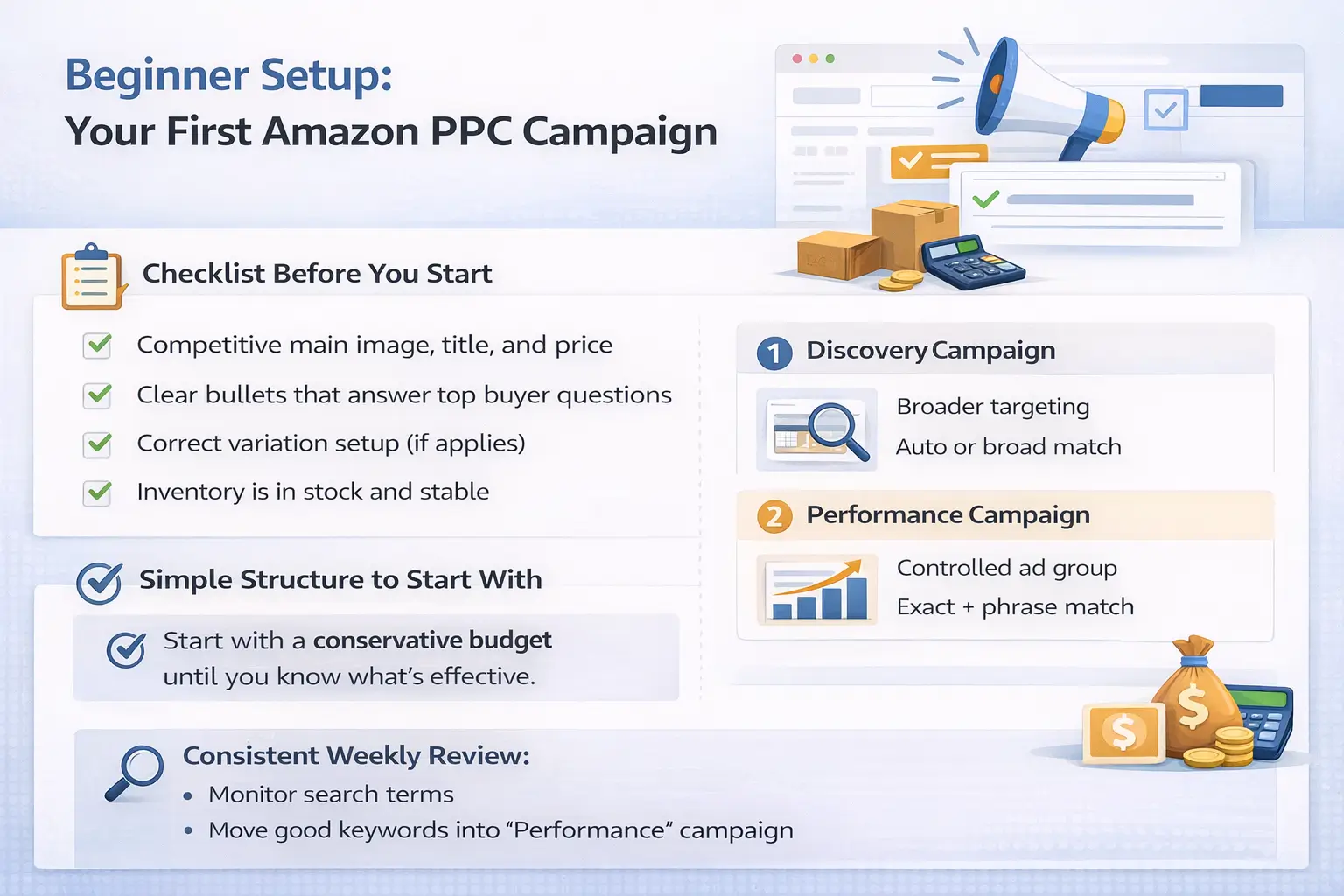
A beginner-safe PPC setup keeps structure simple, starts with learnings (not perfection), and makes it easy to identify wasted spend quickly.
- Start with one clear goal per campaign (learn search terms, protect brand terms, or retarget—don’t mix everything at once).
- Keep naming and structure consistent so reporting is easy to interpret.
- Add “waste controls” early (negative keywords and budget pacing).
Listing readiness checklist (before you spend on clicks):
- Your main image, title, and price are competitive for your niche.
- The listing has clear benefits and scannable bullets.
- Variations and sizing are correct (no shopper confusion).
- Inventory is available (avoid driving paid traffic into an out-of-stock situation).
- You can fulfill consistently (FBA inbound status and replenishment timing are understood).
- Choose one product to start with (prefer a listing you can keep in stock).
- Create a simple Sponsored Products structure:
- One campaign designed to discover terms (often using broader or automatic targeting).
- One campaign designed to focus on proven terms (manual targeting with tighter match types).
- Start with a conservative budget approach you can sustain while learning (avoid aggressive scaling on day one).
- Monitor search terms and placement performance on a steady cadence (weekly is a common starting rhythm).
- Add negatives to block clearly irrelevant searches.
- Move converting search terms into a more controlled campaign and adjust bids gradually.
- Re-check listing conversion before increasing budgets—more traffic won’t fix a weak offer.
A couple of realities to keep in mind:
- The exact buttons and options can change—follow your Amazon Ads console and documentation where details differ.
- No fixed “best budget” exists across categories; consistency and learning quality matter more early on.
Before you optimize, it’s worth making sure your listing is actually ready to convert paid clicks.
Listing readiness checklist (before you spend on clicks)
If your listing can’t convert, PPC data becomes misleading and clicks become expensive tuition. Make sure the core offer is solid before you try to “solve” performance with bids.
- Clear main image and accurate variation setup
- Competitive price for your niche and clear value proposition
- Bullet points answer the top buyer questions
- Reviews and social proof are not “perfect,” but the offer is credible
- Inventory coverage is stable enough to avoid frequent stockouts
A couple of realities to keep in mind:
- Category norms vary; what “good enough” looks like depends on the product type.
- It’s usually better to fix the offer and relevance than to force spend.
Once your foundation is solid, a simple weekly routine can improve relevance and reduce waste over time.
Optimization and Common Amazon PPC Mistakes (A Weekly Loop)
Amazon PPC optimization is an ongoing loop: find what’s working, stop what’s wasting spend, and gradually shift budget toward proven targets—without expecting instant perfection.
- Use search term data to separate “discovery” from “performance” targets.
- Treat negative keywords as a control lever, not an afterthought.
- Check listing conversion before you blame bids.
Weekly loop (beginner-friendly):
- Review search terms and identify irrelevant or low-intent traffic.
- Add negative keywords for obvious mismatches.
- Promote converting search terms into a more controlled campaign/ad group.
- Adjust bids gradually based on performance direction (not single-day spikes).
- Rebalance budgets toward the campaigns that produce the clearest, repeatable results.
Common mistakes that waste budget:
- Sending traffic to a listing that doesn’t convert (weak offer, confusing variation, poor images).
- Running only broad targeting with no negatives (paying for curiosity clicks).
- Changing too many variables at once (no idea what caused improvement or decline).
- Scaling budgets while inventory is unstable (wasted spend and disrupted momentum).
- Treating PPC as “set and forget” instead of a routine.
A couple of realities to keep in mind:
- No tactic guarantees a lower ACoS; product-market fit, competition, and listing quality matter.
- Optimization works best when you make small changes and let data accumulate.
To set expectations, it helps to understand how PPC compares to SEO and how they can support each other.
PPC vs SEO for FBA Sellers: What’s Different (and How They Work Together)
PPC is paid visibility you can turn on and off; SEO is organic discovery that generally grows more slowly and depends heavily on relevance and conversion. Whether PPC feels “harder” than SEO depends on your goal and timeframe.
- Speed: PPC can generate traffic quickly; SEO usually compounds over time.
- Cost: PPC has direct spend; SEO has indirect costs (content, listing optimization, research).
- Control: PPC gives more control over targeting and budgets; SEO is less directly controllable.
- Compounding: SEO effects can last longer, while PPC traffic usually stops when spend stops.
A couple of realities to keep in mind:
- PPC doesn’t guarantee organic ranking improvements; any relationship is indirect and inconsistent.
- Strong listings and offers help both PPC and organic performance.
If you plan to scale PPC, the most overlooked constraint is often operational: inventory must keep up with paid demand.
FBA Inventory Guardrail: Don’t Scale Ads Into Stockouts
PPC can accelerate demand. If inventory can’t keep up (or you frequently go out of stock), you can waste budget, lose momentum, and interrupt the learning that helps campaigns improve.
- Ads can increase sell-through; that changes how fast you need replenishment ready.
- Stockouts can turn “good” ads into wasted spend (shoppers click, but can’t buy).
- Inventory instability can make performance look random because the offer keeps changing.
If inventory is tight, use this low-stock checklist:
- Reduce budgets instead of fully shutting everything off (unless you’re at risk of going out of stock).
- Focus on the highest-intent targets (the terms and placements most likely to convert).
- Pause the campaigns that drive low-intent discovery traffic until restock is stable.
- Re-check inbound timing and FBA receiving delays before you raise spend again.
A couple of realities to keep in mind:
- Lead times and receiving speed vary widely; avoid planning spend around “guaranteed” arrival dates.
- It’s often better to scale when replenishment is reliable than to chase short bursts of traffic.
If you still have quick questions, the FAQ below covers the most common PPC wording sellers search for.
FAQ (Amazon PPC for FBA)
- Q: What is PPC in Amazon FBA?
A: Amazon PPC is Amazon’s pay-per-click advertising model where you typically pay when a shopper clicks your sponsored ad, while FBA is the fulfillment method for storing and shipping orders. PPC drives paid visibility; FBA fulfills the demand after the click. (Source: Amazon Ads CPC guide) - Q: What is a PPC listing?
A: “PPC listing” usually refers to a product showing in a sponsored placement (for example, a “Sponsored” result), not a different type of product page. It’s the same listing—just promoted through ads. (Source: Sponsored Products overview) - Q: How does Amazon PPC work?
A: You choose targeting and bids, your ad enters an auction, and you typically pay when a shopper clicks; then you measure results and refine over time. Auctions can consider factors beyond bid when determining placement and final CPC. (Source: Amazon Ads CPC guide) - Q: What are the 3 types of Amazon PPC ads?
A: The three commonly referenced types are Sponsored Products, Sponsored Brands, and Sponsored Display (now grouped under Amazon’s display ads offering). Availability and features vary by account and marketplace. (Sources: Sponsored Products overview, Sponsored Display / display ads info) - Q: What is ACoS (and what does it tell you)?
A: ACoS (advertising cost of sales) is a metric that compares ad spend to the revenue Amazon attributes to those ads, helping you evaluate ad efficiency. It’s best interpreted alongside conversion rate and your business goals, not as a universal target number. (Source: Amazon Ads ACoS guide) - Q: What are common Amazon PPC mistakes that waste budget?
A: The biggest budget-wasters are irrelevant targeting with no negatives, sending traffic to a listing that doesn’t convert, changing too many settings at once, and scaling spend while inventory is unstable. - Q: Should you run PPC if you’re low on inventory or frequently stocking out?
A: If stock is tight, consider reducing budgets, focusing on high-intent targets, or pausing lower-intent discovery campaigns until replenishment is stable. The goal is to avoid paying for clicks you can’t convert due to inventory constraints.
To close, here’s a simple way to turn the guide into an action plan.
Summary & Next Steps
Amazon PPC is a pay-per-click advertising model that helps FBA sellers buy visibility, but the fundamentals stay simple: choose the right ad type, control targeting, watch the right metrics, and iterate—while making sure inventory can keep up.
Key takeaways:
- Start with clarity: PPC is advertising; FBA is fulfillment. CPC is the click cost.
- Build a clean foundation: simple structure, clear targeting, and early negative keywords.
- Use one metrics table to drive decisions—avoid copying category benchmarks.
- Don’t scale spend into stockouts; stabilize replenishment before pushing traffic.
Scenario-based next steps:
- If you’re brand new: start with one Sponsored Products setup and a weekly review rhythm.
- If you’re choosing ad types: use the comparison table and pick based on your goal and eligibility.
- If you’re spending but not converting: prioritize listing and offer improvements before scaling ads.
- If inventory is unstable: reduce budgets and focus on high-intent targets until restock is reliable.
If PPC is part of a product launch plan and you’re coordinating multiple suppliers, inbound prep, and FBA replenishment timing, it helps to align ad intensity with realistic inventory coverage. FBABEE supports consolidation and FBA prep workflows that can make replenishment planning more predictable: FBABEE.