


Table of contents
Fast Answer: The Best Amazon FBA Software Is the Best-Fit Stack
There isn’t one universal “best Amazon FBA software.” The best setup is a best-fit stack—picked based on your selling model, business stage, and the workflow you actually repeat every week.
Choose-by-scenario (quick guide)
- Private label (launching products): prioritize product research/keywords + basic profitability tracking; add PPC tools later.
- Wholesale/arbitrage (reselling): prioritize faster listing validation, pricing/supply stability signals, and accounting clarity.
- New seller (0–1 product): start with free/official Amazon tools + a minimal stack; avoid paying for categories you don’t use weekly.
- Scaling (multiple SKUs): add inventory forecasting and PPC tooling when manual processes become a bottleneck.
Caveats
- Tool data and dashboards are directional, not guarantees—verify before inventory commitments.
- Features, access, and pricing change over time; avoid decisions based on “deal” or plan-tier claims you haven’t verified.
- The fastest way to waste money is tool sprawl—buy tools only when you can name the workflow gap.
How to Choose the Best-Fit FBA Software Stack (Model + Stage + Workflow)
A best-fit stack starts with clarity: what decisions you’re trying to make, and what steps you’ll repeat weekly. Then you choose the simplest software that supports those steps.
1) Pick your model priorities
- Private label: niche discovery → keyword intent → listing differentiation → launch + reorder.
- Wholesale/arbitrage: sourcing repeatability → pricing stability → competition pressure → replenishment discipline.
2) Pick your stage priorities
- Launch stage: speed to a shortlist + basic profitability clarity + simple execution tracking.
- Scale stage: inventory forecasting, PPC workflows, operational reporting, and reconciliation routines.
3) Map tools to your weekly workflow
Use this mini decision flow:
- Can you reliably shortlist and validate products using free/official tools?
- If not, add one tool that speeds research/validation (not five overlapping tools).
- When PPC becomes meaningful, add PPC workflows to save time and reduce mistakes.
- When you have multiple SKUs or long lead times, add inventory forecasting.
- When payouts, fees, and COGS become hard to reconcile, add accounting/profit analytics support.
Rule of thumb
- If you can’t describe your weekly workflow in 5–7 steps, don’t buy more software—fix the workflow first.
All-in-One Seller Suite vs Tool Stack: What to Choose (and When)
There’s no universal winner. Suites win on simplicity and habit-building. Stacks win on coverage and flexibility—if you have the discipline to maintain them.
All-in-one suite (usually best-fit when…)
- You want one login and a consistent routine.
- You’re a small team (or solo) and need fewer moving parts.
- You prefer “good enough across categories” over “best-in-class per category.”
Tool stack (usually best-fit when…)
- You already know your workflow gaps (e.g., PPC reporting is painful, or inventory planning is breaking).
- You want to avoid paying for many modules you won’t use.
- You’re comfortable with setup, integrations, and ongoing maintenance.
Decision rule (simple)
- New seller: start with the simplest setup you’ll use weekly (often suite or minimal stack).
- Scaling seller: add tools category-by-category when a workflow bottleneck appears (stack grows intentionally).
Anti-overlap checklist (prevents tool sprawl)
- Does this new tool replace a weekly task I already do (and will I stop doing it manually)?
- Does it provide a new signal, or the same signal in a different UI?
- Will I check it weekly (not “someday”)?
- Can I define exactly what decision it improves (not “it has cool features”)?
Amazon FBA Software Categories Map: What You Need Now vs Later
Most “best software” lists are overwhelming because they skip the now vs later priority. Use categories as a map: start with what supports your current stage and model.
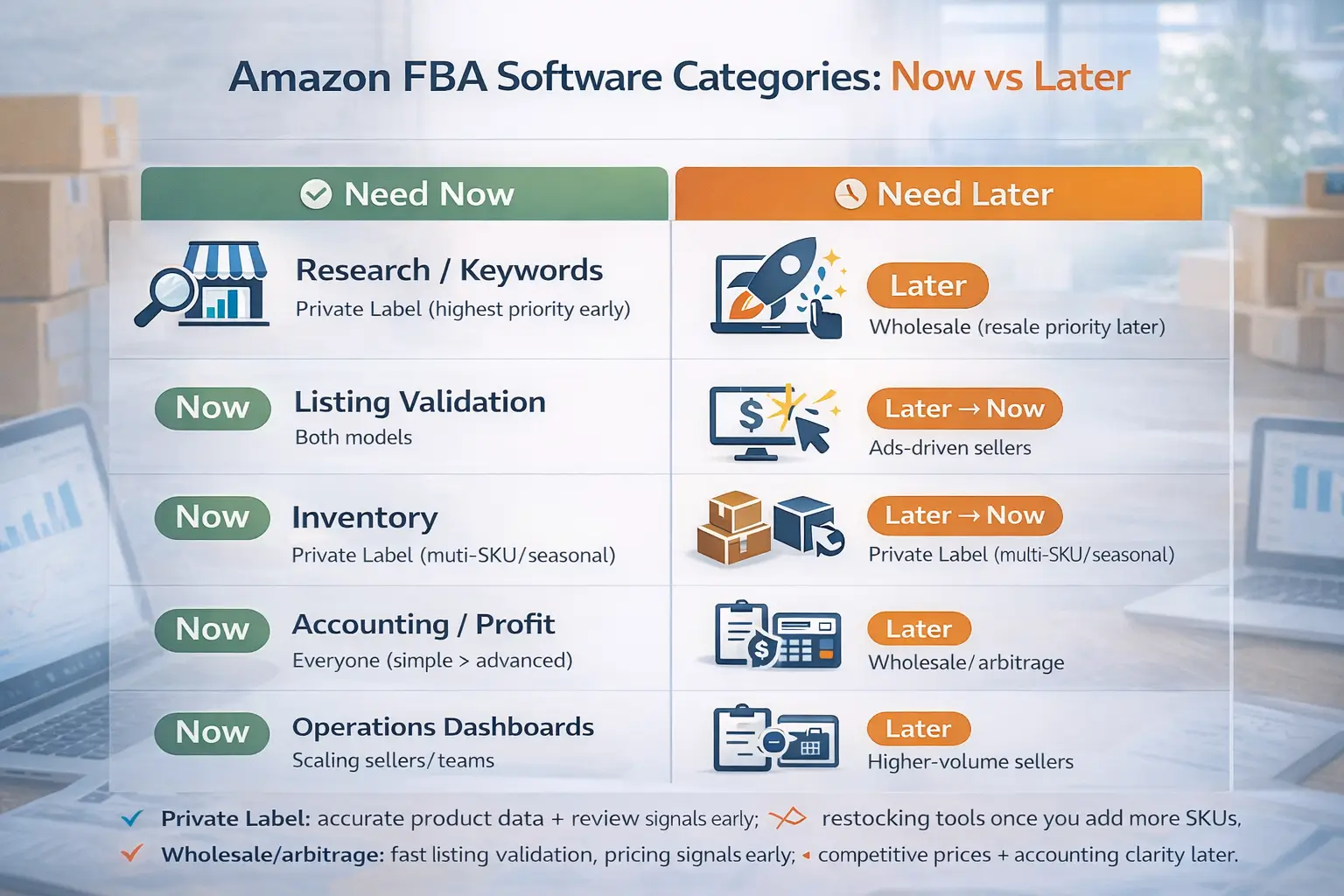
Categories map table
| Category | What it helps you do | Need now or later? | Who needs it most |
|---|---|---|---|
| Product research & keywords | Find and validate opportunities; understand search intent | Now (private label) / Later (resale) | Private label sellers (highest priority early) |
| Listing-level validation (often extension-based) | Faster checks while browsing Amazon listings | Now | Both models |
| PPC / ads workflows | Manage campaigns, reporting, and optimization routines | Later → Now (when spend scales) | Sellers investing in ads to scale |
| Inventory forecasting & replenishment | Reduce stockouts/overstock; plan reorder timing | Later → Now (multi-SKU / long lead time) | Private label and seasonal sellers |
| Profitability & accounting reconciliation | Track payouts, fees, COGS, and profitability decisions | Now (simple) → Later (advanced) | Everyone; complexity grows with volume |
| Repricers (more resale-oriented) | Respond to price competition (where relevant) | Later (model-dependent) | Wholesale/arbitrage sellers |
| Operations / analytics dashboards | Monitor KPIs; standardize reporting | Later | Scaling sellers and teams |
| Reimbursements / claims tracking | Identify potential reimbursement opportunities | Later | Higher-volume sellers (no guarantees) |
Notes
- “Need now” means: you use it weekly and it changes decisions today.
- “Need later” means: it’s valuable once complexity increases, but it’s a distraction too early.
Free and Official Amazon Tools to Use Before Paying for Software
Before you buy more software, start with official tools and free signals to learn the marketplace and build your workflow habits.
Official/free tools table (availability varies)
| Tool / source | Best use | Limits / boundaries |
|---|---|---|
| Amazon seller tools guide (official overview) | Understand common tool categories and workflows | Not a complete “best stack” blueprint; still needs best-fit selection |
| Product Opportunity Explorer (Seller Central feature) | Screen niches and explore demand signals inside Amazon | Access/availability varies by account and marketplace; use as screening, not certainty |
| Amazon marketplace lists (e.g., Best Sellers) | Spot what is currently selling and moving | Trends can be misleading; still validate competition and differentiation |
| Seller Central reports (basic) | Monitor performance and operational signals | You may outgrow manual reporting as you scale |
Official references
- Amazon seller tools guide: https://sell.amazon.com/blog/seller-tools-guide
- Product Opportunity Explorer (tool page): https://sell.amazon.com/tools/product-opportunity-explorer
- Product Opportunity Explorer help page (may require login): https://sellercentral.amazon.com/help/hub/reference/external/GNJ4YRTXWLMBY38U?locale=en-US
Boundary bullets
- Tool availability and features can vary by account; verify access in Seller Central.
- Official tools are often best for screening; deeper validation still requires structured workflow and careful checks.
Beginner Stack: Minimum Viable Software (and Upgrade Triggers)
The best beginner stack is the one you’ll use every week. Start minimal, then upgrade only when complexity forces it.
Minimum viable stack (by category, not brand)
- Research + validation: one consistent way to shortlist and validate products (free/official tools + a simple research workflow).
- Basic profitability tracking: a simple method to understand fees and unit economics directionally.
- Ops tracking: a lightweight way to track tasks, inventory status, and reorder notes (even if it’s simple).
Simple stack diagram (text)
- Stage 1 (0–1 product):
Research/validation → basic profitability notes → simple ops tracking - Stage 2 (2–10 SKUs):
Research/validation + PPC workflows → inventory planning → profitability reconciliation - Stage 3 (10+ SKUs / team):
Standard reporting → deeper inventory forecasting → tighter accounting processes
Upgrade triggers (when to add categories)
- Add PPC software when campaigns become frequent and reporting mistakes cost time or money.
- Add inventory forecasting when stockouts/overstock become common or lead times are long.
- Add accounting/profit analytics depth when payouts and fee categories are too complex to reconcile confidently.
Caveats
- Beginner-friendly means consistent usage, not guaranteed results.
- Avoid adding software “just in case”—buy it only when it replaces a weekly bottleneck.
Product Research & Keyword Software: What to Use (by Function)
Instead of asking “which tool is best,” ask “what function do I need to execute weekly?”
Function buckets
- Discovery: niche and product idea screening (filters, niche exploration).
- Listing validation: faster checks while browsing Amazon.
- Keyword workflows: understand demand intent and find opportunities tied to real listings.
- Fee sanity checks: avoid obvious “math doesn’t work” ideas early.
- Tracking: monitor a shortlist and learn over time (optional early, helpful later).
Feature checklist (what matters most)
- Product/niche filters that support fast shortlisting
- Listing-level validation workflow (to reduce “guessing”)
- Keyword intent workflows (avoid chasing the wrong buyer intent)
- A simple way to keep a shortlist and document assumptions
Boundary bullets
- Avoid “accuracy percentage” thinking—treat numbers as directional.
- Verify candidates manually on Amazon and through multiple signals before buying inventory.
PPC Software: When It’s Worth Using (and What to Do Manually First)
PPC software can help you scale workflows, but it can’t replace strategy. Use it when manual work becomes inconsistent or too slow.
What PPC software can help with (high level)
- Campaign structure hygiene and reporting routines
- Bid and budget workflows (within guardrails you define)
- Alerts and monitoring so you catch issues faster
Manual-first checklist (do this before automation)
- Clear naming conventions for campaigns/ad groups
- A consistent negative keyword process
- Defined goals per campaign type (testing vs scaling)
- A simple weekly review routine (what changes, and why)
Boundary
- Automation does not guarantee performance—keep oversight and test changes carefully.
Inventory Forecasting & Replenishment Software (and What to Track Manually)
Inventory tools help you plan, but forecasts depend on clean inputs and stable assumptions.
Inventory checklist (software or manual)
- Track demand direction (up/down) rather than assuming stability
- Note lead time variability (production + shipping variability)
- Keep reorder decisions consistent (document why you reorder)
What to track manually first (if you don’t buy software yet)
- Current sell-through direction
- On-hand inventory and inbound inventory
- Known lead times and buffer notes (no promises; plan conservatively)
- Stockout events and what caused them (to improve your process)
Boundary
- Forecasts are only as good as your data and assumptions—avoid certainty.
Profitability & Accounting Software: Track What Matters (Without Overclaiming “Accuracy”)
Tools help, but profitability clarity comes from consistent reconciliation routines—especially for payouts, fees, and COGS mapping.
Reconciliation mindset (simple)
- Ensure you can explain: what you earned, what Amazon charged, and what your product actually cost (COGS + inbound costs).
Jobs table (job → tool type → notes)
| Job to do | Tool type | Notes / boundaries |
|---|---|---|
| Track payouts and fee categories | Reporting / reconciliation tooling | Requires clean mapping and consistent categories |
| Understand unit economics directionally | Profitability analytics | Still depends on correct cost inputs (COGS, inbound, packaging) |
| Maintain books for taxes/accounting | Accounting system + integrations | Use consistent categorization; reconcile regularly |
| Investigate fee changes and anomalies | Alerts/reporting | Requires human review; not “set and forget” |
Boundary
- “Accurate” depends on inputs and routine; no tool makes messy data magically clean.
Don’t Skip This: Feasibility Checks Beyond Software (Prep, Shipping, Restrictions)
Software can help you shortlist ideas, but it won’t protect you from hidden execution problems. Add a feasibility checklist before you commit inventory.
Feasibility checklist
- Restricted products risk: verify category/listing eligibility before investing heavily.
- Dangerous goods / hazmat risk: items with chemicals, batteries, aerosols, etc. may require extra steps or have limitations.
- Size/weight and fragility: bulky/fragile products increase damage and inbound complexity.
- Prep complexity: bundles/sets/inserts increase error and rework risk.
- Sample/spec readiness: confirm a “golden sample” and packaging standards before scaling.
Official references (verify; US)
- Restricted products overview: https://sellercentral.amazon.com/help/hub/reference/external/G200164330?locale=en-US
- FBA dangerous goods program overview: https://sellercentral.amazon.com/help/hub/reference/external/GZLZBQ7W6QZRKWWK?locale=en-US
Caveats
- Policies and classifications vary and can change; verify current guidance for your product type.
- Feasibility depends on process and partners; avoid assuming “easy to ship” without testing packaging and specs.
If your shortlist includes higher-complexity items (fragile, battery-containing, multi-component sets), it helps to plan execution early: sample checks, packaging standards, and a clear inbound plan (consolidation, prep, and shipping). For sellers sourcing from China, a China-side logistics and prep partner can support consolidation and FBA prep workflows in a repeatable way. (Optional reference: https://fbabee.com/)
FAQ: Best Amazon FBA Software
What is the best Amazon FBA software, or does it depend?
- Q: What is the best Amazon FBA software, or does it depend?
A: It depends. The best setup is a best-fit stack chosen by your selling model, stage, and weekly workflow—then expanded only when a real bottleneck appears.
Should I use an all-in-one Amazon seller suite or a tool stack?
- Q: Should I use an all-in-one Amazon seller suite or a tool stack?
A: Choose a suite if you want simplicity and consistent usage. Choose a stack if you know your workflow gaps and can maintain multiple tools without duplicating signals.
What software categories do Amazon FBA sellers typically need?
- Q: What software categories do Amazon FBA sellers typically need?
A: Most sellers choose tools by category: product research/keywords, PPC workflows, inventory forecasting, profitability/accounting, and reporting—adding categories over time based on stage and model.
What free or official Amazon tools should I use before paying for software?
- Q: What free or official Amazon tools should I use before paying for software?
A: Start with official guidance and Seller Central tools (like Product Opportunity Explorer where available) to screen opportunities and build your workflow habits. References: https://sell.amazon.com/blog/seller-tools-guide and https://sell.amazon.com/tools/product-opportunity-explorer
What is the best Amazon FBA software stack for beginners?
- Q: What is the best Amazon FBA software stack for beginners?
A: A minimum viable stack: a simple research/validation workflow, basic profitability notes, and lightweight ops tracking—then add PPC, inventory forecasting, and deeper accounting only when complexity demands it.
How do I avoid being misled by software estimates?
- Q: How do I avoid being misled by software estimates?
A: Treat metrics as directional and verify with a repeatable routine: (1) validate listings manually, (2) triangulate multiple signals, (3) check feasibility (restrictions, dangerous goods, prep/shipping complexity), and (4) document assumptions before inventory commitments.
Summary: Build a Best-Fit Stack, Then Add Tools Only When the Workflow Demands It
The “best Amazon FBA software” is not one tool—it’s a best-fit stack that matches your model, stage, and weekly workflow.
Practical next steps
- Start with a category map: what you need now vs later.
- Choose suite vs stack using the decision rule and anti-overlap checklist.
- Use official tools first where available, and upgrade only when you hit a weekly bottleneck.
- Add feasibility checks beyond software before you commit inventory.
Non-affiliation note
- FBABEE is an independent logistics and prep partner and is not affiliated with Amazon.


