

Table of contents
Fast Answer Box: What “Oversize” Means in Amazon FBA (US)
“Oversize” in US Amazon FBA means your packaged unit (the sellable, ready-to-ship unit) is big and/or heavy enough to be placed above standard-size tiers, often showing up under labels like Large Bulky or Extra-Large in Seller Central. The practical takeaway is simple: the final packaged unit measurements drive the size tier, and the size tier influences fees and handling requirements.
Key points to remember:
- “Oversize” is commonly used as shorthand; in Seller Central you may see specific tier labels instead of the word “oversize.”
- Amazon’s classification is tied to measured dimensions and shipping weight of the packaged unit, not your supplier’s raw product spec sheet.
- If an item is borderline, small packaging changes (extra padding, inserts, bundle wrap) can change the measured size and flip the tier.
- To reduce surprises: measure the final packaged unit, confirm the tier in Seller Central, and keep documentation (photos + measurements).
Quick orientation (US-scoped):
| Concept | What it refers to | Where to confirm |
|---|---|---|
| “Oversize” (common shorthand) | Not always the exact label shown in Seller Central | Check your ASIN’s size tier/measurements in Seller Central |
| Packaged unit | The sellable unit after final prep (what Amazon measures for tiering) | Your final packaging spec + your measurements |
| Master carton / shipping carton | The outer carton used for inbound shipping (not the same as the ASIN’s packaged unit) | Your shipment carton plan/carton list |
Boundary notes:
- Size-tier labels and rules can change over time and may differ by marketplace; this article is scoped to US and focuses on stable concepts, not hard-coded numbers.
- For official reference, start with Seller Central guidance on product size tiers and size-tier determination.
Helpful official references (may require Seller Central access):
- Product size tiers: https://sellercentral.amazon.com/help/hub/reference/external/G201105770?locale=en-US
- Determine the product size tier for your item: https://sellercentral.amazon.com/help/hub/reference/external/GJQFCTQM5DNWFKCY?locale=en-US
Oversize in Amazon FBA: Meaning and Size Tier Labels (US)
In practice, “oversize” describes items that land in non-standard FBA size tiers because the packaged unit is too large/heavy to remain standard-size. The most important skill is interpreting the label you see in Seller Central and connecting it back to the packaged-unit measurements you control.
Mapping guide (US-scoped, interpret what you see):
| What sellers often search for | Label you may see in Seller Central | Plain-English meaning | What to do next |
|---|---|---|---|
| “oversize / oversized” | Large Bulky / Extra-Large (or similar tier wording) | The packaged unit is large/heavy enough to fall outside standard-size | Verify measurements used; confirm packaging version; plan costs and inbound cartons accordingly |
| “standard vs oversize” | Standard-size vs a bulky/XL tier | Your packaged unit sits within standard thresholds vs above them | Measure packaged unit and confirm tier before big replenishments |
| “my item got reclassified” | Tier changed in Seller Central | Amazon and/or listing data may have updated measurements | Re-check packaged unit, document, and troubleshoot if needed |
Boundary notes:
- Treat the tier label as “what Amazon is currently using for your ASIN,” not as something permanently tied to the product forever.
- Always align your internal language to avoid confusion: “packaged unit” (sellable unit) vs “master carton” (inbound shipping carton).
Plain-English definition: What “oversize” refers to
In Amazon FBA terms, “oversize” refers to a size-tier classification for the sellable packaged unit, not a carrier’s “oversized package” rule and not simply “a big product.” The tier reflects what Amazon expects to handle and store for that ASIN’s packaged unit.
Key points:
- Oversize is about how Amazon classifies the packaged unit, which affects handling and fee logic.
- It does not automatically mean your inbound shipment must be palletized or that you control which fulfillment center Amazon assigns.
- It does not mean the master carton dimensions are the ASIN’s size tier.
Boundary notes: Avoid relying on generic shipping blog definitions of “oversize” (UPS/FedEx rules); keep the focus on Amazon’s FBA size tiers.
What tier labels you might see (and how to interpret them)
The exact tier wording you see can evolve, but the interpretation stays consistent: the label represents where your packaged unit sits in Amazon’s size-tier framework.
Interpretation mini-table:
| Label type | What it usually implies | What to verify immediately |
|---|---|---|
| Standard-size tier labels | Packaged unit fits within standard-size thresholds | Packaged unit dimensions/weight match your current packaging |
| “Bulky” / “Large Bulky” style labels | Packaged unit is physically large (often “space + handling” driven) | Final packaged unit measurements; any recent packaging changes |
| “Extra-Large” style labels | Packaged unit is very large and/or heavy | Packaged unit measurements + any “bundle/multipack” changes |
Boundary notes:
- If your business operates across marketplaces, don’t assume US labels match UK/EU naming. Keep the US view separate.
Official reference (tier terminology baseline): https://sellercentral.amazon.com/help/hub/reference/external/G63ZD2BUDXF28WEC?locale=en-US
How Amazon Determines Your Size Tier: What Gets Measured
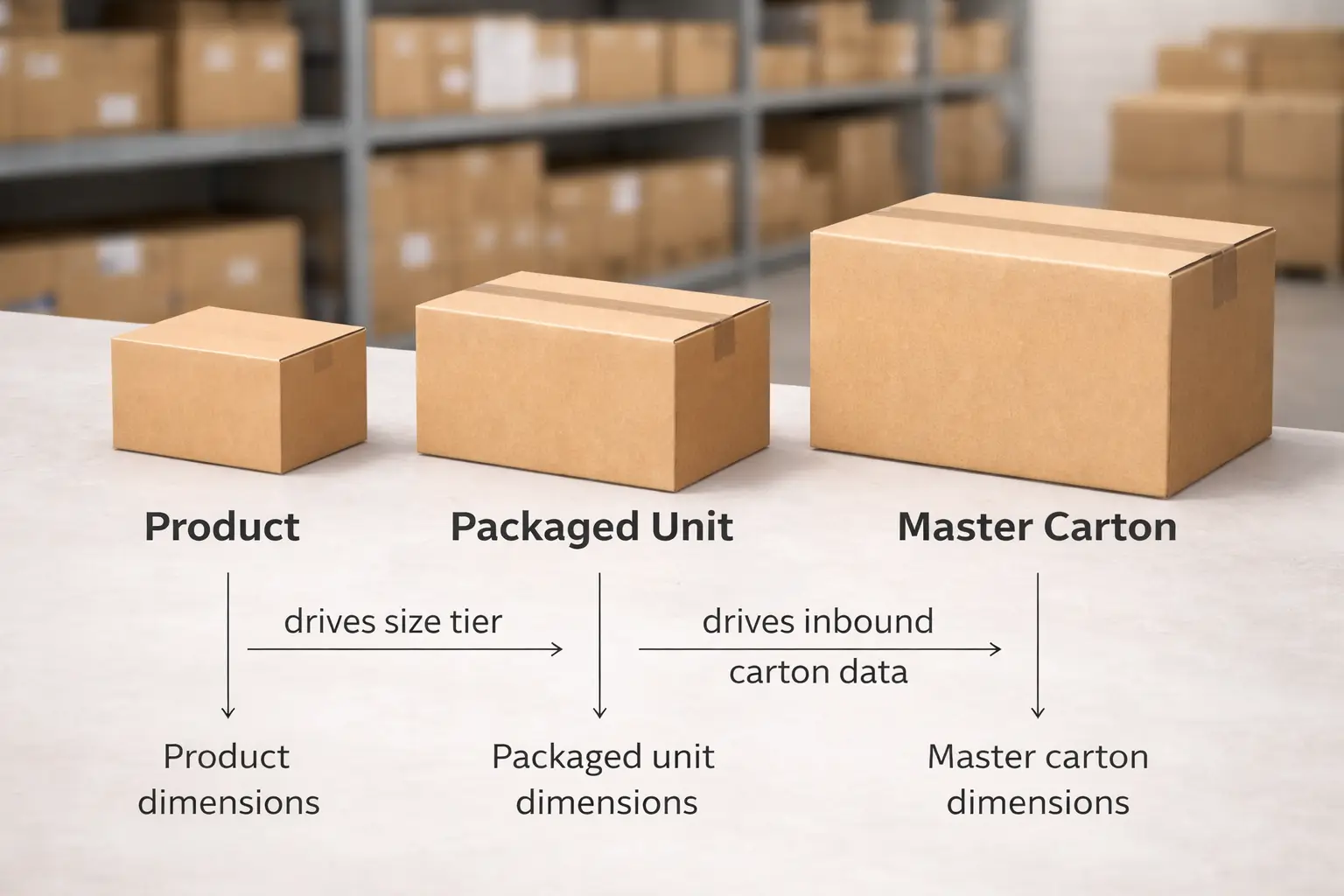
Amazon determines the FBA size tier using the packaged unit’s measured dimensions and shipping weight, not the raw product measurements and not your inbound master carton. If you only remember one rule, make it this: final packaged unit → measured attributes → size tier.
What gets measured (and what it’s used for):
| Object / data point | Used for | Common mistake | Practical tip |
|---|---|---|---|
| Product dimensions (bare product) | Product design/spec reference | Assuming this is what Amazon uses for tiering | Treat as “starting point,” not the final measurement |
| Packaged unit dimensions (sellable unit) | Determining the ASIN’s size tier | Measuring before prep is finalized | Measure after final packaging, inserts, protection, and bundle wrap |
| Shipping weight (of packaged unit) | Part of tier determination and fee logic | Confusing item weight with shipping weight | Weigh the packaged unit exactly as it will be sold/shipped |
| Master carton / shipping carton dimensions | Inbound shipment planning (carton data) | Using master carton size as “ASIN size” | Keep carton data accurate, but separate it from ASIN tiering |
Common triggers that change measurements:
- Adding protective materials (bubble wrap, corner guards, extra corrugate, thick poly bags).
- Switching inserts (manuals, foam, dunnage) or changing the internal layout.
- Changing multipack/bundle configuration (pack count, bundle wrap, retail box changes).
- Factory packing “drift” (same SKU packed slightly differently across batches).
Boundary notes:
- Exact thresholds and tier definitions can change over time; focus on measurement hygiene and verification rather than memorizing numbers.
- If you’re citing a specific rule table, confirm the current US version in Seller Central before treating it as authoritative.
Product vs packaged unit vs master carton: quick comparison
For FBA tiering, the packaged unit is the key object. The master carton matters for inbound logistics, but it is not the same thing as the ASIN’s packaged unit.
Comparison table:
| Term | What it is | Why it matters | What not to do |
|---|---|---|---|
| Product dimensions | The bare item | Helps with design and packaging planning | Don’t assume it equals Amazon’s measured tier basis |
| Packaged unit (sellable unit) | The item as sold (retail box + protection + labels) | Drives size tier classification | Don’t measure “pre-prep” and treat it as final |
| Master carton / shipping carton | Outer carton you ship inbound | Affects inbound shipment carton data accuracy | Don’t use master carton dimensions as the ASIN tier |
Practical consistency tip: Use one internal phrase everywhere: “final packaged unit” to mean “the unit Amazon measures for size tier.”
Boundary notes: If multiple teams touch packaging (supplier + prep + brand ops), agree on one “source of truth” packaging version.
Weight and “bulky” concepts (high level): shipping weight, length+girth, dimensional weight
You may see people reference shipping weight, length+girth, or dimensional weight when discussing bulky items. The key is understanding these as measurement concepts, not as something to memorize as a single formula.
High-level definitions:
- Shipping weight: the weight of the packaged unit as it would be shipped/handled.
- Length+girth: a way to summarize “how large the package is around its widest part,” commonly used in shipping contexts.
- Dimensional weight (DIM weight): a concept where space/volume can matter as much as scale weight for shipping decisions.
Why this matters:
- Even without quoting formulas, these concepts explain why small changes in packaging thickness or box size can have outsized cost implications for attaches bulky items.
Boundary notes: Avoid relying on a single divisor or “one rule” from a blog post; definitions and applications vary by context. Verify current Amazon and carrier rules when you need exact calculations.
Borderline items: why small packaging changes can flip tiers
If your packaged unit is near a tier boundary, minor packaging updates can change the measured dimensions/weight enough to move the item into a different tier. That’s why “measure once” isn’t enough for borderline products—your process needs re-check triggers.
Re-check triggers (use as a simple risk checklist):
- You changed any protective material thickness (new bubble wrap, corner guards, double-boxing).
- You added or removed inserts (manuals, foam, accessories) or changed how they’re positioned.
- You changed the retail box supplier or box style.
- You converted single units into multipacks/bundles (or adjusted pack count).
- A prep partner changed how the unit is protected to meet prep requirements or reduce damage risk.
Boundary notes:
- You don’t control the final measurement outcome once inventory is processed, so the best defense is consistent packaging + documentation.
- If you changed packaging, treat the tier as “needs re-verification” before you create a large inbound shipment plan.
Why Oversize Matters: Fees and Operations (Directional)
Oversize tiers generally matter because larger/heavier packaged units tend to require more handling and storage space, which often increases the fee burden and makes inbound planning more sensitive. Even if you don’t quote exact fees, the decision logic is consistent: bigger packaged unit → more space/handling → higher cost directionally.
What typically changes (directional, US context):
- Fulfillment-related costs: larger/heavier units usually cost more to pick, pack, and ship.
- Storage-related costs: bulky items consume more cubic space, which can raise storage costs directionally.
- Operational constraints: bulky items can be less forgiving of measurement errors, carton data mistakes, and packaging drift.
- Inventory strategy: bulky units can amplify “wrong tier” surprises because small margin swings matter more when costs are higher.
Planning implications:
- Treat packaged-unit measurement and tier verification as part of your go/no-go checklist before pricing or large replenishments.
- If an item is borderline, lock the packaging version before scaling inbound volume.
Boundary notes: Exact fees and threshold definitions can change; consult the current US FBA fee and storage guidance in Seller Central for definitive numbers.
How to Check Your ASIN’s Size Tier (Verification Workflow)
You can verify your ASIN’s size tier by checking the measurements Amazon is using in Seller Central and comparing them to your final packaged unit measurements. The goal is not just “see a label,” but confirm that the label aligns with your current packaging version.
Verification steps (stable SOP, avoid brittle UI paths):
- Identify the ASIN/SKU you’re checking and the packaging version currently in production.
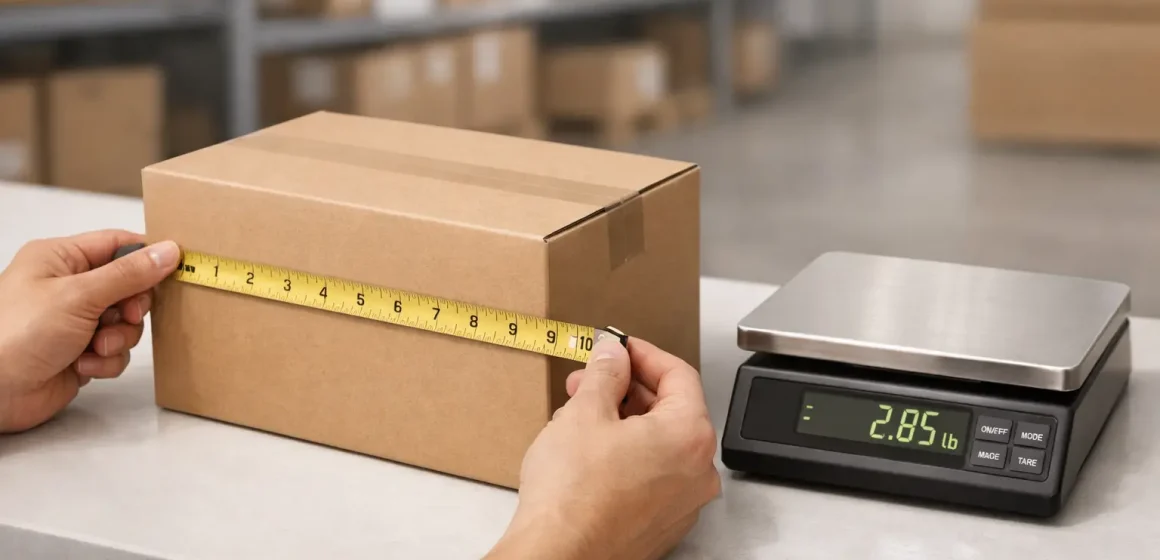
- Measure the final packaged unit (length/width/height) using a consistent method and note the unit of measure (inches/lbs).
- Weigh the packaged unit on a calibrated scale and record the shipping weight you measured.
- In Seller Central, locate the ASIN’s product details / size tier / measurement information (the exact menu path can change).
- Compare Amazon’s recorded dimensions/weight and size tier to your measurements.
- If the data matches, treat that as your “current tier baseline” and store the measurement record.
- If the data does not match or looks outdated, move to troubleshooting (next section) and avoid scaling shipments until you’ve documented the discrepancy.
What to document (keep it simple but complete):
- Date of measurement + packaging version identifier (even a simple “v2.1” internally).
- Photos showing the packaged unit measured with a tape measure (clearly showing edges and units).
- Photo of the packaged unit on a scale (weight visible).
- A short note of what changed (if anything) since the last measurement (insert added, box changed, etc.).
Boundary notes:
- Seller Central UI paths change; focus on finding the ASIN’s current measurement and tier fields rather than memorizing clicks.
- Official reference for the concept of determining size tier: https://sellercentral.amazon.com/help/hub/reference/external/GJQFCTQM5DNWFKCY?locale=en-US
If the Tier Looks Wrong: Misclassification and Remeasurement (Non-Guaranteed)
If Amazon’s tier or measurements look wrong, treat it as a workflow problem: diagnose → document → request review. Outcomes and timelines are not guaranteed, but strong documentation improves clarity and reduces repeated back-and-forth.
Troubleshooting steps:
- Confirm you’re measuring the correct object: the final packaged unit, not the bare product and not the master carton.
- Re-measure and re-weigh using a consistent method (same orientation and tools).
- Confirm your listing/package data reflects your current packaging version (if you changed packaging, reconcile your own records first).
- Compile evidence (photos + measurement notes + packaging version) into one tidy package.
- Use Seller Central’s support or the relevant measurement review/remeasurement pathway (where available) to request a correction or review.
- While the issue is unresolved, plan conservatively: avoid frequent packaging changes and keep inbound carton data aligned to the packaging you actually ship.
Evidence checklist (what to have ready):
- Photos of the packaged unit being measured (multiple angles; edges aligned).
- Photo(s) of the packaged unit on a scale (weight visible).
- Packaging spec sheet or supplier confirmation for the current packaging version.
- Notes on what changed and when (e.g., “added foam insert on 2025-12-15”).
- If multiple suppliers pack the same SKU, confirm both are using the same packaging standard.
Boundary notes:
- Do not assume a “wrong tier” will be corrected quickly, or that any fee change will automatically be applied. Treat it as a variable process.
- Keep your operational decisions anchored to what you can control: packaging consistency, measurement hygiene, and documentation quality.
Avoid “Accidental Oversize”: Packaging, Prep, and Carton Planning SOP
“Accidental oversize” usually happens when packaging changes (often for protection or compliance) increase the packaged unit dimensions/weight without a re-check, causing a tier shift you didn’t plan for. You prevent it by treating packaging like a controlled versioned asset, not an informal “we added padding” decision.
Common mistakes → prevention checklist:
- Mistake: Adding protection (wrap, corner guards) without re-checking packaged unit measurements
Prevention: Re-measure and re-verify tier after any protection change. - Mistake: Changing inserts or pack count without updating internal packaging specs
Prevention: Maintain a packaging version log and require measurement sign-off. - Mistake: Supplier ships with “close enough” box sizes across batches
Prevention: Provide a packaging spec and require supplier confirmation before production runs. - Mistake: Prep partner modifies packaging to reduce damage without telling you
Prevention: Agree on “allowed protection options” and require a packaging-change notice.
SOP mini-table (change → re-check → owner):
| Change type | What to re-check | Who should own it |
|---|---|---|
| Retail box or insert change | Packaged unit dimensions + shipping weight; tier verification | Brand ops / product owner |
| Protection method change (wrap, corner guards) | Packaged unit dimensions; photos + version log | Prep / QC lead + brand ops approval |
| Bundle/multipack change | Packaged unit dimensions/weight; listing package data consistency | Catalog/listing owner |
| Supplier change (same SKU) | Packaging consistency vs spec; measurement sampling | Sourcing/QC |
Boundary notes:
- Don’t sacrifice protection purely to chase a smaller tier. Damage risk and returns can outweigh any intended savings.
- For borderline items, treat “re-check after any change” as a strict rule, not a suggestion.
Inbound Shipment Planning Implications for Oversize Items
Oversize classification can make inbound planning more sensitive because bulky items amplify the cost of mistakes: wrong carton dimensions, inconsistent packing, or last-minute packaging changes can create operational friction. Your best leverage is keeping carton data accurate and separating what you can control from what Amazon controls.
Planning implications (seller-controllable focus):
- Carton data accuracy matters more: bulky cartons and heavier units make errors more costly to fix.
- Packaging drift creates inbound surprises: the shipment plan is only as accurate as the packaging version used to build it.
- Documentation reduces confusion: a clear carton list + packaging version record improves internal alignment across teams.
Inbound “no surprises” steps (high level):
- Lock the packaging version for the replenishment batch (final packaged unit).
- Confirm the ASIN’s size tier and measurements before creating the shipment plan.
- Build cartonization based on what you will actually ship (carton dimensions/weights per carton).
- Ensure labeling and carton list data are consistent and complete.
- Keep one “single source of truth” file for carton data + packaging version + date.
Boundary notes: Amazon may route shipments or split destinations based on network decisions. Focus on controllables: accurate data, consistent packaging, and clean documentation.
Carton data hygiene checklist (dims, weights, labels)
Accurate carton data reduces avoidable inbound issues even though outcomes are not guaranteed.
Checklist:
- Carton dimensions recorded per carton type (not “estimated” from a different box).
- Carton weights recorded and consistent with actual packed cartons.
- Carton labels applied cleanly and match your shipment records.
- Carton count and carton contents (where applicable) match the carton list.
- Packaging version noted for the batch so future rechecks are comparable.
Boundary notes: Don’t reuse old carton measurements after changing packaging or box suppliers.
What you can control vs what Amazon controls (routing, splits, timelines)
Clear expectations prevent wasted effort.
You can control:
- Packaged unit consistency (final packaging version).
- Measurement hygiene and documentation.
- Carton dimensions/weights and label discipline.
Amazon controls:
- Where inbound shipments are routed and whether destinations are split.
- The timing and outcome of measurement updates or reviews.
- Network constraints that can affect processing order.
Boundary notes: Plan your workflow around controllables, and treat Amazon-controlled outcomes as variable.
Optional: China-sourcing checkpoints (factory → prep → FBA)
If you source from China, a small set of checkpoints can prevent the most common “oversize surprise” failures.
Checklist:
- Factory confirms packaging matches your packaging spec (box style, inserts, protection).
- You measure the final packaged unit from a real sample (not just a spec sheet).
- Prep partner agrees to notify you before changing protection methods.
- Consolidation step includes a quick re-measure/re-weigh spot check on arrival.
- Cartonization plan is built from the final packaging version, not an earlier prototype.
Boundary notes: This is a process checklist, not a promise about costs or timelines.
Risks & Common Confusions (Quick Fixes + Glossary)
Most oversize confusion comes from mixing three different “sizes”: the product, the packaged unit, and the inbound carton—plus mixing Amazon size tiers with carrier oversized rules. If you correct those concepts, the rest becomes much easier.
Common confusion → quick fix table:
| Confusion | Correct concept | What to do |
|---|---|---|
| “My product is big, so it must be oversize” | Tier depends on packaged unit measurements | Measure the final packaged unit and verify the tier |
| “My master carton is huge, so my ASIN is oversize” | Master carton is inbound logistics, not ASIN tier | Keep carton data accurate, but verify packaged unit for tier |
| “DIM weight and Amazon size tier are the same thing” | DIM weight is a shipping concept; size tier is Amazon classification | Use DIM weight for freight planning; use packaged unit for tier checks |
| “If Amazon splits shipments, I can choose where it goes” | Routing is largely Amazon-controlled | Focus on accurate shipment/carton data and documentation |
Glossary (recommended internal terms):
- Product: the bare item.
- Packaged unit: the sellable unit (final retail packaging + protection + labels).
- Master carton: the shipping carton used for inbound transport.
- Packaging version: your internal label for the exact packaging configuration used in a batch.
Boundary notes: Keep examples conceptual unless you’re citing an official table for current US thresholds.
FAQ
Q: Is “oversize” the same as “Large Bulky” or “Extra-Large” in Seller Central?
A: Often, yes—“oversize” is commonly used as shorthand for the non-standard size tiers you may see labeled as Large Bulky or Extra-Large in Seller Central. The safest approach is to rely on the tier label displayed for your ASIN and confirm it matches your current packaged-unit measurements.
Q: What’s the difference between product dimensions, packaged unit dimensions, and shipping carton dimensions?
A: Product dimensions describe the bare item, packaged unit dimensions describe the sellable unit Amazon uses for size-tier classification, and shipping carton dimensions describe the outer cartons you use for inbound shipping. For tier checks, measure the final packaged unit; for inbound planning, keep carton data accurate and separate.
Q: Why do oversize items usually cost more to fulfill or store with FBA?
A: Because larger/heavier packaged units typically require more handling and take up more storage space, which tends to increase fulfillment and storage costs directionally. Exact fees vary and can change, so use the current US fee guidance in Seller Central for definitive numbers.
Q: Can changing packaging (poly bag, bubble wrap, inserts, multipacks) change my FBA size tier?
A: Yes—packaging changes can alter the packaged unit’s measured dimensions and/or shipping weight, which can change the size tier, especially for borderline items. After any packaging update, re-measure the final packaged unit, re-verify the tier, and record the new packaging version.
Q: What should I do if Amazon shows the wrong dimensions or size tier for my item?
A: Start by confirming you measured the final packaged unit consistently, then document your measurements with photos and a packaging version note. If the mismatch remains, use Seller Central’s support or measurement review path to request a correction; outcomes and timelines are not guaranteed, so plan conservatively while the issue is open.
Q: How can oversize classification affect inbound shipment planning and carton data accuracy?
A: Bulky items make carton data errors more painful—wrong carton dimensions/weights or packaging drift can create receiving friction and rework. You can reduce risk by locking the packaging version, verifying the tier before shipment planning, and keeping carton lists, weights, and labels consistent.
Summary & Next Steps
Oversize classification becomes manageable when you separate concepts: packaged unit drives the ASIN’s size tier, while master cartons drive inbound logistics. Measure the final packaged unit, verify the tier, document changes, and treat packaging updates as versioned decisions.
Scenario-based next steps:
- New product launch: measure the final packaged unit before you commit to pricing and large inbound quantities.
- Borderline product: set strict re-check triggers after any packaging or bundle change.
- Tier changed unexpectedly: re-measure, document, and pursue a review path if there’s a clear mismatch.
- Multi-supplier SKU: standardize packaging specs and enforce one “source of truth” for measurements.
Need help building a consistent packaged-unit measurement and carton-planning workflow across suppliers and prep? You can request support from FBABEE: https://fbabee.com/


