


Table of contents
Fast Answer: What “IP issues” mean on Amazon FBA (and what to do first)
IP issues on Amazon FBA are problems related to intellectual property (IP) rights—typically trademark, copyright, or patent concerns—raised by a rights owner or flagged by Amazon. They can lead to listing-level actions (like suppression) and can also affect account health, depending on the situation.
| IP issue type | Typical trigger surface on Amazon | Fastest safe first check |
|---|---|---|
| Trademark | Brand names/logos in title, bullets, images, packaging, or inserts | Remove/replace risky brand references and verify your brand/sourcing documentation |
| Copyright | Product photos, graphics, A+ content, manuals/inserts, copy | Replace with original assets and verify you have permission for any third-party content |
| Patent | Product design/function that may be claimed as protected | Compare your product design to the allegation and consider pausing affected inventory decisions until clarified |
What can happen (common, case-dependent):
- Your offer or listing may be deactivated/suppressed while the issue is reviewed.
- You may receive an Account Health-related notice tied to the ASIN(s) involved.
- You may need to update listing content, packaging, or documentation to address the complaint.
A safe “do-first” micro-triage:
- Stop the bleeding: don’t re-upload the same risky content, and avoid expanding the issue to more ASINs.
- Verify the basics: read the notice carefully and list every affected ASIN/SKU.
- Fix the obvious surface: remove/replace the specific images/words/claims the notice points to (if clear).
- Gather your proof: invoices and supplier records, plus any brand/authorization or creation records you have.
- Respond through Amazon’s process with factual, consistent information.
Keep in mind:
- Outcomes depend on the notice type, what’s being claimed, and your account history.
- This is operational guidance, not legal advice.
Basics: What are IP issues on Amazon FBA?
On Amazon, “IP issues” is a catch-all term sellers use for intellectual property complaints or violations tied to trademarks, copyrights, or patents. In practice, it means Amazon believes a listing (or product presentation) may be infringing—or a rights owner has reported it.
Common ways IP issues show up for sellers:
- A rights owner (or their agent) reports an alleged infringement through Amazon’s reporting tools.
- Amazon flags something based on its own checks (for example, certain content patterns or catalog signals).
- The problem is tied to what customers see (listing text/images) and/or what arrives physically (packaging, inserts, labels).
Where it depends:
- The same word “IP” may appear in different places in Seller Central depending on your marketplace and account UI.
- The best fix depends on which IP category is involved and what “surface” triggered the issue (listing content vs packaging vs product design).
Options/Comparison: Trademark vs Copyright vs Patent (the IP issues that show up most often)
Most Amazon IP issues fall into three buckets—trademark, copyright, and patent—and each one tends to be triggered by different “surfaces.” Classifying the issue correctly helps you avoid wasting time on the wrong fix.
| IP category | Common triggers on Amazon | What to check first (seller-safe) |
|---|---|---|
| Trademark | Using another brand’s name in title/bullets/keywords, logos on images, packaging that looks like or references a brand, “brand page” mismatches | Remove/replace brand terms/logos you don’t own, confirm brand ownership/authorization, verify packaging and inserts don’t reference another brand |
| Copyright | Reusing someone else’s photos, graphics, charts, manuals, or A+ modules; copying copy from other sites | Replace with original images/copy, confirm permissions for any third-party content, check inserts/manuals for borrowed text/graphics |
| Patent | Allegations that your product’s design or function overlaps with a protected invention/design | Isolate affected SKUs/ASINs, compare the allegation to your product design, consider pausing decisions that could increase exposure while you clarify |
Where it depends:
- One complaint can mention multiple issues (for example, trademark + copyrighted images).
- IP rules can be jurisdiction-specific; this guide is written for US Amazon sellers and stays conservative.
Decision guide: Suspected vs received complaints, and where the risk is coming from
A fast, accurate diagnosis reduces “panic edits” that can make the situation worse. Two questions usually matter most: (1) is it suspected vs a received complaint, and (2) what surface triggered the issue—listing content, packaging/inserts, or the product itself?
Suspected vs received (plain English):
- Suspected: Amazon is flagging a potential issue based on its checks or catalog signals. Your first move is usually to review the listing and product presentation for obvious risk surfaces and correct what you can quickly.
- Received complaint: A rights owner (or agent) has reported an allegation. Your first move is to read the exact claim, isolate affected ASINs, and prepare consistent documentation and corrections.
A practical “surface diagnosis” table (use it to choose your next action):
| Likely IP type | Most common trigger surface | Fastest safe fix (operational) | Evidence you may want ready |
|---|---|---|---|
| Trademark | Brand terms/logos in listing images/copy; packaging/inserts referencing a brand | Remove/replace risky terms/logos; ensure packaging/inserts don’t reference another brand | Supplier invoices, brand ownership/authorization docs if applicable, packaging proofs |
| Copyright | Product photos, graphics, manuals, inserts, A+ modules | Replace with original assets; remove any third-party content you don’t have permission to use | Original photo files/creation dates, design source files, supplier confirmation for included materials |
| Patent | Product shape/function; “look-alike” design claims | Isolate the affected SKU/ASIN; avoid expanding inventory exposure; consider redesign/variation strategy after clarification | SKU/ASIN list, manufacturing specs, dated design iterations (if you have them) |
Common “trigger buckets” for China-sourcing/private-label workflows:
- Listing content: copied photos, copied bullets, brand names/logos used without clear rights.
- Packaging and inserts: borrowed graphics, “compatible with” language that references brands, patterns that look like a protected design, manuals using copied text.
- Sourcing and authenticity: unclear supply chain, inconsistent invoices, factories using third-party branded materials, or mixed components across suppliers.
Where it depends:
- Some disputes (especially product design “look-alike” arguments) can be nuanced. Focus first on controllable checks and consistent documentation.
- This guide does not endorse infringing products or counterfeit sourcing.
Process: What happens after an IP complaint, and what to do first
When an IP issue is raised, Amazon may take action on the listing/offer and may also record the event in account-level systems, depending on the circumstances. The safest approach is to respond in a structured order: verify, isolate, correct, document, and then respond through the right channel.
What may happen (common, case-dependent):
- Listing/offer suppression or deactivation for one or more ASINs.
- Requests to remove or change specific listing content (images, text, A+).
- Account Health visibility tied to the issue category.
- Operational disruption (ads paused, inventory decisions delayed, rework needed for packaging/labels).
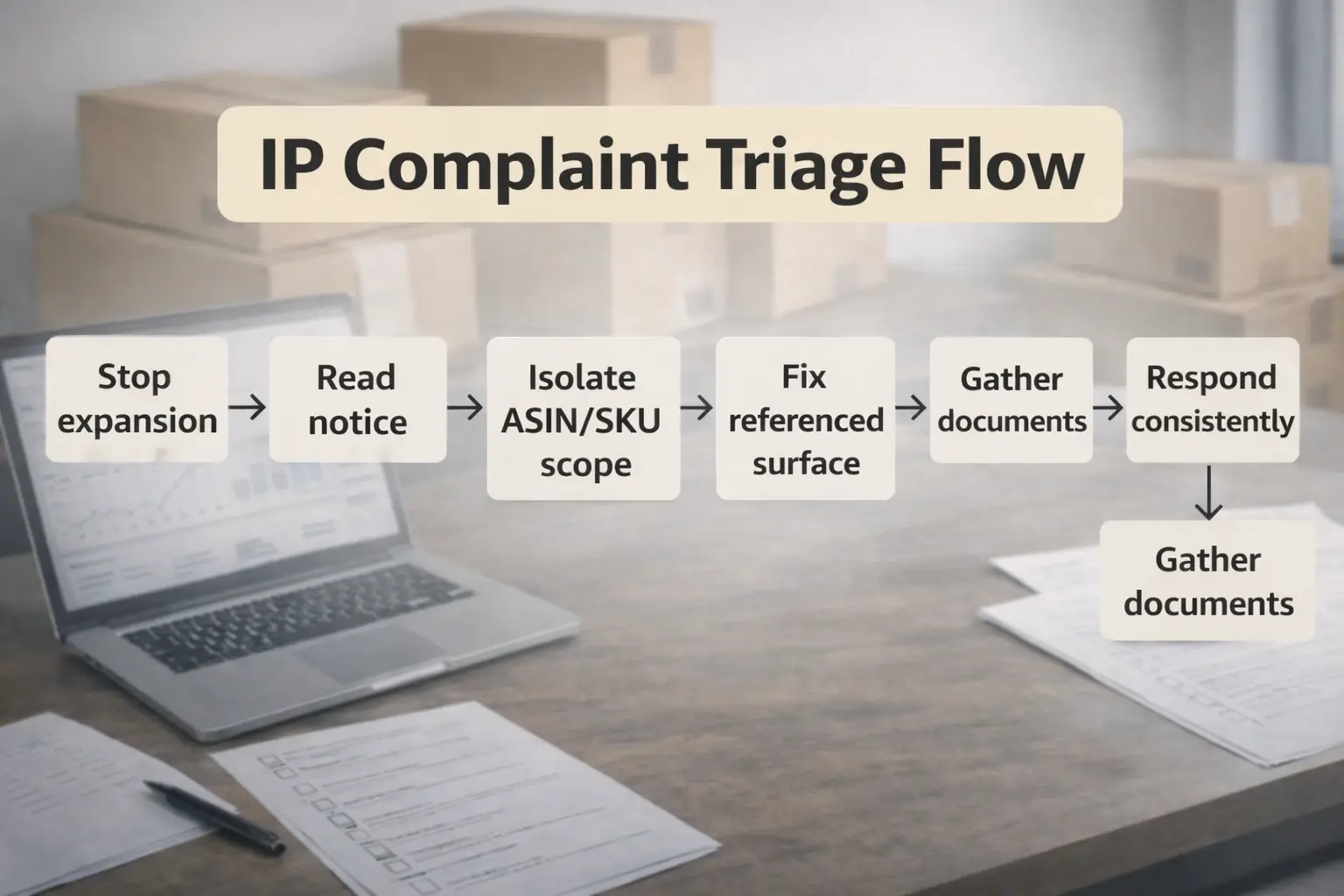
A do-no-harm first-response workflow (5–7 steps):
- Pause expansion: stop duplicating the listing, reusing the same creatives, or rolling the same packaging to new batches.
- Read the notice carefully: write down the issue type, the ASIN(s), and what element is referenced (image/text/product design).
- Isolate the scope: identify which SKUs and suppliers are involved, especially if you consolidate from multiple factories.
- Correct the referenced surface (when clear): replace images/copy, remove risky brand references, or de-risk packaging/inserts for the affected batch.
- Gather an evidence pack: invoices, supplier records, and any relevant ownership/authorization or creation proofs you can provide.
- Respond consistently: submit factual, aligned information through Amazon’s process; avoid contradictory explanations across cases.
- Monitor and document: keep a timeline of changes and communications so you can stay consistent if questions come back.
What not to do (common unforced errors):
- Don’t re-upload the same image set or copy that triggered the issue.
- Don’t make broad, sweeping catalog edits across unrelated ASINs without confirming scope.
- Don’t submit an emotional or speculative explanation—keep it factual and consistent.
- Don’t treat “delete and relist” as a default fix; it can create new problems if the underlying issue remains.
Where it depends:
- The right response varies by allegation and account history, so avoid assuming the same outcome every time.
- If you’re unsure about legal ownership questions, consider qualified professional support.
Documents & evidence: What to prepare (and how to organize it for faster response)
When an IP issue hits, the biggest time sink is usually not the edit—it’s gathering consistent paperwork across suppliers, SKUs, and batches. A clean evidence pack won’t guarantee an outcome, but it can reduce confusion and help you respond in a disciplined way.
A practical documents table (what it supports + common pitfalls):
| Document type | What it can help support (operationally) | Common pitfalls to avoid |
|---|---|---|
| Supplier invoice / commercial invoice | Shows who you bought from, when, and what quantities (traceability) | Missing supplier details, unclear product identifiers, mismatched dates/quantities, unreadable scans |
| Purchase order / contract | Confirms what you ordered and agreed to receive | SKU naming that doesn’t map to your Amazon SKUs/ASINs; missing signatures/terms |
| Brand authorization letter (if applicable) | Supports reseller/authorized distribution relationships when relevant | Generic letters with no scope; not matching the brand/entity; unclear products/territory |
| Proof of authenticity or manufacturing confirmation | Helps show the supply chain and what was produced | Vague factory statements with no product identifiers; missing batch references |
| Original creative files (photos/design source files) | Helps demonstrate originality for listing images/graphics | Using stock images without a clear license; no creation dates/source files |
| Packaging proofs (photos, dielines, inserts) | Shows what customers receive and what claims/graphics are present | Packaging changes not tracked by batch; inserts/manuals copied from third parties |
How to make your invoices more “usable” (practical signals):
- They clearly show supplier name/address/contact and your company name (buyer).
- They include dates, quantities, and consistent product identifiers (model/SKU) that you can map to your Amazon SKUs/ASINs.
- They’re readable and consistent across suppliers (avoid screenshots or partial receipts when possible).
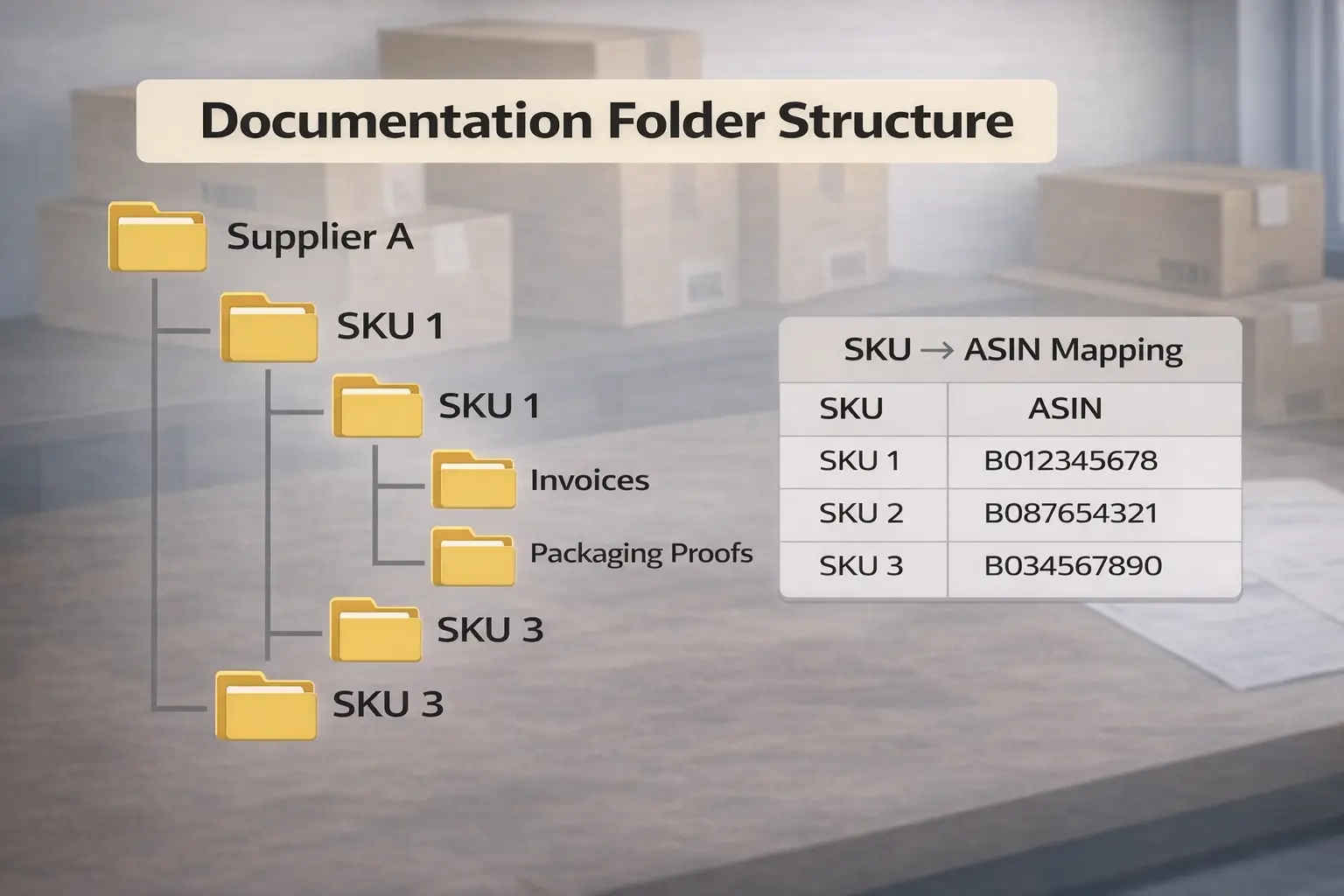
A simple organization system for multi-supplier sellers:
- Create a folder per supplier, then subfolders per product/SKU.
- Maintain a single “SKU → ASIN mapping” spreadsheet that ties supplier identifiers to your Amazon identifiers.
- Store packaging proofs and insert/manual versions by batch/date, so you can quickly show what was shipped.
- Keep a timeline log when you change creatives or packaging (what changed, when, and why).
Where it depends:
- Amazon may request different documents depending on the allegation and the selling model (private label vs reseller).
- Document acceptance is case-by-case, so avoid assuming any single document “always works.”
With documents under control, you can focus on prevention—reducing risk before inventory ships and before the listing goes live.
Prevention before shipping to Amazon FBA: A practical pre-ship IP risk checklist
You can’t eliminate IP risk entirely, but you can reduce avoidable risk by adding checks before production finishes and before cartons move into the FBA pipeline. This is especially valuable when you consolidate inventory from multiple factories.
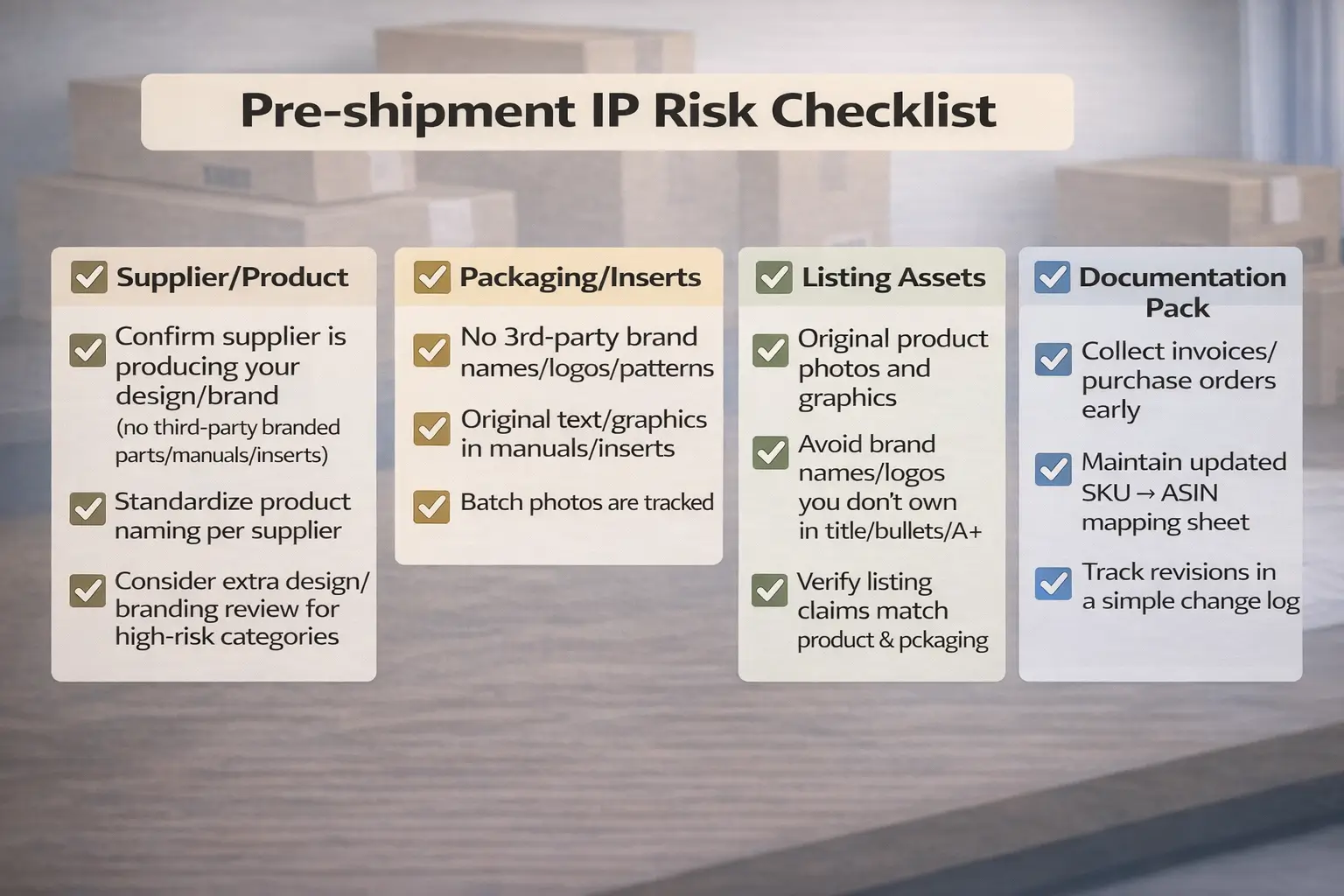
Grouped pre-ship checklist (use it for every SKU/batch):
Supplier and product checks
- Confirm the supplier is producing your design/brand—not reusing third-party branded components, manuals, or inserts.
- Standardize how each supplier names the product (so invoices and cartons map cleanly to your SKUs).
- For higher-risk categories, consider an extra design/branding review before final production.
Packaging, labels, and inserts
- Review packaging artwork for brand names, logos, patterns, and claims—especially anything that references another brand.
- Review inserts/manuals for copied text, copied diagrams, or borrowed graphics.
- Keep “packaging proof” photos by batch so you can show what was shipped if questioned later.
Listing assets before launch
- Use original product photos and graphics (avoid “inspired by” visuals that mimic a known brand’s style).
- Ensure your title/bullets/A+ don’t include brand names or logos you don’t own or have permission to use.
- Double-check that your listing claims match the product and packaging claims.
Documentation pack readiness
- Collect invoices and purchase orders during procurement—not after a complaint arrives.
- Maintain a SKU→ASIN mapping and store it alongside your invoices.
- Keep a simple change log for creatives and packaging.
If inventory is already in motion:
- Prioritize de-risking the listing content immediately (images/copy/A+) and confirm packaging/inserts for the affected batch so you’re not surprised when cartons arrive.
- Avoid expanding to new ASINs with the same assets until the issue is understood.
Where it depends:
- Some categories and designs warrant additional diligence; when in doubt, use conservative claims and original assets.
- Risk reduction is the goal—no checklist guarantees a particular enforcement outcome.
When prevention is in place, the remaining risk is often tied to listing hygiene and how you handle disputes calmly.
If you source from multiple factories and ship into FBA, a lot of “IP problems” become operational problems: inconsistent packaging, missing invoices, and mixed assets across SKUs. A logistics + prep workflow that standardizes packaging/inserts, keeps batch photos, and organizes supplier documents can reduce avoidable scramble when issues arise. Learn more at https://fbabee.com/ (no guarantees—every case is different).
Risks & mistakes: Listing hygiene (images/copy) and handling questionable complaints
Even if your physical product is legitimate, listing content can trigger IP complaints. The safest approach is to treat your images, copy, and A+ as high-risk surfaces that should be original, consistent, and conservative.
Listing hygiene do/don’t (quick audit)
- Images
- Do: use your own photos; keep overlays simple and factual.
- Don’t: reuse competitor images, brand logos you don’t own, or copyrighted graphics/charts.
- Copy and claims
- Do: describe your product’s features in your own words; keep claims aligned with packaging.
- Don’t: copy bullets from other listings or websites; don’t imply endorsement or affiliation you can’t support.
- A+ content and manuals/inserts
- Do: treat A+ modules and inserts like “published content”—use original text and visuals.
- Don’t: paste text/diagrams from other brands’ manuals or marketing materials.
If you believe a complaint is questionable or abusive, a calm, evidence-led approach helps:
- Document everything: screenshots of the notice, ASIN list, dates, and the content in question.
- De-risk the obvious: remove/replace any borderline assets (especially images/overlays) while you investigate.
- Respond factually: keep your language neutral and consistent; avoid accusations.
- Keep an evidence folder: invoices, packaging proofs, creation records, and a simple timeline log.
- Escalate carefully when appropriate: if the situation is complex or you can’t confidently assess rights, consider qualified professional support.
Where it depends:
- Some “compatibility” or reference language can be nuanced; staying conservative reduces avoidable exposure.
- Dispute timelines and outcomes vary.
If you want quick answers to common questions sellers ask, the FAQ below summarizes the most frequent scenarios.
FAQ: Common questions about Amazon IP issues
What is the difference between a suspected IP violation and a received IP complaint?
A suspected issue is typically flagged by Amazon’s systems, while a received complaint usually comes from a rights owner (or agent). In both cases, start by reading the notice, isolating affected ASINs, and removing risky content. The safest next step is to fix what’s clearly referenced and prepare consistent documentation.
What triggers IP complaints for private-label sellers sourcing from China?
The most common triggers are copied listing assets (photos/copy), packaging or inserts that reference other brands, and weak traceability (inconsistent invoices, mixed suppliers, unclear batch records). Treat packaging/inserts and listing creatives as first-class risk surfaces, and standardize documentation by supplier and SKU.
What happens when you receive an IP complaint on Amazon?
It may result in listing/offer suppression, requests to change listing content, and visibility in account-related systems. The exact action depends on the allegation, what’s referenced, and account context. A structured response—verify, isolate scope, correct the surface, document, and respond consistently—reduces unforced errors.
What documents are commonly useful to respond to an Amazon IP complaint?
Commonly helpful items include supplier/commercial invoices, purchase orders, packaging proofs, and original creative files (for content-related allegations). In some models, authorization documentation may be relevant. Focus on clarity and traceability—documents should map cleanly to your SKUs/ASINs.
How do you avoid IP issues in Amazon listing images and copy?
Use original photos and writing, avoid brand names/logos you don’t own or have permission to use, and keep claims consistent with the product and packaging. Audit “risky surfaces” like image overlays, A+ modules, and manuals/inserts, which are often overlooked.
What if you believe an Amazon IP complaint is false or abusive?
Keep a detailed timeline and evidence folder, de-risk any borderline assets, and respond factually through Amazon’s process. Avoid emotional language or contradictory explanations. If rights ownership is unclear or the allegation is complex, consider qualified professional support.
Summary & next steps (based on your situation)
A simple way to think about Amazon IP issues:
- Define the issue: trademark vs copyright vs patent.
- Diagnose the source: suspected vs received complaint, and which surface triggered it.
- Act in order: isolate scope, fix the referenced surface, and build a consistent evidence pack.
- Prevent repeats: standardize listing assets, packaging/inserts, and documentation before shipping.
Practical next steps by scenario:
- If this is your first China-to-FBA shipment: build a pre-ship checklist and collect invoices per SKU before cartons move.
- If you have multiple suppliers per catalog: create a SKU→ASIN mapping and store packaging proofs by batch to reduce scramble later.
- If the shipment is high-value or complex: prioritize asset review (images/copy/A+) and packaging/inserts review before peak production.
Sources (official references used for definitions and platform context):
- Amazon Intellectual Property Policy for Sellers (Seller Central): https://sellercentral.amazon.com/gp/help/external/201361070
- Amazon Intellectual Property Policy (PDF): https://m.media-amazon.com/images/G/02/rainier/help/legal/Amazon_Intellectual_Property_Policy_EN_161220.pdf
- Amazon guidance on reporting IP violations (rights-owner perspective): https://sell.amazon.com/blog/report-a-violation-to-amazon
- USPTO overview: Trademark, patent, or copyright: https://www.uspto.gov/trademarks/basics/trademark-patent-copyright
Remember: this guide is educational and operational. For legal determinations about ownership or infringement, seek qualified professional advice.


