Fast Answer: What “FC transfer” means (and what to do first)
FC transfer (Fulfillment Center transfer) means Amazon is moving your FBA inventory internally from one fulfillment center to another to position stock in its network. You’ll often see it as units shifting between Available / Reserved / Inbound buckets—without any sales happening.
Quick status mapping (why it matters):
- FC transfer = inventory is moving between Amazon fulfillment centers (network positioning).
- FC processing = inventory is being processed/handled inside Amazon’s network (after receiving or during internal handling).
- FC receiving = Amazon is receiving your inbound shipment into the network (intake stage).
Do-first micro checklist (safe sequence):
- Confirm what stage you’re actually in (transfer vs processing vs receiving).
- Reconcile numbers across Available / Reserved / Inbound by SKU/ASIN.
- Start a simple log: first-seen date, SKUs affected, screenshots.
- De-risk panic actions: don’t assume inventory is lost based on a single snapshot.
- Escalate only after you’ve verified scope and documented the change.
Timing note (important): FC transfer timing varies. Don’t rely on fixed day counts you see online—use monitoring signals and buffer planning instead.
Boundary reminders:
- Seller Central labels and report columns can vary by account and UI updates.
- FC transfer does not automatically mean inventory is lost.
Basics: What is an FC transfer in Amazon FBA?
An FC transfer is Amazon’s internal movement of your inventory between fulfillment centers (FCs). “FC” stands for fulfillment center—Amazon’s warehouse where FBA items are stored and shipped.
What sellers usually notice:
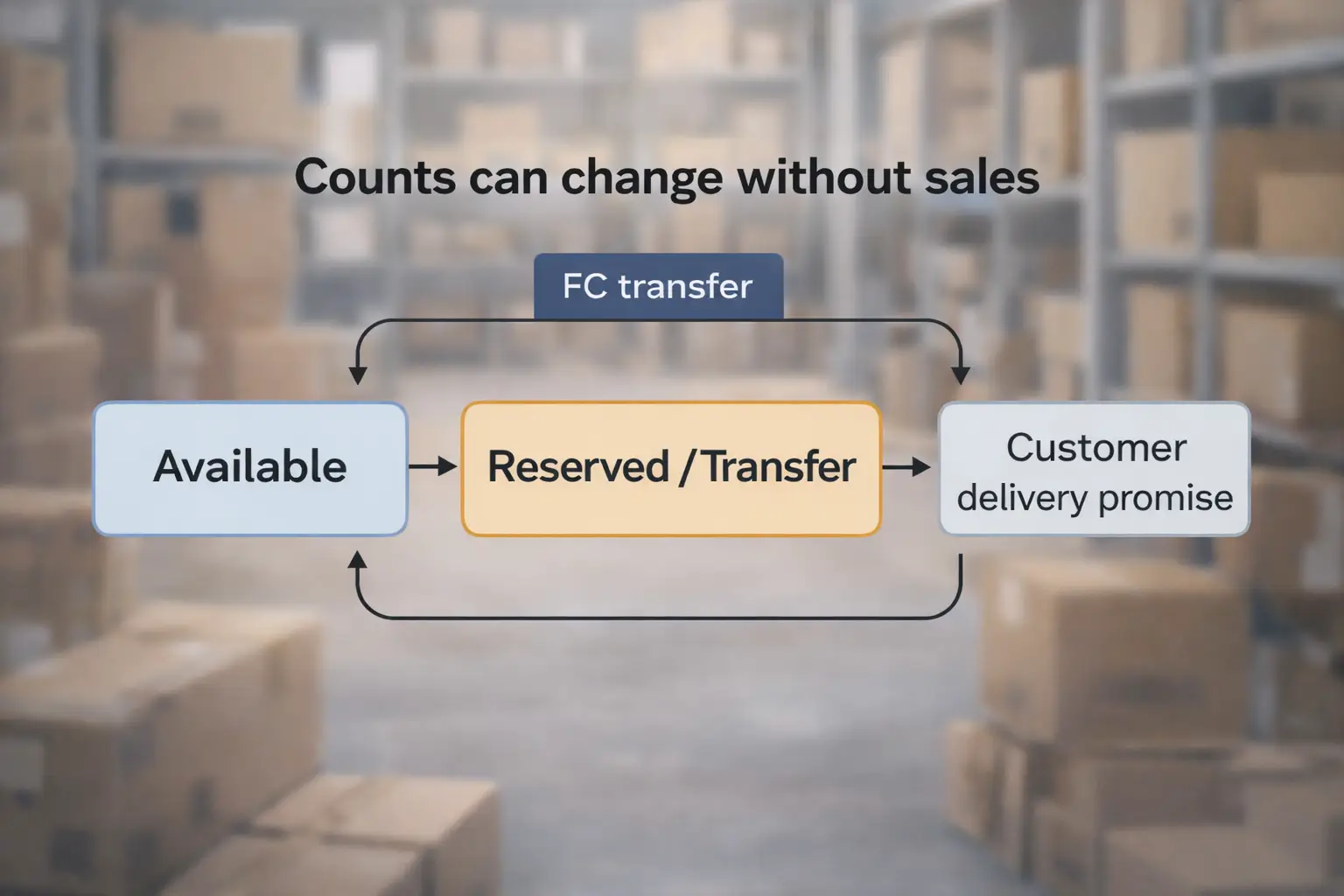
- Available units may decrease while Reserved units increase (or the reverse), even if you didn’t make sales.
- Delivery promises can change because Amazon is repositioning inventory.
- The same SKU can look “split” across buckets depending on how Amazon is allocating units.
Where it depends:
- Different inventory reports refresh on different schedules, so a short mismatch between views can happen.
- The most important step is reconciling by SKU/ASIN, not reacting to one dashboard number.
Why Amazon moves inventory between fulfillment centers
Amazon typically moves inventory to place items closer to customers and balance capacity across its network. In many cases, FC transfers are normal network behavior rather than a sign something is “wrong.”
Common reasons (high-level):
- Demand positioning: place stock nearer to where orders are coming from.
- Network balancing: spread inventory across regions to reduce delivery time variability.
- Capacity and space constraints: move units to facilities with available capacity.
- Operational efficiency: consolidate or redistribute inventory to improve fulfillment flow.
What sellers can vs can’t control (practical):
- You can control: inbound prep accuracy, SKU labeling consistency, clean carton content accuracy, and monitoring/reorder buffers.
- You can’t fully control: Amazon’s internal inventory placement and transfer decisions.
Boundary:
- Sellers usually can’t see the exact “reason code” for each unit’s transfer, so focus on monitoring signals and keeping inventory planning conservative.
Does FC transfer affect sellability or delivery dates?
It depends. While inventory is transferring, the customer experience (and what you see in Seller Central) can shift as Amazon reallocates units across regions.
What sellers may observe:
- Available vs Reserved shifts: Available drops while Reserved increases (or vice versa) without sales.
- Delivery date changes: Customer delivery promises can lengthen or change as Amazon repositions units.
- Regional allocation effects: Some customers may see longer shipping times if inventory is temporarily positioned farther away.
What to watch (seller-safe signals):
- Your SKU’s Available and Reserved counts over time (not one snapshot).
- Whether orders are still coming in (even if delivery windows change).
- If delivery promises shift in a way that suggests inventory is farther from demand.
Boundary:
- Avoid assuming Prime/buy box outcomes from FC transfer alone—Amazon’s allocation and customer location matter.
- Use trends + reconciliation to decide whether action is needed.
FC transfer vs FC processing vs FC receiving (what each status means)
These labels often look similar but point to different stages. Identifying the stage helps you choose the right next action.
| Status label | What it usually means | Where you may see it (high-level) | What to do first |
|---|---|---|---|
| FC transfer | Amazon is moving units between fulfillment centers | Often reflected in Reserved or transfer-related buckets/fields | Reconcile Available/Reserved/Inbound; track by SKU/ASIN; log first-seen date |
| FC processing | Amazon is processing/handling inventory in-network (internal handling stage) | Often tied to reserved/processing buckets or internal handling signals | Verify receiving is complete (if applicable); monitor changes; avoid panic on one snapshot |
| FC receiving | Amazon is receiving your inbound shipment into the network | Inbound shipment / receiving views and related inventory states | Check inbound shipment status, receiving progress, and reconcile inbound vs received |
PAA sub-answers (quick):
- What is FBA FC processing? It’s an internal handling/processing stage inside Amazon’s fulfillment network (distinct from “transfer” movement).
- What is FC receiving at Amazon? It’s the intake stage where Amazon receives inbound inventory into its fulfillment network.
Boundary:
- Terminology can appear differently across reports; focus on the stage concept (movement vs handling vs intake).
How long does FC transfer take on Amazon? (timing expectations without promises)
There is no universal FC transfer timeline. Transfers can be quick in some cases and longer in others because they depend on network conditions and how Amazon allocates inventory.
Drivers of variability (high-level):
- Network congestion and capacity constraints
- Seasonality and peak periods
- Distance between facilities and routing decisions
- SKU demand shifts across regions
- Concurrent stages (receiving/processing) affecting what you see in buckets
What to do instead of relying on fixed day counts:
- Watch the trend in Available/Reserved/Inbound over time.
- Start documenting when the shift began (dates + screenshots).
- Confirm you’re looking at the correct stage (transfer vs processing vs receiving).
Boundary:
- Do not treat a single day or snapshot as a definitive indicator.
- If the situation remains abnormal for your business context, follow the troubleshooting workflow below (documented escalation).
Where to check FC transfer in Seller Central (UI-agnostic steps)
Seller Central layouts change, so use a UI-agnostic reconciliation method that works even when menus move.
Steps (repeatable method):
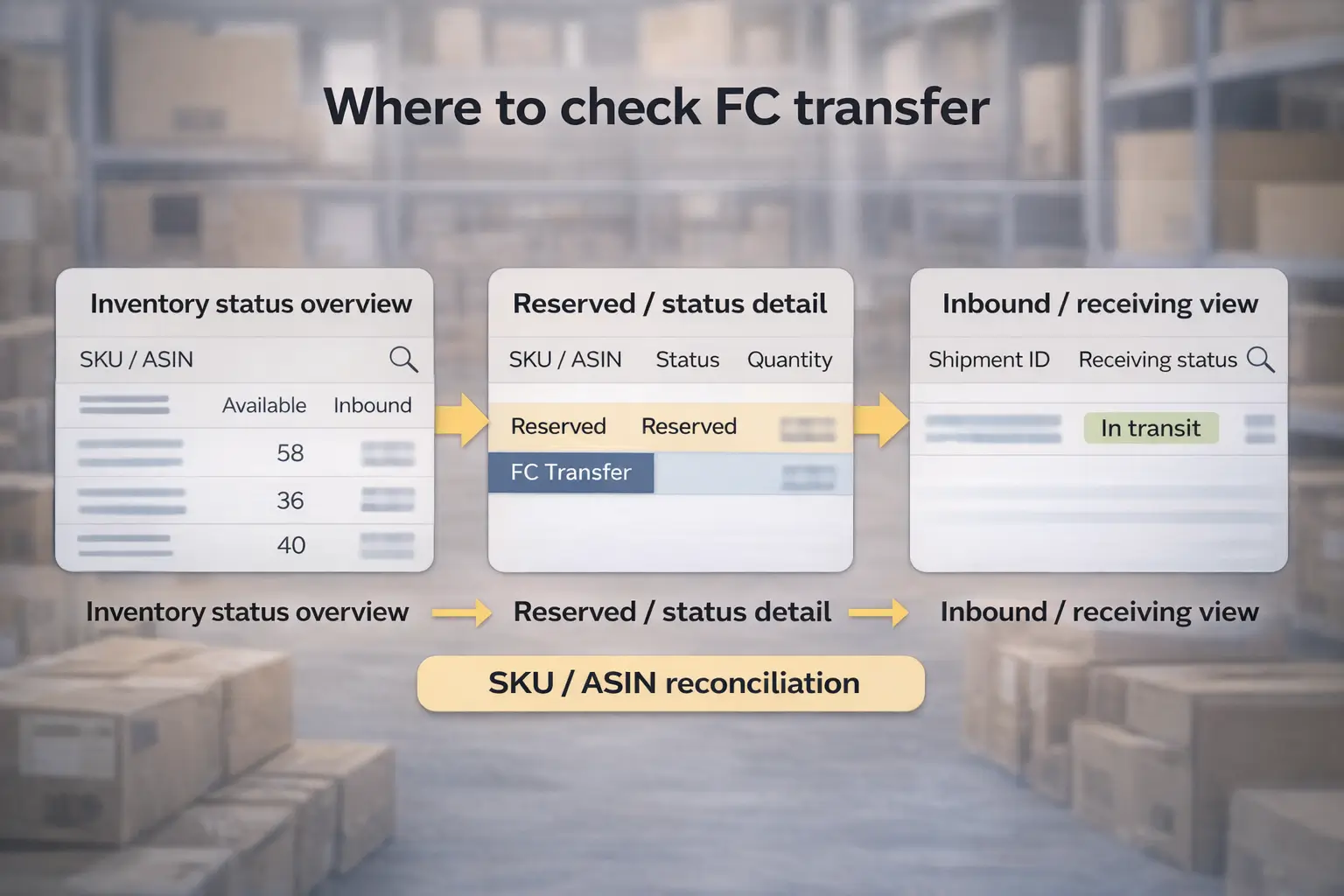
- Start with your Inventory overview and locate the SKU/ASIN in question (use search).
- Record current counts for Available, Reserved, and Inbound (or equivalent status groupings your UI shows).
- Open the relevant inventory detail or reporting view and confirm whether units are marked as transfer/processing/receiving (labels vary).
- Check inbound shipment context (if you recently sent inventory): shipment ID(s), receiving status, and whether receiving is complete.
- Reconcile totals by SKU/ASIN: compare what you see across views and note differences (some reports refresh at different times).
- Capture screenshots and dates so you have a consistent timeline.
- If multiple SKUs are affected, isolate whether this is SKU-specific or a broader account-wide shift.
Boundary:
- Menu names and columns change; rely on searching for inventory status reports and using SKU/ASIN-level reconciliation.
- Reconcile first; escalate second.
FC transfer looks “stuck” or inventory looks “missing”: a safe troubleshooting workflow
If inventory seems stuck, the safest approach is to confirm stage → isolate scope → reconcile → document → escalate if abnormal.
Step-by-step workflow:
- Confirm the stage: is it FC transfer, FC processing, or FC receiving? (Use the comparison table above.)
- Isolate scope: list affected SKUs/ASINs and the quantities that changed.
- Reconcile buckets: compare Available/Reserved/Inbound and confirm whether totals differ across views (allow for report refresh differences).
- Check inbound context: if you recently shipped inventory, confirm shipment IDs and receiving status.
- Document the timeline: when did the shift start, what changed, and what you’ve verified.
- If it remains abnormal after reconciliation: open a Seller Support case with a concise fact pack (no emotional language, just facts).
What to document (copy/paste checklist):
- SKU/ASIN list and quantities affected
- First-seen date of the change
- Screenshots of the relevant inventory views
- Inbound shipment ID(s) and receiving status (if applicable)
- A one-paragraph summary of what changed (e.g., “Available dropped, Reserved increased; no sales; confirmed stage as FC transfer”)
Why inventory can look “missing” during FC transfer:
- Units can be reclassified between buckets (Available ↔ Reserved/transfer-related) without sales.
- Different reports can update on different schedules, causing short-term mismatches.
Symptom-to-check guide (quick table):
| Symptom you see | Likely explanation (high-level) | What to check next |
|---|---|---|
| Available dropped, no sales | Bucket shift to Reserved/transfer-related status | Reconcile Available/Reserved/Inbound by SKU/ASIN; capture screenshots and dates |
| Delivery promises got longer | Inventory repositioning or regional allocation changes | Watch trend over time; confirm stage; avoid snap conclusions from one snapshot |
| Inbound shipped but not reflected yet | Receiving/processing cadence and report refresh differences | Check shipment IDs and receiving progress; compare inbound vs received |
Boundary:
- FC transfer delays can happen; don’t assume loss based on a single report.
- Support outcomes and timelines vary; documenting clearly improves clarity but doesn’t guarantee a resolution.
Inventory planning to reduce stockouts from FC transfer variability
You can’t fully control FC transfers, but you can reduce stockout risk by planning for variability—especially important for cross-border replenishment.
Planning checklist (no universal numbers):
- Keep a safety buffer so you’re not running to zero while inventory shifts between buckets.
- Reorder earlier when you see repeated bucket shifts that reduce Available availability.
- Avoid “single giant replenishment” dependence; consider staged replenishment if your supply chain supports it.
- Standardize supplier labeling and SKU identifiers so documents and labels match your Seller Central identifiers.
- Track lead time variability (manufacturing + freight + receiving/processing + internal positioning) conservatively.
Signals that you may need to reorder earlier:
- Available units trend down while Reserved remains elevated over multiple refresh cycles.
- Delivery promises worsen and sales slow (even if inventory exists in the network).
- You consistently see long internal handling/transfer phases for the same SKU.
Boundary:
- Buffer size depends on your sales velocity and replenishment lead time; avoid copying “one-size-fits-all” numbers from the internet.
If you ship from China to Amazon FBA and manage multiple suppliers, FC transfers can be less disruptive when your inbound workflow is clean: consistent SKU labeling, reliable carton contents, and clear documentation per batch. Consolidation + prep that standardizes labels and reduces inbound errors can help you plan replenishment with fewer surprises (no guarantees—Amazon’s internal placement decisions are outside seller control).
FAQ: Common questions about FC transfer
1) What does “FC” mean at Amazon?
FC stands for “fulfillment center,” an Amazon warehouse where FBA inventory is stored and shipped. In Seller Central, “FC” appears in status labels like FC transfer, FC processing, or FC receiving, which describe different stages of how Amazon is handling or moving your inventory.
2) How long does FC transfer take on Amazon?
There isn’t one standard timeline. Transfer timing varies based on network conditions, capacity, seasonality, and allocation decisions. Instead of relying on fixed day counts, monitor Available/Reserved/Inbound trends, confirm the stage (transfer vs processing vs receiving), and document changes if the situation remains abnormal for your business.
3) Are units in FC transfer available for sale on Amazon?
Sometimes yes, sometimes not in the way you expect—it depends on allocation and where inventory is positioned. Sellers often see Available/Reserved shifts and delivery dates change while units move. Watch trends over time, not a single snapshot, and reconcile by SKU/ASIN across views before escalating.
4) What is FBA FC processing?
FC processing usually refers to Amazon’s internal handling/processing stage for inventory in its network. It’s different from FC transfer (movement between facilities) and FC receiving (intake of inbound shipments). The key is identifying the stage so you can choose the correct next action.
5) What is FC receiving at Amazon?
FC receiving is the inbound intake stage when Amazon is receiving your shipment into its fulfillment network. You’ll typically track it in inbound shipment/receiving views. If you see receiving status, check shipment IDs, receiving progress, and whether receiving is complete before assuming an issue.
6) What should you do if inventory is stuck in FC transfer for a long time?
Follow a safe sequence: confirm the stage, isolate affected SKUs/ASINs, reconcile Available/Reserved/Inbound, check inbound context, and document dates/screenshots. If it remains abnormal after reconciliation, open a Seller Support case with a concise fact pack (SKUs, quantities, first-seen date, screenshots, shipment IDs if relevant).
Summary & next steps
- FC transfer is Amazon moving inventory internally between fulfillment centers, often reflected as bucket shifts (Available/Reserved/Inbound).
- Don’t rely on fixed “X days” timelines—timing varies. Use monitoring signals + buffers instead.
- Diagnose correctly: transfer vs processing vs receiving determines the right next step.
- Reconcile first, escalate second: SKU/ASIN-level reconciliation + documented timeline reduces false alarms.
- Reduce stockout risk by planning for variability (safety buffers, earlier reorder signals, staged replenishment when feasible).