


Fast Answer: What is the minimum quantity to send to Amazon FBA?
Direct answer: In general, Amazon FBA does not require a fixed minimum number of units per shipment—sellers can typically send very small quantities, including a single unit for a SKU if needed. (Authoritative “no minimum” policy signal from Amazon Seller Forums staff guidance.)
Source: https://sellercentral.amazon.com/seller-forums/discussions/t/792dd8aa-34f2-4c53-8a13-2eeb4f2e7f00
Key points
- Allowed vs economical: “Allowed” is not the same as “cost-effective.” Small shipments can have higher overhead per unit (prep, labeling, shipping setup).
- Account/program exceptions: Some programs or account constraints can affect what you can send—verify in Seller Central.
- If you’re confused by other “minimum” terms, the next section separates the three different meanings.
Boundary conditions
- Don’t rely on third-party “minimum 10 units” claims unless you can verify them in Seller Central or official documentation.
- Requirements and limits can change; use current Seller Central guidance as the source of truth.
Three “minimums” people mix up (and what each one actually means)
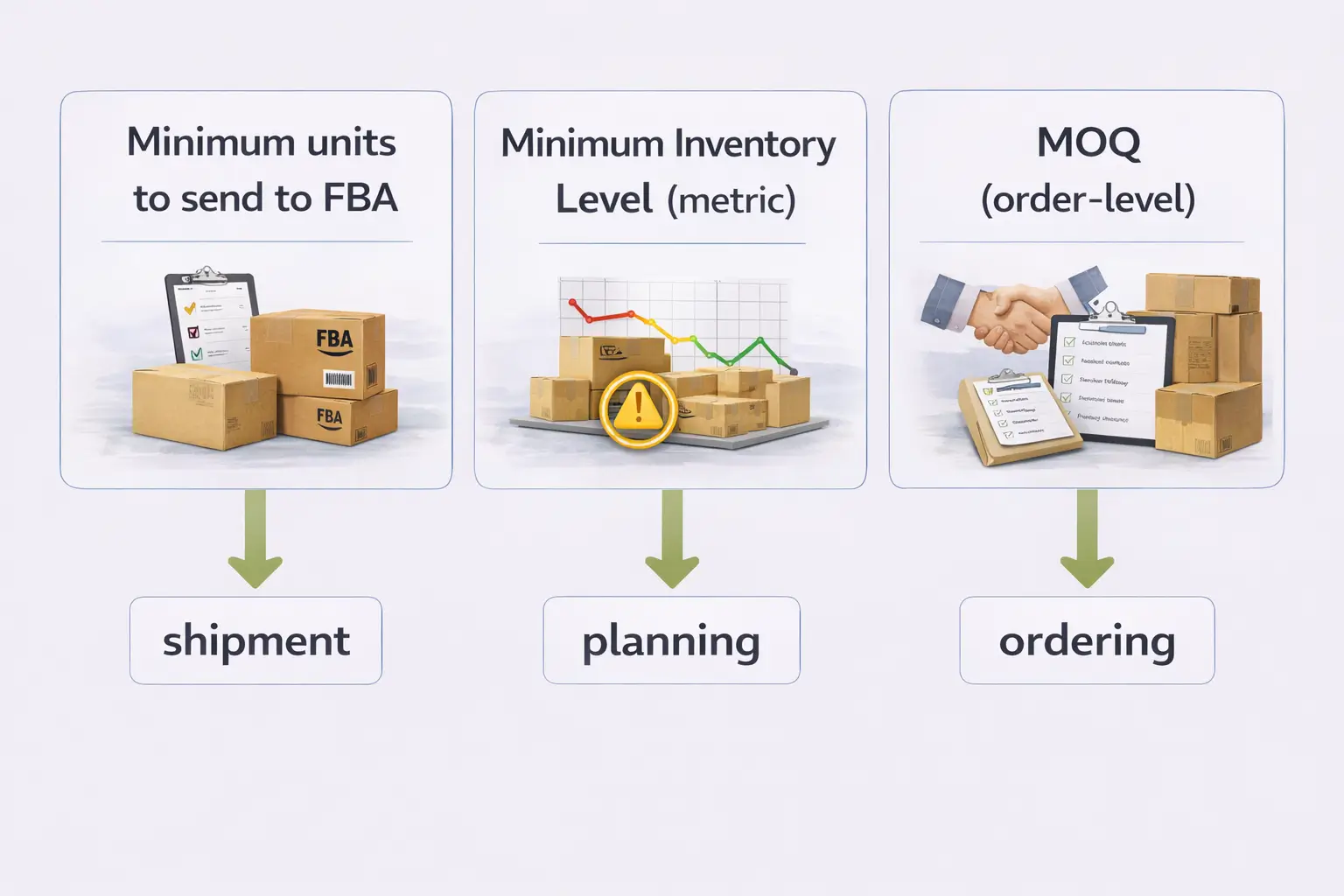
Direct answer: Many “minimum quantity” questions are actually about three different concepts. Here’s the quick separation.
Mini-table: minimum inbound vs Minimum Inventory Level vs MOQ
| Term people say | What it actually means | What it affects | What it’s NOT |
|---|---|---|---|
| “Minimum quantity to send to FBA” | Whether Amazon requires a minimum inbound unit count per shipment | Your inbound shipment plan | Not the same as inventory metrics or order rules |
| “Minimum Inventory Level” | A planning/coverage metric used to help avoid running low | Replenishment planning and visibility | Not a rule that you must ship X units |
| “MOQ” (minimum order quantity) | An order-level rule (or supplier MOQ) about purchasing/ordering | Buyer order quantity (B2B/Business) or supplier ordering | Not an FBA inbound shipment minimum |
Key takeaway bullets
- FBA inbound minimum: usually no fixed minimum units required to create a shipment.
- Minimum Inventory Level: a planning metric, not a shipment requirement.
- MOQ: an ordering concept, not an inbound shipping rule.
Boundary conditions
- Your account/program settings and limits still matter—verify in Seller Central.
Minimum Inventory Level: what it is (and why it’s not a minimum shipment requirement)
Direct answer: “Minimum Inventory Level” is an inventory planning metric that helps you see when inventory is trending low—it is not the same thing as a minimum quantity you must send to FBA.
Source: https://sellercentral.amazon.com/help/hub/reference/external/G9BYNYF4FAXXBPJZ?locale=en-US
Key points
- It’s intended to support replenishment decisions (when you may want to restock).
- It does not mean Amazon requires you to send a minimum number of units per shipment.
- Use it alongside your own planning (lead time, seasonality, sales velocity) to decide when to ship more inventory.
Boundary conditions
- Metrics can change and may be displayed differently depending on your account/tools.
- Even if a metric suggests you’re “low,” you still decide how and when to replenish based on your constraints.
Restock/capacity limits: maximums (not minimums) and how to check them
Direct answer: Restock and capacity limits are maximum inventory limits—they cap how much inventory you can send/store in certain categories or storage types. They do not create a minimum shipment quantity requirement.
Source (definition as “maximum inventory level”): https://sellercentral.amazon.com/help/hub/reference/external/GUWWC8QVAF8TFVFR?locale=en-US
Key points
- Limits answer: “How much can I send/store?” (a ceiling), not “How little can I send?” (a floor).
- Limits can change over time and vary by account, storage type, and inventory performance.
What to check (steps)
- In Seller Central, review your current storage/capacity or restock-related dashboards (location may vary).
- Check whether the limit is by storage type, category, or ASIN/SKU-level constraints.
- If you’re blocked from creating a shipment or adding units, use the on-screen guidance to identify whether it’s a capacity/limit issue.
Boundary conditions
- Avoid assuming a “minimum” from a limit screen. A maximum constraint doesn’t imply you must send a minimum.
- Follow the current prompts and help links inside Seller Central, as UI and policies change.
MOQ: what it means on Amazon (and why it’s not an FBA inbound minimum)
Direct answer: MOQ (minimum order quantity) refers to ordering rules (often in B2B/Amazon Business contexts) or supplier MOQs—it is not the same as Amazon requiring a minimum quantity to send into FBA.
Source (Seller Forums context): https://sellercentral.amazon.com/seller-forums/discussions/t/d5d003c1019eda51064583c15dc1e261
Key points
- Amazon-side MOQ: can appear as an order-level constraint (especially for business buyers/B2B offers), depending on eligibility and settings.
- Supplier MOQ: the minimum you must order from a manufacturer—this affects sourcing, not Amazon inbound shipment rules.
- You can have a supplier MOQ and still choose to send smaller replenishment quantities to FBA (if operationally feasible).
Boundary conditions
- MOQ feature availability and rules can vary; verify current settings and eligibility in Seller Central.
If there’s no minimum, how much should you send to test FBA? (no fixed numbers)

Direct answer: If there’s no minimum, the best first shipment is a conservative test sized to your goal and constraints—without guessing a universal number. The aim is to learn demand and operations while limiting risk.
Steps (6–8)
- Define your goal: demand test, operational test, or replenishment for proven sales.
- Estimate uncertainty: new listing vs proven SKU; seasonality; returns risk.
- Map your overhead drivers: prep/labeling complexity, carton setup, and shipping setup effort.
- Plan replenishment cadence: how quickly you could restock if demand surprises (lead time and workflow reliability).
- Choose a conservative test quantity that you can comfortably prep and track (avoid overcommitting).
- Plan a second shipment now (what triggers it: stock level, sales trend, lead time).
- Track learning signals: sell-through speed, returns/defects, customer feedback, and inbound workflow friction.
- Adjust: increase or decrease future sends based on real data, not assumptions.
Before you ship (quick checklist)
- Shipment plan matches what’s actually packed (SKUs and quantities).
- Labels are correct and consistently applied (unit and carton labels as required).
- Carton contents/box count is accurate.
- You have a simple record (photos + carton count + shipment ID) for troubleshooting.
- You know your replenishment trigger (when you’ll send the next batch).
Boundary conditions
- There is no single “best” test quantity for every seller; it depends on your constraints and learning goals.
- Avoid making decisions based on profit/earnings promises or fixed-dollar targets.
Special cases: when “minimums” can appear (and how to verify)
Direct answer: General FBA inbound shipments typically don’t have a fixed minimum unit requirement, but some programs or offer settings can have their own rules. The safe move is to verify the specific program documentation in Seller Central.
How to verify (steps)
- Identify the exact program or offer type you’re using (if any).
- Use the official help links and program documentation inside Seller Central.
- If a portal requires a specific setting or eligibility, follow the on-screen prompts or help references.
Boundary conditions
- Do not treat program-specific requirements as global FBA rules.
- Avoid relying on third-party pages for minimum thresholds unless confirmed in Seller Central.
Shipping mode practicality: small parcel vs pallets/LTL (what changes)
Direct answer: Small shipments are usually easiest as small parcel (cartons). Larger shipments are often more practical as palletized/LTL, but palletizing adds planning and coordination.
Comparison table
| Aspect | Small parcel (cartons) | Pallets / LTL (palletized freight) |
|---|---|---|
| Best for | Smaller test shipments and simple replenishments | Larger inbound volumes |
| Operational complexity | Lower | Higher (pallet build + coordination) |
| What you must manage | Labels, carton counts, carton accuracy | Pallet consistency + carton/pallet labeling + coordination |
| Common risk | Label/carton mismatch, missing carton records | Pallet build inconsistency, coordination errors |
Boundary conditions
- Keep the decision based on handling practicality and workflow reliability, not on “minimum quantity” myths.
- Carrier requirements and Amazon receiving constraints can vary; verify current guidance in your shipment workflow.
Common mistakes with small FBA shipments (and how to avoid them)
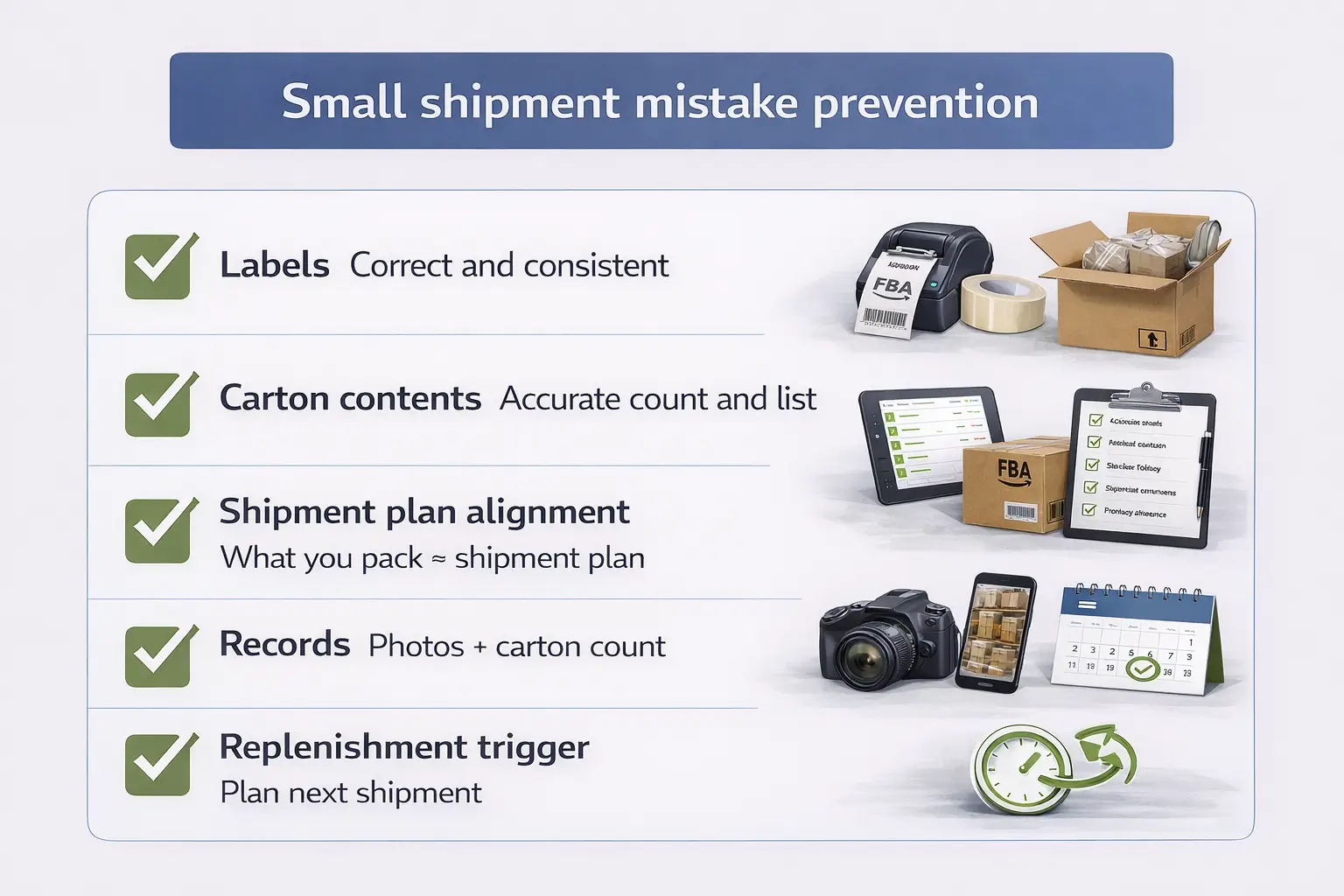
Direct answer: Small shipments fail most often due to execution errors, not because Amazon requires a minimum quantity.
Mistakes checklist
- Wrong or inconsistent labels (unit/carton labels as required).
- Shipment plan quantities don’t match what’s packed.
- Carton contents/box count isn’t recorded accurately (hard to reconcile later).
- Packing mixed SKUs without a reliable carton contents process.
- No documentation (photos, carton count, shipment ID) when a discrepancy happens.
- Shipping a tiny test with no replenishment trigger (stockouts if demand spikes).
If/then fixes
- If you see receiving discrepancies, then compare shipment plan vs packing records and use photos/carton counts to reconcile.
- If cartons are marked missing, then validate carton labels and carton count accuracy first.
- If you repeatedly run out of stock, then tighten your replenishment trigger and shorten your restock cadence.
- If small shipments are too expensive operationally, then consolidate multiple small supplier quantities into fewer, cleaner shipments.
Boundary conditions
- This section focuses on avoidable operational errors; it does not guarantee Amazon receiving outcomes.
Cross-border optional: making small quantities workable with consolidation
Direct answer: Cross-border sellers often face supplier MOQs and higher setup overhead. Consolidation can help make small quantities workable by combining multiple suppliers/SKUs into one controlled shipment.
Simple flow (conceptual)
- Suppliers produce goods (supplier MOQ may apply).
- Goods are received at a consolidation/prep location.
- Prep/labeling/carton planning is standardized.
- A smaller, cleaner replenishment shipment is sent into FBA when needed.
Boundary conditions
- No time/cost promises; the point is to reduce operational friction and errors.
FAQ
- Q: What is the minimum quantity to send to Amazon FBA?
A: Generally, there’s no fixed minimum unit quantity required to create an FBA inbound shipment. Very small shipments are typically allowed, but what’s practical depends on your overhead and planning. https://sellercentral.amazon.com/seller-forums/discussions/t/792dd8aa-34f2-4c53-8a13-2eeb4f2e7f00 - Q: Can I send just 1 unit to Amazon FBA?
A: Typically yes—sellers can often send a single unit for a SKU, especially for testing. Verify any account/program constraints in Seller Central. https://sellercentral.amazon.com/seller-forums/discussions/t/792dd8aa-34f2-4c53-8a13-2eeb4f2e7f00 - Q: What is the minimum inventory level?
A: It’s an inventory planning metric, not a rule that you must ship a minimum number of units to FBA. https://sellercentral.amazon.com/help/hub/reference/external/G9BYNYF4FAXXBPJZ?locale=en-US - Q: How do restock limits relate to how much you can send to FBA?
A: Restock/capacity limits are maximum inventory constraints (a ceiling), not a minimum shipment requirement (a floor). https://sellercentral.amazon.com/help/hub/reference/external/GUWWC8QVAF8TFVFR?locale=en-US - Q: What does MOQ mean on Amazon?
A: MOQ is “minimum order quantity,” typically an order-level concept (often in B2B contexts) or a supplier constraint. It’s separate from FBA inbound shipment minimums. https://sellercentral.amazon.com/seller-forums/discussions/t/d5d003c1019eda51064583c15dc1e261 - Q: If there’s no minimum, how much should I send to test FBA?
A: Use a conservative test based on your goal, demand uncertainty, and operational overhead—then set a replenishment trigger and plan your next shipment. Avoid fixed “one-size-fits-all” numbers. - Q: What are common mistakes with small FBA shipments?
A: Labeling errors, carton contents/count mismatches, shipment plan misalignment, and missing documentation are the most common. Use a checklist and keep records (photos + carton counts + shipment ID).
Summary & next steps
Direct answer: Amazon FBA generally has no fixed minimum quantity to send, but small shipments should be planned for practicality. Separate “minimum units to send” from inventory metrics, capacity maximums, and MOQ so you don’t make the wrong decision.
Next steps
- Use a small test shipment only if it fits your learning goal and you can execute cleanly (labels, carton records, shipment plan accuracy).
- If you’re “blocked,” check whether it’s a capacity/limit issue (maximums), not a minimum quantity rule.
- If supplier MOQ is the constraint, consider consolidation to keep shipments clean and workable.
Note: If you’re shipping from China and want to make small test quantities workable (consolidation, labeling/prep, carton planning, and coordinated delivery into FBA), FBABEE provides FBA-focused logistics and prep support. Learn more at https://fbabee.com/
Boundary conditions
- Seller Central policies, metrics, and program requirements can change; verify current details in your account.
- This guide avoids fixed numeric thresholds and does not guarantee outcomes.



